
Wstęp
Thank you for choosing the Renkforce RF-SBS-500 2D Wired Barcode Scanner. This device is designed for efficient and reliable scanning of both 1D and 2D barcodes from various surfaces, including paper and smartphone screens. Its omnidirectional scanning capability and hands-free operation make it suitable for a wide range of applications. This manual provides essential information for the proper setup, operation, and maintenance of your scanner.
Instrukcje bezpieczeństwa
- Nie wystawiaj skanera na działanie ekstremalnych temperatur, wilgoci ani bezpośredniego światła słonecznego.
- Unikaj upuszczania skanera i narażania go na silne uderzenia.
- Nie należy podejmować prób demontażu ani modyfikacji skanera. Spowoduje to unieważnienie gwarancji.
- Keep the scanning window clean to ensure optimal performance. Use a soft, dry cloth.
- Ensure the USB cable is connected securely to prevent accidental disconnection.
Zawartość opakowania
- Renkforce RF-SBS-500 2D Wired Barcode Scanner
- Integrated USB-A Cable
- Instrukcja obsługi (ten dokument)
Organizować coś
Follow these steps to set up your Renkforce RF-SBS-500 barcode scanner:
- Rozpakuj skaner: Ostrożnie wyjmij skaner z opakowania.
- Połącz się z komputerem: Plug the integrated USB-A cable from the scanner into an available USB port on your desktop or laptop computer.
- Instalacja sterownika: The scanner is typically plug-and-play. Your operating system (Windows, macOS, Linux) should automatically detect and install the necessary drivers. Wait for the installation to complete.
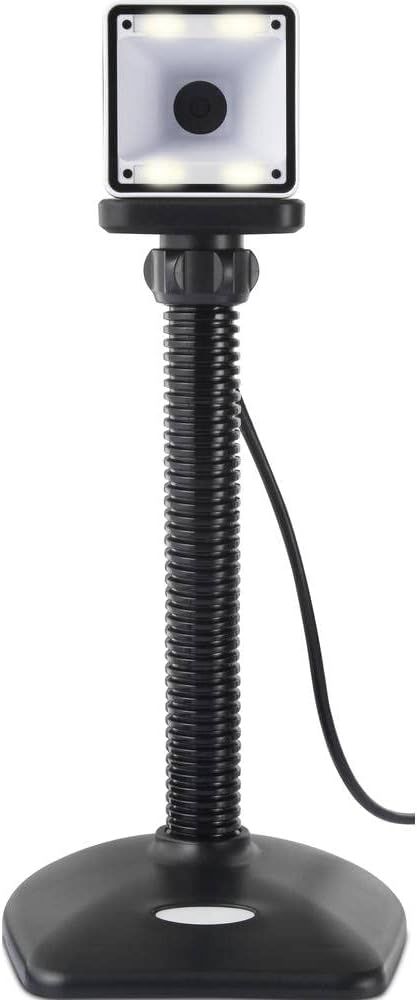
- Umieszczenie: Place the scanner on a stable, flat surface. The flexible neck allows for adjustment of the scanning head angle for optimal positioning.

Obsługa skanera
The Renkforce RF-SBS-500 is designed for ease of use with its omnidirectional and hands-free capabilities.
- Włączanie: Once connected via USB, the scanner will power on automatically. The LED indicators on the scanner head may illuminate briefly.
- Skanowanie kodu kreskowego: Position the barcode within the scanning area of the scanner head. The scanner will automatically detect and read the barcode.
- Opinia wizualna i dźwiękowa: Upon successful scanning, the integrated buzzer will emit a short beep, and the LED display on the scanner will flash or change color, indicating a successful read.
- Czytanie wielokierunkowe: The scanner can read barcodes regardless of their orientation, eliminating the need to align the barcode precisely.
- Hands-Free Mode (Presentation Mode): The scanner operates continuously in a presentation mode, allowing you to simply pass items with barcodes in front of the scanning window without pressing any buttons. This saves time and improves workflow efficiency.
- Obsługiwane kody kreskowe: The scanner supports both 1D (e.g., EAN, UPC, Code 39) and 2D (e.g., QR Code, Data Matrix, PDF417) barcode types.
Konserwacja
Właściwa konserwacja gwarantuje długowieczność i optymalną wydajność skanera.
- Czyszczenie okna skanowania: Regularnie czyść okno skanowania miękką, niepozostawiającą włókien ściereczką. W przypadku uporczywych zabrudzeń delikatnie przetrzyj.ampen the cloth with water or a mild, non-abrasive cleaner. Do not spray cleaner directly onto the scanner.
- Ogólne sprzątanie: Przetrzyj zewnętrzną część skanera suchą lub lekko zwilżoną szmatką.amp płótno. Unikaj stosowania ostrych chemikaliów lub materiałów ściernych.
- Składowanie: Gdy skaner nie jest używany, należy przechowywać go w czystym i suchym miejscu, z dala od bezpośredniego światła słonecznego i ekstremalnych temperatur.
Rozwiązywanie problemów
Jeśli napotkasz problemy ze skanerem, zapoznaj się z poniższymi typowymi problemami i ich rozwiązaniami:
| Problem | Możliwa przyczyna | Rozwiązanie |
|---|---|---|
| Skaner się nie włącza. | Kabel USB nie jest prawidłowo podłączony lub port USB jest uszkodzony. | Ensure the USB cable is firmly connected to both the scanner and the computer. Try a different USB port. |
| Skaner nie odczytuje kodów kreskowych. | Barcode damaged, scanning window dirty, or incorrect barcode type. | Check the barcode for damage. Clean the scanning window. Ensure the barcode type is supported (1D/2D). Adjust the distance and angle of the barcode to the scanner. |
| Brak sygnału dźwiękowego lub diody LED po skanowaniu. | Barcode not read successfully. | Refer to the "Scanner does not read barcodes" solution. If the issue persists, contact support. |
| Zeskanowane dane są wyświetlane nieprawidłowo. | Keyboard layout mismatch or software issue. | Ensure your computer's keyboard layout matches the expected output. Test with a simple text editor. |
If the problem persists after trying these solutions, please contact Renkforce customer support.
Specyfikacje
| Funkcja | Specyfikacja |
|---|---|
| Numer modelu | RF-4679568 |
| Możliwość skanowania | Kody kreskowe 1D i 2D |
| Technologia łączności | USB-A (przewodowy) |
| Szybkość skanowania | 60 obrazów na sekundę |
| Tryb skanowania | Omnidirectional, Hands-free (Presentation Mode) |
| Informacja zwrotna | Integrated Buzzer, LED Display |
| Kompatybilne urządzenia | Desktop Computer, Laptop, Smartphone (via appropriate adapter if needed) |
| Wymiary (dł. x szer. x wys.) | Wymiary 150 x 5.2 x 5.2 cm |
| Waga przedmiotu | 102 gram |
| Źródło zasilania | zasilana przez USB |
| Kraj pochodzenia | Niemcy |
Gwarancja i wsparcie
Renkforce products are manufactured to high-quality standards and come with a standard warranty. Please refer to your purchase documentation or the Renkforce official webAby zapoznać się ze szczegółowymi warunkami gwarancji obowiązującymi w Twoim regionie, odwiedź naszą witrynę.
For technical support, troubleshooting assistance, or warranty claims, please contact Renkforce customer service. Contact details can typically be found on the Renkforce webstronie internetowej lub na opakowaniu produktu.