
1. Wprowadzenie
Thank you for choosing the IROAD X5 Dash Cam. This device is designed to record your driving journey in Full HD, providing crucial evidence in case of an incident. It features front and rear cameras, Wi-Fi connectivity for smartphone access, a G-Sensor for impact detection, and advanced driver assistance systems (ADAS). Please read this manual carefully before installation and operation to ensure proper use and optimal performance.

Figure 1: IROAD X5 Dash Cam (Front and Rear Units)
2. Koniec produktuview
2.1 Zawartość opakowania
- Main Unit (Front Camera)
- Kamera tylna
- Dongle Wi-Fi
- IROAD Genuine 16GB MicroSD Card
- Uchwyt montażowy
- Constant Power Cable (3m)
- Kabel połączeniowy kamery tylnej (6 m)
- Instrukcja obsługi (ten dokument)
- Spare Double-sided Tape
2.2 Główne cechy
- Podwójne nagrywanie w jakości Full HD: Front and rear cameras record in 1920x1080P at 30fps.
- Szeroki Viewkąt ing: 140° pole view zarówno do przedniego, jak i tylnego aparatu.
- Czujnik G: 3-axis acceleration sensor for automatic impact detection and event recording.
- Łączność Wi-Fi: Connect to your smartphone via Wi-Fi for live view, odtwarzanie i dostosowywanie ustawień.
- ADAS (zaawansowany system wspomagania kierowcy): Includes Lane Departure Warning, Front Vehicle Departure Warning, and Forward Collision Warning.
- Różne tryby nagrywania: Continuous, Impact, Parking, and Motion Detection recording.
- Widzenie nocne: Lepsza jakość nagrywania w warunkach słabego oświetlenia.
- Nagrywanie dźwięku: On/Off selectable.
3. Konfiguracja
3.1 Wkładanie karty MicroSD
- Sprawdź, czy kamera samochodowa jest wyłączona.
- Znajdź gniazdo karty MicroSD na jednostce głównej.
- Włóż dołączoną kartę MicroSD o pojemności 16 GB do gniazda, aż zatrzaśnie się na miejscu. Upewnij się, że jest prawidłowo ułożona.
3.2 Instalacja przedniej kamery
- Wyczyść obszar szyby przedniej w miejscu, w którym zamierzasz zamontować kamerę.
- Attach the mounting bracket to the front camera.
- Peel off the protective film from the double-sided tape on the bracket.
- Mount the front camera on the windshield, ideally behind the rearview lustro, zapewniające przejrzystość view of the road. Press firmly for secure adhesion.

Figure 2: IROAD X5 Front Camera
3.3 Instalacja kamery tylnej
- Clean the rear window area.
- Attach the rear camera to the rear window using the double-sided tape, ensuring a clear view.
- Connect the rear camera to the main unit using the provided 6m rear camera connection cable. Route the cable neatly along the vehicle's interior trim.
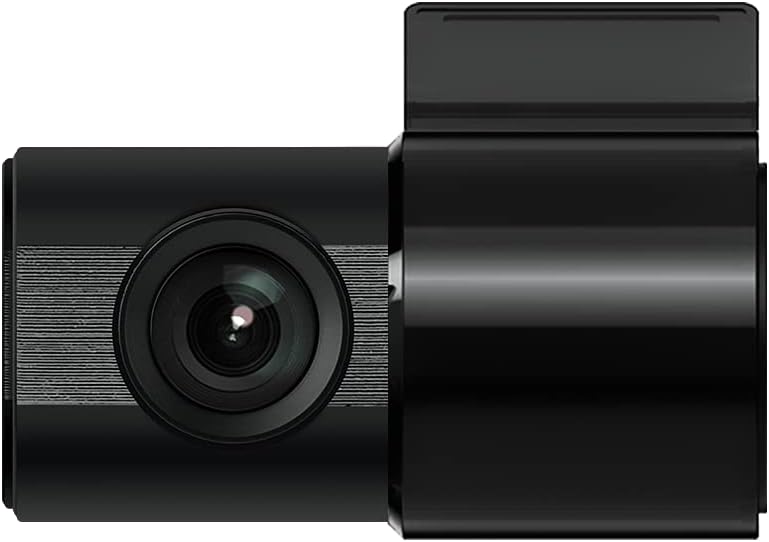
Figure 3: IROAD X5 Rear Camera
3.4 Połączenie zasilania
- Connect the constant power cable to the main unit's power input port.
- Connect the other end of the power cable to your vehicle's power source (e.g., OBDII port for general and hybrid vehicles, if using the optional OBDII power cable, or fuse box for constant power). Consult a professional for hardwiring if unsure.
3.5 Wi-Fi Dongle Connection (Optional)
If your model requires an external Wi-Fi dongle, insert it into the designated USB port on the main unit. This enables Wi-Fi connectivity for smartphone app control.
4. Instrukcja obsługi
4.1 Automatyczne włączanie/wyłączanie
The IROAD X5 Dash Cam will automatically power on and begin recording when your vehicle's ignition is turned on. It will power off automatically when the ignition is turned off.
4.2 Tryby nagrywania
- Ciągłe nagrywanie: The dash cam continuously records while driving. Older files are overwritten by new ones when the MicroSD card is full.
- Impact Recording: When the G-Sensor detects a sudden impact or collision, the dash cam automatically saves the current recording segment as an event file, zapobiegając jego nadpisaniu.
- Nagrywanie parkingu: When the vehicle is parked and the ignition is off, the dash cam enters parking mode. It records events triggered by motion detection or impacts.
- Nagrywanie z wykrywaniem ruchu: In parking mode, the camera records when motion is detected in its field of view.
4.3 Funkcje ADAS
The IROAD X5 includes Advanced Driver Assistance Systems to enhance driving safety:
- Lane Departure Warning (LDWS): Ostrzega Cię, gdy Twój pojazd zjeżdża z pasa ruchu.
- Front Vehicle Departure Warning (FVDW): Powiadamia Cię, gdy pojazd z przodu rusza z miejsca.
- Forward Collision Warning (FCWS): Ostrzega przed potencjalnym zderzeniem z pojazdem jadącym z przodu.
These features can be configured via the IROAD smartphone application.
4.4 Nagrywanie dźwięku
Audio recording is enabled by default. You can toggle this feature on or off through the IROAD smartphone application settings.
4.5 Using the IROAD App (Wi-Fi)
- Download the "IROAD" app from your smartphone's app store.
- Włącz kamerę samochodową.
- On your smartphone, go to Wi-Fi settings and connect to the IROAD dash cam's Wi-Fi network (SSID and password can be found in the app or on the device label).
- Open the IROAD app to access live view, recorded videos, and adjust settings.
5. Konserwacja
5.1 Zarządzanie kartami MicroSD
It is recommended to format the MicroSD card regularly (e.g., once a month) to maintain optimal recording performance and prevent data corruption. This can be done through the IROAD smartphone app or by removing the card and formatting it on a computer.
5.2 Czyszczenie soczewek
Periodically clean the front and rear camera lenses with a soft, dry cloth to ensure clear video quality. Avoid using abrasive cleaners.
5.3 aktualizacji oprogramowania sprzętowego
Check the official IROAD website or the IROAD app for available firmware updates. Keeping your dash cam's firmware up-to-date ensures the latest features and bug fixes.
6. Rozwiązywanie Problemów
| Problem | Możliwa przyczyna / rozwiązanie |
|---|---|
| Kamera samochodowa nie włącza się. | Check power cable connection. Ensure vehicle ignition is on. Verify fuse in power cable or vehicle's fuse box. |
| No recording or recording stops. | MicroSD card may be full or corrupted. Format the MicroSD card. Ensure the card is inserted correctly. |
| Problemy z połączeniem Wi-Fi. | Ensure Wi-Fi dongle is properly connected (if applicable). Restart the dash cam and your smartphone. Check Wi-Fi settings on your phone. |
| Słaba jakość wideo. | Clean camera lenses. Ensure protective film is removed from lenses. Check recording resolution settings in the app. |
| ADAS warnings are inaccurate. | Ensure the camera is properly calibrated and mounted centrally. Environmental factors (heavy rain, fog) can affect performance. |
7. Specyfikacje
| Funkcja | Specyfikacja |
|---|---|
| Pole View (przód/tył) | 140° |
| Rozdzielczość (przód/tył) | Full HD 1920x1080P |
| Frame Rate (Front/Rear) | 30 klatek na sekundę |
| Tryby nagrywania | Continuous, Impact, Parking, Motion Detection |
| Funkcje ADAS | Lane Departure Warning, Front Vehicle Departure Warning, Forward Collision Warning |
| G-czujnik | 3-osiowy czujnik przyspieszenia |
| Nagrywanie dźwięku | On/Off selectable |
| Pobór mocy | 2.6 W |
| Temperatura pracy | -30°C do 75°C |
| Nośniki zapisu | Karta MicroSD (16 GB w zestawie) |
| Wymiary jednostki głównej | 90x40x30mm |
| Waga jednostki głównej | 60g |
| Łączność | Wi-Fi |
| Typ wyświetlacza | LCD (4 inch, if applicable, though product description implies no screen on main unit) |
| Metoda montażu | Spoiwo |
8. Gwarancja i wsparcie
For warranty information, technical support, or service inquiries, please refer to the warranty card included with your product or visit the official IROAD webZachowaj paragon jako dowód zakupu na wypadek reklamacji.