
XIAOMI Mi 11 Lite
Xiaomi Mi 11 Lite Instrukcja obsługi
Model: Mi 11 Lite (M2101K9AG)
Wstęp
This manual provides essential information for the safe and efficient use of your Xiaomi Mi 11 Lite smartphone. Please read this manual carefully before using the device to ensure optimal performance and to prevent damage.
The Xiaomi Mi 11 Lite is designed to offer a premium mobile experience with its ultra-thin and ultra-light design, powerful Snapdragon 732G processor, long-lasting 4250 mAh battery with 33W fast charging, and a versatile 64MP triple camera system. Its AMOLED DotDisplay screen provides vibrant visuals, and the durable glass and metal frame ensure a superior look and feel.
Organizować coś
1. Rozpakowanie i wstępna inspekcja
Carefully remove all components from the packaging. Verify that all items are present and undamaged. The standard package typically includes the Xiaomi Mi 11 Lite smartphone, a power adapter, a USB Type-C cable, a SIM eject tool, and a protective case.

Obraz: Przód view of the Xiaomi Mi 11 Lite smartphone in Bubblegum Blue color. The phone features a punch-hole camera on the top left of the screen and slim bezels.
2. Inserting SIM Card and microSD Card (Optional)
- Znajdź tackę na kartę SIM znajdującą się z boku urządzenia.
- Insert the SIM eject tool into the small hole on the tray to open it.
- Place your Nano-SIM card(s) and/or microSD card (if applicable) into the tray with the gold contacts facing down, ensuring correct orientation as indicated on the tray.
- Delikatnie wsuń tackę z powrotem do urządzenia, aż zatrzaśnie się na swoim miejscu.

Obraz: Bok view of the Xiaomi Mi 11 Lite, highlighting the slim profile and the location of the SIM card tray on the left side of the device.
3. Ładowanie akumulatora
Before first use, fully charge the device. Connect the USB Type-C cable to the phone's charging port and the other end to the power adapter. Plug the power adapter into a wall outlet. The charging indicator will appear on the screen.
The Xiaomi Mi 11 Lite supports 33W fast charging. Use the original charger and cable for optimal charging speed and safety.
4. Włączanie i konfiguracja początkowa
Press and hold the Power button (located on the right side of the device) until the Xiaomi logo appears. Follow the on-screen instructions to complete the initial setup, including language selection, Wi-Fi connection, Google account setup, and security settings.
Operacyjny
1. Podstawowa nawigacja
- Przycisk zasilania: Naciśnij, aby włączyć/wyłączyć ekran. Naciśnij i przytrzymaj, aby włączyć/wyłączyć lub ponownie uruchomić.
- Przyciski głośności: Dostosuj głośność multimediów, połączeń i powiadomień.
- Gesty na ekranie dotykowym:
- Uzyskiwać: Wybierz element lub otwórz aplikację.
- Trzepnąć: Przewijaj ekrany lub listy.
- Szczypta: Powiększ lub pomniejsz obrazy lub web stron.
- Długie naciśnięcie: Uzyskaj dostęp do menu kontekstowych i przenieś ikony.
2. Korzystanie z aparatu
The Mi 11 Lite features a 64MP triple camera system. To open the camera app, tap the camera icon on the home screen or lock screen. Select different modes such as Photo, Portrait, Video, or Pro mode. Tap the shutter button to capture an image or start/stop video recording.
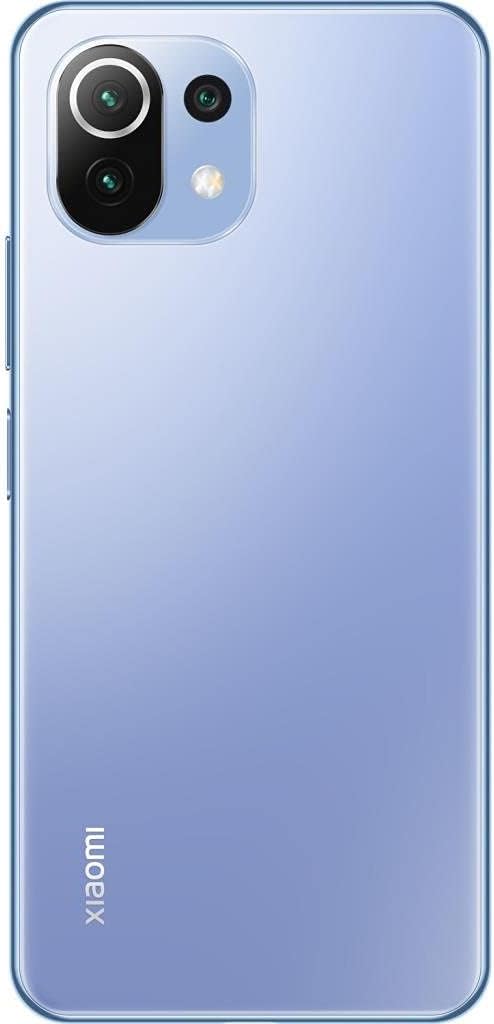
Obraz: Tył view of the Xiaomi Mi 11 Lite in Bubblegum Blue, showcasing the triple camera module located on the top left corner. The Xiaomi logo is vertically aligned on the bottom left.
3. Łączność
- Wi-Fi: Przejdź do Ustawienia > Wi-Fi, aby połączyć się z dostępnymi sieciami.
- Bluetooth: Przejdź do Ustawienia > Bluetooth, aby sparować je z innymi urządzeniami Bluetooth, np. słuchawkami lub głośnikami.
- Dane mobilne: Ensure your SIM card is active and mobile data is enabled in Settings > SIM cards & mobile networks.
Konserwacja
1. Czyszczenie urządzenia
Use a soft, lint-free cloth to clean the screen and body of the phone. Avoid using harsh chemicals, abrasive cleaners, or aerosol sprays, as these can damage the device's finish or internal components. The phone features a fingerprint-resistant coating on the back.
2. Pielęgnacja baterii
- Unikaj wystawiania urządzenia na działanie ekstremalnych temperatur (poniżej 0°C lub powyżej 45°C).
- Do not fully discharge the battery regularly. It is recommended to keep the battery level between 20% and 80% for optimal longevity.
- Używaj wyłącznie oryginalnych lub certyfikowanych ładowarek i kabli.
3. Aktualizacje oprogramowania
Regularly check for and install software updates to ensure your device has the latest features, security patches, and performance improvements. Go to Settings > About phone > MIUI version to check for updates.
Rozwiązywanie problemów
- Urządzenie nie włącza się: Upewnij się, że bateria jest naładowana. Podłącz ładowarkę i odczekaj kilka minut przed ponownym włączeniem.
- Aplikacje ulegają awarii lub zawieszają się: Close the problematic app and reopen it. If the issue persists, restart the device. Clear the app's cache or data in Settings > Apps.
- Słaba żywotność baterii: Check for background apps consuming power. Reduce screen brightness, disable unnecessary features like GPS or Bluetooth when not in use, and ensure the device is running the latest software update.
- Problemy z łącznością sieciową: Toggle Airplane mode on and off. Restart the device. Check if your SIM card is properly inserted. Contact your mobile carrier if the issue persists.
- Ekran nie reaguje: Force restart the device by holding the Power button for about 10-15 seconds.
Specyfikacje
| Funkcja | Szczegół |
|---|---|
| Marka | XIAOMI |
| Nazwa modelu | Mi 11 Lite |
| Numer części | M2101K9AG |
| Rozmiar pamięci RAM | 6 GB |
| Pamięć wewnętrzna | 128 GB |
| Edytor | Snapdragon 732G |
| Typ wyświetlacza | AMOLED |
| Rozmiar ekranu | 6.55 cali |
| Rozdzielczość wyświetlacza | 2400x1080 |
| Pojemność baterii | 4250 mAh (litowo-jonowy) |
| Technologia komórkowa | 4G |
| Wymiary | 16 x 4 x 2 cm; 470 g |
Gwarancja i wsparcie
Informacje o gwarancji
This product comes with a 3-month warranty provided by the seller, Telmov. Please retain your proof of purchase for any warranty claims. The warranty covers manufacturing defects under normal use conditions.
Obsługa klienta
For technical assistance, troubleshooting, or warranty inquiries, please contact your point of purchase or refer to the official Xiaomi support channels. You can find more information on the official Xiaomi webstrona: www.mi.com/global/service/support/
Powiązane dokumenty - Mi 11 Lite
 |
Instrukcja obsługi Xiaomi Mi 11 Lite: konfiguracja, funkcje i informacje o bezpieczeństwie Oficjalna instrukcja obsługi smartfona Xiaomi Mi 11 Lite. Dowiedz się więcej o konfiguracji, najważniejszych funkcjach, środkach ostrożności i zgodności z przepisami. Wykorzystaj w pełni możliwości swojego urządzenia. |
 |
Mi 11 Lite Kullanım Kılavuzu Mi 11 Lite (M2101K9AG) akıllı telefon için resmi kullanım kılavuzu. Kurulum, güvenlik bilgileri, teknik özellikler ve garanti şartları hakkında kapsamlı bilgiler içerir. |
 |
Xiaomi Mi 11 Lite Instrukcja obsługi Official user guide for the Xiaomi Mi 11 Lite smartphone, covering device setup, MIUI features, safety precautions, regulatory compliance, and technical specifications. |
 |
Xiaomi Mi 11 Lite Instrukcja obsługi Instrukcja obsługi smartfona Xiaomi Mi 11 Lite (model M2101K9AG) obejmująca konfigurację, system operacyjny MIUI, korzystanie z dwóch kart SIM, ważne informacje dotyczące bezpieczeństwa, przepisy UE i FCC, szczegóły dotyczące emisji częstotliwości radiowej (SAR) oraz specyfikacje techniczne. |
 |
Xiaomi Mi 11 Lite Instrukcja obsługi Kompleksowy podręcznik użytkownika smartfona Xiaomi Mi 11 Lite, obejmujący konfigurację, urządzenie i wiele innych.view, funkcjonalność dwóch kart SIM, informacje dotyczące bezpieczeństwa i ochrony środowiska oraz zgodność z przepisami. |
 |
Instrukcja obsługi Xiaomi Mi 11 Lite: funkcje, bezpieczeństwo i zgodność Comprehensive user manual for the Xiaomi Mi 11 Lite smartphone, covering setup, MIUI, safety guidelines, EU and FCC compliance, SAR information, and technical specifications. Learn how to use your device safely and effectively. |
Ask a question about this manual
Ask about setup, troubleshooting, compatibility, parts, safety, or missing instructions. Manuals+ will review the question and use this page’s manual context to help answer it.