
1. Wprowadzenie
Thank you for choosing the Caliber HPG318DAB Portable DAB+/FM Radio. This device offers high-quality digital and analog radio reception, a compact design for portability, and convenient alarm functions. This manual provides essential information for the safe and efficient use of your radio.
2. Informacje dotyczące bezpieczeństwa
- Przed użyciem należy uważnie przeczytać wszystkie instrukcje i zachować je do wykorzystania w przyszłości.
- Nie wystawiaj urządzenia na działanie deszczu, wilgoci ani ekstremalnych temperatur.
- Unikaj umieszczania urządzenia w pobliżu źródeł ciepła lub w miejscu bezpośrednio nasłonecznionym.
- Nie rozmontowuj ani nie próbuj samodzielnie naprawiać urządzenia. Wszelkie prace serwisowe zleć wykwalifikowanemu personelowi.
- Należy używać wyłącznie dołączonego kabla ładującego i adaptera.
- Przechowywać w miejscu niedostępnym dla dzieci.
3. Zawartość opakowania
Sprawdź, czy w przesyłce znajdują się wszystkie elementy:
- Caliber HPG318DAB Portable DAB+/FM Radio Unit
- Instrukcja obsługi
- Kabel ładujący USB
- Zasilacz
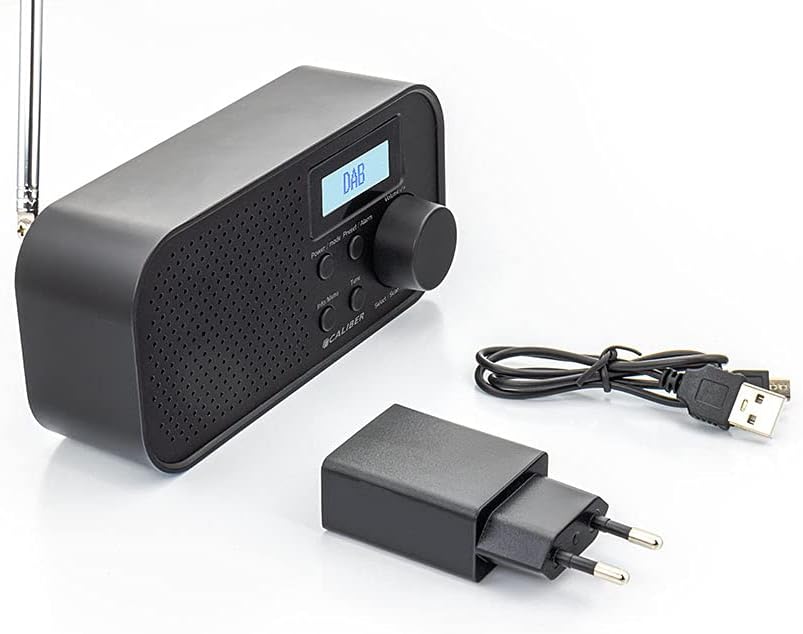
Image: Caliber HPG318DAB radio unit, USB charging cable, and power adapter.
4. Koniec produktuview
4.1 Elementy sterujące na panelu przednim
Obraz: Przód view of the Caliber HPG318DAB radio, highlighting the LCD screen, speaker grille, and control buttons.
- Ekran LCD: Displays station information, time, and menu options.
- Przycisk zasilania / trybu: Turns the radio on/off and switches between DAB+ and FM modes.
- Przycisk Menu/Informacje: Accesses menu settings and displays additional information.
- Preset/Alarm Button: Saves/recalls preset stations and sets alarm functions.
- Select/Scan Button: Confirms selections and initiates station scans.
- Przycisk drzemki: Tymczasowo wycisza alarm.
- Pokrętło głośności: Dostosowuje głośność dźwięku.
- Kratka głośnika: Wyjście audio.
4.2 Połączenia panelu tylnego

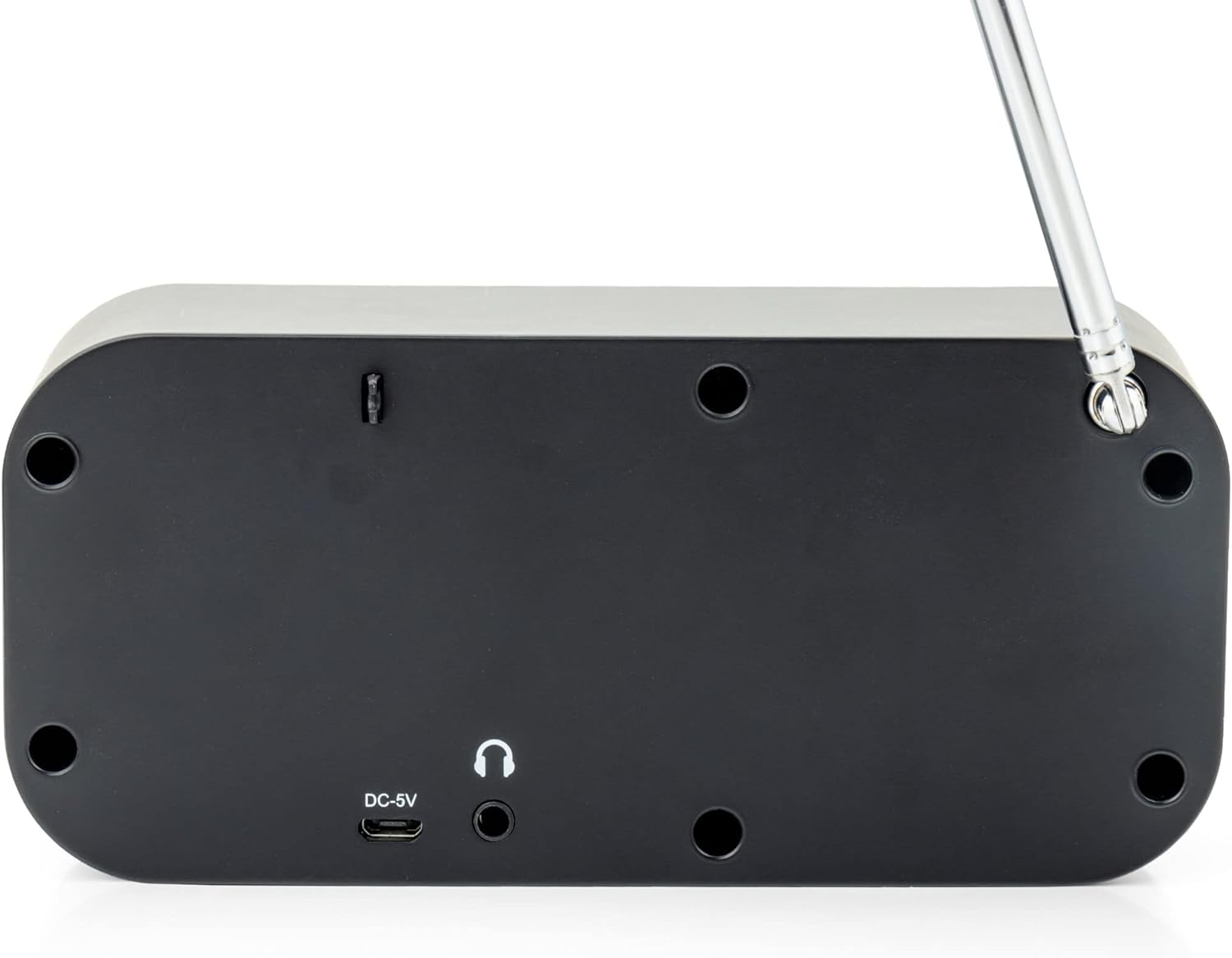
Obraz: Tył view of the Caliber HPG318DAB radio, showing the DC-5V charging port, 3.5mm headphone jack, and telescopic antenna.
- Wejście DC-5V: Podłącz tutaj kabel ładujący USB.
- Gniazdo słuchawkowe 3.5 mm: Do podłączenia słuchawek.
- Antena teleskopowa: Rozłóż dla uzyskania optymalnego odbioru radiowego.
5. Konfiguracja
5.1 Ładowanie akumulatora
The Caliber HPG318DAB features a built-in rechargeable battery, providing up to 8 hours of playback on a full charge.
- Podłącz mniejszy koniec dostarczonego kabla ładującego USB do Wejście DC-5V port z tyłu radia.
- Connect the larger end of the USB cable to the provided power adapter.
- Podłącz zasilacz do standardowego gniazdka ściennego.
- The charging indicator on the LCD screen will show the charging status. Once fully charged, the indicator will change.
Uwaga: Przed pierwszym użyciem zaleca się pełne naładowanie akumulatora.
5.2 Regulacja anteny
For optimal radio reception, fully extend the telescopic antenna located on the rear of the device. Adjust its position to improve signal strength if reception is poor.
6. Instrukcja obsługi
6.1 Włączanie/wyłączanie i wybór trybu
- Aby włączyć radio ON, naciśnij i przytrzymaj Moc/Tryb przycisk.
- Aby włączyć radio WYŁĄCZONY, naciśnij i przytrzymaj Moc/Tryb naciśnij przycisk ponownie.
- Aby przełączać się między DAB+ I FM modes, short press the Moc/Tryb button while the radio is on. The current mode will be displayed on the LCD screen.
6.2 Obsługa radia DAB+
- Przełącz się na tryb DAB+ za pomocą Moc/Tryb przycisk.
- The radio will automatically perform a full scan for available DAB+ stations upon first use or if no stations are found. To initiate a manual scan, press the Menu/Informacje button, navigate to 'Full Scan', and press Wybierz/Skanuj.
- Użyj Pokrętło głośności Aby przewinąć listę dostępnych stacji, naciśnij Wybierz/Skanuj aby wybrać stację.
- To save a station as a preset (up to 10 presets): While listening to a station, press and hold the Preset/Alarm przycisk. Użyj Pokrętło głośności aby wybrać numer ustawienia wstępnego (1-10), a następnie naciśnij Wybierz/Skanuj aby potwierdzić.
- To recall a preset station: Short press the Preset/Alarm przycisk, użyj Pokrętło głośności aby wybrać żądany numer ustawienia wstępnego, a następnie naciśnij Wybierz/Skanuj.
- Naciśnij Menu/Informacje przycisk do view additional information (e.g., program type, signal strength, time) provided by Radio Data System (RDS).
6.3 Obsługa radia FM
- Przełącz się na tryb FM za pomocą Moc/Tryb przycisk.
- To automatically scan for stations: Press and hold the Wybierz/Skanuj przycisk. Radio rozpocznie skanowanie i zatrzyma się na następnej silnej stacji.
- To manually tune: Rotate the Pokrętło głośności aby dostosować częstotliwość w małych krokach.
- To save a station as a preset (up to 10 presets): While listening to a station, press and hold the Preset/Alarm przycisk. Użyj Pokrętło głośności aby wybrać numer ustawienia wstępnego (1-10), a następnie naciśnij Wybierz/Skanuj aby potwierdzić.
- To recall a preset station: Short press the Preset/Alarm przycisk, użyj Pokrętło głośności aby wybrać żądany numer ustawienia wstępnego, a następnie naciśnij Wybierz/Skanuj.
- Naciśnij Menu/Informacje przycisk do view additional information (e.g., station name, program type) provided by Radio Data System (RDS).
6.4 Regulacja głośności
Obróć duży Pokrętło głośności zgodnie z ruchem wskazówek zegara, aby zwiększyć głośność, i przeciwnie do ruchu wskazówek zegara, aby ją zmniejszyć.
6.5 Korzystanie ze słuchawek
Connect any standard 3.5mm headphones or earphones to the Gniazdo słuchawkowe 3.5 mm on the rear of the radio for private listening. The internal speaker will automatically mute when headphones are connected.
6.6 funkcji alarmu
The radio includes alarm clock and sleep timer functions.
Ustawianie budzika:
- Naciśnij i przytrzymaj Preset/Alarm button until the alarm setup menu appears.
- Użyj Pokrętło głośności to navigate through options like Alarm 1, Alarm 2, Time, Source (Buzzer/DAB/FM), and Volume. Press Wybierz/Skanuj aby potwierdzić każde ustawienie.
- Set the desired alarm time, choose your preferred alarm source (buzzer, DAB+ station, or FM station), and set the alarm volume.
- Ensure the alarm is set to 'On' in the menu.
Korzystanie z funkcji drzemki:
Gdy zabrzmi alarm, naciśnij Drzemka button to temporarily pause the alarm for a short period (e.g., 9 minutes). The alarm will sound again after the snooze period.
Ustawianie wyłącznika czasowego:
- Naciśnij Menu/Informacje przycisk.
- Navigate to the 'Sleep' option using the Pokrętło głośności i naciśnij Wybierz/Skanuj.
- Select the desired sleep timer duration (e.g., 15, 30, 45, 60, 90 minutes, or Off). The radio will automatically turn off after the selected time.
7. Konserwacja
7.1 Czyszczenie
To clean the radio, use a soft, dry cloth. Do not use abrasive cleaners, waxes, or solvents as they may damage the finish.
7.2 Przechowywanie
When not in use for extended periods, store the radio in a cool, dry place away from direct sunlight and extreme temperatures. Ensure the battery is partially charged before storage to maintain its lifespan.
7.3 Pielęgnacja baterii
To prolong the life of the built-in Lithium-ion battery, avoid fully discharging it frequently. Charge the radio regularly, even if not in constant use.
8. Rozwiązywanie Problemów
| Problem | Możliwa przyczyna | Rozwiązanie |
|---|---|---|
| Radio się nie włącza. | Bateria jest rozładowana. | Connect the radio to power using the USB cable and adapter to charge the battery. |
| Słaby odbiór radia (DAB+/FM). | Antena nie jest wysunięta lub sygnał jest słaby. | Fully extend the telescopic antenna and adjust its position. Try moving the radio to a different location. |
| Brak dźwięku. | Głośność jest zbyt niska lub podłączone są słuchawki. | Zwiększ głośność za pomocą Pokrętło głośności. Disconnect headphones if you want sound from the speaker. |
| Alarm nie włącza się. | Alarm nie jest ustawiony prawidłowo lub jest wyłączony. | Check alarm settings (time, source, volume, 'On' status) in the menu. |
9. Specyfikacje
| Funkcja | Specyfikacja |
|---|---|
| Numer modelu | HPG318DAB |
| Wymiary (dł. x szer. x wys.) | Wymiary 15 x 4 x 6.5 cm |
| Waga | 255 gramów |
| Źródło zasilania | Battery-Powered (1 Lithium-ion battery required) |
| Żywotność baterii | Do 8 godzin |
| Obsługiwane pasma radiowe | DAB+, FM |
| Technologia łączności | AUX (for headphones), USB (for charging) |
| Maksymalna moc wyjściowa głośnika | 25 waty |
| Tworzywo | Plastikowy |
| Kolor | Czarny |
| Cechy specjalne | Portable, Alarm Function, RDS, LCD Screen |
10. Gwarancja i wsparcie
For warranty information and customer support, please refer to the documentation provided with your purchase or visit the official Caliber webZachowaj dowód zakupu na wypadek roszczeń gwarancyjnych.