
Wstęp
The ION Total PA Prime is a high-power Bluetooth speaker system designed for versatile audio performance. This manual provides essential information for setting up, operating, and maintaining your speaker system to ensure optimal sound quality and longevity. Key features include multi-colored lights, a one-touch user interface for sound adjustments, acoustic optimization for various venues, and a bi-amplified 500-watt sound system with a 15-inch woofer and 1-inch tweeter.
Informacje dotyczące bezpieczeństwa
Please read all safety instructions before using this product. Keep this manual for future reference. Do not expose the unit to water or moisture. Ensure proper ventilation and avoid blocking any ventilation openings. Use only attachments/accessories specified by the manufacturer. Disconnect the unit during lightning storms or when unused for long periods. Refer all servicing to qualified service personnel.
Zawartość opakowania
- ION Total PA Prime Speaker
- Mikrofon z kablem
- Podstawa głośnika
- Kabel zasilający
- Przewodnik szybkiego startu (nie jest zawarty w tym podręczniku)
Organizować coś
1. Rozpakowanie i ustawienie
Carefully remove all contents from the packaging. Place the speaker on a stable, flat surface or assemble the included speaker stand for elevated placement. Ensure adequate space around the speaker for ventilation.
2. Assembling the Speaker Stand
Unfold the tripod legs of the speaker stand until they are fully extended and stable. Insert the main pole into the top of the tripod. Secure the pole at the desired height using the locking pin and tightening knob. Carefully lift the Total PA Prime speaker and place it onto the top of the stand's pole, ensuring it is securely seated.

Image: ION Total PA Prime speaker system fully assembled on its tripod stand, with the included microphone resting on the floor in front of it.
3. Podłączanie zasilania
Connect the included power cable to the AC input on the rear panel of the speaker, then plug the other end into a grounded power outlet.
4. Pierwsze włączenie zasilania
Locate the power switch on the rear panel of the speaker and turn it to the 'ON' position. The display screen on the control panel will illuminate.
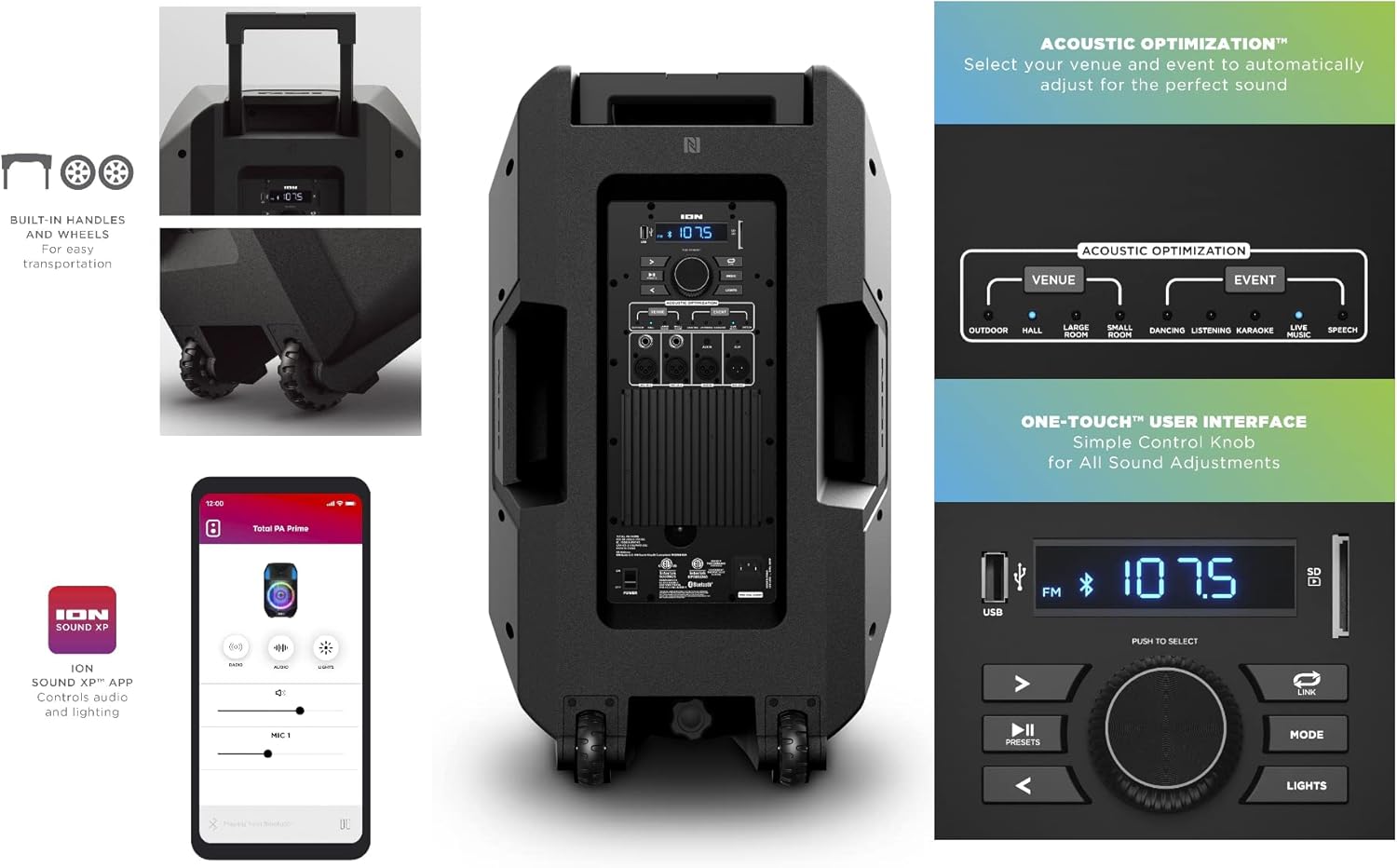
Obraz: Tył view of the ION Total PA Prime speaker, highlighting the control panel with various inputs and controls, along with the built-in handles and wheels for transport.
5. Parowanie Bluetooth
Press the 'Mode' button on the control panel until 'BT' (Bluetooth) is displayed. On your smart device, navigate to Bluetooth settings and select 'ION Total PA Prime' from the list of available devices. The speaker will indicate a successful connection.
6. Microphone and Instrument Connection
Plug the microphone cable into one of the 'MIC IN' inputs on the rear control panel. Adjust the corresponding 'MIC LEVEL' knob to control the microphone volume. Additional instruments can be connected via the 'XLR IN' or 'AUX IN' ports.

Image: Close-up of the ION Total PA Prime's rear control panel, showing the USB port, display, main volume knob, mode and light buttons, and various audio input/output jacks including microphone and auxiliary inputs.
Instrukcja obsługi
1. Adjusting Volume and Audio Source
Use the large 'Main Volume' knob to adjust the overall output volume. Press the 'Mode' button to cycle through available audio sources: Bluetooth, FM Radio, USB, SD Card, and Auxiliary Input.
2. Acoustic Optimization
The Total PA Prime features Acoustic Optimization. Use the dedicated buttons to select your venue (e.g., Outdoor, Hall, Large Room) and event type (e.g., Dancing, Listening, Karaoke, Live, Speech) to automatically adjust the sound for optimal performance.
3. Multi-Colored Lights
Press the 'Lights' button to cycle through different light modes for the woofer, which glows in multiple colors and can dance to the beat. Press and hold the 'Lights' button to turn the lights off.
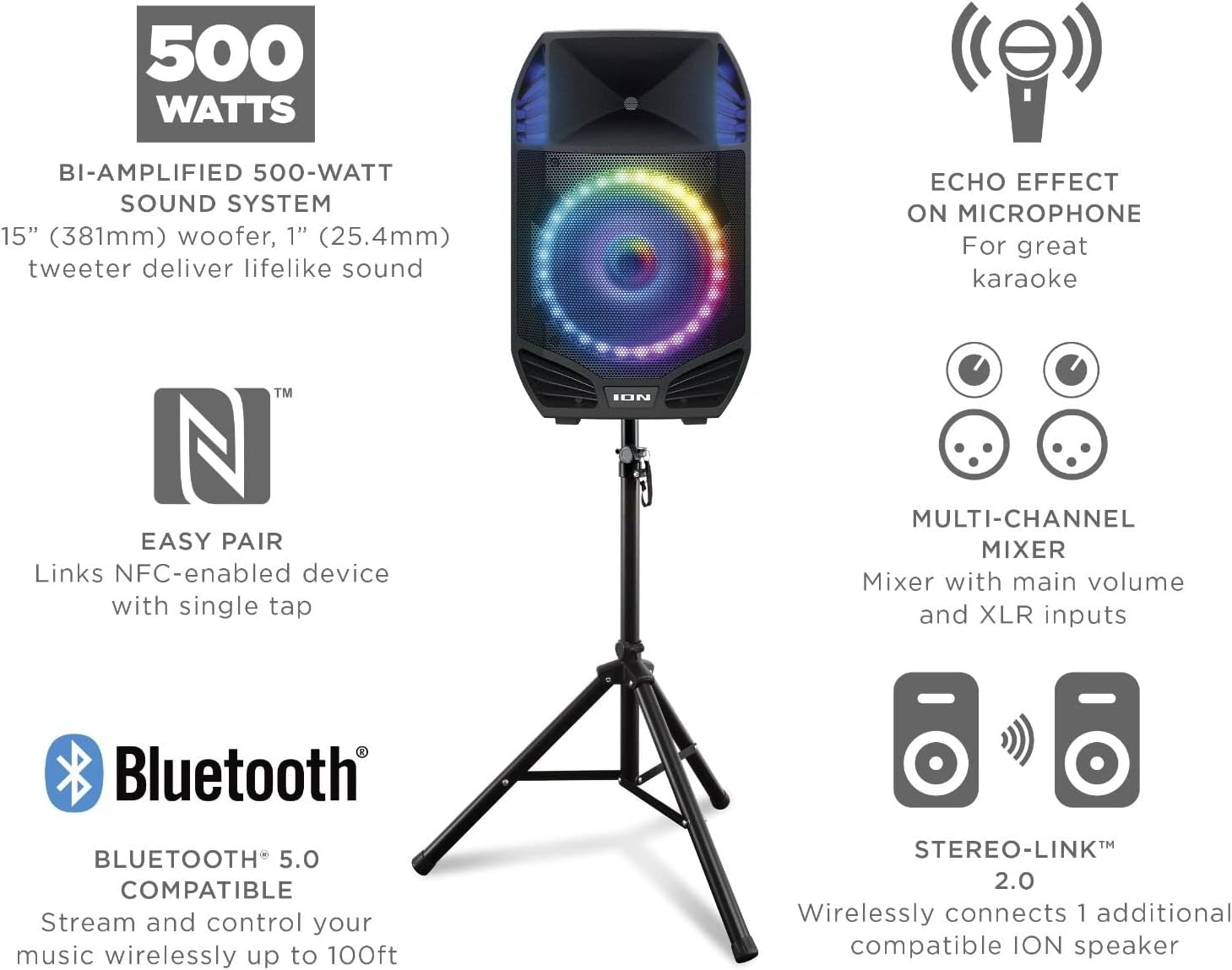
Obraz: Przód view of the ION Total PA Prime speaker, showcasing its multi-colored LED woofer. Callouts highlight features like the 500-watt sound system, echo effect on microphone, easy NFC pairing, multi-channel mixer, and Stereo-Link 2.0 capability.
4. Microphone Echo Effect
When using a microphone, adjust the 'MIC ECHO' knob on the control panel to add an echo effect for enhanced vocal performance, especially useful for karaoke.
5. Stereo-Link™ 2.0
To wirelessly connect two compatible ION speakers for stereo sound, ensure both speakers are powered on and not connected to Bluetooth. Press the 'Link' button on both speakers. They will automatically connect, providing a wider soundstage.
6. Przenośność
The speaker features built-in handles and wheels for easy transportation. When not on the stand, the retractable handle can be extended to pull the speaker like luggage.
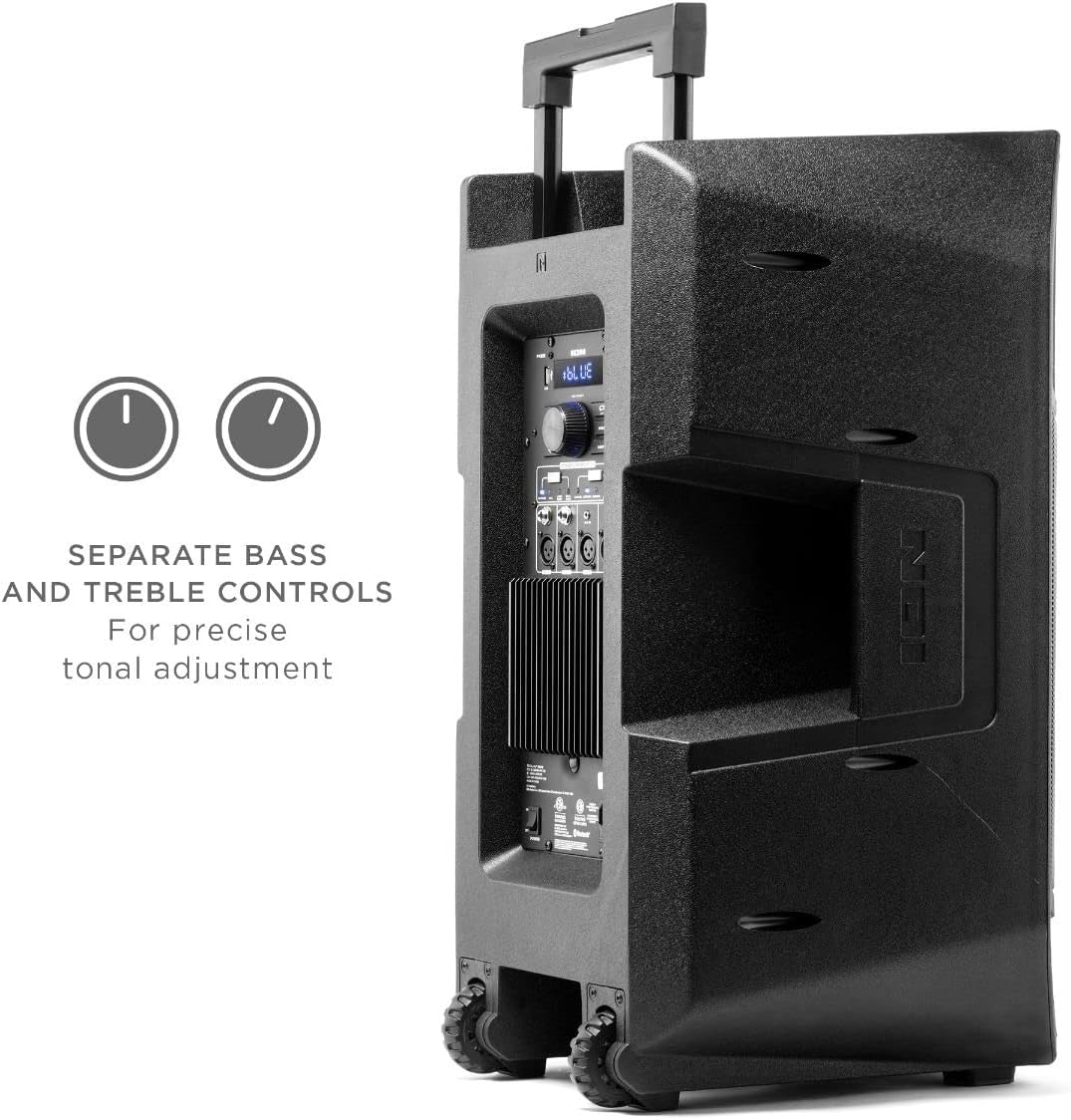
Obraz: Bok view of the ION Total PA Prime speaker, illustrating its robust design with integrated handles and durable wheels for convenient mobility.
Integracja mediów
Official Product Video: ION Trouper 300 Product Spotlight
Video: This official product spotlight from Ion Audio- CE demonstrates the features of the ION Trouper 300, including its dynamic speaker system, microphone with echo effect, multi-channel mixer, and control via the ION Sound Control™ App. While showcasing a similar model, it provides insight into the general functionality and quality of ION speaker systems.
Konserwacja
To ensure the longevity and performance of your ION Total PA Prime, follow these maintenance guidelines:
- Czyszczenie: Do czyszczenia zewnętrznej części głośnika należy używać miękkiej, suchej ściereczki. Nie należy używać środków czyszczących o właściwościach ściernych, wosków ani rozpuszczalników.
- Składowanie: Store the speaker in a cool, dry place away from direct sunlight and extreme temperatures. If storing for extended periods, ensure the unit is unplugged.
- Wentylacja: Utrzymuj otwory wentylacyjne wolne od kurzu i zanieczyszczeń, aby zapobiec przegrzaniu.
- Pielęgnacja kabli: Inspect power and audio cables regularly for any damage. Replace damaged cables immediately.
Rozwiązywanie problemów
- Brak zasilania: Ensure the power cable is securely connected to both the speaker and a working power outlet. Check the power switch on the rear panel.
- Brak dźwięku: Verify the volume is turned up on both the speaker and your connected audio source. Ensure the correct audio source (Bluetooth, Aux, etc.) is selected. Check all cable connections.
- Brak połączenia Bluetooth: Make sure the speaker is in Bluetooth mode and your device's Bluetooth is enabled. Try forgetting the device on your smartphone and re-pairing. Ensure no other devices are currently connected to the speaker.
- Światła nie działają: Press the 'Lights' button to cycle through light modes or turn them on. Check if the lights feature is enabled via the ION Sound Control™ App.
- Słaba jakość dźwięku: Adjust the Acoustic Optimization settings to match your environment and event. Consider downloading the 'ION Sound-Xp' app for additional sound tuning options.
Specyfikacje
| Funkcja | Specyfikacja |
|---|---|
| Nazwa modelu | PA Prime |
| Typ głośnika | Głośnik niskotonowy |
| Funkcja specjalna | Radio |
| Zalecane zastosowania | Na smartfony lub tablety |
| Kompatybilne urządzenia | Gaming Console, Laptop, Personal Computer, Projector, Smartphone |
| Średnica subwoofera | 15 cali |
| Liczba jednostek | 1 Liczba |
| Konfiguracja kanału dźwięku przestrzennego | 2.0 |
| Kolor | Czarny |
| Wymiary produktu | 18.3" gł. x 21.41" szer. x 30.11" wys. |
| Waga przedmiotu | 60 funtów |
| jest wodoodporny | FAŁSZ |
| Rodzaj gwarancji | Ograniczony |
| Liczba elementów | 1 |
| Metoda kontroli | Aplikacja |
| Technologia komunikacji bezprzewodowej | Bluetooth |
| Rozmiar głośnika | 15 cali |
| Źródło zasilania | Elektryczny przewodowy |
| Średnica głośnika niskotonowego | 15 cali |
| Średnica głośnika wysokotonowego | 1 cali |
| Typ sterownika audio | Dynamiczny sterownik |
| Zasięg Bluetooth | 10 metrów |
| Rozmiar sterownika audio | 15 cali |
| Technologia łączności z subwooferem | Bezprzewodowy |
| UPC | 649661904700 |
| Producent | Jon |
| Kształt | Pryzmat prostokątny |
| Data pierwszej dostępności | 15 kwietnia 2021 r. |
| Maksymalna moc wyjściowa głośnika | 500 watów |
| Technologia łączności | Bluetooth |
| Tryb wyjścia audio | Stereofoniczny |
| Typ montażu | Uchwyt na koło |
Gwarancja i wsparcie
This product is offered as an Amazon Renewed item, meaning it has been professionally inspected and tested to work and look like new by Amazon-qualified suppliers. Renewed products are eligible for replacement or refund under the Amazon Renewed Guarantee if you are not satisfied with your purchase.
For technical support or warranty inquiries, please refer to the contact information provided with your purchase or visit the official Ion Audio webstrona.