
ThreeH H-AC55Blue
ThreeH Digital Alarm Clock with Radio
Model: H-AC55Blue
Marka: ThreeH
Wstęp
Dziękujemy za zakupasing the ThreeH Digital Alarm Clock with Radio. This manual provides detailed instructions for setting up, operating, and maintaining your new alarm clock. Please read it thoroughly to ensure optimal performance and longevity of the product.

Obraz: Przód view of the ThreeH Digital Alarm Clock, displaying a large, clear blue LED time. The clock features a sleek, modern design with a reflective screen.
Cechy produktu
- Duży wyświetlacz LED: 7.6-inch LED screen for easy readability.
- Radio FM: Built-in FM radio with 15-level adjustable volume and memory for up to 15 stations (76-108 MHz).
- Ustawienia podwójnego alarmu: Ustaw dwa niezależne alarmy na różne godziny pobudki.
- Funkcja drzemki: Adjustable snooze duration (default 9 minutes).
- Port ładowania USB: Convenient USB port for charging mobile phones or other devices.
- Wbudowana bateria zapasowa: Ensures time memory function during power outages (requires 1 CR2 battery, not included).
- Regulowana jasność: 4 levels of brightness adjustment (manual or automatic).
Organizować coś
1. Podłączenie zasilania
Connect the DC jack to the power input port on the back of the unit. Plug the other end into a standard wall outlet.
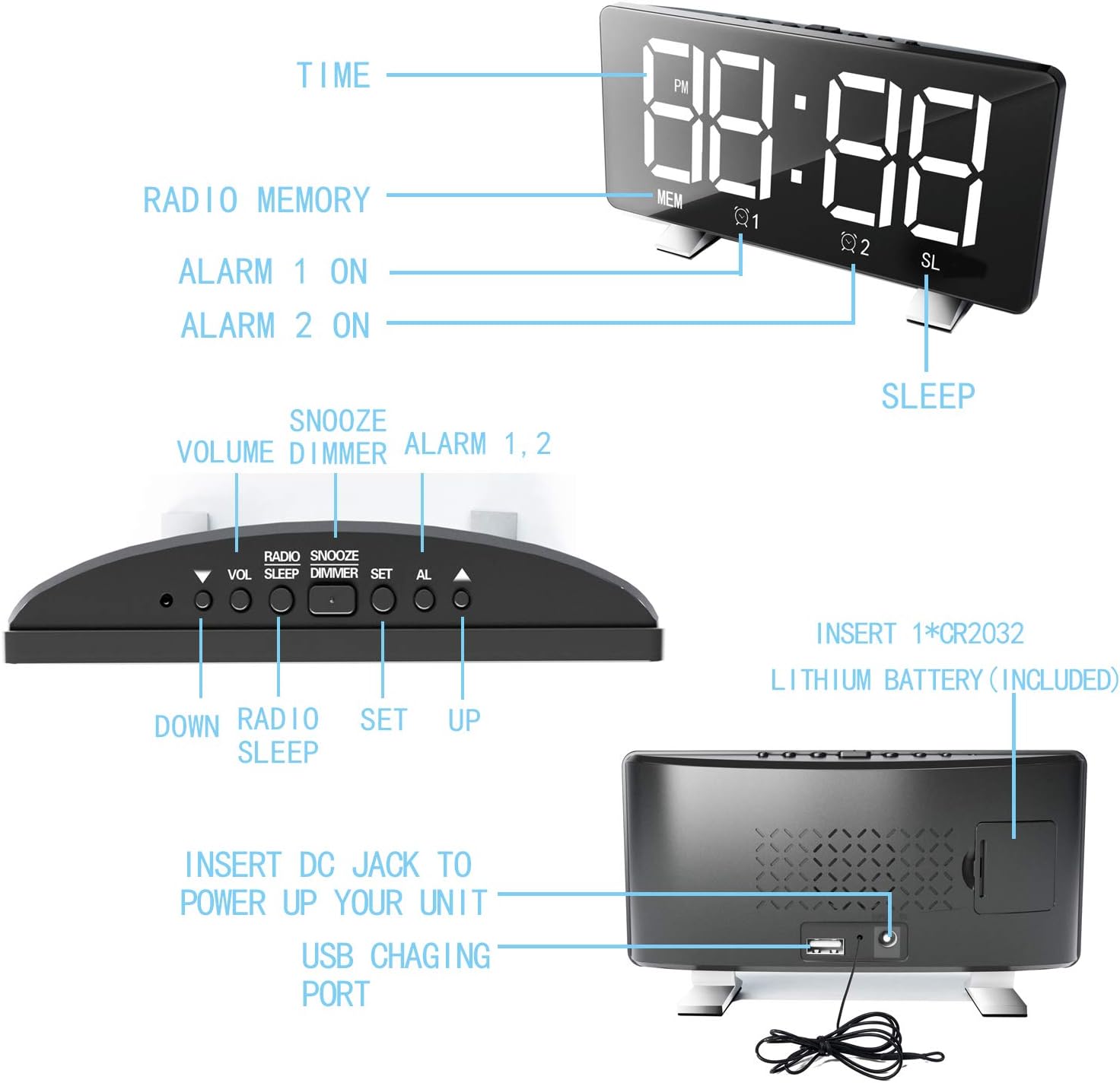
Image: Diagram illustrating the back panel of the alarm clock, highlighting the DC power input and the USB charging port. It also shows the location for the CR2032 lithium battery.
2. Instalacja baterii zapasowej
For time memory function during power outages, insert 1 CR2 battery (not included) into the battery compartment on the back of the clock. Ensure correct polarity.
3. Ustawienie czasu początkowego
Po pierwszym uruchomieniu zegar może wyświetlać domyślną godzinę. Przejdź do sekcji „Instrukcja obsługi”, aby ustawić prawidłową godzinę.
Instrukcja obsługi
Ustawianie czasu
- Naciśnij i przytrzymaj USTAWIĆ Naciskaj przycisk, aż zaczną migać cyfry godziny.
- Użyj UP or W DÓŁ przyciski do regulacji godziny.
- Naciskać USTAWIĆ ponownie, aby przejść do cyfr oznaczających minuty.
- Użyj UP or W DÓŁ przyciski, aby ustawić minuty.
- Naciskać USTAWIĆ aby potwierdzić i wyjść z trybu ustawiania czasu.
- Aby przełączać się między formatem 12-godzinnym i 24-godzinnym, naciśnij przycisk USTAWIĆ button once while in normal time display mode.
Ustawianie alarmów (Alarm 1 i Alarm 2)
Zegar obsługuje dwa niezależne alarmy.
- Naciśnij AL button once to set Alarm 1, or twice to set Alarm 2. The corresponding alarm icon (Q1 or Q2) zacznie migać.
- The hour digits will flash. Use UP or W DÓŁ ustawić godzinę.
- Naciskać AL again to move to the minute digits. Use UP or W DÓŁ aby dostosować minuty.
- Naciskać AL again to select the alarm sound source: Radio or Digital Alarm.
- Naciskać AL one more time to confirm and activate the alarm. The alarm icon will remain lit.
- Aby dezaktywować alarm, naciśnij AL Naciskaj przycisk aż zniknie ikona odpowiadającego jej alarmu.

Image: Illustration demonstrating the dual alarm functionality, showing two different wake-up times (7:00 and 10:00) and the snooze/dimmer button.
Korzystanie z funkcji drzemki
Gdy zabrzmi alarm, naciśnij przycisk DRZEMKA/ŚCIEMNIACZ button to temporarily silence the alarm for 9 minutes (default). The alarm will sound again after the snooze period. To cancel the alarm completely, press any other button.
Obsługa radia FM
- Naciśnij RADIO przycisk, aby włączyć radio FM.
- Naciśnij i przytrzymaj RADIO button to automatically scan and save available stations (up to 15).
- Użyj UP or W DÓŁ buttons to manually tune or cycle through saved stations.
- Dostosuj głośność za pomocą TOM przycisk.
- Aby wyłączyć radio, naciśnij RADIO naciśnij przycisk ponownie.
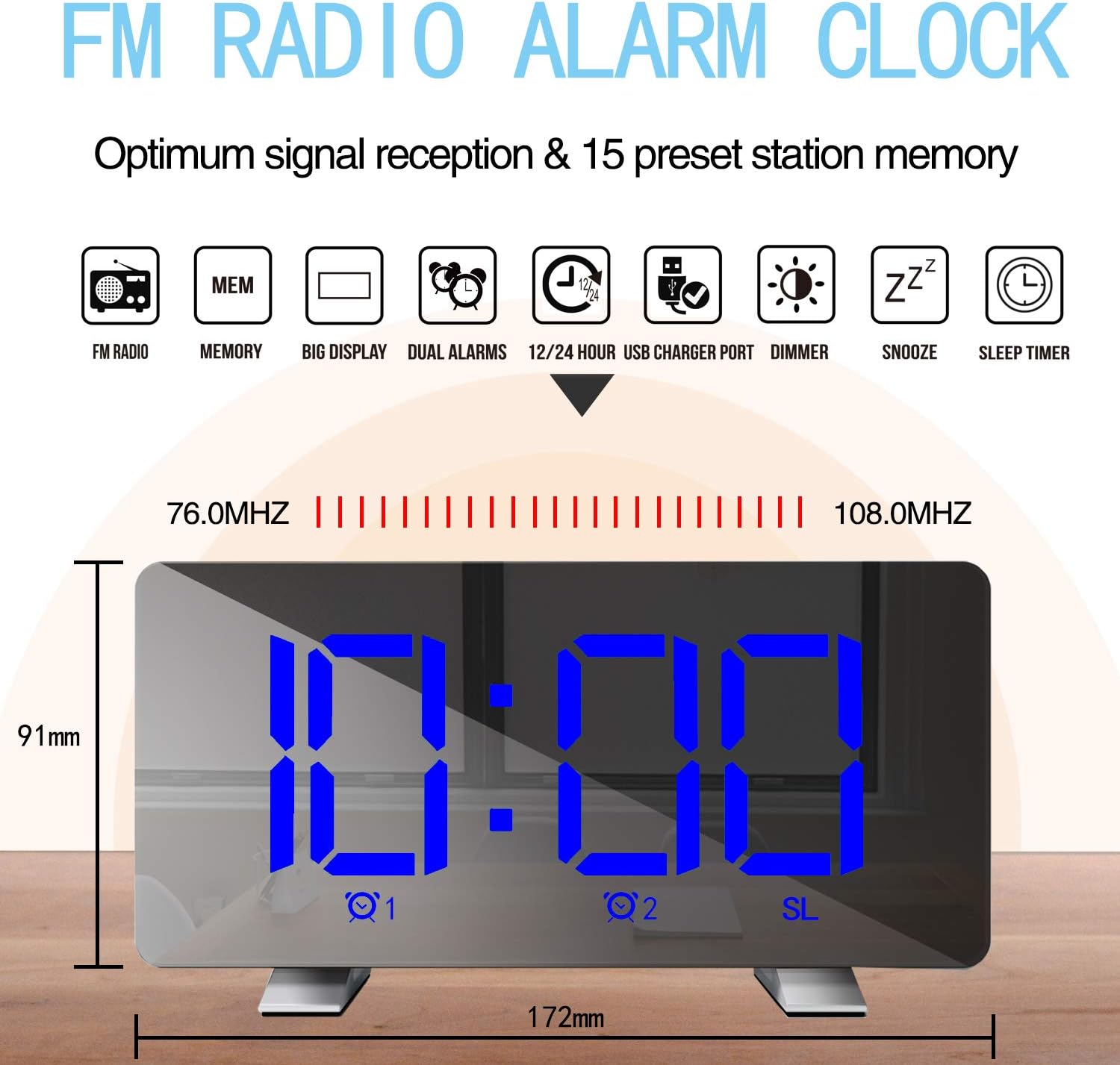
Image: Diagram highlighting the FM radio features, including frequency range (76.0MHz-108.0MHz) and memory for 15 preset stations. Also shows the clock's dimensions.
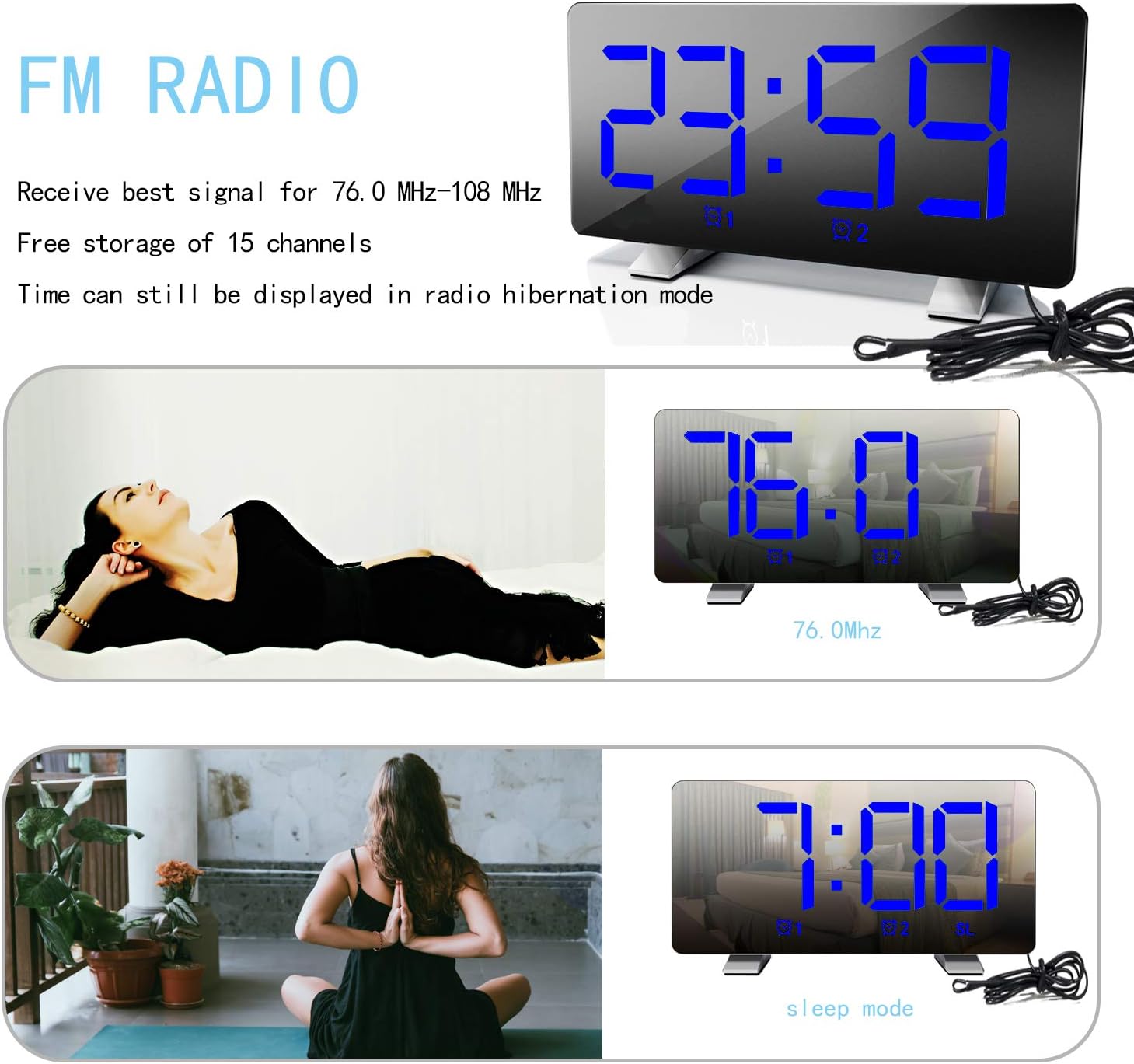
Image: The alarm clock displaying an FM radio frequency (76.0 MHz) and showing the time in sleep mode, indicating that time is still visible during radio operation.
Regulacja jasności wyświetlacza
Naciśnij DRZEMKA/ŚCIEMNIACZ button repeatedly to cycle through 4 levels of brightness: Bright, Medium, Dim, and Off. The clock can also automatically adjust brightness based on ambient light.

Image: Visual representation of the alarm clock display at three adjustable brightness levels: Bright, Medium, and Dim, along with an "Off" state for the display.
Port ładowania USB
Connect your mobile phone or other USB-powered device to the USB charging port on the back of the clock. This port provides power for charging your devices.
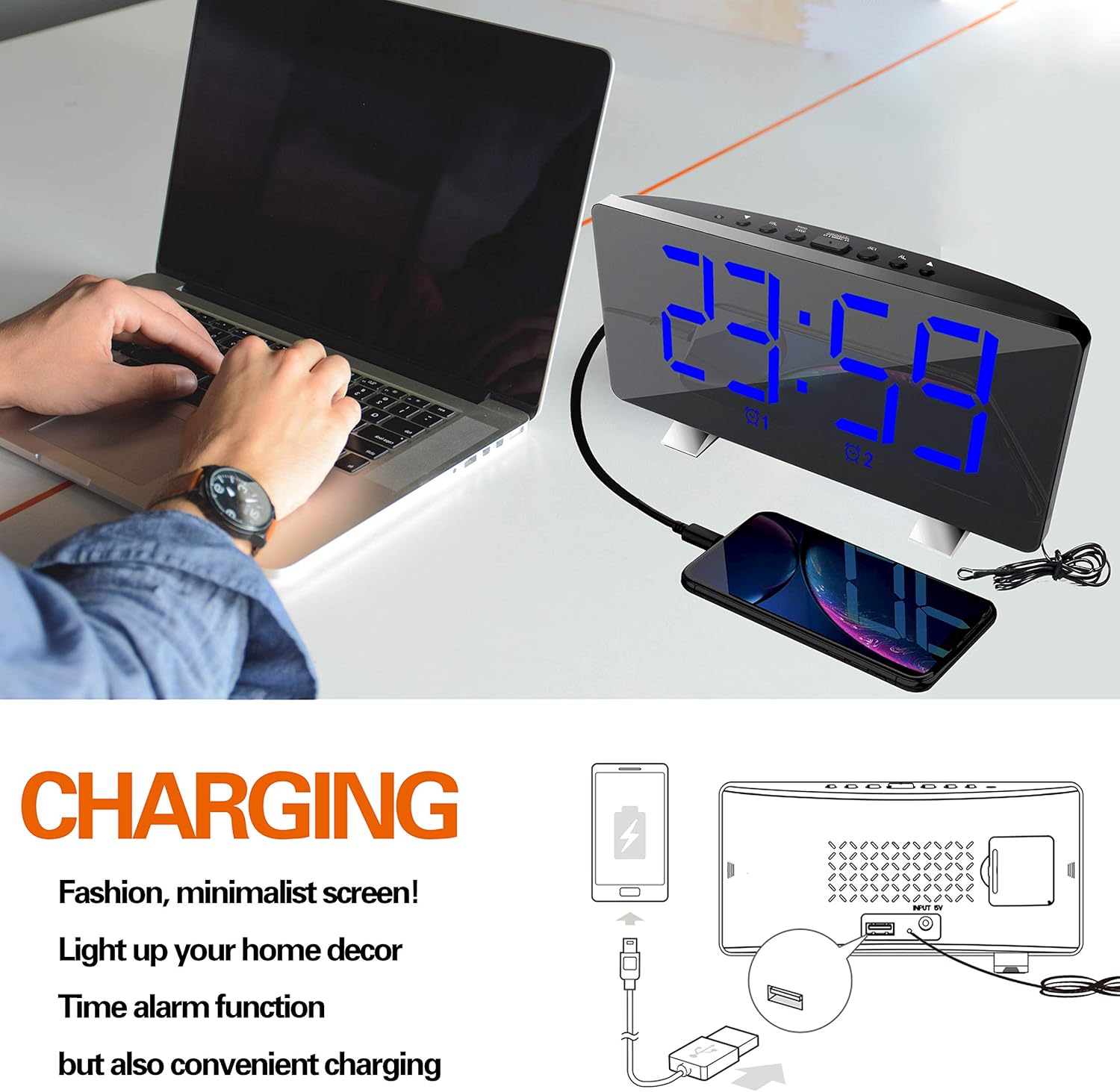
Image: The ThreeH Digital Alarm Clock connected to a laptop, with a smartphone charging via the clock's USB port, demonstrating its charging capability.
Konserwacja
- Czyść zegar miękką, suchą ściereczką. Nie używaj środków czyszczących ani rozpuszczalników o działaniu ściernym.
- Unikaj wystawiania zegara na działanie ekstremalnych temperatur, bezpośredniego światła słonecznego i wysokiej wilgotności.
- Do not immerse the clock in water or any other liquid.
- If the clock will not be used for an extended period, remove the battery backup to prevent leakage.
Rozwiązywanie problemów
| Problem | Możliwa przyczyna | Rozwiązanie |
|---|---|---|
| Wyświetlacz jest pusty. | Brak podłączenia zasilania. | Upewnij się, że zasilacz jest prawidłowo podłączony do zegara i sprawnego gniazdka ściennego. |
| Alarm nie włącza się. | Alarm nie został aktywowany lub został nieprawidłowo ustawiony. | Verify alarm settings and ensure the alarm icon is lit on the display. Check alarm volume. |
| Odbiór radia jest słaby. | Słaby sygnał lub zakłócenia. | Adjust the position of the clock or the antenna wire for better reception. Avoid placing near other electronic devices. |
| Ładowanie przez USB nie działa. | Urządzenie nie jest kompatybilne lub występuje problem z kablem. | Ensure your device is compatible with USB charging. Try a different USB cable. |
Specyfikacje
| Marka | TrzyH |
| Numer modelu | H-AC55Blue |
| Typ wyświetlacza | Cyfrowa dioda LED |
| Wymiary (w przybliżeniu) | 172 mm (szer.) x 91 mm (wys.) |
| Źródło zasilania | AC Power Adapter (USB powered, adapter not included) |
| Zapasowa bateria | 1 CR2 battery (not included) |
| Częstotliwość radiowa FM | 76.0 MHz - 108.0 MHz |
| Tworzywo | Plastik, akrylonitryl-butadien-styren |
| Waga przedmiotu | 295 gramów (10.4 uncji) |
Gwarancja i wsparcie
For warranty information and customer support, please refer to the documentation included with your purchase or contact ThreeH customer service directly. Contact details can typically be found on the manufacturer's official webmiejscu lub na opakowaniu produktu.
Proszę zachować dowód zakupu na wypadek ewentualnych roszczeń gwarancyjnych.
Ask a question about this manual
Ask about setup, troubleshooting, compatibility, parts, safety, or missing instructions. Manuals+ will review the question and use this page’s manual context to help answer it.