
1. Wprowadzenie
Thank you for choosing the USHINING 3G Flip Phone, Model SC6531E. This phone is specifically designed for seniors, featuring large buttons, clear displays, and enhanced audio for ease of use. It includes essential functions such as an SOS emergency call button, FM radio, and a flashlight, making it a reliable communication device. This manual provides detailed instructions on how to set up, operate, and maintain your new phone.

Image 1.1: The USHINING 3G Flip Phone shown with its charging dock.
2. Informacje dotyczące bezpieczeństwa
Przed użyciem telefonu prosimy o uważne przeczytanie tej sekcji, aby zapewnić jego bezpieczne i prawidłowe działanie. Zachowaj instrukcję na przyszłość.
- Bezpieczeństwo baterii: Use only approved batteries and chargers. Do not short-circuit, puncture, or disassemble the battery. Keep away from flammable and explosive materials during charging.
- Ochrona słuchu: Avoid prolonged exposure to high volume levels when using headphones or the loudspeaker.
- Bezpieczeństwo jazdy: Nie korzystaj z telefonu podczas jazdy. Zawsze priorytetem jest bezpieczeństwo na drodze.
- Urządzenia medyczne: Maintain a safe distance between the phone and medical devices like pacemakers to avoid interference.
- Sprzedaż: Dispose of the phone and battery according to local regulations. Do not dispose of in household waste.

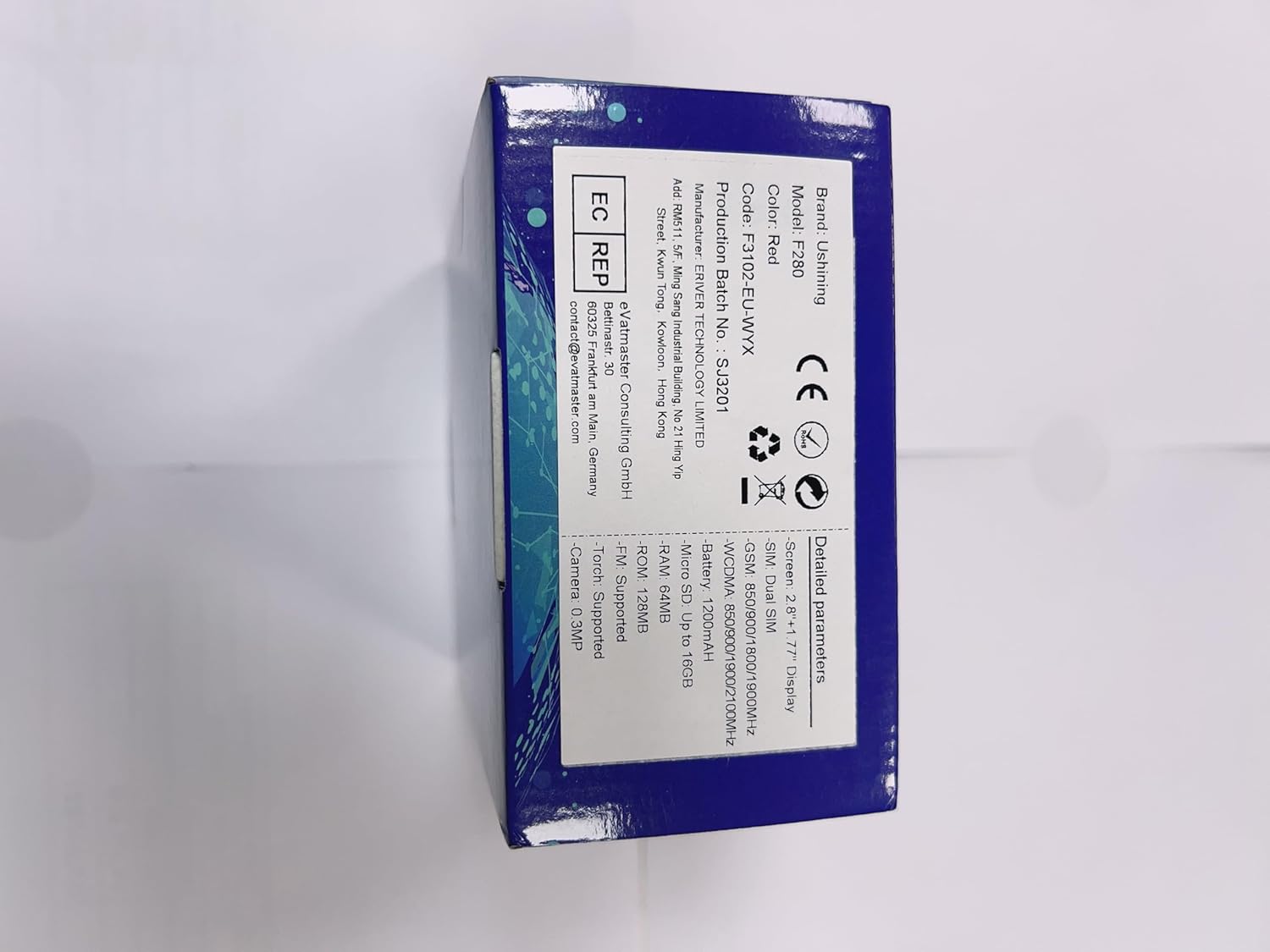
Image 2.1: Product packaging showing warning labels, including battery safety information.
3. Zawartość opakowania
Proszę sprawdzić zawartość opakowania po rozpakowaniu:
- USHINING 3G Flip Phone (Model SC6531E)
- Stacja ładująca
- Kabel ładujący USB
- 1200 mAh Bateria litowo-jonowa
- Instrukcja obsługi (ten dokument)

Obraz 3.1: Przód i bok views of the USHINING flip phone, illustrating its design.
4. Konfiguracja
4.1. Wkładanie karty(kart) SIM i baterii
- Otwórz tylną pokrywę telefonu, delikatnie podważając ją, aby wyjąć ją z wycięcia.
- Jeżeli jest obecna, wyjmij baterię.
- Locate the SIM card slot(s). This phone supports Dual SIM. Insert your SIM card(s) with the gold contacts facing down, ensuring they are correctly seated.
- Insert the 1200 mAh Lithium-ion battery into its compartment, aligning the contacts.
- Załóż tylną pokrywę, aż zatrzaśnie się na swoim miejscu.
4.2. Ładowanie telefonu
Before first use, fully charge the phone. The phone can be charged using the included charging dock or directly via the USB cable.
- Korzystanie ze stacji ładującej: Connect the USB cable to the charging dock and then to a power adapter (not included) or a USB port. Place the phone into the charging dock, ensuring it sits firmly. The charging indicator on the phone will light up.
- Ładowanie bezpośrednie: Connect the USB cable directly to the phone's charging port and then to a power adapter or USB port.


Image 4.1: Illustrations of the phone being charged via its convenient charging dock.
4.3. Powering On/Off and Initial Setup
- Włączanie: Naciśnij i przytrzymaj przycisk zasilania/zakończenia połączenia (czerwony przycisk), aż ekran się zaświeci.
- Wyłączone: Press and hold the Power/End Call button until the power off options appear, then select "Power off".
- Wybór języka: Upon first power-on, you may be prompted to select your preferred language. The phone supports Spanish, English, French, Italian, and German.
5. Instrukcja obsługi
5.1. Podstawowe funkcje wywołań
- Nawiązywanie połączenia: Dial the number using the keypad and press the Call button (green button).
- Odbieranie połączenia: When the phone rings, press the Call button (green button).
- Zakończenie połączenia: Press the End Call button (red button).
- Regulacja głośności: Use the side volume keys during a call or in standby mode to adjust the earpiece or ringtone volume.
5.2. Funkcja połączenia alarmowego SOS
The SOS button is a critical safety feature, allowing you to quickly contact pre-set emergency numbers.
- Konfigurowanie numerów SOS: Navigate to the SOS settings in the phone's menu. You can set up to 5 family numbers or emergency contacts.
- Aktywacja SOS: In an emergency, press and hold the dedicated SOS button on the back of the phone for a few seconds. The phone will automatically dial the pre-set numbers in sequence until one answers. It will also send an emergency SMS to these contacts.


Image 5.1: Visual representation of the SOS emergency call function and its contact setup.
5.3. Główne cechy i funkcje
The USHINING flip phone includes several useful features:
- Duże przyciski i wyświetlacz: Designed for easy dialing and viewing, with large fonts and menu icons.
- Enhanced Speakers: Provides clear and loud audio for calls and multimedia.
- Radio FM: Listen to your favorite radio stations. Access via the main menu.
- Flesz: A built-in LED torch for convenience. Activate it via a dedicated button or menu option.
- Kamera: Capture simple photos. Access the camera from the main menu.
- Szybkie wybieranie: Assign frequently called numbers to specific keys (M1, M2, or number keys 2-9) for quick dialing.
- Kalendarz i budzik: Manage your schedule and set reminders.
- Czarna lista/Biała lista: Manage incoming calls by blocking unwanted numbers or allowing only specific contacts.
- Hearing Aids Compatible: Designed to reduce interference with hearing aids.


Obraz 5.2: Koniecview of the phone's various features and the flashlight in action.


Image 5.3: The phone's FM radio function and its enhanced audio quality for clear listening.
6. Konserwacja
- Czyszczenie: Use a soft, dry cloth to clean the phone's surface. Avoid using liquid cleaners or aerosols.
- Składowanie: Przechowuj telefon w chłodnym, suchym miejscu, z dala od bezpośredniego światła słonecznego i ekstremalnych temperatur.
- Pielęgnacja baterii: To prolong battery life, avoid fully discharging the battery frequently. Charge the phone regularly, especially if not used for extended periods.
- Unikaj kropli: While durable, avoid dropping the phone to prevent damage to the screen or internal components.
7. Rozwiązywanie Problemów
If you encounter issues with your phone, please refer to the following common solutions:
| Problem | Możliwa przyczyna | Rozwiązanie |
|---|---|---|
| Telefon się nie włącza. | Bateria jest słaba lub nie została prawidłowo włożona. | Charge the battery. Ensure the battery is properly inserted. |
| Nie można wykonywać ani odbierać połączeń. | Brak karty SIM, karta SIM nieaktywna lub karta poza zasięgiem sieci. | Upewnij się, że karta SIM jest włożona i aktywna. Sprawdź siłę sygnału sieci. Skontaktuj się z operatorem. |
| Słaba jakość połączeń. | Słaby sygnał, zakłócenia środowiskowe. | Move to an area with better signal. Avoid obstacles. |
| Bateria szybko się rozładowuje. | Częste użytkowanie, aplikacje działające w tle lub stara bateria. | Reduce screen brightness, close unused applications. If battery is old, consider replacement. |
| Funkcja SOS nie działa. | SOS numbers not set, or no credit/signal. | Verify SOS numbers are correctly set in settings. Ensure sufficient credit and network signal. |
8. Specyfikacje
| Funkcja | Szczegół |
|---|---|
| Marka | UŚWIETLANIE |
| Numer modelu | SC6531E |
| System operacyjny | System operacyjny Nucleus |
| Rozmiar ekranu | 2.8 Inches (main), 1.77 Inches (sub-screen) |
| Rezolucja | 480x800 |
| Technologia komórkowa | 3G |
| Łączność | USB |
| Pojemność baterii | 1200 mAh Li-ion |
| Czas rozmowy | Do 300 minut |
| Czas czuwania | Do 200 godzin |
| Rozmiar pamięci RAM | 32 MB |
| Pojemność pamięci masowej | 16 GB (rozszerzalna) |
| Obsługa karty SIM | Podwójna karta SIM |
| Obsługiwane języki | Spanish, English, French, Italian, German |
| Kolor | Pomarańczowy |
9. Gwarancja i wsparcie
USHINING products are designed for reliability and performance. For warranty information, please refer to the warranty card included in your product packaging or contact your point of purchase. For technical support or further assistance, please visit the official USHINING webwitryny lub skontaktuj się z obsługą klienta.
Note: Information regarding software updates and spare parts availability was not provided at the time of this manual's creation.