
1. Wprowadzenie
This manual provides essential instructions for the safe and efficient use of your Xiaomi Poco F3 smartphone. It covers device setup, basic operations, maintenance guidelines, and troubleshooting tips. Please read this manual thoroughly before using your device to ensure optimal performance and longevity.
2. Zawartość opakowania
Upon unboxing your Xiaomi Poco F3, please verify that all the following items are included:
- Xiaomi Poco F3 Smartphone
- Zasilacz
- Kabel USB typu C.
- Narzędzie do wyjmowania karty SIM
- Protective Case (availability may vary by region)
- Szybki przewodnik
- Karta gwarancyjna
3. Układ i komponenty urządzenia
Familiarize yourself with the physical components of your Xiaomi Poco F3.

Rysunek 3.1: Kątowy view of the Poco F3, highlighting the display and rear camera setup.
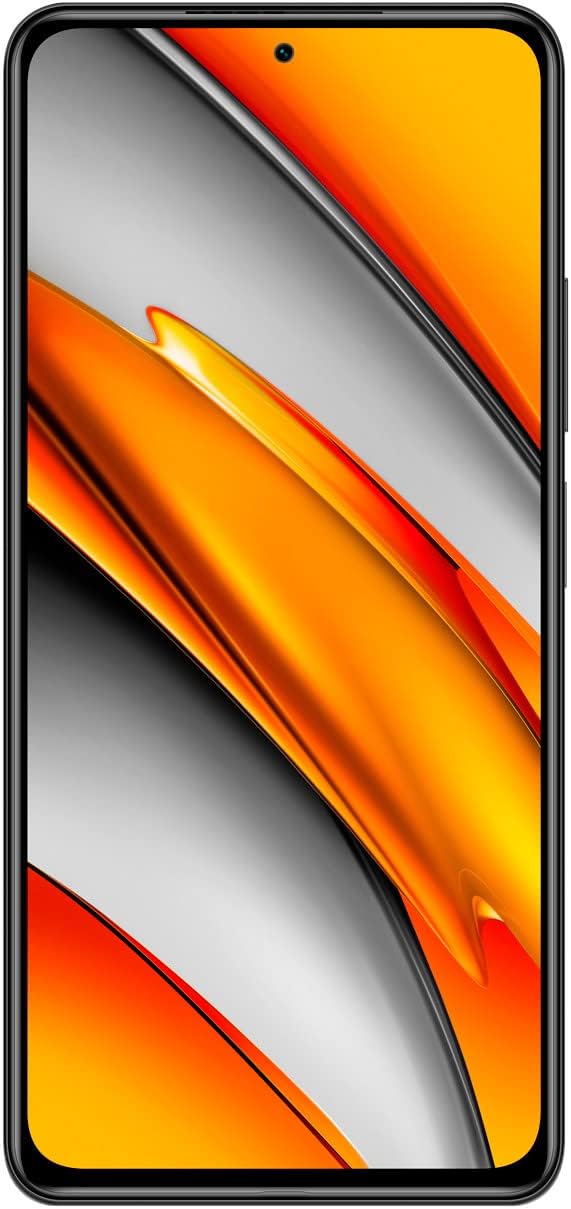
Rysunek 3.2: Przód view of the Poco F3, showing the full display and front camera.

Rysunek 3.3: Tył view of the Poco F3, detailing the triple camera system and branding.

Rysunek 3.4: Prawa strona view of the Poco F3, illustrating the power button and volume controls.

Rysunek 3.5: Dolna krawędź view of the Poco F3, displaying the SIM tray, USB-C port, and speaker.

Rysunek 3.6: Górna krawędź view of the Poco F3, showing the secondary speaker, microphone, and IR blaster.
Kluczowe komponenty:
- Wyświetlacz: Large AMOLED screen for vibrant visuals.
- Przednia kamera: Located at the top center of the display for selfies and video calls.
- Moduł kamery tylnej: Houses the triple camera setup and LED flash.
- Przycisk zasilania/Czytnik linii papilarnych: On the right side, used for power control and biometric authentication.
- Regulacja głośności: Located above the power button, for adjusting audio levels.
- Tacka na kartę SIM: On the bottom edge, for inserting Nano-SIM cards.
- Port USB typu C: Na dolnej krawędzi, do ładowania i przesyłania danych.
- Głośniki: Stereo speakers located on the top and bottom edges for enhanced audio.
- Mikrofony: Primary microphone on the bottom, secondary microphone on the top for noise cancellation.
- Miotacz podczerwieni: On the top edge, for controlling compatible home appliances.
4. Konfiguracja
4.1. Wkładanie karty SIM
- Locate the SIM card tray on the bottom edge of your device.
- Insert the provided SIM eject tool into the small hole on the SIM tray. Press firmly until the tray pops out.
- Umieść kartę(y) Nano-SIM w tacce złotymi stykami do dołu. Upewnij się, że karta(y) jest prawidłowo ułożona, zgodnie ze wskazaniem na tacce.
- Carefully push the SIM tray back into the slot until it is flush with the device.
4.2. Włączanie urządzenia
Naciśnij i przytrzymaj Przycisk zasilania (located on the right side) for a few seconds until the Xiaomi logo appears on the screen.
4.3. Wstępna konfiguracja
Upon first startup, follow the on-screen instructions to set up your device. This typically includes:
- Wybór języka i regionu.
- Łączenie z siecią Wi-Fi.
- Logowanie przy użyciu konta Google.
- Setting up screen lock (PIN, pattern, password, or fingerprint).
- Reviewzapoznanie się z regulaminem i jego akceptacją.
5. Obsługa urządzenia
5.1. Power On, Off, and Restart
- Włączanie: Press and hold the Power Button until the device vibrates and the logo appears.
- Wyłączone: Press and hold the Power Button until the power menu appears, then tap 'Power off'.
- Uruchom ponownie: Press and hold the Power Button until the power menu appears, then tap 'Restart'.
5.2. Nawigacja po ekranie
Your Poco F3 features a touch-sensitive display. Use the following gestures for navigation:
- Uzyskiwać: Wybierz element lub otwórz aplikację.
- Trzepnąć: Przewijaj ekrany lub listy.
- Szczypta: Powiększaj lub pomniejszaj zdjęcia i web stron.
- Długie naciśnięcie: Uzyskaj dostęp do menu kontekstowych i przenieś ikony.
5.3. Łączność
Manage your device's network connections:
- Wi-Fi: Idź do Ustawienia > Wi-Fi aby połączyć się z dostępnymi sieciami bezprzewodowymi.
- Bluetooth: Idź do Ustawienia > Bluetooth do sparowania z urządzeniami Bluetooth, np. słuchawkami lub głośnikami.
- Mobile Data/5G: Idź do Ustawienia > Karty SIM i sieci komórkowe to enable or disable mobile data and manage 5G connectivity.
5.4. Camera Basics
Aby skorzystać z aparatu:
- Otwórz Kamera aplikację z ekranu głównego lub szuflady aplikacji.
- Stuknij przycisk migawki, aby zrobić zdjęcie.
- Swipe left or right to switch between different camera modes (e.g., Photo, Portrait, Video).
- Kliknij ikonę przełączania aparatu, aby przełączać się między aparatem przednim i tylnym.
5.5. Odblokowanie odciskiem palca
Aby skonfigurować odblokowywanie odciskiem palca:
- Idź do Ustawienia > Hasła i bezpieczeństwo > Odblokowanie odciskiem palca.
- Postępuj zgodnie z instrukcjami wyświetlanymi na ekranie, aby zarejestrować swój odcisk(i) palca(ów).
- Once registered, you can unlock your device by placing your finger on the power button.
6. Konserwacja
6.1. Czyszczenie urządzenia
To maintain the appearance and functionality of your Poco F3:
- Do delikatnego przecierania ekranu i obudowy używaj miękkiej, niepozostawiającej włókien ściereczki.
- Unikaj stosowania silnych środków chemicznych, materiałów ściernych i aerozoli.
- Utrzymuj porty wolne od kurzu i zanieczyszczeń.
6.2. Aktualizacje oprogramowania
Regularnie sprawdzaj dostępność aktualizacji oprogramowania i instaluj je, aby mieć pewność, że Twoje urządzenie ma najnowsze funkcje, poprawki zabezpieczeń i udoskonalenia wydajności.
- Idź do Ustawienia > Informacje o telefonie > Wersja MIUI.
- Tap 'Check for updates' and follow the prompts if an update is available.
6.3. Pielęgnacja baterii
Aby przedłużyć żywotność baterii:
- Używaj wyłącznie oryginalnej ładowarki i kabla dostarczonych wraz z urządzeniem.
- Unikaj wystawiania urządzenia na działanie ekstremalnych temperatur (wysokich lub niskich).
- Optimize battery settings in Ustawienia > Bateria i wydajność.
- Unikaj częstego całkowitego rozładowywania baterii.
7. Rozwiązywanie Problemów
This section addresses common issues you might encounter with your Poco F3.
7.1. Urządzenie się nie włącza
- Upewnij się, że bateria jest naładowana. Podłącz urządzenie do ładowarki na co najmniej 30 minut.
- Attempt a force restart by pressing and holding the Power Button for approximately 10-15 seconds.
7.2. Problemy z łącznością sieciową
- Sprawdź, czy karta SIM jest prawidłowo włożona i aktywowana.
- Toggle Airplane Mode on and off from the Quick Settings panel.
- Uruchom ponownie urządzenie.
- Verify your mobile data plan is active and you have coverage.
7.3. Aplikacje ulegają awarii lub zawieszają się
- Wyczyść pamięć podręczną i dane problematycznej aplikacji za pomocą Ustawienia > Aplikacje > Zarządzaj aplikacjami.
- Sprawdź, czy aplikacja została zaktualizowana do najnowszej wersji, pobranej ze sklepu Google Play.
- If the issue persists, try uninstalling and reinstalling the app.
7.4. Niska wydajność
- Zamknij niepotrzebne aplikacje działające w tle.
- Clear cached data regularly via Settings > About phone > Storage.
- Ensure your device has sufficient free storage space.
- As a last resort, consider a factory reset (back up your data first). Go to Ustawienia > Informacje o telefonie > Reset do ustawień fabrycznych.
8. Specyfikacje
Below are the key technical specifications for the Xiaomi Poco F3 (Model: M2012K11AG):
| Funkcja | Specyfikacja |
|---|---|
| Nazwa modelu | Mały F3 |
| Numer modelu przedmiotu | M2012K11AG |
| System operacyjny | MIUI 12 |
| BARAN | 8 GB |
| Pojemność pamięci masowej | 256 GB (wewnętrzna) |
| Rozmiar ekranu | 6.67 cali |
| Technologia wyświetlania | AMOLED |
| Rezolucja | 1080 x 2400 pikseli |
| Częstotliwość odświeżania | 120 Hz |
| Pojemność baterii | 4520 mlnamp Godziny (typ.) |
| Wymiary produktu | 6.44 x 3.01 x 0.31 cala |
| Waga przedmiotu | 6.9 uncji (196 grama) |
| Technologie łączności | Wi-Fi, 5G, Bluetooth, GPS |
| Kolor | Nocna czerń |
| Producent | Xiaomi |
9. Gwarancja i wsparcie
Your Xiaomi Poco F3 is covered by a limited warranty. Please refer to the warranty card included in your package for detailed terms and conditions, including warranty period and coverage.
For technical support, service, or further assistance, please visit the official Xiaomi support website or contact their customer service. Contact information can typically be found on the Xiaomi official webstronie lub w Przewodniku szybkiego startu.