
Wstęp
The Seagate Expansion Portable Hard Drive provides an easy-to-use solution for instantly adding storage to your computer. This portable hard drive is designed for simple drag-and-drop file saving and offers automatic recognition with both Windows and Mac computers. It features a sleek, compact design, making it ideal for carrying your photos, movies, music, and other important files on the go. The device connects via USB 3.0, ensuring fast data transfer speeds and power directly from the USB port.
Co jest zawarte
Sprawdź, czy w opakowaniu znajdują się wszystkie elementy:
- Seagate Expansion portable hard drive
- 18-calowy (45.72 cm) kabel USB 3.0
- Szybki przewodnik
- Limited Warranty: APAC - 3 years
- Rescue Data Recovery Services information
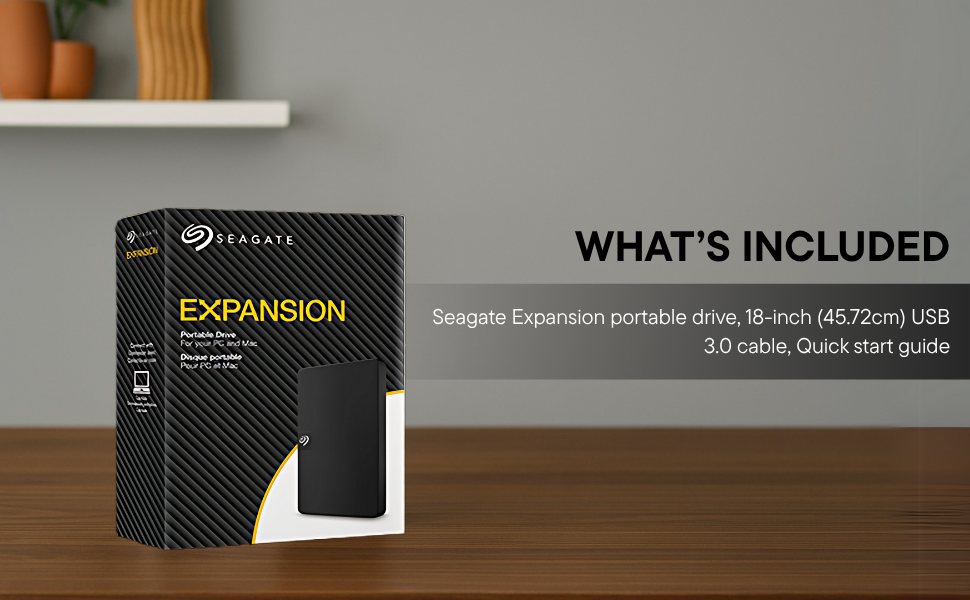
Image: Contents of the Seagate Expansion portable hard drive package, including the drive, USB cable, and documentation.
Organizować coś
- Podłącz kabel USB: Plug the small end of the included USB 3.0 cable into the Seagate Expansion portable hard drive.
- Połącz z komputerem: Plug the larger end of the USB 3.0 cable into an available USB port on your computer. The drive is USB 3.0 powered, so no external power adapter is needed.
- Automatyczne rozpoznawanie: The drive will be automatically recognized by your Windows or Mac operating system. No software installation is typically required for basic functionality.
- For Mac Users (Time Machine): If you intend to use the drive with Apple Time Machine for backups, reformatting the drive is required. Refer to your Mac's documentation for instructions on how to reformat and set up Time Machine.

Image: A Seagate Expansion portable hard drive connected to a laptop via a USB cable, demonstrating the plug-and-play setup.

Image: A hand holding the Seagate Expansion drive, with Windows and Mac compatibility logos displayed next to it.
Instrukcja obsługi
Once connected, the Seagate Expansion drive functions like any other external storage device on your computer.
- Dostęp do dysku: On Windows, the drive will appear under 'This PC' or 'My Computer'. On Mac, it will appear on the desktop or in Finder under 'Locations'.
- Oszczędność Files: Aby zapisać files, simply drag and drop them from your computer's internal storage to the Seagate Expansion drive's icon or open folder. You can also use the 'Copy' and 'Paste' functions.
- Organizowanie Files: Create folders on the drive to organize your data efficiently.
- Bezpieczne wyrzucanie: Always safely eject the drive before disconnecting it to prevent data corruption. On Windows, right-click the drive icon in the system tray and select 'Eject'. On Mac, drag the drive icon to the Trash or click the Eject button next to the drive in Finder.

Image: A hand demonstrating the drag-and-drop method to transfer files from a laptop to the Seagate Expansion portable hard drive.
Konserwacja
Proper maintenance ensures the longevity and optimal performance of your Seagate Expansion drive.
- Opieka fizyczna: Handle the drive with care. Avoid dropping it or exposing it to extreme temperatures, moisture, or strong magnetic fields.
- Czyszczenie: Do czyszczenia zewnętrznej części napędu należy używać miękkiej, suchej i niepozostawiającej włókien ściereczki. Nie należy używać płynnych środków czyszczących ani rozpuszczalników.
- Kopia zapasowa danych: While the drive is designed for storage, it is always recommended to maintain backups of critical data on multiple devices or cloud services.
- Aktualizacje oprogramowania układowego: Okresowo sprawdzaj wsparcie Seagate webodwiedź naszą witrynę, aby sprawdzić, czy są dostępne aktualizacje oprogramowania sprzętowego dla Twojego modelu, aby zapewnić optymalną wydajność i kompatybilność.
Rozwiązywanie problemów
If you encounter issues with your Seagate Expansion drive, consider the following steps:
- Napęd nie został wykryty:
- Upewnij się, że kabel USB jest prawidłowo podłączony do dysku i komputera.
- Spróbuj podłączyć dysk do innego portu USB w komputerze.
- Jeżeli masz możliwość, przetestuj dysk przy użyciu innego kabla USB.
- Uruchom ponownie komputer.
- Niska wydajność:
- Ensure you are using a USB 3.0 port for optimal speeds. USB 2.0 ports will result in slower transfers.
- Zamknij wszystkie niepotrzebne aplikacje działające w tle.
- Check your computer's disk management or disk utility to ensure the drive is healthy.
- Dostęp Files: Jeśli nie masz dostępu files, ensure the drive is properly mounted and not in use by another application.
Aby uzyskać bardziej szczegółowe informacje dotyczące rozwiązywania problemów, zapoznaj się z oficjalną instrukcją Seagate Troubleshooting Guide (PDF).
Specyfikacje
| Numer modelu | STKM1000400 |
| Pojemność pamięci cyfrowej | 1 TB |
| Interfejs dysku twardego | USB2.0/3.0 |
| Technologia łączności | USB |
| Marka | Morze |
| Funkcja specjalna | Data Recovery Service, Portable |
| Współczynnik kształtu dysku twardego | 2.5 cali |
| Opis dysku twardego | Mechaniczny dysk twardy |
| Kompatybilne urządzenia | Komputer stacjonarny, laptop |
| Typ instalacji | Dysk twardy zewnętrzny |
| Kolor | Czarny |
| Prędkość obrotowa dysku twardego | 5400 obr./min. |
| Prędkość odczytu | 120 megabajtów na sekundę |
| Item Dimensions L x W x Thickness | 11.7L x 8W x 1.5Th Centimeters |
| Waga przedmiotu | 0.4 funtów |
| Materiał obudowy | Plastikowy |
Gwarancja i wsparcie
Your Seagate Expansion portable hard drive comes with comprehensive support and warranty coverage.
- Ograniczona gwarancja: The product includes a 3-year limited warranty. This covers device replacement or repair for manufacturing defects.
- Usługi odzyskiwania danych Rescue: For added peace of mind, your purchase includes 3 years of Rescue Data Recovery Services. This service covers data loss due to accidents, mechanical errors, or natural disasters, providing a chance to recover your valuable data.

Image: The 'Rescue Services' logo, indicating the inclusion of 3 years of data recovery services.
Informacje kontaktowe
For warranty claims, technical support, or inquiries regarding Rescue Data Recovery Services, please contact Seagate Customer Care:
- Seagate Technology (Thailand) Limited. India Customer Care No: 18003092525
Please have your product model number (STKM1000400) and proof of purchase ready when contacting support.