
1. Wprowadzenie
Thank you for choosing the MESTEK AC20 Digital Non-Contact AC Voltage Detector. This device is designed for safe and convenient detection of AC voltage in electrical circuits without direct contact. Its pen-style design, intelligent features, and robust construction make it an essential tool for electricians, homeowners, and DIY enthusiasts. Please read this manual thoroughly before using the device to ensure safe and proper operation.
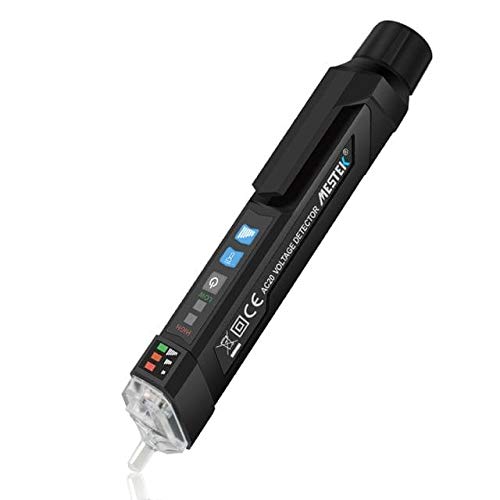
Figure 1: MESTEK AC20 Digital Non-Contact AC Voltage Detector. This image displays the sleek, pen-shaped design of the device, highlighting its compact form factor and the integrated clip for portability. Both the front with its display and buttons, and the back with warning labels, are visible.
2. Informacje dotyczące bezpieczeństwa
OSTRZEŻENIE: Nieprzestrzeganie tych instrukcji bezpieczeństwa może skutkować porażeniem prądem, pożarem lub poważnymi obrażeniami.
- Zawsze zakładaj, że dany obwód jest pod napięciem, dopóki nie udowodnisz inaczej.
- Nie używaj urządzenia, jeśli wydaje się uszkodzone lub nie działa prawidłowo.
- Nie próbuj mierzyć objtagprzekraczających określony zakres (1000 V AC).
- Do not use the device in wet environments or during electrical storms.
- Ensure batteries are correctly installed and replaced when the low battery indicator appears.
- This device is designed for non-contact detection. Do not make direct contact with live conductors.
- Zawsze należy przestrzegać lokalnych i krajowych przepisów bezpieczeństwa.
- Przechowywać w miejscu niedostępnym dla dzieci.
3. Funkcje produktu
The MESTEK AC20 is equipped with several features to enhance safety and usability:
- Objętość bezkontaktowatage (NCV) Wykrywanie: Bezpiecznie wykrywa objętość prądu przemiennegotage bez kontaktu fizycznego.
- Dual Sensitivity Modes: Switch between 12V~1000V (high sensitivity) and 48V~1000V (low sensitivity) for various applications.
- Zero/Fire Wire Distinction: Identifies live (fire) and neutral (zero) wires.
- Live Line Breakpoint Detection: Pomaga zlokalizować przerwy w przewodach pod napięciem.
- Alarm dźwiękowy i świetlny: Alerty wizualne i dźwiękowe dotyczące objętościtage wykrywanie.
- Latarka LED: Zintegrowana latarka do pracy w słabo oświetlonych miejscach.
- Automatyczne wyłączanie: Oszczędza baterię, automatycznie wyłączając urządzenie po 5 minutach bezczynności.
- Wskaźnik niskiego poziomu baterii: Ostrzega, gdy baterie wymagają wymiany.
- Durable and Fall Resistant: Constructed from ABS anti-falling materials.
- Wodoodporność IP67: Provides protection against dust and temporary immersion in water.

Figure 2: The MESTEK AC20 is IP67 water resistant. This image shows the device partially submerged in water, illustrating its ability to withstand wet conditions, making it suitable for use in various environments.
4. Konfiguracja: Instalacja baterii
The MESTEK AC20 requires two 1.5V AAA batteries (not included) for operation.
- Unscrew the battery compartment cap at the rear of the device by turning it counter-clockwise.
- Insert two 1.5V AAA batteries, ensuring the correct polarity (+/-) as indicated inside the compartment.
- Replace the battery compartment cap and turn it clockwise until securely fastened.
- The device will power on briefly to confirm battery installation.
Note: If the low battery indicator appears during use, replace the batteries promptly to ensure accurate readings.
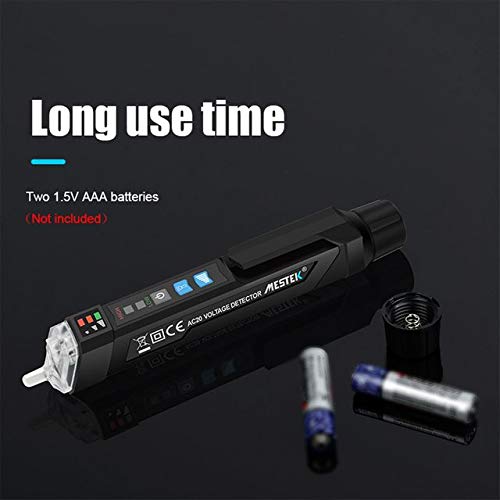
Figure 3: Battery installation for the MESTEK AC20. This image shows the rear cap removed, revealing the battery compartment, and two AAA batteries positioned nearby, indicating the power source for the device.
5. Instrukcja obsługi
5.1 Włączanie/wyłączanie zasilania
- Press the power button (usually marked with a power symbol) to turn the device on.
- Press and hold the power button to turn the device off. The device will also automatically power off after 5 minutes of inactivity.
5.2 Bezdotykowy obj. ACtage Wykrywanie (NCV)
- Włącz urządzenie.
- Bring the tip of the detector close to the wire, outlet, or electrical component you wish to test.
- Jeśli AC objtage is detected, the device will emit an audible beep and the LED indicator lights will illuminate, with more lights indicating higher voltagsiła.
5.3 Regulacja czułości
- The device has two sensitivity modes:
- High Sensitivity (12V~1000V): Nadaje się do wykrywania niższych objętościtaglub w celu dokładniejszego wykrycia.
- Low Sensitivity (48V~1000V): Ideal for general detection and reducing false positives from ambient electrical fields.
- Press the sensitivity switch button (often labeled "SENS" or with a sensitivity icon) to toggle between high and low sensitivity modes. The current mode may be indicated by an LED or on the display.
5.4 Zero/Fire Wire Distinction
- Place the tip of the test pen near the wire or insert it into the socket.
- The device will indicate the live (fire) wire with a stronger induction signal (e.g., faster beeping, more illuminated LEDs) compared to the neutral (zero) wire.
Latarka LED 5.5
- Press the flashlight button (often marked with a light bulb icon) to turn the LED flashlight on or off. This is useful for working in dark environments.
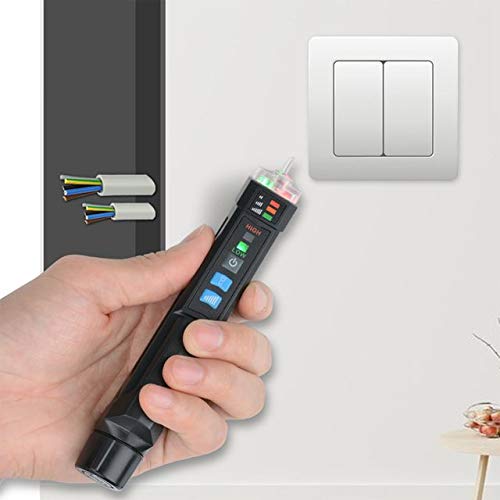
Figure 4: MESTEK AC20 in operation. The image shows a hand holding the voltage detector near a wall-mounted electrical switch, demonstrating its non-contact detection capability in a typical household setting.
6. Konserwacja
- Czyszczenie: Przetrzyj urządzenie suchą, miękką ściereczką. Nie używaj środków czyszczących o właściwościach ściernych ani rozpuszczalników.
- Składowanie: Przechowuj urządzenie w chłodnym, suchym miejscu, z dala od bezpośredniego światła słonecznego i ekstremalnych temperatur. W przypadku dłuższego przechowywania wyjmij baterie, aby zapobiec wyciekowi.
- Wymiana baterii: Replace batteries promptly when the low battery indicator is active to ensure optimal performance and prevent damage from battery leakage.
7. Rozwiązywanie Problemów
| Problem | Możliwa przyczyna | Rozwiązanie |
|---|---|---|
| Urządzenie nie włącza się. | Rozładowane lub nieprawidłowo zainstalowane baterie. | Wymień baterie na nowe baterie 1.5 V AAA, zwracając uwagę na prawidłową biegunowość. |
| Niespójna lub brak objętościtage wykrywanie. | Low battery; device too far from voltage source; incorrect sensitivity mode. | Replace batteries; bring the tip closer to the source; switch to high sensitivity mode (12V~1000V). |
| False positive readings. | High sensitivity mode in an electrically noisy environment. | Switch to low sensitivity mode (48V~1000V). |
| Latarka nie działa. | Niski poziom naładowania baterii; usterka diody LED. | Wymień baterie. Jeśli problem będzie się powtarzał, skontaktuj się z pomocą techniczną. |
8. Specyfikacje
| Model | AC20 |
| Poziom bezpieczeństwa | CE KAT.III 1000V / KAT.IV 600V |
| AC Objętośćtage Zakres | 12V~1000V (High Sensitivity) / 48V~1000V (Low Sensitivity) |
| Częstotliwość | 50/60Hz |
| Metoda alarmu | Alarm dźwiękowy |
| Flesz | White LED lighting lamp |
| Automatyczne wyłączanie | 5 minutes (no operation/no voltagsygnał e) |
| Wskaźnik niskiego poziomu baterii | Tak |
| Zero/Fire Wire Test | Tak |
| Użyj temperatury | 0~40°C |
| Temperatura przechowywania | -10~50°C |
| Wysokość | 2000m |
| Zasilacz | 2 * 1.5V AAA battery |
| Rozmiar przedmiotu | 156 * 20 * 20 mm / 6.14 * 0.79 * 0.79 cala |
| Waga przedmiotu | 45g / 1.59 uncji |
| Tworzywo | ABS |
| Odporność na wodę | IP67 |
9. Gwarancja i wsparcie
Aby uzyskać informacje o gwarancji i pomocy technicznej, zapoznaj się z dokumentacją dołączoną do produktu lub skontaktuj się bezpośrednio ze sprzedawcą/producentem. Zachowaj paragon jako dowód zakupu.
Manufacturer: MESTEK