
1. Wprowadzenie
This manual provides instructions for the K&F Concept NIK-M4/3 Lens Mount Adapter. This adapter allows you to mount Nikon AI F screw mount lenses onto Micro Four Thirds (MFT, M4/3) mirrorless camera bodies. It is designed for manual operation, enabling photographers to utilize a wider range of lenses with their M4/3 cameras.
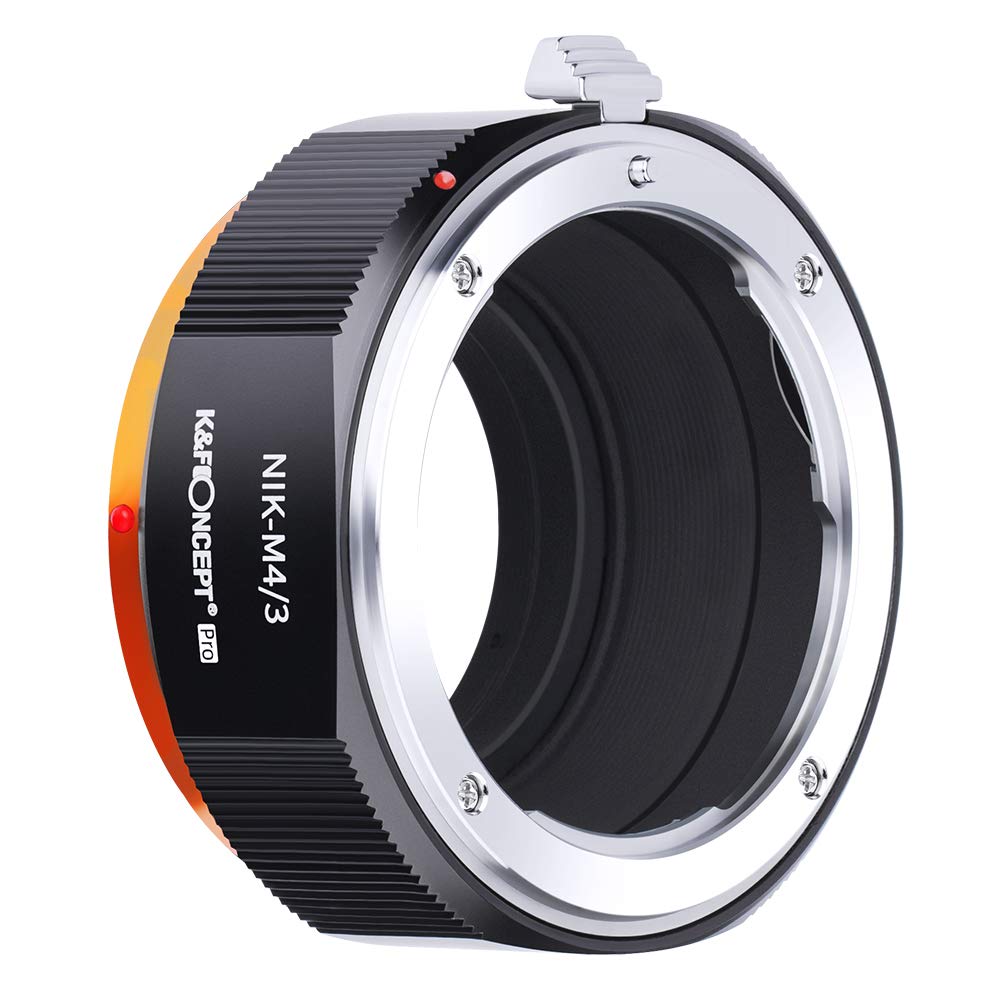
Image 1.1: K&F Concept NIK-M4/3 Lens Mount Adapter. This image shows the adapter from an angled view, highlighting its black and orange design with the 'NIK-M4/3 Pro' branding.
2. Funkcje produktu
- Funkcjonować: Enables mounting of Nikon AI F screw mount lenses to Micro Four Thirds (MFT) mount mirrorless cameras.
- Tworzywo: Constructed from hardened anodized aluminum with an all-metal design for durability.
- Jakość optyczna: Features internal matting varnish to minimize light reflection and reduce glare, contributing to sharper images.
- Kontrola: Supports manual control, manual focus, and manual exposure.
- Centrum: Allows for focus to infinity.

Image 2.1: Close-up of the adapter's construction, highlighting the copper and aluminum alloy for precision and durability.

Image 2.2: Demonstration of the adapter's internal matting varnish, showing a 'Before' image with reflections and an 'After' image with reduced glare and sharper results.
3. Zgodność
This adapter is designed for Nikon AI F mount lenses and Micro Four Thirds (MFT, M4/3) camera bodies. Please verify your camera and lens mount types before use.
Kompatybilne modele aparatów:
- Olympus PEN Series: E-PL1, E-PL1s, E-PL2, E-PL3, E-P2, E-P3, E-M, OM-D, E-M5, E-M10
- Panasonic Lumix Series: DMC-G1, G2, G3, G10, GX1, GH1, GH2, GF1, GF2, GF3, GF5, GH4
- Inny: Panasonic AG-AF100 Mirrorless Digital Cameras, Black Magic Pocket Cinema Camera (BMPCC)
Verifying Mount Type:
You can typically find your lens and camera mount type in their original user manuals or on the manufacturer's website under product specifications. Look for terms like "mount type" or "lens mount."
Video 3.1: How to choose the right adapter. This video from K&F Concept explains how to identify camera and lens mount types to select the correct adapter.
4. Konfiguracja i instalacja
Follow these steps to correctly attach your Nikon AI F lens to your Micro Four Thirds camera using the K&F Concept NIK-M4/3 adapter.
Step 1: Identify Adapter Sides
The adapter has a lens side and a body side. Ensure you distinguish between them before mounting. The adapter is marked with "NIK-M4/3" and the K&F Concept logo.

Image 4.1: The adapter's design, indicating the lens and body attachment points.

Rysunek 4.2: Szczegółowy views of the adapter's lens-fixing and camera-fixing mechanisms.
Step 2: Attach Adapter to Lens
- Align the red dot on the adapter (lens side) with the red dot or indicator on your Nikon AI F lens.
- Gently insert the lens into the adapter.
- Rotate the lens clockwise until you hear a "click," indicating it is securely locked.
Step 3: Attach Lens and Adapter to Camera Body
- Align the red dot on the adapter (body side) with the red dot or indicator on your Micro Four Thirds camera body.
- Gently insert the adapter with the lens into the camera body.
- Rotate the adapter clockwise until you hear a "click," confirming it is securely locked.
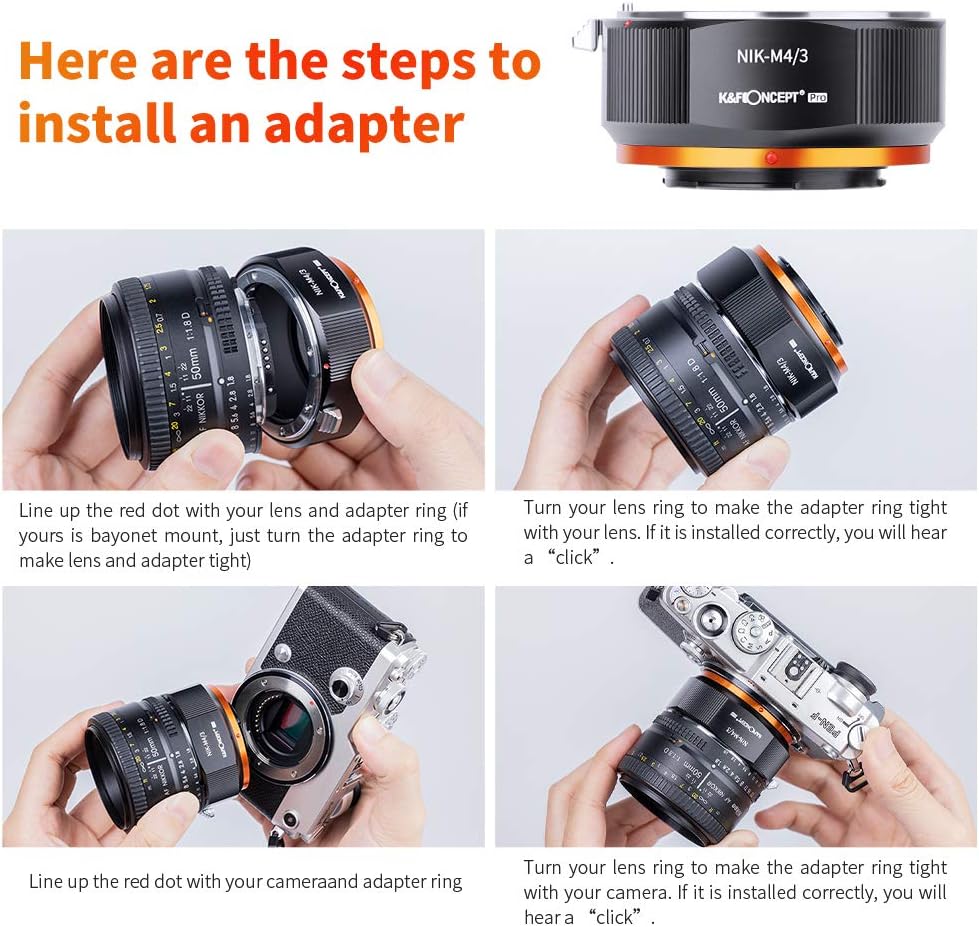
Image 4.3: Visual guide showing the steps to install the adapter onto a lens and then onto a camera body, emphasizing alignment and rotation.

Image 4.4: Close-up of the adapter mounted on a camera with a lens, highlighting the red dot indicator for precise alignment during mounting and dismounting.
5. Instrukcja obsługi
The K&F Concept NIK-M4/3 adapter is a mechanical adapter and does not support electronic communication between the lens and camera. Therefore, all operations related to focus and exposure must be performed manually.
- Ręczne ustawianie ostrości: Adjust the focus ring on your Nikon AI F lens to achieve sharp focus. Your camera's focus peaking or magnification assist features can be helpful.
- Ekspozycja ręczna: Set your camera to Manual (M) mode or Aperture Priority (A/Av) mode. Adjust the aperture on your lens (if it has an aperture ring) and control shutter speed and ISO via your camera settings to achieve correct exposure.
- Focus to Infinity: The adapter supports focusing to infinity, allowing for distant subjects to be brought into sharp focus.
6. Konserwacja
Proper care and maintenance will ensure the longevity and optimal performance of your lens mount adapter.
- Czyszczenie: Use a clean, dry microfiber cloth to wipe the exterior of the adapter. Avoid using harsh chemicals or abrasive materials.
- Zapobieganie pyleniu: Gdy adapter nie jest używany, należy zawsze zakładać przednie i tylne zaślepki, aby zapobiec przedostawaniu się do środka kurzu i zanieczyszczeń.
- Składowanie: Przechowywać adapter w chłodnym i suchym miejscu, z dala od bezpośredniego światła słonecznego i ekstremalnych temperatur.
- Obsługiwanie: Handle the adapter carefully to avoid dropping or impacting it, which could cause misalignment or damage.
7. Rozwiązywanie Problemów
If you encounter issues while using your K&F Concept NIK-M4/3 adapter, consider the following:
- Lens or Camera Not Mounting:
- Ensure you are using a Nikon AI F mount lens and a Micro Four Thirds camera body.
- Verify that the red alignment dots on the lens, adapter, and camera are correctly matched before rotating to lock.
- Check for any obstructions or debris on the mounting surfaces.
- Luźny krój: If the lens or adapter feels loose, ensure it has been rotated fully until a "click" is heard, indicating a secure lock.
- Image Quality Issues (e.g., reflections, glare): Ensure the internal matting varnish is clean and free from dust or smudges.
- Unable to Focus to Infinity: Confirm that the lens is properly seated and that the adapter is fully engaged with both the lens and camera body.
8. Specyfikacje
| Funkcja | Szczegół |
|---|---|
| Model | NIK-M4/3 |
| Mocowanie obiektywu | Nikon AI F |
| Mocowanie kamery | Micro Four Thirds (MFT, M4/3) |
| Tworzywo | Hardened Anodized Aluminum |
| Waga przedmiotu | 5.3 uncji (około 150 gramów) |
| Wymiary opakowania | 3.11 x 2.99 x 1.85 cala |
| Wsparcie skupienia | Manual Focus, Focus to Infinity |
| Exposure Support | Ekspozycja ręczna |
9. Gwarancja i wsparcie
This product is covered by the manufacturer's standard warranty. For warranty claims, technical support, or further assistance, please refer to the contact information provided with your purchase or visit the official K&F Concept webstrona.