
1. Wprowadzenie
This manual provides detailed instructions for the setup, operation, and maintenance of your USHINING BF-N11 HD Webcam. This device is designed to enhance your video communication experience with features such as high-definition video, an integrated ring light, and a noise-reducing microphone. Please read this manual thoroughly before using the product.
2. Zawartość opakowania
Sprawdź, czy w przesyłce znajdują się wszystkie elementy wymienione poniżej:
- USHINING BF-N11 HD Webkrzywka
- Ochrona prywatności
- Kabel USB (zintegrowany)
- Instrukcja obsługi (ten dokument)
3. Funkcje produktu
The USHINING BF-N11 HD Webcam offers a range of features for optimal performance:
- Wideo w jakości Full HD 1080p: Zapewnia wyraźny i ostry obraz.
- Integrated Ring Light: Provides adjustable illumination with three brightness levels (Low, Medium, High) to improve video quality in various lighting conditions.
- Ochrona prywatności: A physical cover to ensure privacy when the webkrzywka nie jest używana.
- Built-in Dual Noise-Reducing Microphone: Captures clear audio by minimizing background noise.
- Łączność USB typu Plug & Play: Easy setup without the need for additional drivers.
- Szeroka kompatybilność: Supports Windows XP, Mac OS 10.6, Android 5.0, and various video conferencing software like Zoom, Skype, Facetime, and Teams.
- Obiektyw szerokokątny 90 stopni: Rejestruje szerokie pole view, suitable for group calls.
- Elastyczny montaż: Features a clip that allows for secure placement on monitors, laptops, or flat surfaces, with 360-degree rotation and 15-degree tilt adjustment.
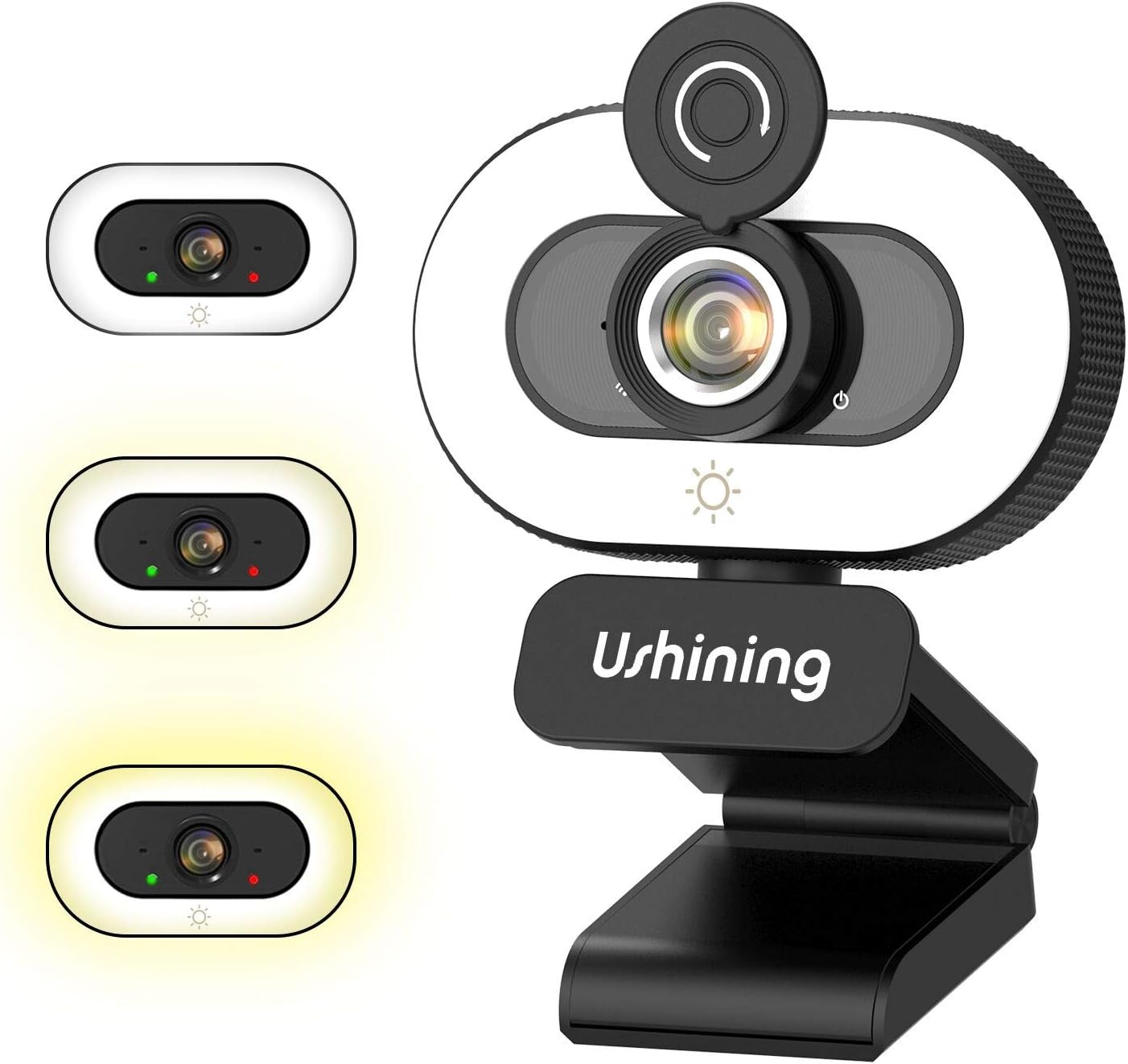
Image 1: USHINING BF-N11 HD Webcam with its integrated ring light and privacy cover.

Obraz 2: Koniecview of key features including adjustable ring light, security & privacy, internal noise reduction mic, USB plug & play, human face optimization, wide compatibility, and Full HD 1080P resolution.

Image 3: Demonstrates the three adjustable brightness levels (Low, Medium, High) of the integrated ring light, controlled by a touch sensor.

Image 4: Illustrates the difference between 720P and 1080P video clarity, highlighting the Full HD capability of the webkamera

Image 5: Shows the webcam in use during a video conference, emphasizing the built-in dual noise-reducing microphone for clear audio.

Ilustracja 6: Demonstruje szerokokątny obiektyw o kącie 90 stopni view and flexible mounting options, including 360-degree rotation and 15-degree tilt.

Image 7: Illustrates the function of the privacy cover, protecting against surveillance and privacy leaks.

Image 8: Displays the wide compatibility of the webcam with various software and operating systems, including Windows XP, Mac OS 10.6, and Android 5.0.
4. Instrukcje konfiguracji
Follow these steps to set up your USHINING BF-N11 HD Webkrzywka:
- Montaż Webkrzywka:
- Otwórz elastyczną podstawę klipsa.
- Umieść webkamerę na górze monitora komputera lub ekranu laptopa, upewniając się, że przód webcam faces you.
- Adjust the clip to securely rest on the back of your monitor or laptop. The webcam can also be placed on a flat surface.
- Dostosuj kąt webcam as needed. It supports 360-degree horizontal rotation and 15-degree vertical tilt.
- Łączenie się z komputerem:
- Plug the integrated USB cable into an available USB port on your computer.
- Ten webcam is plug-and-play, meaning your operating system (Windows, macOS, Android) should automatically detect and install the necessary drivers. This may take a few moments.
- Po zainstalowaniu plik webcam will be ready for use with your preferred video conferencing or recording software.
5. Instrukcja obsługi
Using your USHINING BF-N11 HD Webcam is straightforward:
- Using the Ring Light:
- Ten webcam features an integrated ring light. To turn it on or adjust its brightness, gently touch the light icon sensor located on the front of the webcam, below the lens.
- Each touch will cycle through the three brightness levels: Low, Medium, High, and Off.
- Korzystanie z osłony prywatności:
- To ensure privacy, slide the physical privacy cover over the webobiektywu kamery, gdy nie jest używany.
- Slide it back to expose the lens when you need to use the camera.
- Wybór Webkamera i mikrofon:
- In your video conferencing software (e.g., Zoom, Skype, Microsoft Teams, Facetime), navigate to the audio and video settings.
- Select "USHINING BF-N11 Webcam" jako urządzenie wejściowe wideo.
- Select "USHINING BF-N11 Microphone" (or similar name) as your audio input device.
6. Konserwacja
Właściwa konserwacja zapewnia długowieczność i optymalną wydajność Twojego webkrzywka:
- Czyszczenie obiektywu: Do delikatnego przecierania soczewek optycznych należy używać miękkiej, niepozostawiającej włókien ściereczki przeznaczonej specjalnie do soczewek optycznych. webcam lens. Avoid abrasive materials or harsh chemicals.
- Czyszczenie ciała: Wytrzyj korpus webPrzetrzyj kamerę miękką, suchą ściereczką. W razie potrzeby delikatnieamp Można użyć ściereczki, ale należy uważać, aby do urządzenia nie dostała się wilgoć.
- Przechowywanie: W przypadku nieużywania przez dłuższy czas, należy przechowywać webcam in a clean, dry place. Use the privacy cover to protect the lens from dust and scratches.
- Unikaj ekstremalnych warunków: Nie wystawiaj na działanie webnarażonych na ekstremalne temperatury, wilgoć lub bezpośrednie działanie promieni słonecznych.
7. Rozwiązywanie Problemów
If you encounter issues with your USHINING BF-N11 HD Webcam, zapoznaj się z poniższymi typowymi problemami i rozwiązaniami:
| Problem | Możliwe rozwiązanie |
|---|---|
| Webkamera nie została wykryta przez komputer. |
|
| No video output or black screen. |
|
| Microphone not working or poor audio quality. |
|
| Ring light not turning on or adjusting. |
|
8. Specyfikacje
| Funkcja | Szczegół |
|---|---|
| Marka | UŚWIETLANIE |
| Numer modelu | BF-N11 |
| Rozdzielczość przechwytywania wideo | 1080p |
| Technologia łączności | USB |
| Mikrofon | Built-in Dual Noise-Reducing Microphone |
| Pierścień świetlny | Integrated, 3 Adjustable Brightness Levels |
| Typ soczewki | Brzęczenie |
| Pole View | 90 stopni szeroki kąt |
| Obrót | 360 stopni w poziomie |
| Nachylenie | 15 stopni w pionie |
| Kolor | Czarny, biały |
| Waga przedmiotu | 5.7 uncji |
| Wymiary opakowania | 4.53 x 3.35 x 2.36 cala |
| Współczynnik kształtu | Laptop |
| Zawarte komponenty | Privacy Cover, USB Cable |
9. Gwarancja i wsparcie
For warranty information and technical support, please refer to the official USHINING webOdwiedź witrynę lub skontaktuj się bezpośrednio z działem obsługi klienta. Szczegóły dotyczące okresów gwarancji i kanałów wsparcia są zazwyczaj podane w dokumentacji zakupu lub na stronie producenta produktu.
For further assistance, you may visit the USHINING support page or contact their customer service team.