
1. Wprowadzenie
The COMPUTHERM T-32 room thermostat is designed for controlling most boilers and air conditioners available in the EU. It can be easily connected to any gas boiler with a two-wire thermostatic connection point, and to all air conditioning systems or electrical appliances, whether they have a 24V or 230V control circuit.
This digital thermostat allows for more precise temperature measurement and adjustment compared to traditional thermostats. It helps reduce energy costs while maintaining comfort by regulating the connected appliance (e.g., a gas boiler or pump) based on the measured and set temperatures.
Główne cechy:
- Precyzyjna kontrola temperatury: Easily set desired temperature between 5°C and 30°C in 0.5°C increments.
- Constant Indoor Temperature: Switching sensitivity of ±0.2°C or 0.1°C ensures a uniform and stable room temperature.
- Wszechstronna kompatybilność: Suitable for boilers with a two-wire connection and various HVAC systems (24V or 230V).
- Tryby grzania i chłodzenia: Supports both heating and cooling functions.
- Wyświetlacz cyfrowy: Provides clear and accurate temperature readings.
2. Konfiguracja i instalacja
Ważny: Urządzenie musi zostać zainstalowane przez kompetentną osobę.
2.1 Zawartość opakowania
Sprawdź, czy wszystkie komponenty są obecne:
- 1x COMPUTHERM T-32 Digital Room Thermostat
- 2 baterie AAA
- Sprzęt montażowy (śruby i kołki rozporowe)

Figure 1: Package contents including the thermostat, batteries, and mounting hardware.
2.2 Instalacja baterii
- Carefully remove the back cover of the thermostat.
- Włóż dwie baterie AAA do komory baterii, zwracając uwagę na prawidłową biegunowość (+/-).
- Załóż tylną obudowę.
2.3 Montaż i okablowanie
The thermostat is designed for wall mounting in a room. Choose a location away from direct sunlight, drafts, or heat sources that could affect temperature readings.
- Separate the front panel from the back plate.
- Zaznacz na ścianie żądane miejsce montażu.
- Wywierć otwory i włóż kołki rozporowe.
- Przymocuj płytę tylną do ściany za pomocą dołączonych śrub.
- Connect the two-wire control circuit from your boiler or HVAC system to the terminals on the back plate. Refer to the wiring diagram on the back of the thermostat for correct connections.
- Carefully reattach the front panel to the back plate.

Rysunek 2: Tył view of the thermostat with wiring terminals and battery compartment details.
3. Działanie
3.1 Wyświetl ponadview
The digital display shows the current room temperature and the set desired temperature. The thermostat features three control buttons below the display.

Rycina 3: Przód view of the COMPUTHERM T-32 thermostat with its digital display and three control buttons.
3.2 Ustawianie żądanej temperatury
Use the temperature control buttons (typically marked with up and down arrows or similar symbols) to adjust the desired temperature. Each press changes the temperature by 0.5°C within a range of 5°C to 30°C.
- Naciśnij Strzałka w górę przycisk, aby zwiększyć żądaną temperaturę.
- Naciśnij Strzałka w dół przycisk, aby zmniejszyć żądaną temperaturę.
The thermostat will automatically regulate the connected heating or cooling appliance to maintain the set temperature within its switching sensitivity of ±0.2°C.
3.3 Działanie w trybie ogrzewania
In heating mode, if the measured room temperature falls below the set temperature minus the switching sensitivity (e.g., 22°C - 0.2°C = 21.8°C), the thermostat will activate the heating appliance. It will deactivate the heating when the room temperature rises above the set temperature plus the switching sensitivity (e.g., 22°C + 0.2°C = 22.2°C).
3.4 Działanie w trybie chłodzenia
In cooling mode, the operation is reversed. If the measured room temperature rises above the set temperature plus the switching sensitivity, the thermostat will activate the cooling appliance. It will deactivate cooling when the room temperature falls below the set temperature minus the switching sensitivity.
Note: After a temperature change using the thermostat's adjustment buttons, the switching sensitivity is temporarily not considered, allowing the thermostat to react to a difference of ±0.1°C for immediate response.
4. Konserwacja
- Czyszczenie: Przetrzyj termostat miękką, suchą ściereczką. Nie używaj środków czyszczących o właściwościach ściernych ani rozpuszczalników.
- Wymiana baterii: Replace batteries when the low battery indicator appears on the display. Always use new AAA alkaline batteries.
- Unikaj przeszkód: Ensure no objects block the thermostat's ventilation slots or sensor, as this can affect temperature accuracy.
5. Rozwiązywanie Problemów
| Problem | Możliwa przyczyna | Rozwiązanie |
|---|---|---|
| Wyświetlacz termostatu jest pusty. | Rozładowane lub nieprawidłowo zainstalowane baterie. | Wymień baterie, zwracając uwagę na prawidłową biegunowość. |
| Układ ogrzewania/chłodzenia nie odpowiada. | Incorrect wiring; system power off; thermostat in wrong mode. | Check wiring connections (consult a professional); ensure system power is on; verify thermostat is set to appropriate mode (heating/cooling). |
| Niedokładny odczyt temperatury. | Thermostat located near heat source/draft; sensor obstructed. | Relocate thermostat if possible; ensure no obstructions around the sensor. |
| Temperature fluctuates too much. | High switching sensitivity setting (not applicable for T-32 as it's fixed). | The T-32 has a fixed sensitivity of ±0.2°C. Ensure proper placement and insulation of the room. |
6. Specyfikacje
- Model: T32
- Źródło zasilania: 2x AAA 1.5V Alkaline Batteries (included)
- Kontrola objętościtage: 24 V AC lub 230 V AC
- Nośność: 8 Ampjesteś
- Zakres pomiaru temperatury: 5°C do 30°C
- Zakres ustawień temperatury: 5°C do 30°C
- Temperature Setting Increment: 0.5°C
- Czułość przełączania: ±0.2°C (or ±0.1°C after manual adjustment)
- Wymiary (dł. x szer. x wys.): Wymiary 8.5 x 8.5 x 2.8 cm
- Waga: 160 gramów
- Łączność: Przewodowy
- Kolor: Biały


Figure 4: Dimensions of the COMPUTHERM T-32 thermostat.
7. Gwarancja
The COMPUTHERM T-32 Digital Room Thermostat comes with a 5-letnia gwarancja producentaProsimy zachować dowód zakupu na wypadek roszczeń gwarancyjnych. Gwarancja obejmuje wady materiałowe i wykonawcze powstałe w wyniku normalnego użytkowania.
8. Wsparcie
For further assistance or if you encounter issues not covered in this manual, please refer to the official COMPUTHERM website or contact your retailer. Always ensure that any electrical work is performed by a qualified professional.
Więcej informacji można znaleźć na stronie producenta webstrona: www.calorsol.de
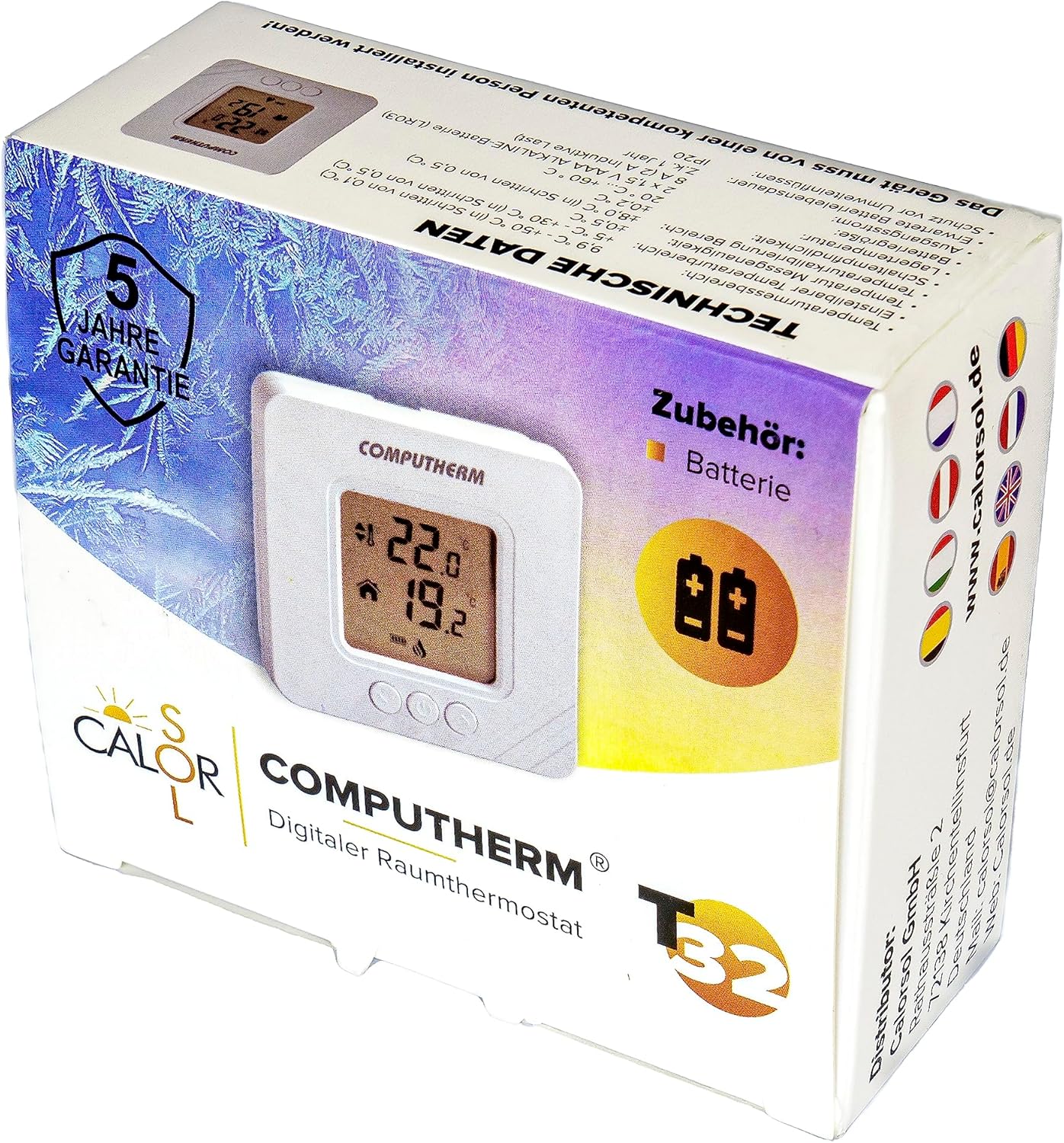
Figure 5: Product packaging displaying warranty information and technical data.