
1. Wprowadzenie
This manual provides essential information for the proper setup and operation of your ZdalaMit AKB75155301 replacement remote control. This remote is designed to function as a direct replacement for specific LG Sound Bar models without requiring any programming or pairing.
2. Konfiguracja: Instalacja baterii
Aby zacząć używać pilota, najpierw musisz włożyć baterie.
- Znajdź komorę baterii z tyłu pilota.
- Aby otworzyć komorę baterii, przesuń ją w dół lub w kierunku wskazanym strzałką.
- Insert two (2) 1.5V AAA alkaline batteries, ensuring that the positive (+) and negative (-) terminals align correctly with the markings inside the compartment.
- Załóż pokrywę komory baterii, wsuwając ją z powrotem na miejsce, aż do zatrzaśnięcia.

Rycina 2.1: Przód view of the ZdalaMit AKB75155301 remote control. The battery compartment is located on the back.
Notatka: Batteries are not included with the remote control. Always use new AAA alkaline batteries for optimal performance. Do not mix old and new batteries, or different types of batteries.
3. Instrukcja obsługi
Once batteries are installed, the remote control is ready for immediate use with compatible LG Sound Bar models. Point the remote directly at your sound bar when operating.
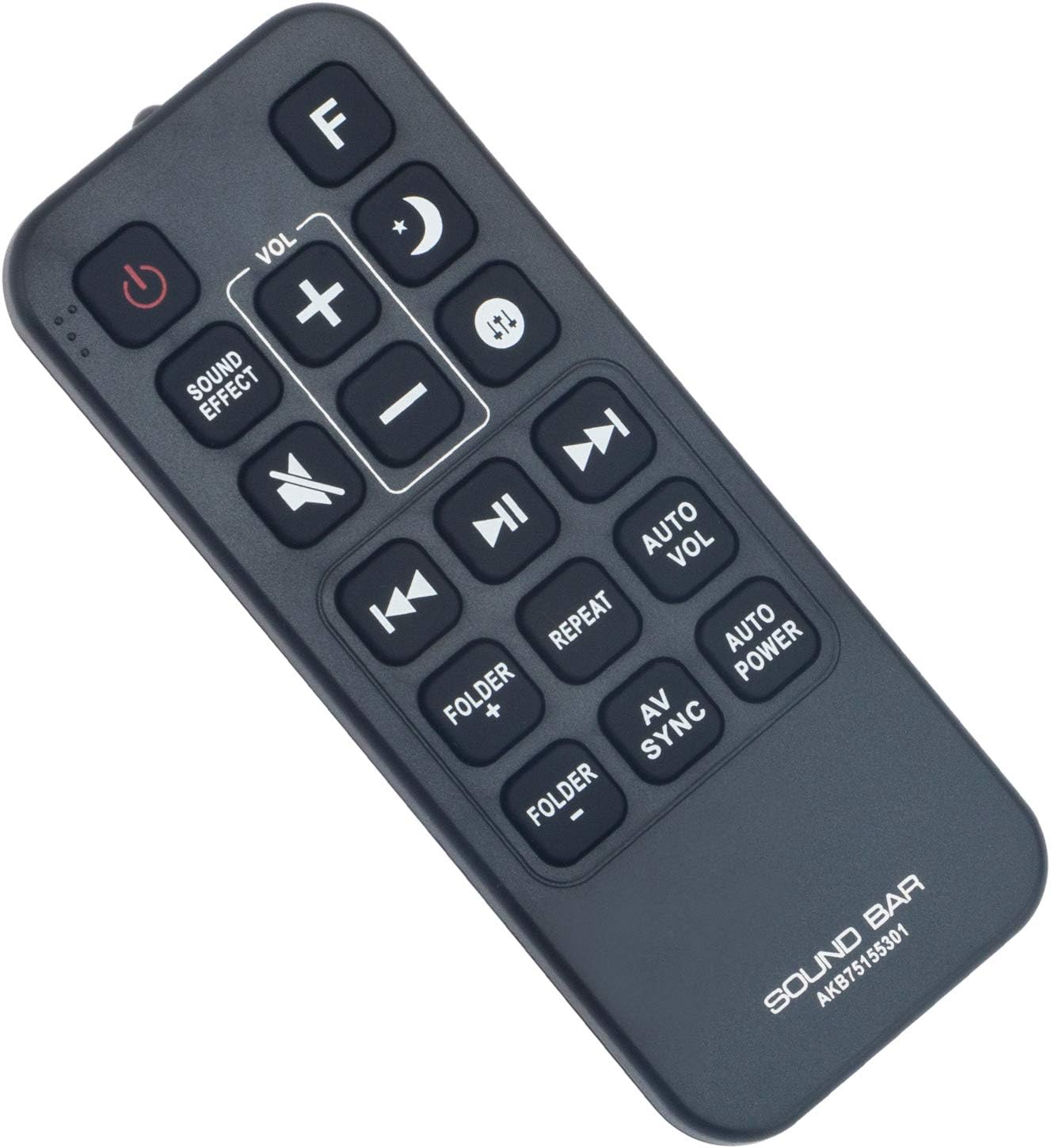
Rysunek 3.1: Zbliżenie view of the remote control buttons for operation.
Główne funkcje:
- Moc (⏻): Włącza lub wyłącza soundbar.
- Efekt dźwiękowy: Cycles through available sound modes or effects.
- GŁOŚNOŚĆ + / -: Zwiększa lub zmniejsza poziom głośności.
- Wycisz (🔇): Wycisza lub włącza dźwięk.
- Poprzednie (⏮): Przechodzi do poprzedniego utworu lub rozdziału.
- Odtwórz/Pauza (⏯): Odtwarza lub wstrzymuje odtwarzanie multimediów.
- Next (⏭): Przechodzi do następnego utworu lub rozdziału.
- Folder + / -: Navigates through folders (if supported by the sound bar).
- Powtarzać: Przełącza tryb powtarzania odtwarzania.
- Auto Vol: Activates or deactivates automatic volume leveling.
- Synchronizacja AV: Adjusts audio-video synchronization.
- Automatyczne zasilanie: Controls automatic power on/off features.
- F: Function button, typically used to switch input sources.
- Moon/Sleep (🌙): May activate sleep timer or night mode.
- Up/Down Arrows (⇵): Navigation or specific function depending on sound bar model.
4. Zgodność
This ZdalaMit AKB75155301 replacement remote control is compatible with the following LG Sound Bar models:
- LG SJ5 Sound Bar
- LG SJ5Y Sound Bar
- LG SJ5Y-S Sound Bar
- LG SPJ5B-W Sound Bar
- LG SPJ4B-W Sound Bar
5. Specyfikacje
| Marka | Zdala Mit |
| Nazwa modelu | AKB75155301 |
| Technologia łączności | Podczerwieni (IR) |
| Typ kontrolera | Sterowanie przyciskami |
| Liczba przycisków | 18 |
| Zasilacz | Baterie 2 x AAA (brak w zestawie) |
| Maksymalny zasięg | 33 stóp (10 m) |
| Kompatybilne urządzenia | LG Sound Bars (specific models listed above) |
| Waga przedmiotu | 35 gram |
| Pozycja Wymiary (dł. x szer. x wys.) | 4.37" x 1.79" x 0.55" (11.1 cm x 4.55 cm x 1.4 cm) |
6. Rozwiązywanie Problemów
- Pilot nie odpowiada:
- Ensure batteries are installed correctly with the correct polarity (+/-).
- Wymień stare baterie na nowe baterie alkaliczne AAA.
- Check for any obstructions between the remote control and the sound bar's IR receiver.
- Ensure you are within the maximum operating range (33 feet) and pointing the remote directly at the sound bar.
- Niektóre przyciski nie działają:
- Some functions may be specific to certain sound bar models or require the sound bar to be in a particular mode. Refer to your LG Sound Bar's original manual for specific function details.
7. Konserwacja
- Regularnie czyść pilota miękką, suchą ściereczką. Nie używaj płynnych środków czyszczących ani materiałów ściernych.
- Avoid exposing the remote control to extreme temperatures, direct sunlight, or high humidity.
- Jeśli pilot nie będzie używany przez dłuższy czas, należy wyjąć baterie, aby zapobiec wyciekowi elektrolitu i potencjalnym uszkodzeniom.
8. Gwarancja i wsparcie
This ZdalaMit remote control comes with a 1-letnia gwarancja od daty zakupu.
For any queries or support needs regarding your remote control, please contact the ZdalaMit customer service. Refer to your purchase documentation for specific contact information.