
Wstęp
The Akozon KW850 Car Code Reader Scanner is a diagnostic instrument designed to read and clear engine fault codes in vehicles. When a vehicle system experiences a fault, the Malfunction Indicator Lamp (MIL) or engine control light illuminates. The Powertrain Control Module (PCM) stores this fault information. This device allows users to retrieve these fault codes from the PCM to identify the nature and location of the issue, facilitating targeted inspection and repair.
This manual provides instructions for the proper use, setup, and maintenance of your KW850 Car Code Reader Scanner.
Produkt ponadview i funkcje

Obraz: przód i tył view of the KW850 Car Code Reader Scanner, highlighting its display and robust casing.
The KW850 is equipped with a large LCD display for easy operation and clear data visualization. It supports full On-Board Diagnostics II (OBDII) function tests and is compatible with all American, European, and Asian vehicles compliant with OBDII standards from 1996 and later.
- Engine Code Reading: Reads and identifies engine fault codes to determine the cause of the Malfunction Indicator Lamp (MIL) illumination.
- Czyszczenie kodu: Erases diagnostic trouble codes (DTCs) to turn off the MIL.
- Wykrywanie pojazdów: Quickly scans codes, reads oxygen sensor test status, and component test status.
- Pojemność bateriitage Wykrywanie: Monitors car battery voltage.
- Transmisja danych na żywo: Supports custom data flow and graphic display of data streams for real-time monitoring.
- Obsługa protokołów: Supports CAN, J1850PWM, J1850VPW, ISO9141, and KWP2000 protocol modes.
- Wsparcie wielojęzyczne: Supports eight languages including English, French, German, Dutch, Spanish, Russian, Portuguese, and Italian.
Zawartość opakowania
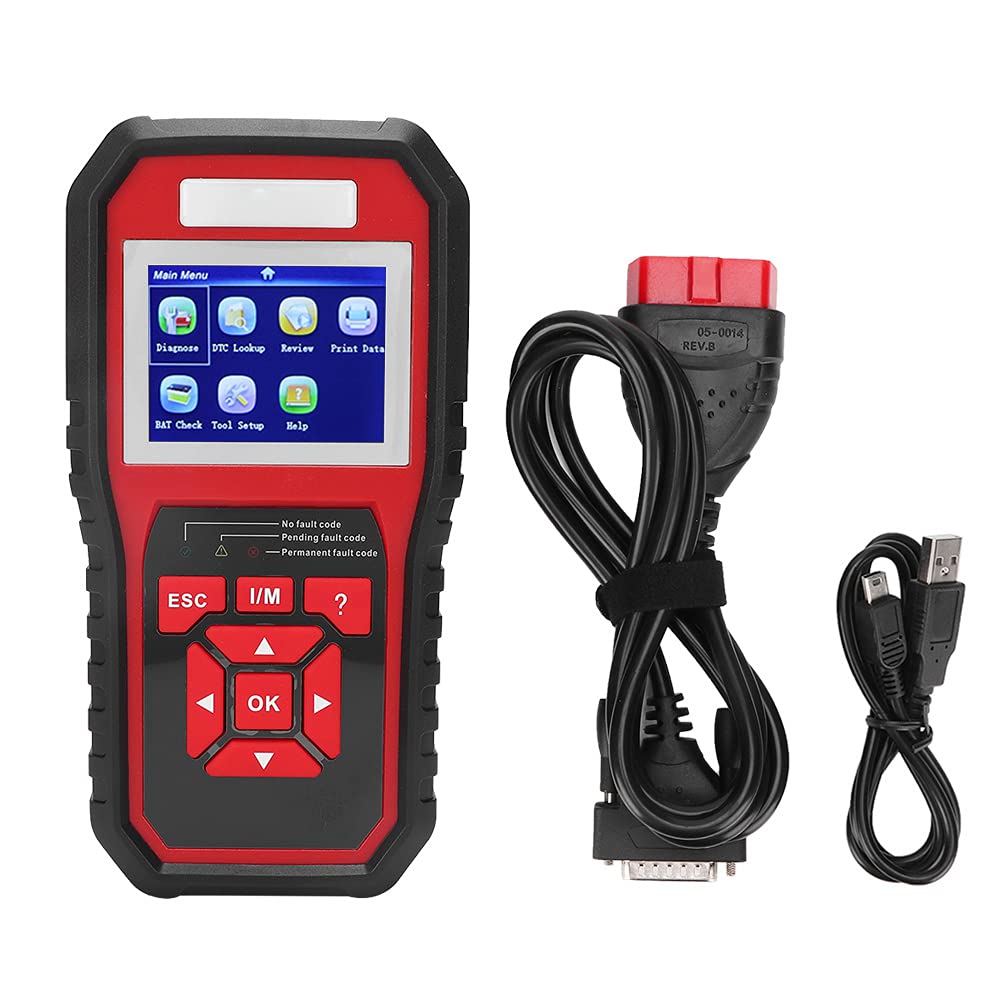
Image: The KW850 diagnostic tool, connection cables, and a black cloth carrying bag.
Sprawdź, czy w przesyłce znajdują się wszystkie elementy:
- 1 x KW850 Diagnostic Tool (Black + Red)
- 2 x Connection Lines (OBDII cable and USB cable)
- 1 x Instrukcja obsługi (ten dokument)
- 1 x woreczek materiałowy do przechowywania i transportu
Organizować coś
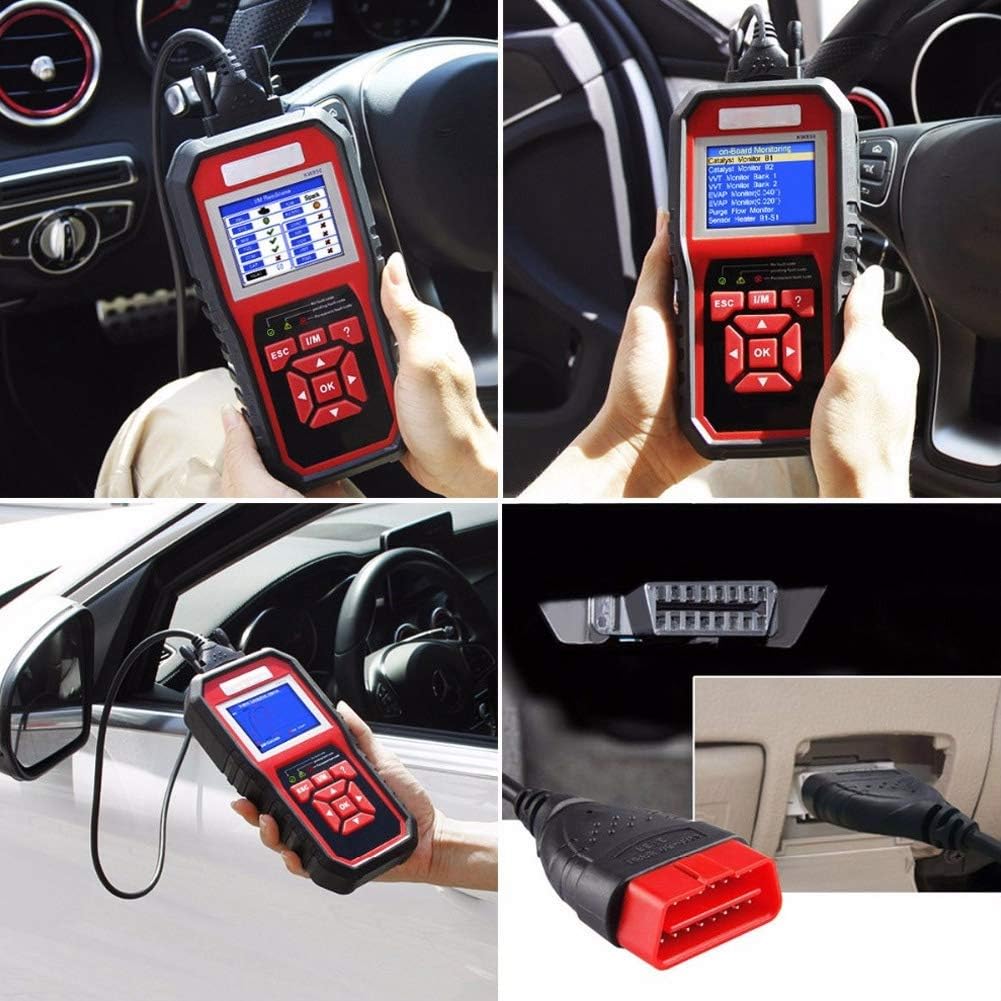
Image: The KW850 diagnostic tool connected to a vehicle's OBDII port, typically located under the dashboard.
- Zlokalizuj port OBDII: Port OBDII zazwyczaj znajduje się pod deską rozdzielczą po stronie kierowcy pojazdu. Jeśli nie możesz go znaleźć, zapoznaj się z instrukcją obsługi pojazdu.
- Podłącz skaner: With the vehicle's ignition off, firmly plug the OBDII connector cable from the KW850 scanner into the vehicle's OBDII port.
- Włącz zapłon: Przekręć zapłon pojazdu do pozycji „ON” (nie uruchamiaj silnika). Skaner włączy się automatycznie.
- Wybierz język: If prompted, select your preferred language from the available options using the navigation buttons.
Ważna uwaga dotycząca bezpieczeństwa: Operate the vehicle in a well-ventilated work area. Keep the device away from corrosive agents and water.
Instrukcja obsługi

Image: A user holding the KW850 scanner, showing the main menu with options like Diagnose, DTC Lookup, Review, and Print Data.
Poruszanie się po menu
Użyj UP I W DÓŁ Przyciski strzałek służą do przewijania opcji menu. Naciśnij OK przycisk, aby potwierdzić wybór. Użyj ESC przycisk umożliwiający powrót do poprzedniego ekranu lub wyjście z funkcji.
1. Odczyt kodów usterek diagnostycznych (DTC)
- W menu głównym wybierz "Rozpoznać chorobę" i naciśnij OK.
- Skaner nawiąże komunikację z komputerem sterowania pojazdu.
- Wybierać „Odczyt kodów” from the diagnostic menu.
- The screen will display any stored DTCs (Pending, Permanent, or Confirmed). Each code will have a brief description.
- Użyj UP I W DÓŁ przyciski do view all codes.
2. Usuwanie kodów błędów diagnostycznych (DTC)
Ostrożność: Clearing DTCs will erase all diagnostic data from the vehicle's ECU, including freeze frame data and manufacturer-specific enhanced data. Ensure you have recorded all necessary information before clearing codes. Clearing codes does not fix the underlying problem.
- Po odczytaniu kodów wybierz „Usuń kody” from the diagnostic menu.
- Po wyświetleniu monitu potwierdź swój wybór.
- The scanner will attempt to clear the codes. The Malfunction Indicator Lamp (MIL) should turn off if the fault is no longer present.
3. Viewstrumieniowanie danych na żywo
- Z "Rozpoznać chorobę" menu, wybierz „Dane na żywo”.
- Możesz view various sensor readings and parameters in real-time. Options may include "View All Items," "Custom Data List," or "Graph Data."
- Użyj UP/W DÓŁ przyciski do przewijania i OK aby wybrać.
4. Stan gotowości I/M
This function checks the readiness of the emission-related monitoring systems on the vehicle. It indicates if the vehicle's monitors have completed their diagnostic testing.
- Z "Rozpoznać chorobę" menu, wybierz „Gotowość I/M”.
- The screen will display the status of various monitors (e.g., O2 Sensor Monitor, Catalyst Monitor). "OK" or "Complete" indicates the monitor has run, "INC" or "Incomplete" means it has not.
5. Objętość bateriitage Sprawdź
- W menu głównym wybierz "BAT Check" i naciśnij OK.
- The scanner will display the current voltage akumulatora pojazdu.
Rozwiązywanie problemów
| Problem | Możliwa przyczyna | Rozwiązanie |
|---|---|---|
| Skaner się nie włącza. | Loose connection to OBDII port; vehicle ignition not on; vehicle battery low. | Ensure cable is securely connected. Turn ignition to "ON". Check vehicle battery. |
| Komunikat „Błąd łącza” lub „Błąd komunikacji”. | Faulty connection; vehicle not OBDII compliant; ignition off; damaged cable. | Verify connection. Ensure vehicle is OBDII compliant (1996+). Turn ignition on. Try another OBDII compliant vehicle if possible. |
| Nie można wyczyścić kodów. | Podstawowa usterka nadal występuje: zapłon wyłączony. | Address the root cause of the fault first. Ensure ignition is on. |
| Ekran jest pusty lub zamrożony. | Software glitch; power interruption. | Disconnect and reconnect the scanner. If problem persists, contact support. |
Aby uzyskać dalszą pomoc, zapoznaj się z sekcją pomocy.
Specyfikacje
- Model: KW850
- Tworzywo: ABS
- Kolor: Czarny + Czerwony
- Waga: Approximately 650 g / 22.9 oz (device only)
- Rozmiar ekranu: 2.8 cale (wyświetlacz LCD)
- Źródło zasilania: Battery Powered (via vehicle OBDII port)
- Obsługiwane protokoły: CAN, J1850PWM, J1850VPW, ISO9141, KWP2000
- Zgodność: OBDII compliant vehicles (US, EU, Asian) 1996 and newer
- Obsługiwane języki: Angielski, francuski, niemiecki, holenderski, hiszpański, rosyjski, portugalski, włoski
Konserwacja
To ensure the longevity and proper functioning of your KW850 Car Code Reader Scanner, follow these maintenance guidelines:
- Czyszczenie: Do czyszczenia urządzenia należy używać miękkiej, suchej ściereczki. Nie należy używać środków czyszczących o właściwościach ściernych ani rozpuszczalników.
- Składowanie: Store the device in its provided cloth bag in a cool, dry place, away from direct sunlight and extreme temperatures.
- Pielęgnacja kabli: Avoid bending or crimping the connection cables excessively. Store them neatly to prevent damage.
- Ochrona środowiska: Keep the device away from water, moisture, and corrosive materials.
Gwarancja i wsparcie
This product comes with a standard manufacturer's warranty. Please retain your proof of purchase for warranty claims. For technical support, troubleshooting assistance, or warranty inquiries, please contact Akozon customer service through the retailer where the product was purchased or visit the official Akozon webstrona.
Zasoby internetowe: For additional information and updates, you may visit the Akozon store page on Amazon: Akozon Store