
ITECH IT6952A
Instrukcja obsługi programowalnego zasilacza prądu stałego ITECH IT6952A
Model: IT6952A | Brand: ITECH
1. Wprowadzenie
This user manual provides essential information for the safe and effective operation of your ITECH IT6952A Programmable DC Power Supply. Please read this manual thoroughly before using the device to ensure proper functionality and to prevent damage or injury. The IT6952A is a high-performance, programmable DC power supply designed for laboratory and industrial applications, offering precise control over voltage i prąd wyjściowy.
2. Informacje dotyczące bezpieczeństwa
Always observe the following safety precautions to prevent electric shock, injury, or damage to the instrument:
- Ensure the power supply is connected to a grounded AC outlet.
- Nie używaj urządzenia w mokrym lub damp warunki.
- Nie otwierać casing; wewnątrz nie ma żadnych części, które mogłyby być naprawiane przez użytkownika. Wszelkie prace serwisowe należy zlecać wykwalifikowanemu personelowi.
- Sprawdź, czy objętość wejściowatage matches the power supply's rating before connecting to the mains.
- Avoid short-circuiting the output terminals, especially at high power settings.
- Zapewnij odpowiednią wentylację wokół urządzenia, aby zapobiec przegrzaniu.
3. Koniec produktuview
The ITECH IT6952A features a clear VFD display and intuitive controls for easy operation.
3.1 Układ panelu przedniego

Figure 3.1: Front Panel of IT6952A
The front panel includes the VFD display for voltage and current readings, a rotary knob for precise adjustments, number keys (0-9) and ESC for direct input, function keys (V-SET, I-SET, Save, Recall, Meter, Trigger, Enter, On/Off) for various operations, navigation keys (UP/DOWN/LEFT/RIGHT) for cursor movement, and output terminals for connecting loads. The 'Shift' and 'Local' keys provide additional control options, and the main power switch is integrated.
3.2 Układ panelu tylnego
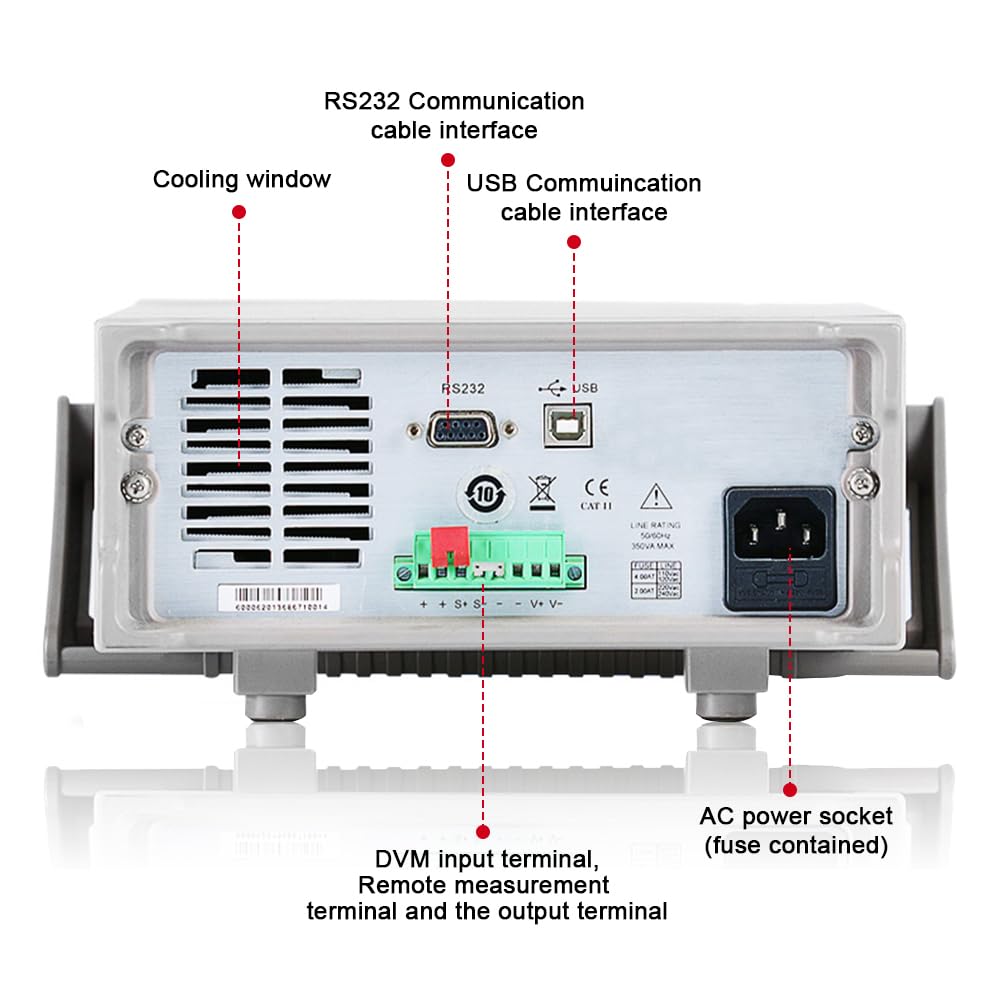
Figure 3.2: Rear Panel of IT6952A
The rear panel features the AC power socket (with integrated fuse), cooling windows for heat dissipation, an RS232 communication cable interface, a USB communication cable interface, and DVM input terminals along with remote measurement terminals and additional output terminals for specific applications.
4. Konfiguracja
Wykonaj poniższe kroki w celu wstępnej konfiguracji:
- Rozpakowywanie: Carefully remove the power supply from its packaging. Inspect for any signs of damage during transit.
- Umieszczenie: Place the unit on a stable, level surface with adequate ventilation around all sides. Do not block the cooling vents on the sides and rear.
- Podłączenie zasilania: Connect the provided AC power cord to the AC power socket on the rear panel of the IT6952A. Plug the other end into a grounded electrical outlet.
- Włączanie: Press the main power switch on the front panel to turn on the unit. The VFD display should illuminate.
- Połączenie wyjściowe: Connect your load to the output terminals on the front panel using appropriate test leads. Ensure correct polarity (positive to positive, negative to negative).
5. Instrukcja obsługi
This section covers basic operation of the IT6952A.
5.1 Ustawianie głośnościtage i Aktualne
- Ustaw objętośćtage: Naciśnij ZESTAW V przycisk. Objętośćtage display will become active. Use the rotary knob to adjust the voltage, or use the number keys for direct input followed by Wchodzić.
- Ustaw prąd: Naciśnij USTAWIŁEM button. The current display will become active. Use the rotary knob to adjust the current limit, or use the number keys for direct input followed by Wchodzić.
- Włącz wyjście: Po ustawieniu żądanej głośnościtage i aktualne, naciśnij Włącz/Wyłącz button to enable the output. The output indicator will illuminate.
- Wyłącz wyjście: Aby wyłączyć wyjście, naciśnij Włącz/Wyłącz naciśnij przycisk ponownie.
5.2 Using Memory Functions (Save/Recall)
The IT6952A allows you to save and recall frequently used voltage i bieżące ustawienia.
- Zapisz ustawienia: Ustaw żądaną głośnośćtage and current. Press the Ratować button. Use the navigation keys or number keys to select a memory location (e.g., 0-9) and press Wchodzić to store the settings.
- Recall Setting: Naciśnij Przypomnienie sobie czegoś button. Use the navigation keys or number keys to select the desired memory location and press Wchodzić to load the stored settings.
6. Konserwacja
Proper maintenance ensures the longevity and reliability of your power supply.
- Czyszczenie: Disconnect the power supply from the mains before cleaning. Use a soft, dry cloth to wipe the exterior. For stubborn dirt, a slightly damp cloth with mild detergent can be used, ensuring no liquid enters the unit.
- Wentylacja: Regularly check that the cooling vents are free from dust and obstructions. Use compressed air to clear dust if necessary.
- Składowanie: When not in use for extended periods, store the power supply in a cool, dry, and dust-free environment.
7. Rozwiązywanie Problemów
If you encounter issues with your IT6952A, refer to the following common problems and solutions:
| Problem | Możliwa przyczyna | Rozwiązanie |
|---|---|---|
| Brak zasilania po włączeniu | Power cord not connected; Blown fuse; No power from outlet | Check power cord connection; Replace fuse (refer to specifications for type); Test outlet with another device |
| Brak objętości wyjściowejtage/aktualne | Output disabled; Overload protection activated; Incorrect settings | Naciskać Włącz/Wyłącz to enable output; Reduce load or increase current limit; Verify voltage/bieżące ustawienia |
| Na wyświetlaczu pojawia się komunikat „Błąd” | Internal fault; Over-temperature | Turn off unit, wait 5 minutes, restart; Ensure proper ventilation, allow unit to cool down. If error persists, contact support. |
| Niedokładne odczyty | Poor connection; Calibration needed | Check all connections; Contact ITECH support for calibration information. |
8. Specyfikacje
Key technical specifications for the ITECH IT6952A Programmable DC Power Supply:
| Specyfikacja | Wartość |
|---|---|
| Marka | ITECH |
| Model | IT6952A |
| Objętość wyjściatage | 60 wolty |
| Ampwymazać | 25 Amps |
| Moc wyjściowatage | 600 watów |
| Współczynnik kształtu | Blat roboczy |
| Typ złącza | USB |
| Tworzywo | Metal |
| Kolor | Czerwony czarny |
9. Gwarancja i wsparcie
ITECH products are designed for reliability and performance. For warranty information, technical support, or service inquiries, please refer to the warranty card included with your product or visit the official ITECH webZachowaj paragon jako dowód zakupu na wypadek reklamacji.
For further assistance, you may contact ITECH customer service through their official channels. Always provide your product model (IT6952A) and serial number when seeking support.
Powiązane dokumenty - IT6952A
 |
IT6900 wersja mobilna — ITECH ITECH IT6900 może być używany do pracy w trybie ITECH IT6900. Rozpoczęcie pracy IT6900系列电源的操作,功能,技术规格及安全指南,是电子工程师和技术人员进行研发、测试和生产的必备参考。 |
 |
Instrukcja obsługi programowalnego zasilacza prądu stałego ITECH IT6900 User manual for the ITECH IT6900 Series Programmable DC Power Supply, detailing features, specifications, operation, and safety precautions for models including IT6922A, IT6932A, IT6933A, IT6942A, IT6952A, IT6953A, IT6922B, IT6932B, IT6933B, IT6942B, IT6952B, IT6953B, and IT6900(G) series. |
 |
Programowalny zasilacz prądu stałego ITECH IT-N6900 – funkcje, zastosowania i specyfikacje Poznaj programowalny zasilacz prądu stałego ITECH IT-N6900 z serii 60 V/150 V i 850 W/1500 W. W tym dokumencie opisano zaawansowane funkcje, takie jak priorytet CC/CV, programowanie list, rejestrowanie danych, kompleksowa ochrona i opcje łączności. Zawiera szczegółowe specyfikacje techniczne i obszary zastosowań w przemyśle i badaniach. |
 |
Instrukcja obsługi cyfrowego zasilacza sterującego ITECH IT6720 Kompleksowy podręcznik użytkownika cyfrowego zasilacza sterującego ITECH IT6720, szczegółowo opisujący jego funkcje, obsługę, środki ostrożności, specyfikacje i rozwiązywanie problemów. |
 |
ITECH IT-N6700 Series Programmable DC Power Supply User Manual Explore the IT-N6700 Series Programmable DC Power Supply from ITECH. This user manual provides comprehensive details on features, installation, operation, safety, and technical specifications for reliable power solutions. |
 |
ITECH IT6300 系列可编程直流电源用户手册 ITECH IT6300 系列是多通道可编程直流电源的用户手册,提供产品安装、操作、安全指南、技术规格及通信接口的详细信息。 |