
Bytech BY-AU-BS-152-BK
Bytech True Wireless Bluetooth Boost Link True Speaker User Manual
Model: BY-AU-BS-152-BK
Wstęp
Dziękujemy za zakupasing the Bytech True Wireless Bluetooth Boost Link True Speaker. This manual provides essential information for setting up, operating, and maintaining your new speakers. Please read this manual thoroughly before use to ensure proper operation and to maximize your listening experience. These speakers feature True Wireless Stereo (TWS) functionality, Bluetooth connectivity, FM Radio, and Bass Boost for rich audio.
Informacje dotyczące bezpieczeństwa
- Nie wystawiaj głośników na działanie ekstremalnych temperatur, wilgoci ani bezpośredniego światła słonecznego.
- Unikaj upuszczania głośników i narażania ich na silne uderzenia.
- Do not disassemble, repair, or modify the speakers yourself. Refer all servicing to qualified personnel.
- Trzymaj głośniki z dala od wody i innych płynów.
- Należy używać wyłącznie wskazanego kabla ładującego i zasilacza.
- Czyść głośniki miękką, suchą ściereczką. Nie używaj środków czyszczących o właściwościach ściernych ani rozpuszczalników.
- Aby uniknąć uszkodzenia słuchu, słuchaj przy umiarkowanym poziomie głośności.
Zawartość opakowania

Image: The Bytech Boost Link True Wireless Speakers shown in their retail packaging, highlighting the two speakers and the Bluetooth connectivity feature.
Sprawdź, czy wszystkie przedmioty są obecne i w dobrym stanie:
- 2 x Bytech Boost Link True Wireless Speakers
- 1 x kabel ładujący (USB)
- 1 x Instrukcja obsługi (ten dokument)
Produkt ponadview

Zdjęcie: Zbliżenie z przodu view of the two Bytech Boost Link True Wireless Speakers, showing the speaker grilles and control buttons at the bottom.
Zapoznaj się z elementami i elementami sterującymi głośnika:
- Kratka głośnika: Chroni przetwornik głośnika.
- Przyciski sterujące:
- Przycisk zasilania: Power On/Off, Play/Pause.
- Przycisk trybu: Switch between Bluetooth, FM Radio, etc.
- Poprzedni utwór/Przycisk zmniejszania głośności: Krótkie naciśnięcie powoduje przejście do poprzedniego utworu, długie naciśnięcie powoduje zmniejszenie głośności.
- Następny utwór/Przycisk zwiększania głośności: Krótkie naciśnięcie powoduje przejście do następnego utworu, długie naciśnięcie powoduje zwiększenie głośności.
- Port ładowania: Do podłączenia kabla ładującego USB.
- Wskaźnik LED: Pokazuje stan zasilania, ładowania i parowania.
Organizować coś
Ładowanie głośników
Before first use, fully charge both speakers. Connect the supplied USB charging cable to the charging port on each speaker and plug the other end into a USB power adapter (not included) or a computer's USB port. The LED indicator will show charging status and turn off or change color when fully charged.
Włączanie/wyłączanie
- Włączanie: Press and hold the Power button on each speaker until the LED indicator lights up and you hear a power-on prompt.
- Aby wyłączyć: Press and hold the Power button on each speaker until the LED indicator turns off and you hear a power-off prompt.
Instrukcja obsługi
Bluetooth Pairing (Single Speaker Mode)
- Sprawdź, czy głośnik jest włączony i czy znajduje się w trybie parowania Bluetooth (dioda LED będzie migać).
- Na swoim urządzeniu (smartfonie, tablecie, laptopie) włącz Bluetooth i wyszukaj dostępne urządzenia.
- Select "BYTECH BOOST LINK" (or similar name) from the list.
- Po sparowaniu wskaźnik LED przestanie migać i zacznie świecić światłem ciągłym, a Ty usłyszysz dźwięk potwierdzający.
Prawdziwe bezprzewodowe parowanie stereo (TWS) (dwa głośniki)
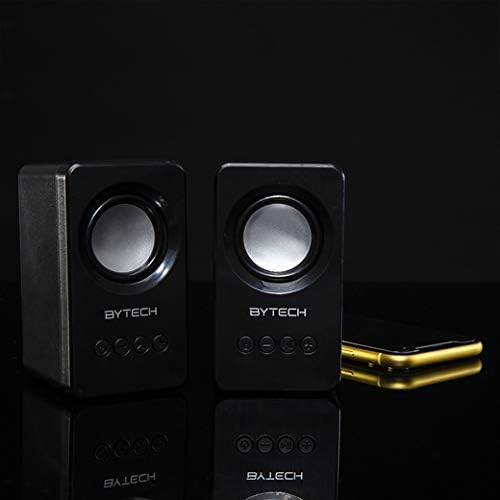
Image: The two Bytech Boost Link True Wireless Speakers positioned next to a smartphone, symbolizing their ability to connect wirelessly to each other and a device for stereo sound.
For a true stereo sound experience, you can pair both speakers together:
- Power on both Bytech Boost Link speakers. Do not connect them to your Bluetooth device yet.
- The speakers will automatically attempt to pair with each other. You will hear a confirmation sound when they are successfully linked for TWS. One speaker will become the master (left channel) and the other the slave (right channel).
- Once TWS paired, the master speaker will enter Bluetooth pairing mode (LED flashing).
- On your device, enable Bluetooth and search for "BYTECH BOOST LINK". Connect to this single entry.
- Both speakers will now play audio in stereo.
- Notatka: If the speakers do not automatically pair, try double-pressing the Mode button on one of the speakers to initiate TWS pairing.
Obsługa radia FM
- Power on the speaker(s).
- Naciśnij Tryb Naciskaj przycisk wielokrotnie, aż usłyszysz komunikat radia FM.
- Aby automatycznie przeskanować i zapisać stacje, naciśnij i przytrzymaj Odtwórz/Pauza button. The speaker will scan and store available FM stations.
- Użyj Poprzedni utwór I Następny utwór przyciski umożliwiające nawigację pomiędzy zapisanymi stacjami.
Odtwarzanie dźwięku i regulacja głośności
- Odtwórz/Pauza: Krótko naciśnij przycisk zasilania.
- Następny utwór: Short press the Next Track/Volume Up button.
- Poprzedni utwór: Short press the Previous Track/Volume Down button.
- Zwiększenie głośności: Long press the Next Track/Volume Up button.
- Ściszanie: Long press the Previous Track/Volume Down button.
Konserwacja
- Czyszczenie: Use a soft, dry, lint-free cloth to clean the surface of the speakers. Do not use liquid cleaners, aerosols, or solvents.
- Składowanie: Jeśli głośniki nie będą używane przez dłuższy czas, należy je przechowywać w chłodnym, suchym miejscu, z dala od bezpośredniego światła słonecznego i ekstremalnych temperatur.
- Pielęgnacja baterii: To prolong battery life, avoid fully discharging the battery frequently. Charge the speakers regularly, even if not in use.
Rozwiązywanie problemów
| Problem | Możliwa przyczyna | Rozwiązanie |
|---|---|---|
| Głośnik nie włącza się. | Niski poziom naładowania baterii. | Naładuj głośnik całkowicie. |
| Nie można sparować przez Bluetooth. | Głośnik nie jest w trybie parowania; Bluetooth urządzenia jest wyłączony; Urządzenie jest zbyt daleko. | Sprawdź, czy dioda LED głośnika miga; Włącz Bluetooth w urządzeniu; Zbliż głośnik do urządzenia (na odległość nie większą niż 10 metrów). |
| Brak dźwięku. | Volume too low; Speaker not connected; Incorrect mode. | Increase volume on speaker and device; Re-pair Bluetooth; Ensure correct mode (Bluetooth/FM). |
| Parowanie TWS nie powiodło się. | Głośniki są już podłączone do urządzenia; Głośniki są zbyt daleko od siebie. | Disconnect speakers from any device; Power off and on both speakers, then try TWS pairing again; Ensure speakers are close to each other. |
| Słaby odbiór radia FM. | Słaby sygnał; zakłócenia. | Relocate the speaker to an area with better reception; Extend the charging cable (can act as an antenna). |
Specyfikacje
- Model: BY-AU-BS-152-BK
- Marka: Bytech
- Technologia łączności: Bezprzewodowy (Bluetooth)
- Tryb wyjścia audio: Otaczać
- Typ głośnika: Dźwięk przestrzenny
- Cechy szczególne: Wireless Bluetooth, Bass Boost, FM Radio, True Wireless Stereo (TWS)
- Zalecane zastosowanie: Dla odtwarzaczy muzycznych
- Zgodne urządzenia: Laptop, tablet, smartfon
- Rodzaj kontrolera: Przyciski na urządzeniu
- Wymiary opakowania: Wymiary 20.7 x 16 x 9 cm
- Waga: 560 gramów
Gwarancja i wsparcie
Bytech products are designed and manufactured to the highest quality standards. For information regarding warranty coverage, technical support, or service inquiries, please refer to the warranty card included with your purchase or visit the official Bytech webStrona. Zachowaj dowód zakupu na wypadek roszczeń gwarancyjnych.
For further assistance, please contact Bytech customer support.
Ask a question about this manual
Ask about setup, troubleshooting, compatibility, parts, safety, or missing instructions. Manuals+ will review the question and use this page’s manual context to help answer it.