
1. Ważne informacje dotyczące bezpieczeństwa
Before operating the Zipro Nix Rower, please read and understand all instructions in this manual. Keep this manual for future reference.
- Przed rozpoczęciem jakiegokolwiek programu ćwiczeń skonsultuj się z lekarzem.
- Przed każdym użyciem należy upewnić się, że wszystkie części są prawidłowo zmontowane i dokręcone.
- Place the rower on a flat, stable surface. Ensure adequate clear space around the equipment (at least 0.6 meters).
- Podczas pracy dzieci i zwierzęta domowe należy trzymać z dala od urządzenia.
- Nie należy przekraczać maksymalnej wagi użytkownika wynoszącej 120 kg (264 funtów).
- Noś odpowiednią odzież i obuwie sportowe.
- Jeśli odczuwasz ból, zawroty głowy lub masz duszności, natychmiast przerwij ćwiczenia i skonsultuj się z lekarzem.
- Regularly inspect the rower for wear and tear, especially cables, straps, and moving parts. Do not use if damaged.
2. Zawartość opakowania
Carefully unpack the carton and verify all parts are present and undamaged. If any parts are missing or damaged, contact customer support immediately.
- Main Rower Frame (pre-assembled components)
- Seat and Rail Assembly
- Podnóżki
- Kierownica
- Konsola komputerowa
- Zestaw elementów montażowych (śruby, podkładki, nakrętki, narzędzia)
- Instrukcja obsługi
3. Montaż i konfiguracja
Follow these steps to assemble your Zipro Nix Rower. It is recommended to have two people for assembly.
- Rozpakuj komponenty: Lay out all parts on a clean, flat surface. Refer to the parts diagram in the included manual for identification.
- Zamontuj stabilizatory: Przymocuj przednie i tylne stabilizatory do ramy głównej za pomocą dołączonych śrub i podkładek. Upewnij się, że są mocno dokręcone, aby zapewnić stabilność.
- Montaż szyny siedzenia: Attach the seat rail to the main unit. Ensure the seat carriage slides smoothly along the rail.
- Mount Footrests: Secure the footrests to the main frame. Ensure the adjustable straps are correctly positioned.
- Podłącz kierownicę: Attach the handlebar to the pulling mechanism. Verify the strap or chain is securely connected.
- Zainstaluj konsolę komputerową: Mount the computer console onto its designated bracket. Connect any necessary sensor cables from the main unit to the console. Insert batteries if required.
- Kontrola końcowa: Double-check all bolts and connections to ensure they are secure. Test the seat movement and handlebar pull for smooth operation.

Rysunek 3.1: The Zipro Nix Rower with its approximate dimensions: Length 183 cm, Width 46 cm, Height 48 cm. These dimensions are important for planning the placement of the rower in your home.
4. Instrukcja obsługi
4.1. Regulacja oporu
The Zipro Nix Rower features an 8-level magnetic resistance system. To adjust the resistance, locate the rotary knob on the main unit, typically near the footrests. Turn the knob clockwise to increase resistance (levels 1-8) and counter-clockwise to decrease it. Start with a lower resistance level and gradually increase as your fitness improves.

Rysunek 4.1: Z bliska view of the adjustable footrests and the 8-level resistance control knob on the Zipro Nix Rower.
4.2. Using the Computer Console
The easy-to-use LCD computer console displays various workout data to help you monitor your progress.
Rysunek 4.2: The LCD computer display of the Zipro Nix Rower, showing icons for Time, Calories, Speed, and Pulse, along with numerical readouts.
- Włączanie/wyłączanie: The console typically powers on automatically when you begin rowing or press any button. It will power off after a period of inactivity.
- Funkcje: The display cycles through or allows selection of the following metrics:
- CZAS: Czas trwania treningu.
- COUNT (Strokes): Łączna liczba wykonanych uderzeń.
- KALORIE: Szacunkowa liczba kalorii spalonych podczas treningu.
- PRĘDKOŚĆ: Aktualna prędkość wiosłowania.
- PULS: Heart rate (if a compatible heart rate monitor is used and connected).
- Reset: Press and hold the button (usually marked 'MODE' or 'RESET') to clear all current workout data.
4.3. Prawidłowa technika wiosłowania
Aby zmaksymalizować skuteczność i zapobiec urazom, należy zachować prawidłową formę ćwiczenia:
- Złapać: Rozpocznij ze zgiętymi kolanami, wyprostowanymi ramionami i prostymi plecami.
- Prowadzić: Push off with your legs, then lean back slightly, and finally pull the handlebar towards your abdomen.
- Skończyć: Nogi są wyciągnięte, ciało lekko odchylone do tyłu, a kierownica znajduje się przy brzuchu.
- Powrót do zdrowia: Wyciągnij ramiona do przodu, następnie pochyl się do przodu i na koniec ugnij kolana, aby powrócić do pozycji łapania.

Rysunek 4.3: The ergonomically designed seat of the Zipro Nix Rower, providing comfort during extended workouts.
5. Konserwacja i przechowywanie
5.1. Czyszczenie
Po każdym użyciu wytrzyj wioślarza wodą.amp cloth to remove sweat and dust. Do not use abrasive cleaners or solvents, as they may damage the finish or electronic components.
5.2. Smarowanie
The magnetic resistance system is largely maintenance-free. However, periodically check the seat rail for any debris and wipe it clean. If the seat movement becomes less smooth, a small amount of silicone-based lubricant can be applied to the rail, but avoid oil-based lubricants.
5.3. Przechowywanie
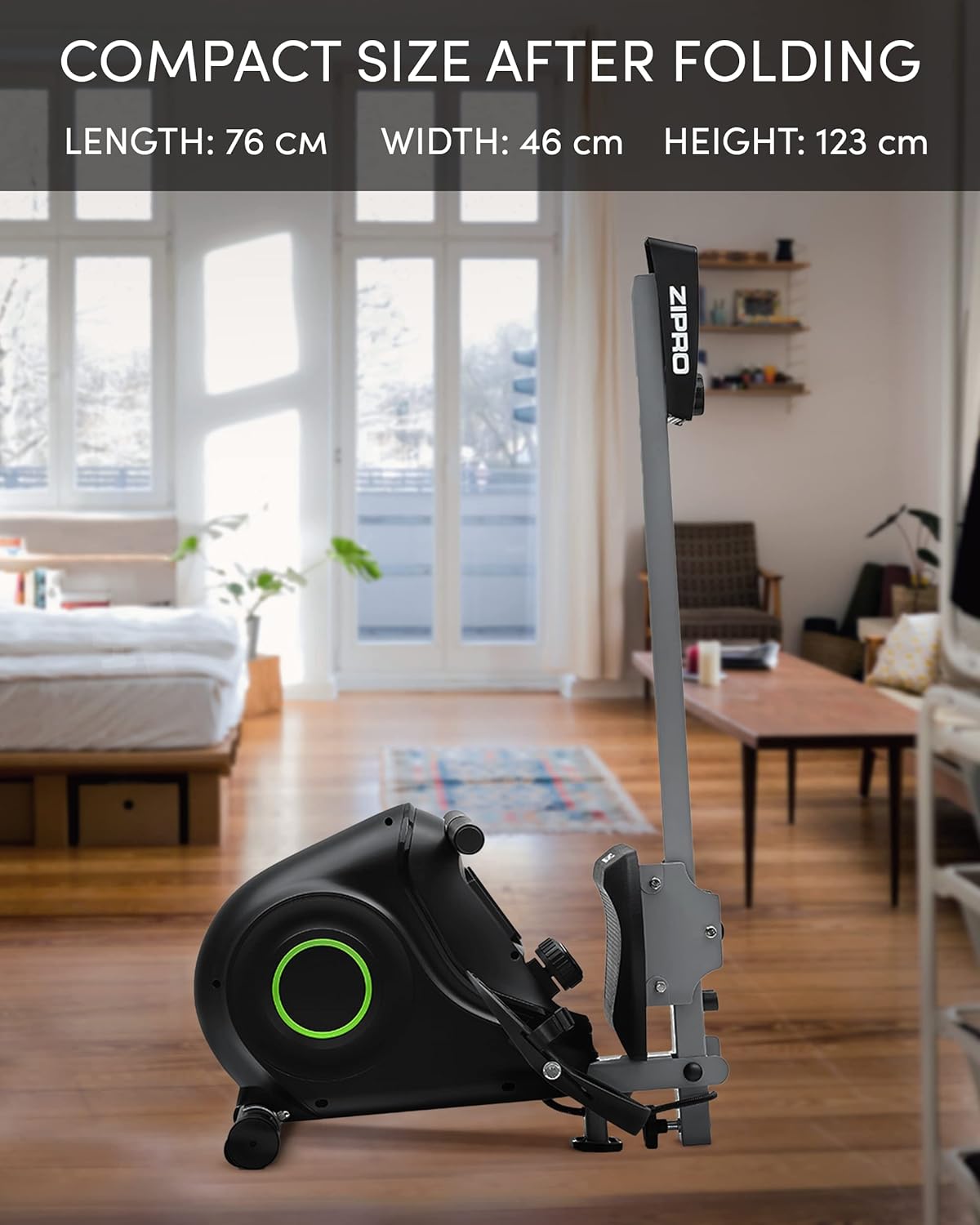
The Zipro Nix Rower is designed to be foldable for compact storage, saving space when not in use.
- Składanie: Follow the instructions in your assembly manual for folding the rower into its vertical position. This typically involves releasing a locking pin or knob and folding the rail upwards.
- Transport: Utilize the integrated transport wheels located on the rear stabilizer to easily move the rower. Tilt the rower onto its wheels and push it to your desired storage location.

Rysunek 5.1: The Zipro Nix Rower in its compact, folded position, ideal for space-saving storage.

Rysunek 5.2: Z bliska view of the transport wheels on the Zipro Nix Rower, facilitating easy relocation of the unit.
6. Rozwiązywanie Problemów
If you encounter issues with your Zipro Nix Rower, refer to the following common problems and solutions:
| Problem | Możliwa przyczyna | Rozwiązanie |
|---|---|---|
| No display on computer console | Batteries are dead or incorrectly installed. Loose sensor cable connection. | Replace batteries. Check battery orientation. Ensure sensor cable is securely plugged into the console. |
| Resistance feels inconsistent or too low/high | Resistance knob not set correctly. Internal magnetic mechanism issue. | Adjust the resistance knob to a different level. If problem persists, contact customer support. |
| Siedzisko nie przesuwa się płynnie | Debris on the rail. Rail or wheels need lubrication. | Clean the seat rail and wheels. Apply a small amount of silicone-based lubricant to the rail. |
| Nietypowe dźwięki podczas pracy | Loose bolts or components. Internal friction. | Check and tighten all visible bolts. If noise persists, discontinue use and contact customer support. |
7. Specyfikacje
Detailed technical specifications for the Zipro Nix Rower:
| Funkcja | Specyfikacja |
|---|---|
| Numer modelu | 6299217 |
| Marka | ZIPRO |
| Mechanizm oporu | Magnetyczny |
| Poziomy oporu | 8 |
| Typ wyświetlacza | LCD |
| Displayed Metrics | Time, Strokes (Count), Calories, Speed, Pulse |
| Materiał ramy | Stal węglowa |
| Maksymalna waga użytkownika | 120 kilogramów (264 funty) |
| Wymiary produktu (dł. x szer. x wys.) | 183 x 46 x 48 cm (72 x 18.1 x 18.9 cala) |
| Wymiary po złożeniu (dł. x szer. x wys.) | Około 76 x 46 x 123 cm (30 x 18.1 x 48.4 cala) |
| Waga przedmiotu | 27 kilogramów (59.5 funty) |
| Źródło zasilania (konsola) | Zasilany bateryjnie |
| Cechy specjalne | Adjustable foot strap, Foldable design, Transport wheels |
8. Gwarancja i wsparcie
Informacje dotyczące gwarancji można znaleźć w karcie gwarancyjnej dołączonej do produktu lub na oficjalnej stronie ZIPRO website. If you require technical assistance, replacement parts, or have any questions not covered in this manual, please contact ZIPRO customer support through their official channels.
Kontaktując się z pomocą techniczną, przygotuj numer modelu (6299217) i dowód zakupu.