
Varmilo VBS108
Varmilo VBS108 Lure Bot Mechanical Keyboard
Instrukcja obsługi
Wstęp
Thank you for choosing the Varmilo VBS108 Lure Bot Mechanical Keyboard. This keyboard is designed for versatility and durability, featuring triple mode connectivity (Bluetooth 5.0, 2.4GHz Wireless, and USB-C), high-quality PBT dye-sub keycaps, and Cherry MX Brown switches for a tactile typing experience. This manual provides detailed instructions for setup, operation, maintenance, and troubleshooting to ensure optimal performance and longevity of your keyboard.
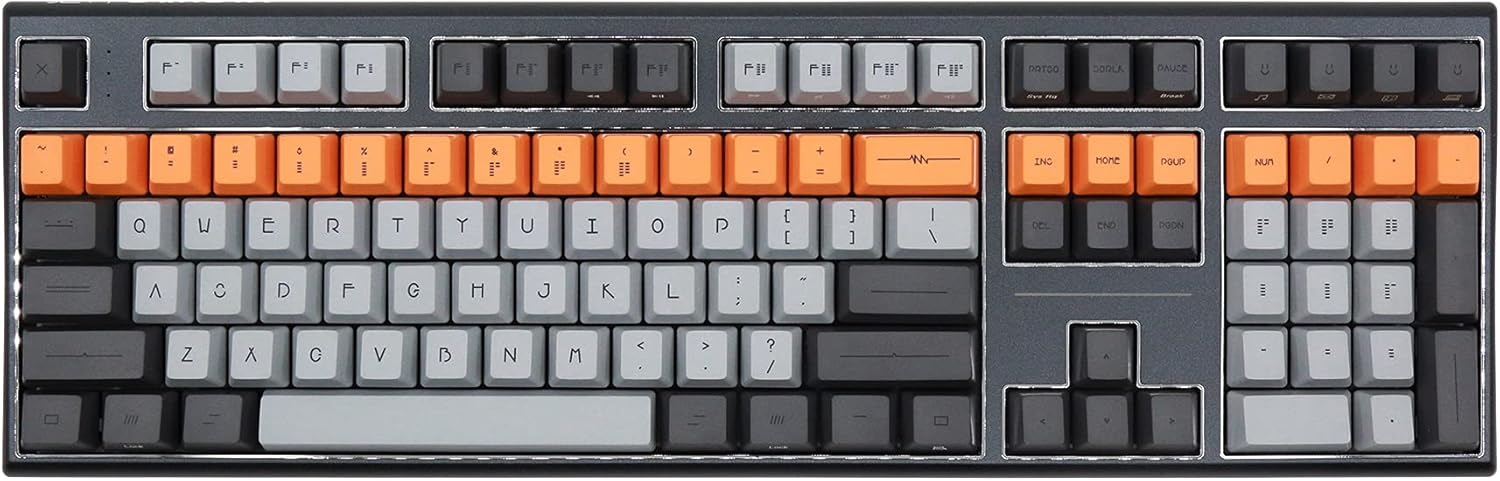
Figure 1: Varmilo VBS108 Lure Bot Mechanical Keyboard
Zawartość opakowania
Upewnij się, że w przesyłce znajdują się wszystkie elementy:
- Varmilo VBS108 Lure Bot Mechanical Keyboard
- Kabel USB-C do USB-A
- 2.4GHz Wireless Dongle (typically stored in the keyboard's battery compartment or a dedicated slot)
- Narzędzie do zdejmowania nakładek klawiszy (może być dołączone)
- Instrukcja obsługi (ten dokument)
Organizować coś
The Varmilo VBS108 offers three connectivity modes: USB-C wired, 2.4GHz wireless, and Bluetooth 5.0.
1. Połączenie przewodowe USB-C
- Locate the USB-C port on the keyboard (usually on the top edge).
- Podłącz jeden koniec dołączonego kabla USB-C do klawiatury.
- Podłącz drugi koniec (USB-A) do wolnego portu USB w komputerze.
- Klawiatura zostanie automatycznie rozpoznana i będzie gotowa do użycia.
2. Połączenie bezprzewodowe 2.4 GHz
- Znajdź bezprzewodowy adapter 2.4 GHz.
- Podłącz klucz sprzętowy do wolnego portu USB w komputerze.
- Ensure the keyboard is in 2.4GHz mode (refer to the keyboard's function key combinations or a physical switch if available).
- Klawiatura powinna połączyć się automatycznie.
3. Połączenie Bluetooth 5.0
- Ensure the keyboard is in Bluetooth pairing mode. This typically involves holding down a specific Fn key combination (e.g., Fn + 1, Fn + 2, or Fn + 3 for different profiles) until an indicator light flashes. Consult your keyboard's specific key legend for Bluetooth pairing.
- Na komputerze lub urządzeniu otwórz ustawienia Bluetooth.
- Szukaj new devices and select "Varmilo VBS108" or a similar name from the list.
- Postępuj zgodnie ze wskazówkami wyświetlanymi na ekranie, aby dokończyć proces parowania.
Operacyjny
The Varmilo VBS108 keyboard includes various function key combinations for enhanced control.
Function Key Combinations (Fn + Key)
- Fn + F1-F12: Multimedia controls (play/pause, volume up/down, mute, etc.). Refer to the keycap legends for specific functions.
- Fn + Win: Klawisz blokowania/odblokowywania systemu Windows.
- Fn + Left Alt: Switch between macOS and Windows layouts (if supported).
- Fn + Q/W/E: Przełączanie między Bluetooth profiles (jeśli dotyczy).
- Fn + R: Przełącz na tryb bezprzewodowy 2.4 GHz.
- Fn + T: Switch to USB-C wired mode.
- Fn + Backlight Keys: Adjust backlight brightness or effects (if applicable).
Adjustable Flip-out Feet
Klawiatura posiada 3-stage adjustable flip-out feet on the underside, allowing you to customize the typing angle for ergonomic comfort.

Figure 2: Adjustable Flip-out Feet
Konserwacja
Proper maintenance ensures the longevity and performance of your Varmilo keyboard.
Czyszczenie klawiatury
- Nasadki klawiszy: Use a keycap puller to carefully remove keycaps. Clean them with a mild soap solution and a soft cloth, then rinse thoroughly and air dry completely before reattaching.
- Sprawa: Wipe the keyboard case with a soft, slightly damp, ściereczka niepozostawiająca włókien. Unikaj stosowania silnych środków chemicznych i materiałów ściernych.
- Między kluczami: Use compressed air to remove dust and debris from between the key switches. A small brush can also be used for stubborn particles.

Figure 3: PBT Dye-Sub Keycaps
Rozwiązywanie problemów
If you encounter issues with your Varmilo VBS108 keyboard, try the following solutions:
- Klawiatura nie odpowiada (przewodowa): Upewnij się, że kabel USB-C jest prawidłowo podłączony do klawiatury i komputera. Spróbuj użyć innego portu USB lub kabla.
- Keyboard not responding (Wireless/Bluetooth):
- Sprawdź poziom naładowania baterii.
- Ensure the keyboard is in the correct mode (2.4GHz or Bluetooth).
- For 2.4GHz, ensure the dongle is properly inserted and try a different USB port.
- For Bluetooth, unpair and re-pair the keyboard with your device. Ensure your device's Bluetooth is enabled.
- Klucze nie są rejestrowane: Remove the keycap and check for any obstructions around the switch. Clean the area with compressed air.
- Przerywane połączenie: Ensure there are no major sources of interference (e.g., other wireless devices) near the keyboard or dongle.
- Aktualizacja firmware: Check the official Varmilo website for any available firmware updates for your model, which can resolve known issues.
Specyfikacje
| Funkcja | Szczegół |
|---|---|
| Marka | Warmilo |
| Model | VBS108 Lure Bot |
| Technologia łączności | Bluetooth 5.0, 2.4GHz Wireless, USB-C |
| Typ przełącznika | Cherry MX Brown |
| Materiał nasadek klawiszy | PBT Dye-Sub |
| Liczba kluczy | 104 |
| Kompatybilne urządzenia | PC |
| Kolor | Cherry MX Brown (keyboard color scheme) |
| Funkcja specjalna | 3-Stage Adjustable Flip-out Feet |
Gwarancja i wsparcie
Varmilo products are designed for quality and reliability. For information regarding warranty coverage, technical support, or service, please refer to the warranty card included with your product or visit the official Varmilo webwitryny. Możesz również skontaktować się ze sprzedawcą, u którego kupiłeś produkt, aby uzyskać pomoc.
Ask a question about this manual
Ask about setup, troubleshooting, compatibility, parts, safety, or missing instructions. Manuals+ will review the question and use this page’s manual context to help answer it.