
Teslong TD450D85L1 Articulating Borescope User Manual
Model: TD450D85L1
1. Wprowadzenie
The Teslong TD450D85L1 Articulating Borescope is a professional inspection tool designed for visual examination of hard-to-reach areas. It features a two-way 180-degree articulating probe, an integrated 4.5-inch IPS LCD monitor, and high-definition imaging capabilities. This manual provides essential information for the safe and effective use of your borescope.
2. Informacje dotyczące bezpieczeństwa
- Non-Waterproof Probe: The inspection probe of this borescope is NIE WODOODPORNE. Do not submerge the probe or any part of the device in water or other liquids. Doing so will cause damage and void the warranty.
- Avoid using the device in environments with extreme temperatures or high humidity.
- Trzymaj urządzenie z dala od silnych pól magnetycznych.
- Nie należy podejmować prób demontażu ani modyfikacji urządzenia. Naprawy powinny być wykonywane wyłącznie przez upoważniony personel.
- Ensure the device is fully charged before use to prevent unexpected power loss during inspections.

3. Zawartość opakowania
Sprawdź, czy w przesyłce znajdują się wszystkie elementy wymienione poniżej:
- TD450D85L1 Articulating Borescope Unit (with integrated 4.5-inch IPS monitor)
- Kabel do ładowania USB typu C.
- Karta MicroSD 8 GB (preinstalowana)
- Etui transportowe
- Instrukcja obsługi

4. Koniec produktuview i funkcje
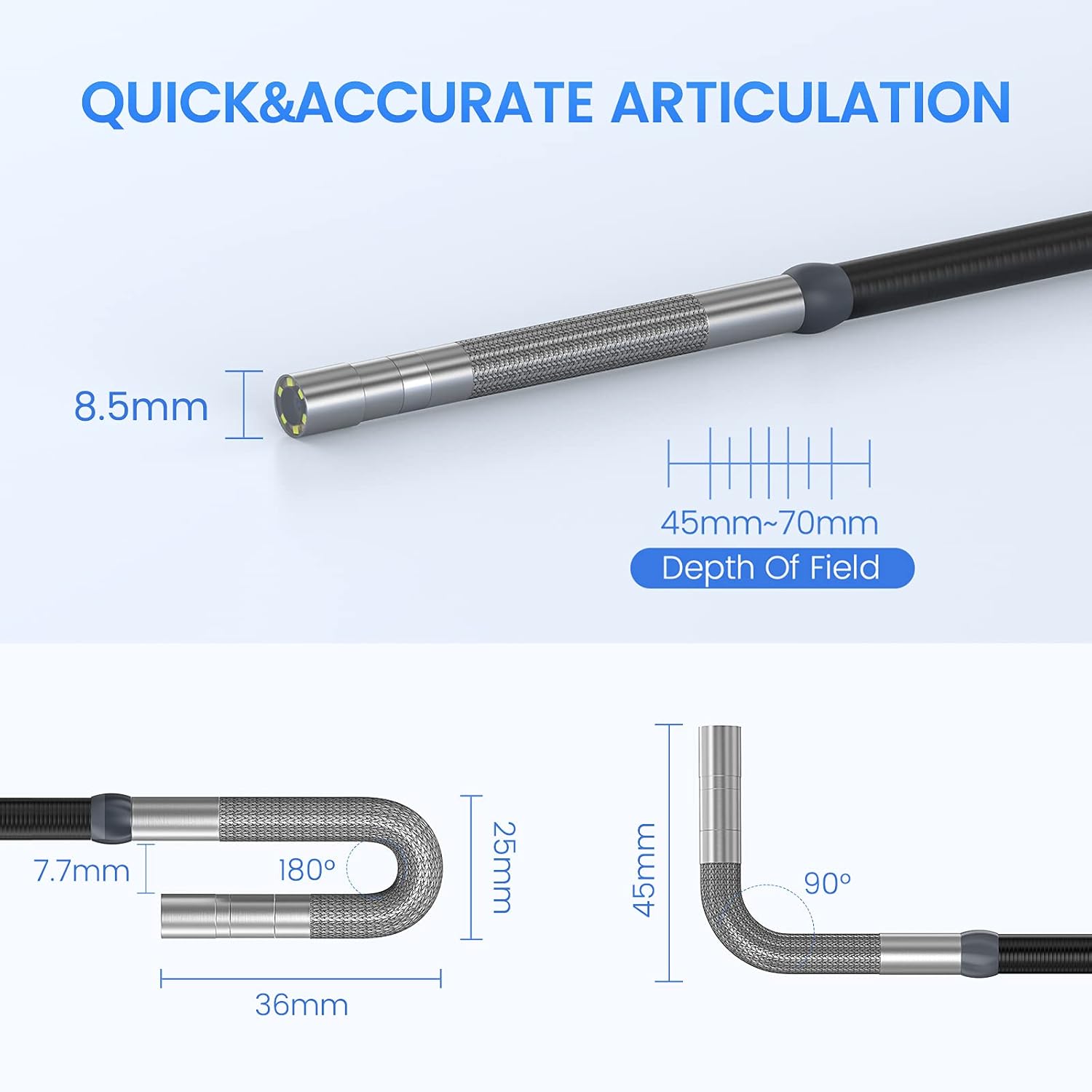
The Teslong TD450D85L1 is an advanced inspection camera designed for detailed visual inspections. It features a flexible gooseneck probe with an 8.5mm diameter and a 2.0MP CMOS sensor, providing 1080P HD image and video capture. The integrated 4.5-inch IPS LCD monitor offers a clear view without the need for external devices or Wi-Fi connections.
Główne cechy:
- Two-Way 180° Articulation: Allows precise control of the probe tip for navigating complex spaces and maintaining optimal viewkąty.
- Integrated 4.5-inch IPS LCD Monitor: Provides a clear, real-time display of the inspection area. No smartphone, Wi-Fi, or app required.
- Obrazowanie w wysokiej rozdzielczości: 1080P HD resolution with a 2.0MP CMOS sensor for capturing detailed images and videos.
- Regulowane oświetlenie LED: Built-in highlighting LEDs ensure clear visibility in dark conditions.
- Nagrywanie zdjęć i filmów: Supports JPG image and AVI video recording directly to the included 8GB MicroSD card. Includes a microphone and speaker for audio recording.
- Długa żywotność baterii: Equipped with a built-in 5000mAh rechargeable battery for extended operation.


5. Konfiguracja
5.1 Pierwsze ładowanie
- Connect the USB Type-C charging cable to the borescope's charging port.
- Podłącz drugi koniec kabla USB do standardowego zasilacza USB (nie ma go w zestawie) lub do portu USB komputera.
- Allow the device to charge fully before first use. The charging indicator light will change when charging is complete.
5.2 Instalacja karty MicroSD
The 8GB MicroSD card is typically pre-installed. If it needs to be inserted or replaced:
- Locate the MicroSD card slot on the side of the monitor unit.
- Ostrożnie włóż kartę MicroSD złotymi stykami skierowanymi w dół, aż do momentu, gdy zatrzaśnie się na miejscu.
- Aby wyjąć kartę, delikatnie ją dociśnij, aż wyskoczy.

6. Instrukcja obsługi
6.1 Włączanie/wyłączanie
- Aby włączyć urządzenie, naciśnij i przytrzymaj przycisk zasilania, aż ekran się podświetli.
- Aby wyłączyć urządzenie, naciśnij i przytrzymaj przycisk zasilania, aż ekran zgaśnie.
6.2 Controlling Articulation
The borescope probe features two-way 180-degree articulation. Use the control knob on the handle to adjust the direction of the probe tip:
- Rotate the knob clockwise or counter-clockwise to bend the probe tip left or right.
- The articulation can be locked in position for stable viewing.

6.3 Regulacja oświetlenia LED
The probe tip is equipped with adjustable LED lights to illuminate the inspection area. Use the dedicated button on the monitor unit to cycle through different brightness levels or turn the lights off.
6.4 Robienie zdjęć i nagrywanie filmów
- Aby zrobić zdjęcie: Na żywo view, press the Photo button (usually indicated by a camera icon) to capture a still image.
- Aby nagrać film: Press the Video button (usually indicated by a video camera icon) to start recording. Press it again to stop recording. The device will record audio through its built-in microphone.
- All captured media is saved to the installed MicroSD card.
6.5 Odnośnievieww mediach
Dostęp do trybu odtwarzania z menu głównego view captured photos and videos. Use the navigation buttons to browse through your media files.
7. Konserwacja
- Czyszczenie: Gently wipe the monitor screen and the probe with a soft, dry cloth. For stubborn dirt on the probe, use a slightly damp cloth and ensure it is completely dry before storage. Do not use abrasive cleaners or solvents.
- Składowanie: Store the borescope in its carrying case in a cool, dry place, away from direct sunlight and extreme temperatures.
- Pielęgnacja baterii: Aby zapewnić optymalną żywotność baterii, ładuj urządzenie regularnie i unikaj całkowitego rozładowywania przez dłuższy czas. W przypadku długotrwałego przechowywania ładuj je do około 50% co kilka miesięcy.
- Aktualizacje oprogramowania: Sprawdź producenta webOdwiedzaj witrynę okresowo, aby sprawdzić, czy są dostępne aktualizacje oprogramowania sprzętowego.
8. Rozwiązywanie Problemów
| Problem | Możliwa przyczyna | Rozwiązanie |
|---|---|---|
| Urządzenie nie włącza się. | Niski poziom naładowania baterii. | Całkowicie naładuj urządzenie. |
| Brak obrazu na ekranie. | Probe cable not securely connected. | Ensure the probe cable is firmly connected to the monitor unit. |
| Obraz jest rozmazany lub ciemny. | Insufficient lighting; dirty camera lens; incorrect focus. | Adjust LED brightness. Clean the camera lens. Ensure the object is within the 45-70mm depth of field. |
| Nie można zapisywać zdjęć/filmów. | Karta MicroSD jest pełna lub nieprawidłowo włożona; błąd karty. | Sprawdź, czy karta MicroSD została włożona. Usuń niepotrzebne. files lub wymień kartę. W razie potrzeby sformatuj kartę (spowoduje to usunięcie wszystkich danych). |
| Artykulacja jest sztywna lub niereagująca. | Mechanical obstruction; debris in articulation mechanism. | Carefully inspect the probe tip for any obstructions. Do not force articulation. Contact customer support if the issue persists. |
9. Specyfikacje
| Funkcja | Specyfikacja |
|---|---|
| Nazwa modelu | Articulating Endoscope Inspection Camera (TD450D85L1) |
| Rozmiar ekranu | 4.5-calowy ekran IPS LCD |
| Efektywna rozdzielczość obrazu nieruchomego | 2 MP |
| Rozdzielczość przechwytywania wideo | 1080p |
| Średnica sondy | 8.5mm |
| Artykulacja | Two-Way 180 Degrees |
| Macro Focus Range (Depth of Field) | 45-70 mm |
| Kąt rzeczywisty View | 60 stopni |
| Typ czujnika | CMOS |
| Typ nośnika | Karta Micro SD (8 GB w zestawie) |
| File Format | JPG (images), AVI (videos) |
| Nagrywanie dźwięku | Yes (with internal microphone) |
| Technologia łączności | USB |
| Pojemność baterii | 5000mAh (ładowalny) |
| Poziom wodoodporności | Not Waterproof (probe) |
10. Gwarancja i wsparcie
Your Teslong TD450D85L1 Articulating Borescope comes with a 12-miesięczna gwarancja od daty zakupu. Niniejsza gwarancja obejmuje wady produkcyjne i zapewnia niezawodne działanie przy normalnym użytkowaniu.
For technical assistance, troubleshooting, or warranty claims, please contact Teslong customer service. Refer to the contact information provided on the official Teslong website or in your product packaging for the most up-to-date support channels.
Please have your model number (TD450D85L1) and purchase details ready when contacting support.