
Muzen MW-2AI
Muzen Metal Bluetooth Speaker Vintage Instrukcja obsługi radia
Model: MW-2AI
Produkt ponadview
The Muzen Metal Bluetooth Speaker Vintage Radio is a portable audio device designed with a classic retro aesthetic, combining modern Bluetooth technology with traditional FM radio functionality. It offers versatile connectivity options including Bluetooth 4.0 and a 3.5mm AUX input, making it suitable for various audio sources. Its compact size and durable metal construction ensure portability and longevity, providing clear sound for both indoor and outdoor use.
This speaker features a 5-watt amplifier for robust audio output and a 1000mAh built-in rechargeable battery, offering extended playtime. The vintage design, reminiscent of 1950s radios, makes it a unique addition to any setting.
Zawartość opakowania

Image: The Muzen Metal Bluetooth Speaker, its carrying case, charging cables, and decorative stickers, all neatly arranged with its product box.
Upon unboxing your Muzen Metal Bluetooth Speaker, please ensure all the following items are present:
- Muzen Metal Bluetooth Speaker (Model: MW-2AI)
- Kabel ładujący USB
- Kabel audio AUX 3.5 mm
- Instrukcja obsługi (ten dokument)
- Antenna (for FM radio)
- Naklejki dekoracyjne
- Carrying Case (often included with specific models/bundles)
Jeśli brakuje jakichkolwiek elementów lub są one uszkodzone, prosimy o natychmiastowy kontakt z działem obsługi klienta.
Organizować coś
Początkowe ładowanie
Before first use, it is recommended to fully charge the speaker. Connect the provided USB charging cable to the speaker's charging port and the other end to a USB power adapter (not included) or a computer's USB port. The charging indicator light will illuminate during charging and turn off when fully charged.
Antenna Installation (for FM Radio)
For optimal FM radio reception, gently insert the provided antenna into the designated antenna port on the speaker. Extend the antenna fully for better signal strength.
Instrukcja obsługi
Włączanie/wyłączanie zasilania
Aby włączyć głośnik, obróć TOM knob clockwise until you hear a click and the indicator light illuminates. To power off, rotate the TOM knob counter-clockwise until it clicks off.
Kontrola głośności
Dostosuj głośność, obracając pokrętłem TOM knob. Rotate clockwise to increase volume and counter-clockwise to decrease volume.
Wybór trybu
The speaker supports three operating modes: Bluetooth, FM Radio, and AUX. Use the mode switch or knob (if present) to cycle between these modes.

Image: A hand is shown adjusting the tuning knob on the vintage-style Muzen speaker, which has an extended antenna, indicating FM radio operation.
Tryb Bluetooth
- Włącz głośnik.
- Switch to Bluetooth mode. The speaker will emit a pairing tone and the indicator light will flash, indicating it's ready for pairing.
- Włącz Bluetooth na swoim urządzeniu (smartfonie, tablecie itp.) i wyszukaj dostępne urządzenia.
- Wybierać "Muzen OTR" or similar from the list of devices.
- Once connected, the speaker will emit a confirmation tone, and the indicator light will become solid. You can now play audio from your device.

Image: The Muzen speaker is shown next to a smartphone displaying a music player interface, with a Bluetooth icon indicating a successful wireless connection.
Tryb radia FM
- Ensure the antenna is properly installed and extended.
- Przełącz głośnik w tryb FM.
- Rotate the tuning knob (often labeled FM or with frequency markings) to scan for radio stations.
- Fine-tune the knob until you achieve clear reception for your desired station.
Tryb AUX
- Podłącz jeden koniec kabla audio AUX 3.5 mm do portu wejściowego AUX głośnika.
- Connect the other end of the AUX cable to the audio output jack of your external device (e.g., MP3 player, computer, TV).
- Przełącz głośnik w tryb AUX.
- Dźwięk z podłączonego urządzenia będzie teraz odtwarzany przez głośnik.
Konserwacja
- Czyszczenie: Use a soft, dry cloth to wipe the speaker's surface. Avoid using abrasive cleaners, solvents, or strong chemicals, as they may damage the finish.
- Składowanie: Jeśli głośnik nie będzie używany przez dłuższy czas, należy przechowywać go w chłodnym i suchym miejscu, z dala od bezpośredniego światła słonecznego i ekstremalnych temperatur.
- Pielęgnacja baterii: Aby przedłużyć żywotność baterii, unikaj częstego całkowitego rozładowywania. Ładuj głośnik regularnie, nawet jeśli nie jest używany regularnie.
- Wodoodporność: This speaker is not waterproof. Avoid exposing it to water, rain, or excessive humidity.
Rozwiązywanie problemów
| Problem | Możliwa przyczyna | Rozwiązanie |
|---|---|---|
| Głośnik nie włącza się. | Bateria jest rozładowana. | Naładuj głośnik w pełni, korzystając z dołączonego kabla USB. |
| Brak dźwięku w trybie Bluetooth. | Not paired correctly; volume too low; device not playing audio. | Ensure speaker is in Bluetooth mode and paired. Increase speaker and device volume. Check if audio is playing on the source device. |
| Słaby odbiór radia FM. | Antena nie jest wysunięta; obszar o słabym sygnale. | Rozłóż całkowicie antenę. Spróbuj zmienić położenie głośnika, aby uzyskać lepszy sygnał. |
| Brak dźwięku w trybie AUX. | AUX cable not connected properly; speaker not in AUX mode; device volume too low. | Ensure AUX cable is securely connected. Switch speaker to AUX mode. Increase volume on both speaker and source device. |
Specyfikacje
| Funkcja | Szczegół |
|---|---|
| Numer modelu | MW-2AI |
| Wymiary | 8.8 x 5.6 x 6.5 cm (3.46 x 2.21 x 2.56 cala) |
| Waga | 800 gramów |
| Tworzywo | Metal (High-density zinc-aluminum alloy) |
| Łączność | Bluetooth 4.0, 3.5 mm AUX |
| Wyjście audio | 5 watów |
| Pojemność baterii | 1000mAh (ładowalny) |
| Playtime (Bluetooth) | Do 10 godzin |
| Playtime (FM Mode) | Do 20 godzin |
| Pasma radiowe | FM |
| Opcje kolorów | Blue/Red/Green/Pink/Black/Purple/White |
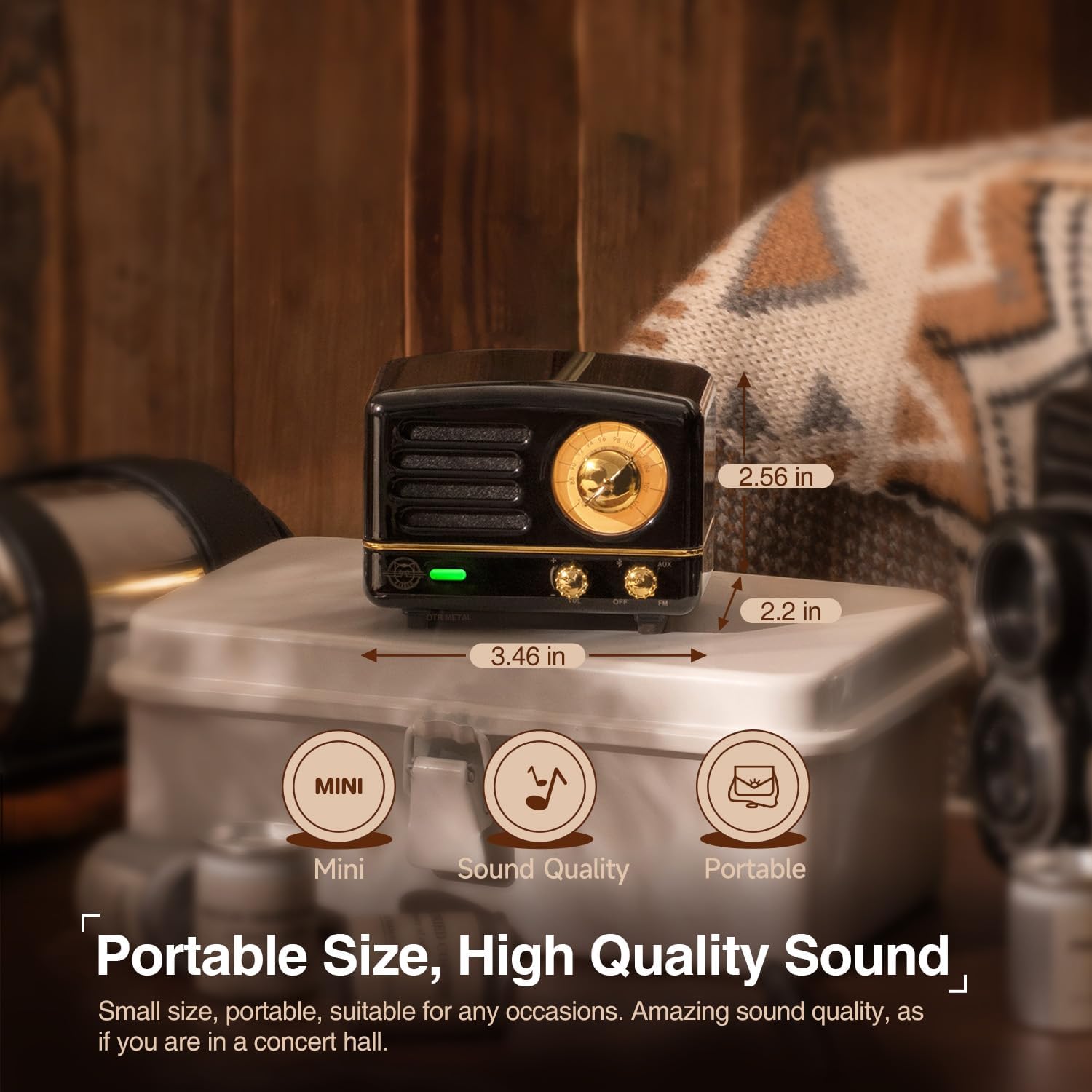
Image: The Muzen speaker is shown with overlaid measurements indicating its compact size: 3.46 inches wide, 2.56 inches tall, and 2.2 inches deep.
Gwarancja i wsparcie
Muzen products typically come with a standard manufacturer's warranty. Please refer to the warranty card included in your package for specific terms and conditions, including warranty period and coverage details. Retain your proof of purchase for warranty claims.
For technical support, troubleshooting assistance, or warranty inquiries, please visit the official Muzen webOdwiedź witrynę lub skontaktuj się z działem obsługi klienta. Dane kontaktowe zazwyczaj znajdują się na opakowaniu produktu lub oficjalnej stronie marki. webstrona.
Możesz również odwiedzić Muzen Store on Amazon Aby uzyskać więcej informacji o produkcie i zasobach pomocy.