
Wstęp
Dziękujemy za zakupasing the Power Dynamics PV240BT 4-Zone HiFi Stereo Amplifier. This manual provides essential information for the safe and efficient operation of your amplifier. Please read this manual thoroughly before using the device to ensure proper setup and to maximize its performance. Keep this manual for future reference.
Instrukcje bezpieczeństwa
Always observe the following safety precautions to avoid electric shock, fire, or damage to the unit.
- Nie wystawiać urządzenia na działanie deszczu i wilgoci.
- Nie otwierać casing. Wewnątrz nie ma żadnych części, które mogłyby być naprawiane przez użytkownika. Wszelkie prace serwisowe należy zlecać wykwalifikowanemu personelowi.
- Zapewnij odpowiednią wentylację wokół urządzenia. Nie blokuj otworów wentylacyjnych.
- Umieść urządzenie na stabilnej, równej powierzchni.
- Disconnect the power cord from the mains before cleaning or when not in use for extended periods.
- Używaj wyłącznie wskazanego źródła zasilania.
- Trzymaj urządzenie z dala od źródeł ciepła, bezpośredniego światła słonecznego i nadmiernej ilości kurzu.
Zawartość opakowania
Po rozpakowaniu upewnij się, że wszystkie wymienione poniżej przedmioty są obecne i w dobrym stanie:
- Dynamika mocy PV240BT Ampjednostka lifier
- Instrukcja obsługi
- Zdalne sterowanie
- Kabel zasilający
Cechy produktu
Dynamika mocy PV240BT amplifier offers a range of features designed for versatile audio applications:
- Multi-zone HiFi stereo amplifier with 4x 100W output across four separate zones, each with independent volume control.
- Built-in Bluetooth 4.2 receiver for reliable wireless audio streaming from smartphones, tablets, or laptops.
- Integrated USB/SD MP3 player and FM radio with digital LCD display.
- Wejście AUX umożliwiające podłączenie zewnętrznych urządzeń audio.
- Dual microphone inputs with separate volume dials and echo effect, plus talkover function.
- Optical/coaxial ports, dual RCA in/out, and subwoofer output for comprehensive connectivity.
- W zestawie znajduje się pilot zdalnego sterowania zapewniający wygodną obsługę.
Produkt ponadview

Rysunek 1: Przód view of the Power Dynamics PV240BT amplifier, showcasing jego elementów sterujących i wyświetlacza.

Rysunek 2: The 400W amplifier features four independent zones, each with its own volume control for multiroom audio distribution.
Organizować coś
1. Umieszczenie
Umieść amplifier on a flat, stable surface with adequate ventilation. Ensure there is enough space around the unit for heat dissipation. Avoid placing it near heat sources or in direct sunlight.
2. Podłączenie zasilania
Connect the supplied power cable to the AC IN socket on the rear panel of the amplifier and then to a suitable mains power outlet. Ensure the power switch on the front panel is in the OFF position before connecting.
3. Połączenia głośnikowe
Connect your speakers to the corresponding speaker terminals on the rear panel. The PV240BT features four speaker output zones. Ensure correct polarity (+ to + and - to -) for each speaker. Use appropriate gauge speaker wire for optimal performance.

Rysunek 3: Nadview z amplifier's front and back panels, highlighting various input and output connections including speaker terminals.
Instrukcja obsługi
1. Włączanie/wyłączanie zasilania
Naciśnij MOC przycisk na panelu przednim, aby włączyć ampWłącz lub wyłącz liifier. Wyświetlacz będzie podświetlony po włączeniu urządzenia.
2. Wybór źródła wejściowego
Użyj TRYB button on the front panel or remote control to cycle through available input sources: Bluetooth, USB, SD, FM, AUX, Optical, Coaxial.
3. Regulacja głośności
Ten amplifier features independent volume controls for each of the four zones (VOLUME 1-4). Adjust these knobs to set the desired output level for each connected speaker zone. The main GŁOŚNOŚĆ MUZYKI knob controls the overall music volume.
4. Kontrola tonów
Dostosuj BASS I POTROIĆ knobs to fine-tune the low and high frequencies of your audio output. The ECHO knob controls the echo effect for microphone inputs.

Rysunek 4: Close-up of the tone control section, showing knobs for Treble, Bass, Music Volume, and Echo.
5. Przesyłanie strumieniowe Bluetooth
Aby połączyć się przez Bluetooth:
- Select "Bluetooth" as the input source using the TRYB przycisk.
- On your Bluetooth-enabled device (smartphone, tablet, etc.), search for available devices.
- Select "PV240BT" from the list to pair. Once paired, you can stream audio wirelessly.

Rysunek 5: Ten amplifier supports Bluetooth 4.2 for seamless wireless audio streaming from compatible devices.
6. Odtwarzacz multimedialny USB/SD
Włóż dysk USB lub kartę SD do odpowiedniego gniazda na panelu przednim. amplifier automatycznie przełączy się na tryb USB/SD i rozpocznie odtwarzanie zgodnego dźwięku files (e.g., MP3). Use the playback controls (ODTWÓRZ/PAUZA, POPRZEDNI, NASTĘPNY) to navigate your media.

Rysunek 6: The integrated media player features USB and SD card slots for direct playback of audio files.
7.Radio FM
Select "FM" as the input source. Use the POPRZEDNI I NASTĘPNY buttons to tune to radio stations. The digital LCD display will show the current frequency.
8. Microphone Inputs
Podłącz mikrofony do Mikrofon 1 or Mikrofon 2 inputs. Adjust the individual GŁOŚNOŚĆ MIKROFONU knobs for each microphone. The OBGADAĆ function automatically lowers the music volume when a microphone is in use.
Konserwacja
Aby zapewnić długowieczność i optymalną wydajność Twojego amplifier, postępuj zgodnie z poniższymi wskazówkami dotyczącymi konserwacji:
- Czyszczenie: Disconnect the power before cleaning. Use a soft, dry cloth to wipe the exterior of the unit. Do not use liquid cleaners or aerosols.
- Wentylacja: Regularnie sprawdzaj, czy otwory wentylacyjne są wolne od kurzu i zanieczyszczeń, aby zapobiec przegrzaniu.
- Składowanie: Jeśli przechowujesz urządzenie przez dłuższy czas, odłącz je od zasilania i przechowuj w chłodnym, suchym miejscu, z dala od bezpośredniego światła słonecznego i ekstremalnych temperatur.
Rozwiązywanie problemów
Jeśli napotkasz problemy z urządzeniem amplifier, refer to the following table for common problems and their solutions:
| Problem | Możliwa przyczyna | Rozwiązanie |
|---|---|---|
| Brak zasilania | Kabel zasilający nie jest podłączony; Wyłącznik zasilania jest wyłączony; Gniazdo zasilania jest uszkodzone. | Ensure power cable is securely connected. Turn power switch ON. Test power outlet with another device. |
| Brak dźwięku | Incorrect input source selected; Volume too low; Speakers not connected or faulty; Mute function active. | Select correct input source. Increase master and zone volumes. Check speaker connections and ensure speakers are functional. Deactivate mute if applicable. |
| Bluetooth nie łączy się | Amplifier nie jest w trybie Bluetooth; Urządzenie jest za daleko; Urządzenie jest już połączone z innym urządzeniem. | Zapewnić amplifier jest w trybie Bluetooth. Przybliż urządzenie do amplifier. Disconnect from other Bluetooth devices. |
| USB/SD nie odtwarza się | Błędny file format; USB/SD card faulty or empty; Amplifier not in USB/SD mode. | Zapewnić files are compatible (e.g., MP3). Try another USB/SD card. Select USB/SD input mode. |
| Zniekształcony dźwięk | Volume too high; Incorrect impedance speakers; Poor cable connections. | Zmniejsz głośność. Upewnij się, że głośniki są dopasowane. amplifier impedance. Check all audio cable connections. |
Jeśli po wypróbowaniu tych rozwiązań problem nadal występuje, skontaktuj się z obsługą klienta.
Specyfikacje
| Funkcja | Szczegół |
|---|---|
| Numer modelu | PV240BT |
| Moc wyjściowa | 4 x 100 W (łącznie 400 W) |
| Strefy | 4 independent zones with volume control |
| Wersja Bluetooth | 4.2 |
| Odtwarzacz multimedialny | USB/SD MP3 player, FM Radio |
| Wejścia | AUX/RCA, Optical, Coaxial, 2x Microphone (6.3mm jack) |
| Wyjścia | RCA Line Out, Subwoofer Out, Speaker Terminals (4 zones) |
| Wymiary (dł. x szer. x wys.) | Wymiary 38.5 x 30.6 x 14 cm |
| Waga | 4.6 kilogramów |
| Zasilacz | 220–240 V AC 50 Hz |
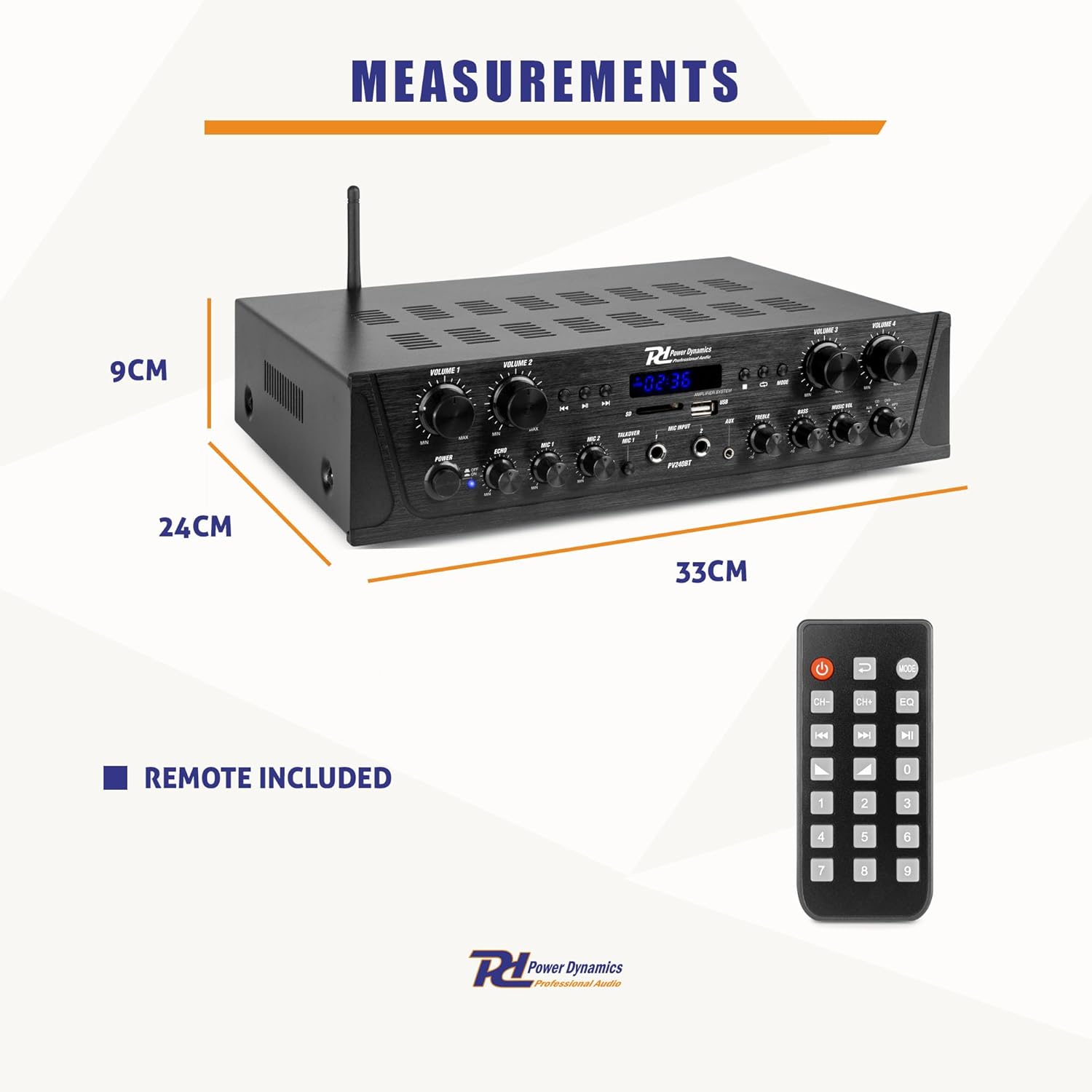
Rysunek 7: Wymiary fizyczne amplifier and the included remote control.
Gwarancja i wsparcie
This Power Dynamics PV240BT amplifier comes with a standard manufacturer's warranty. Please refer to the warranty card included in your package for specific terms and conditions. For technical support, service, or warranty claims, please contact your retailer or the Power Dynamics customer service department. Keep your proof of purchase for warranty validation.
For further assistance, visit the official Power Dynamics webodwiedź witrynę lub skontaktuj się z ich kanałami wsparcia.


