
1. Koniec produktuview
The KAIDI KD-763 is a wired gaming headset designed for use with the PlayStation 4 (PS4) console and other compatible devices with a 3.5mm audio jack. It features over-ear cups for immersive sound, a rotary microphone for clear communication, and an inline volume control for convenient audio adjustments. The headset also includes an LED lighting effect, typically powered via a USB connection.
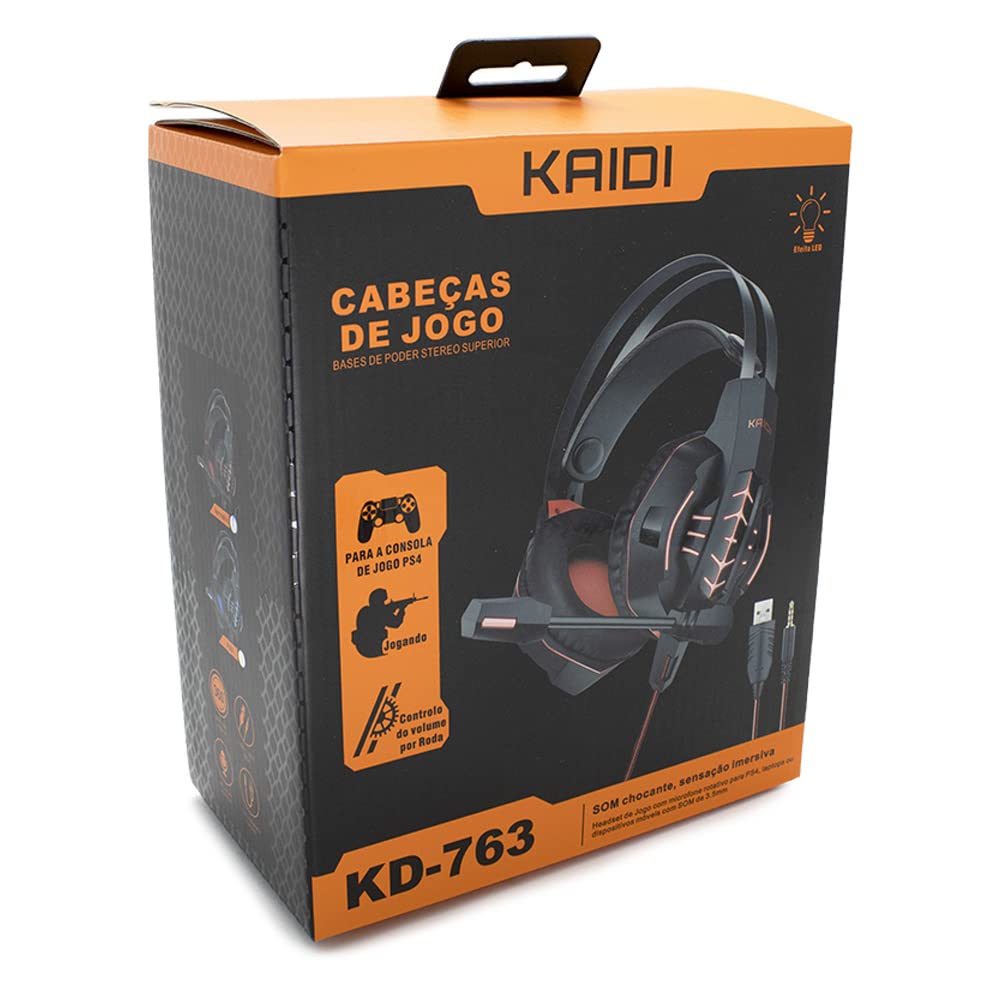
Rysunek 1.1: The KAIDI KD-763 PS4 Gaming Headset packaging, showing the headset, its features, and compatibility with PS4.
2. Informacje dotyczące bezpieczeństwa
- Aby zapobiec uszkodzeniu słuchu, należy unikać długotrwałego słuchania muzyki przy dużej głośności.
- Nie wystawiaj zestawu słuchawkowego na działanie ekstremalnych temperatur, wilgoci ani bezpośredniego światła słonecznego.
- Trzymaj zestaw słuchawkowy z dala od wody i innych płynów.
- Nie próbuj demontować ani modyfikować zestawu słuchawkowego. Może to spowodować unieważnienie gwarancji i uszkodzenie.
- Zestaw słuchawkowy należy czyścić wyłącznie miękką, suchą ściereczką.
- Przechowywać w miejscu niedostępnym dla dzieci.
3. Zawartość opakowania
Proszę sprawdzić zawartość opakowania po otwarciu. Jeśli brakuje któregokolwiek elementu lub jest on uszkodzony, prosimy o kontakt ze sprzedawcą.
- KAIDI KD-763 Gaming Headset
- Instrukcja obsługi (ten dokument)
4. Przewodnik konfiguracji
- Connect to PS4 Controller: Locate the 3.5mm audio jack on your PS4 controller. Insert the 3.5mm connector from the KD-763 headset firmly into this port.
- Powering LED Lights (Optional): If your headset features LED lighting, connect the USB connector from the headset to an available USB port on your PS4 console or a compatible USB power adapter. The LED lights will illuminate once connected.
- Dopasowanie zestawu słuchawkowego: Extend or retract the headband to ensure the earcups sit comfortably and securely over your ears. The over-ear design should fully enclose your ears for optimal sound isolation.
- Pozycja mikrofonu: Adjust the flexible rotary microphone boom to a position near your mouth for clear voice pickup. Ensure it is not obstructing your vision.
- Configure PS4 Audio Settings:
- Idź do Ustawienia > Urządzenia > Urządzenia audio on your PS4.
- Ustawić Urządzenie wejściowe to "Headset (Controller)".
- Ustawić Urządzenie wyjściowe to "Headset (Controller)".
- Ustawić Wyjście na słuchawki to "All Audio" for full game and chat sound.
- Regulować Regulacja głośności (słuchawki) do komfortowego poziomu.
5. Instrukcja obsługi
5.1. Regulacja głośności
The KD-763 headset features an inline volume control wheel located on the cable. Rotate the wheel upwards to increase the volume and downwards to decrease it. Adjust to a comfortable listening level.
5.2. Użycie mikrofonu
The microphone is designed to capture your voice clearly. Ensure it is positioned correctly near your mouth. If your PS4 audio settings are configured correctly, your voice will be transmitted to other players in online games or chat parties.
To mute the microphone, check if there is a physical mute switch on the inline control. If not, you can mute the microphone through your PS4's quick menu (hold the PS button on your controller).
6. Konserwacja
- Czyszczenie: Use a soft, dry, lint-free cloth to wipe the earcups and headband. Do not use liquid cleaners or abrasive materials.
- Składowanie: Gdy nie używasz zestawu słuchawkowego, przechowuj go w czystym, suchym miejscu, z dala od bezpośredniego światła słonecznego i ekstremalnych temperatur. Unikaj splątania kabla.
- Pielęgnacja kabli: Do not pull on the cable to disconnect the headset. Always grasp the plug. Avoid bending or twisting the cable excessively.
7. Rozwiązywanie Problemów
- Brak dźwięku lub niski poziom głośności:
- Sprawdź, czy gniazdo 3.5 mm jest całkowicie włożone do kontrolera PS4.
- Check the inline volume control wheel on the headset cable and turn it up.
- Verify PS4 audio settings (Ustawienia > Urządzenia > Urządzenia audio) are correctly configured for the headset.
- Test the headset with another device (e.g., smartphone) to rule out a headset issue.
- Mikrofon nie działa:
- Sprawdź, czy wysięgnik mikrofonu jest ustawiony prawidłowo.
- Check PS4 audio settings (Ustawienia > Urządzenia > Urządzenia audio) to ensure Urządzenie wejściowe is set to "Headset (Controller)".
- Confirm the microphone is not muted via an inline switch or the PS4 quick menu.
- Jeżeli to możliwe, przetestuj mikrofon za pomocą innej aplikacji lub urządzenia.
- Światła LED nie działają:
- Sprawdź, czy złącze USB jest dokładnie podłączone do zasilanego portu USB.
- Wypróbuj inny port USB.
8. Specyfikacje
| Marka: | KAIDI |
| Model: | KD-763 |
| Typ zestawu słuchawkowego: | Over-ear (Circumaurais) |
| Impedancja: | 32 omy |
| Wrażliwość: | 110dB |
| Łączność: | Przewodowy (gniazdo audio 3.5 mm + USB dla diody LED) |
| Zgodne urządzenia: | Gaming Consoles (e.g., PS4), devices with 3.5mm audio jack |
| Konkretne zastosowanie: | Hazard |
| Typ sterowania: | Inline Volume Control Wheel |
| Mikrofon: | Rotary/Swivel |
| Efekt LED: | Yes (USB powered) |
9. Gwarancja i wsparcie
KAIDI products are designed and manufactured to the highest quality standards. For information regarding warranty coverage, terms, and conditions, please refer to the warranty card included with your purchase or visit the official KAIDI webstrona.
For technical support, troubleshooting assistance, or to inquire about replacement parts, please contact KAIDI customer service through their official channels. Contact information can typically be found on the product packaging or the official KAIDI webstrona.