
VPFET 52-542
VPFET 4K60Hz HDMI Audio Extractor User Manual
Model: 52-542
1. Wprowadzenie
The VPFET 4K60Hz HDMI Audio Extractor is designed to separate audio signals from an HDMI source and output them to an external sound system via optical SPDIF or 3.5mm audio interfaces. This device supports high-resolution video up to 4K at 60Hz, HDMI 2.0b, HDCP 2.2, and HDR10, making it suitable for various home entertainment and professional audio-video setups. It allows users to enjoy high-quality audio from HDMI sources on audio receivers, soundbars, or headphones that may not have HDMI input capabilities.
2. Główne cechy
- HDMI Audio Extraction: Extracts audio from an HDMI signal to optical SPDIF and 3.5mm stereo outputs.
- Obsługa wysokiej rozdzielczości: Compatible with 4K@60Hz (YUV444), 1080P@144Hz, and 1080P@120Hz video resolutions.
- HDMI 2.0b Standard: Supports 18Gbps bandwidth, HDCP 2.2, and DVI compliance.
- Obsługa HDR10: Enhances visual quality with High Dynamic Range (HDR10). Use HDMI 2.0 certified cables for optimal HDR10 compatibility.
- Dźwięk Sampstawka lingwistyczna: Supports audio sampling rates up to 192kHz.
- Multiple Audio Modes: Features 2.0CH, 5.1CH, and TV audio modes for flexible output configuration.
- Niskie zużycie energii: Powered via a 5V USB port, requiring minimal power.
- Szeroka kompatybilność: Suitable for various HDMI source devices such as Blu-ray/DVD players, gaming consoles (Xbox, PlayStation), PCs/laptops, and streaming devices.
- Podłącz i graj: Designed for easy installation and immediate use.
3. Zawartość opakowania
Sprawdź, czy w opakowaniu znajdują się wszystkie elementy:
- 1x VPFET HDMI Audio Extractor
- 1x kabel HDMI
- 1x kabel zasilający USB
- 1x L/R RCA Audio Cable (3.5mm to RCA)
- 1x Instrukcja obsługi

Rysunek 1: Zawartość opakowania i wymiary urządzenia
This image displays the VPFET HDMI Audio Extractor unit along with all the cables and documentation included in the product package. It also shows the device's approximate dimensions: 2.3 inches (length) x 2.1 inches (width) x 0.9 inches (height).
4. Koniec produktuview
The VPFET HDMI Audio Extractor features clearly labeled ports and controls for easy connection and operation.

Figure 2: Front Panel of the Audio Extractor
To zdjęcie wyraźnie pokazuje view of the front panel of the VPFET HDMI Audio Extractor. Key components visible include the HDMI OUT port for video passthrough, a 'SIG' indicator light for signal status, an OPTICAL (SPDIF) port for digital audio output, and a 3.5mm AUX port for analog stereo audio output.

Figure 3: Rear Panel of the Audio Extractor
This image shows the rear panel of the VPFET HDMI Audio Extractor. It highlights the 'MODE' switch, which allows selection between 5.1CH, 2CH, and TV audio output modes. Also visible are the HDMI IN port for connecting the source device, a 'PW' indicator light for power status, and the USB 5V port for power input.
5. Instrukcje konfiguracji
Follow these steps to connect your VPFET HDMI Audio Extractor:
- Podłącz źródło HDMI: Use an HDMI cable to connect your source device (e.g., Blu-ray player, gaming console, PC) to the HDMI IN port na ekstraktorze audio.
- Podłącz wyświetlacz: Use another HDMI cable to connect your display device (e.g., TV, monitor, projector) to the Wyjście HDMI port na ekstraktorze audio.
- Podłącz wyjście audio:
- For digital audio (5.1CH or 2.0CH PCM): Connect an optical cable from the OPTYCZNY port on the extractor to your audio receiver or soundbar.
- For analog stereo audio (2.0CH PCM): Connect a 3.5mm audio cable from the Wejście AUX 3.5 mm port on the extractor to your headphones or stereo speakers. The included L/R RCA cable can be used if your audio system requires RCA inputs.
- Włącz urządzenie: Podłącz dostarczony kabel zasilający USB do USB 5V port on the extractor and plug the other end into a 5V USB power source (e.g., a USB port on your TV, a phone charger, or a dedicated 5V1A USB power adapter). The 'PW' indicator light will illuminate.
- Wybierz tryb audio: Dostosuj TRYB switch on the extractor according to your audio output requirements (refer to Section 6: Operating Modes).

Rysunek 4: Typowy schemat połączeń
This diagram illustrates a common setup for the HDMI Audio Extractor. An input device (e.g., Blu-ray player) connects to the HDMI IN port. The HDMI OUT port connects to a TV for video. Audio is extracted via the Optical port to an amplifier or via the 3.5mm AUX port to headphones. A crucial note indicates that the device does not support ARC (Audio Return Channel) or eARC functionality.
Video 1: HDMI Audio Extractor Connection Diagram
This video demonstrates the step-by-step connection process for the VPFET HDMI Audio Extractor, showing how to connect source devices, displays, and audio output devices using HDMI, optical, and 3.5mm cables. It also illustrates the different audio output modes and their corresponding connections.
6. Tryby pracy
The audio extractor features a MODE switch to select the desired audio output format:
- Tryb 5.1CH:
In this mode, the optical output will provide 5.1 channel audio. This mode is ideal if your sound equipment (e.g., AV receiver, soundbar) supports Dolby Digital or DTS formats. The 3.5mm output is not active in this mode.

Figure 5: 5.1CH Optical Audio Setup
This image illustrates the connection for 5.1CH optical audio. A laptop (source) is connected to the HDMI IN of the extractor. The HDMI OUT goes to a TV. The optical output from the extractor is connected to a 5.1 speaker system, providing surround sound.
- Tryb 2.0CH:
When 2.0CH mode is selected, both the 3.5mm stereo output and the optical output will provide 2-channel PCM stereo audio. For this mode, ensure your HDMI source device's audio output is set to PCM format. This mode is suitable for headphones or stereo speaker systems.
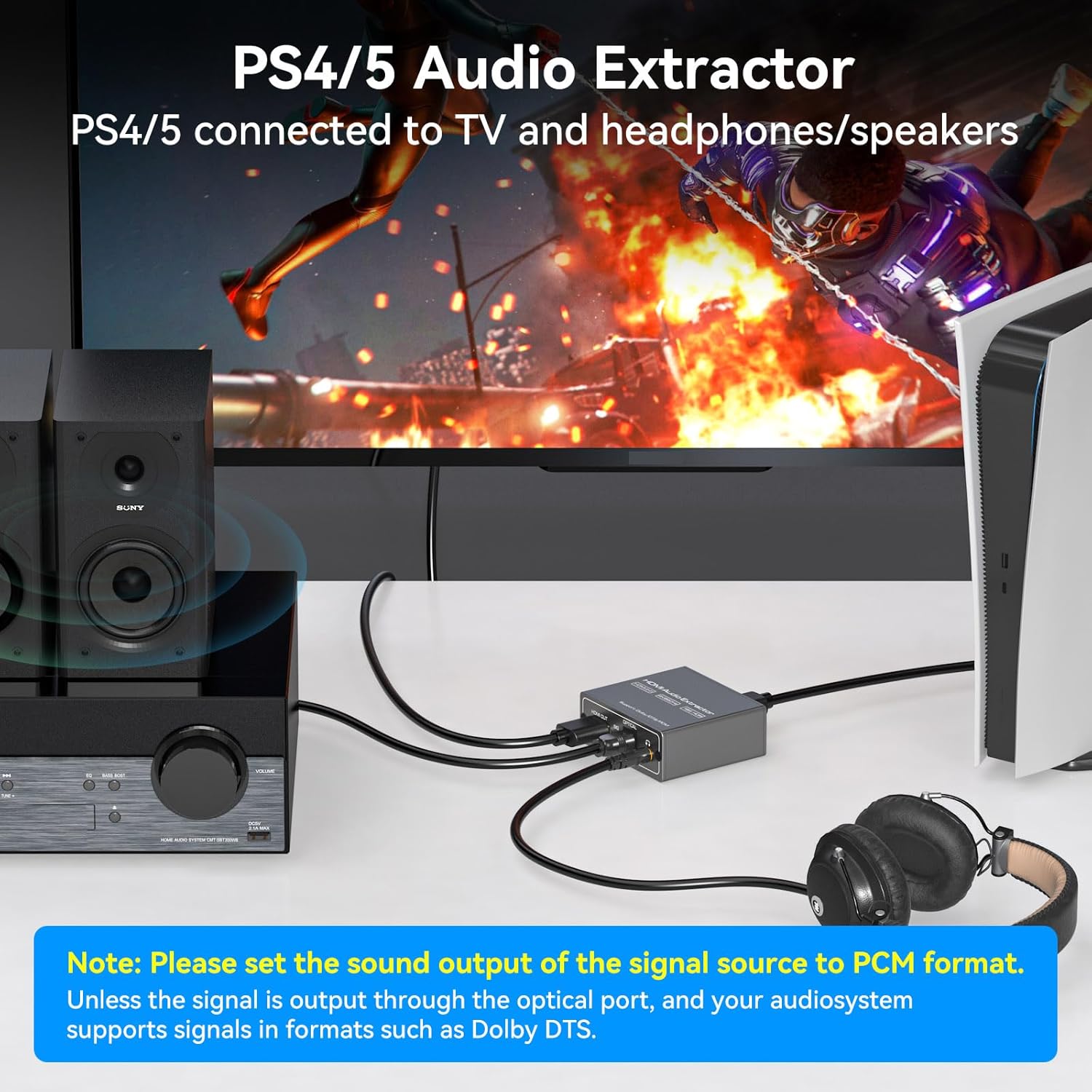
Figure 6: 2.0CH Headphone Audio Setup
This image demonstrates connecting a PlayStation 4 or 5 to the HDMI Audio Extractor. The video signal is passed through to a TV, while the 3.5mm audio output is connected to headphones, allowing for private listening during gaming.
- Tryb TV:
In TV mode, the audio format output will follow the parameters supported by your connected TV. Use this mode if you encounter no audio signal when using 5.1CH or 2.0CH modes, especially if your display device uses a DVI interface or has specific audio handling requirements.
Ważna uwaga: If no sound is obtained, please ensure the audio output setting on your signal source device (e.g., Blu-ray player, game console, PC) is configured to PCM format, especially when using 2.0CH mode for 3.5mm output.
7. Rozwiązywanie Problemów
- Brak wyjścia audio:
- Ensure the audio extractor is properly powered via the USB 5V port and the 'PW' indicator light is on.
- Verify that all HDMI and audio cables are securely connected.
- Sprawdź TRYB switch setting on the extractor. If using 3.5mm output, select 2.0CH mode. If using optical output for surround sound, select 5.1CH mode.
- Confirm that your HDMI source device's audio output is set to PCM format, especially for 2.0CH output. For 5.1CH optical output, ensure your audio receiver supports Dolby Digital or DTS.
- Increase the volume on both your signal source and the connected audio receiver/speakers/headphones.
- No Video Output or Poor Video Quality:
- Sprawdź, czy wszystkie kable HDMI są solidnie podłączone.
- Use high-quality, HDMI 2.0 certified cables, especially for 4K@60Hz and HDR10 signals.
- Verify that your display device supports the resolution and refresh rate being output by your source.
- ARC/eARC Not Working:
To urządzenie nie NIE support ARC (Audio Return Channel) or eARC functionality. Audio must be extracted from the HDMI source before it reaches the TV, or from the TV's dedicated audio output ports if available.
- Low Audio Volume:
If the audio output is too low, increase the volume on your signal source device and the connected audio output device (e.g., headphones, speakers, ampliyfikator).
8. Specyfikacje
| Funkcja | Szczegół |
|---|---|
| Wymiary produktu (dł. x szer. x wys.) | 4.8 x 2.2 x 0.8 cala |
| Waga przedmiotu | 0.317 uncji |
| Numer modelu | 52-542 |
| Wersja HDMI | HDMI 2.0b |
| Wersja HDCP | HDCP2.2 jest standardem, który umożliwia: |
| Obsługa maksymalnej rozdzielczości | 4K@60Hz (YUV444), 1080P@144Hz, 1080P@120Hz |
| Przepustowość łącza | 18 Gb/s |
| Obsługa HDR | HDR10 |
| Porty wyjściowe audio | Optical (SPDIF), 3.5mm AUX |
| Moc wejściowa | USB 5V |
| Kolor | Czarny |
| Kompatybilne urządzenia | PC, TV, Blu-ray/DVD players, gaming consoles, streaming devices |
9. Konserwacja
To ensure the longevity and optimal performance of your VPFET HDMI Audio Extractor:
- Przechowywać urządzenie w chłodnym i suchym miejscu, z dala od bezpośredniego światła słonecznego i nadmiernego ciepła.
- Unikaj narażania urządzenia na działanie wilgoci lub cieczy.
- Czyść zewnętrzną część miękką, suchą ściereczką. Nie używaj silnych środków chemicznych ani ściernych środków czyszczących.
- Zapewnij odpowiednią wentylację wokół urządzenia, aby zapobiec przegrzaniu.
- Aby zapobiec uszkodzeniom, należy obchodzić się z kablami i złączami ostrożnie.
10. Gwarancja i wsparcie
VPFET is committed to providing quality products and customer satisfaction. This audio splitter comes with a user manual and necessary cables. If you encounter any problems with your device, including defective products or operational issues, please contact our professional technical support team immediately. We are dedicated to assisting you until your issue is resolved and offer replacement services for product problems.
For support, please refer to the contact information provided in your product packaging or visit the official VPFET webstrona.
Powiązane dokumenty - 52-542
 |
Instrukcja obsługi ekstraktora dźwięku HDMI VPFET HD811 Kompleksowa instrukcja obsługi ekstraktora dźwięku HDMI VPFET HD811. W tym podręczniku znajdziesz funkcje, szczegółowe specyfikacje, układ panelu, schematy połączeń, instrukcje konfiguracji krok po kroku, wybór trybu audio, ustawienia FireTV oraz wskazówki dotyczące rozwiązywania problemów w celu optymalnej ekstrakcji dźwięku ze źródeł HDMI. |
 |
Instrukcja obsługi ekstraktora dźwięku HDMI Instrukcja obsługi ekstraktora dźwięku HDMI zawierająca szczegółowe informacje o jego funkcjach, specyfikacjach, opisie panelu, ustawieniach EDID, schematie okablowania i rozwiązywaniu problemów. |
 |
Goobay HDMI™ Audio Extractor 4K @ 30 Hz Bedienungsanleitung Die Bedienungsanleitung für den Goobay HDMI™ Audio Extractor 4K @ 30 Hz (Modell 58469). Erfahren Sie mehr über Einrichtung, Anschlüsse, Audioformate und Fehlerbehebung für diesen HDMI-zu-Analog-Audio-Konverter. |
 |
VPFET CV121AD Audio Converter User Manual User manual for the VPFET CV121AD Audio Converter, detailing features, specifications, connections, and troubleshooting for converting audio signals (Toslink, Coaxial, ARC) to various outputs (Toslink, Coaxial, Stereo R/L, 3.5mm). |
 |
Podłączanie ButtKickera do systemu bez wyjścia subwoofera Przewodnik opisujący podłączanie systemów haptycznych ButtKicker do źródeł dźwięku nieposiadających dedykowanego wyjścia na subwoofer, szczegółowo opisujący użycie ekstraktorów audio HDMI i konwerterów optyczno-analogowych. |
 |
Instrukcja obsługi konwertera HDMI na HDMI + audio SEADA SD-HHA Szczegółowa instrukcja obsługi konwertera SEADA SD-HHA HDMI na HDMI + Audio, obejmująca funkcje, specyfikacje, schematy połączeń i instrukcje bezpieczeństwa. Obsługuje rozdzielczość 4K@60Hz, HDR, ARC i wiele wyjść audio. |
Ask a question about this manual
Ask about setup, troubleshooting, compatibility, parts, safety, or missing instructions. Manuals+ will review the question and use this page’s manual context to help answer it.