1. Wprowadzenie
The Tycon TPSC2440NMPPT is an advanced Maximum Power Point Tracking (MPPT) solar charge controller designed for efficient battery charging from solar panels. It automatically adjusts to 12V or 24V battery systems and supports various battery types including Flooded, AGM, GEL, and Lithium, with a customizable USER setting. This controller features an integral LCD display for monitoring key system parameters.
2. Instrukcje bezpieczeństwa
Przed instalacją i uruchomieniem należy przeczytać i zrozumieć wszystkie instrukcje. Nieprzestrzeganie tych instrukcji może spowodować porażenie prądem, pożar lub poważne obrażenia.
- Upewnij się, że wszystkie przewody są prawidłowo spolaryzowane i pewnie podłączone.
- Do not disassemble or attempt to repair the controller. Refer to qualified service personnel.
- Zainstaluj kontroler w dobrze wentylowanym pomieszczeniu, z dala od materiałów łatwopalnych i gazów żrących.
- Always disconnect the battery and solar panel before installing or moving the controller.
- Podczas instalacji należy nosić odpowiedni sprzęt ochrony osobistej (PPE).
- The controller is designed for indoor use or protected outdoor environments (IP32 rating). Avoid direct exposure to water.
3. Koniec produktuview
The TPSC2440NMPPT controller is equipped with several features to optimize solar charging and battery management:
- Technologia MPPT: Maksymalizuje pozyskiwanie energii z paneli słonecznych.
- Auto-Ranging Voltage: Compatible with 12V or 24V battery arrays.
- Multimode Load Operation: Offers 5 selectable modes for load control.
- Soft Start Load Output: Powers high capacitive loads safely.
- Automatic Battery Equalization: Performs 30-day equalization for optimal battery health.
- Conformal Coated Electronics: Provides environmental protection.
- TVS Lightning Protection: Enhances durability against electrical surges.
- Integral LCD Display: Pokazuje pojemność bateriitage, Capacity, Charging Capacity, Temperature, Load Current, and Solar Current.
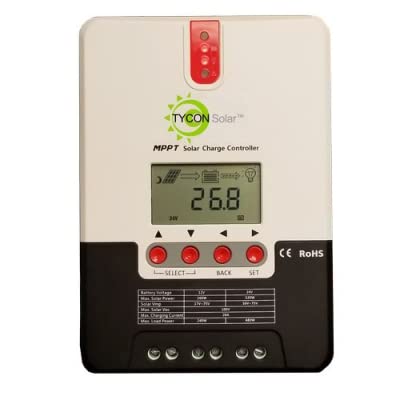
Rycina 1: Przód view of the Tycon TPSC2440NMPPT Solar MPPT Battery Charging Controller, showing the LCD display and connection terminals.
4. Konfiguracja i instalacja
Aby przeprowadzić prawidłową instalację, wykonaj następujące czynności:
- Montowanie: Choose a suitable location for mounting the controller. Ensure good ventilation and protection from direct sunlight and moisture.
- Podłączenie akumulatora: Najpierw podłącz akumulator do zacisków akumulatora kontrolera. Upewnij się, że biegunowość jest prawidłowa (+ do + i - do -). Kontroler automatycznie wykryje napięcie akumulatora.tage (12 V lub 24 V).
- Podłączenie panelu słonecznego: Connect the solar panel array to the controller's solar input terminals. Observe correct polarity. Ensure the open-circuit voltage panelu słonecznego nie przekracza maksymalnej objętości wejściowej kontroleratage (110V at 25°C).
- Podłączenie obciążenia (opcjonalnie): If using the load output, connect your DC loads to the controller's load terminals. Do not exceed the rated load current (20A Max).
- Czujnik temperatury: Connect the included battery temperature probe cable to the designated port on the controller. Place the sensor near the battery for accurate temperature compensation.
- Włączanie: Once all connections are secure, the controller will power on and begin operation.
5. Instrukcja obsługi
The integral LCD display provides real-time information about your solar charging system. Use the buttons (if present, assuming standard UP/DOWN/SET) to navigate through the display menus and adjust settings.
5.1 Informacje o wyświetlaczu LCD
- Pojemność bateriitage: Aktualna objętośćtage podłączonego akumulatora.
- Pojemność baterii: Estimated state of charge.
- Pojemność ładowania: Current power being delivered to the battery.
- Temperatura baterii: Temperature measured by the external probe.
- Wczytaj obecną: Current being drawn by connected DC loads.
- Solar Current: Current being generated by the solar panels.
5.2 Ustawienia typu baterii
The controller supports Flooded, AGM, GEL, and Lithium battery types. A USER setting allows for custom charge parameters. Refer to the on-screen menu for selecting and configuring the battery type.
5.3 Load Operation Modes
The controller offers 5 selectable load operation modes. Consult the device's menu for details on each mode and how to select them, typically involving timed operation or dusk-to-dawn control.
6. Konserwacja
Regularna konserwacja zapewnia optymalną wydajność i długowieczność regulatora ładowania słonecznego.
- Sprawdź połączenia: Okresowo sprawdzaj wszystkie połączenia przewodów pod kątem szczelności i korozji.
- Wyczyść kontroler: Keep the controller clean and free of dust. Use a dry cloth for cleaning. Do not use liquids.
- Stan baterii: Monitoruj pojemność bateriitage and capacity on the LCD. Ensure batteries are properly maintained according to their manufacturer's guidelines.
- Wentylacja: Aby zapobiec przegrzaniu, należy zadbać o dobrą wentylację miejsca instalacji.
7. Rozwiązywanie Problemów
| Problem | Możliwa przyczyna | Rozwiązanie |
|---|---|---|
| Brak wyświetlacza/brak zasilania | Loose battery connection; Battery voltage too low; Blown fuse (external, if applicable). | Check battery connections and polarity. Charge battery if voltage is below operating threshold. Check and replace any external fuses. |
| Brak ładowania słonecznego | Solar panel not connected; Incorrect polarity; Insufficient sunlight; Damaged solar panel/wiring. | Verify solar panel connections and polarity. Ensure panels are receiving adequate sunlight. Inspect panels and wiring for damage. |
| Ładowanie nie działa | Load disconnected; Overload; Short circuit; Battery voltage za niskie. | Check load connections. Reduce load if exceeding 20A. Check for short circuits. Ensure battery is sufficiently charged. |
| Niedokładne odczyty | Loose connections; Faulty sensor. | Check all wiring connections. Ensure temperature sensor is properly connected and placed. |
8. Specyfikacje
- Model: TPSC2440NMPPT
- Automatyczna głośnośćtage: 12V/24V (System)
- Amptutaj: 40A
- Znamionowy prąd obciążenia: Maksymalnie 20 A
- Maksymalne obciążenie pojemnościowe: 10,000 XNUMXuF
- Maksymalna objętość wejściowa energii słonecznejtage: 110V (25°C), 90V (25°C)
- Max Power Point Range: 2VDC to 75VDC (Battery Volts)
- Efektywność konwersji: 96% typ.
- MPPT Tracking Efficiency: 99%
- Zużycie własne: 1W
- Kompensacja temperatury: -3.0mV/°C/ogniwo
- Maksymalny rozmiar przewodu: 8AWG
- Tomtage and Current Accuracy: +/-2%
- Grunt: Negatywny grunt
- Ochrona środowiska: IP32
- Wymiary produktu: 12 x 9 x 6 cala
- Waga przedmiotu: 5.16 funta
- Typ wyświetlacza: LCD