
1. Wprowadzenie
Thank you for choosing the Estink 2.4-inch Smart Electronic Peephole Camera. This device provides enhanced home security with its wide-angle camera, clear TFT LCD screen, and 24-hour monitoring capabilities. This manual will guide you through the installation, operation, and maintenance of your new electronic peephole.
2. Funkcje produktu
- Ekran TFT LCD o przekątnej 2.4 cala: Provides a clear and smooth display of visitors.
- Kamera HD o rozdzielczości 1 megapikseli: Captures and records visitor information with high clarity.
- Szeroki kąt 145° View: Offers a broad perspective of the area outside your door for comprehensive security.
- 24-Hour Security Monitoring: Equipped with an intelligent operating system for continuous surveillance.
- Manual Photo Recording: Allows users to manually capture photos of visitors.
- Przechowywanie kart TF: Supports up to 32GB TF card (not included) for storing recordings, with automatic overwrite functionality.
- Ukryta konstrukcja: The outdoor camera resembles a traditional peephole, maintaining privacy.
- Łatwa instalacja: Designed for simple setup without the need for specialized tools or installers.
3. Zawartość opakowania
Proszę sprawdzić, czy w paczce znajdują się następujące elementy:
- Indoor Display Unit (with 2.4-inch TFT LCD screen)
- Outdoor Peephole Camera
- Uchwyt montażowy
- Set of Installation Screws (various lengths)
- Instrukcja obsługi

Image: All components of the Estink Smart Electronic Peephole Camera, including the indoor monitor, outdoor camera, mounting plate, and various screws.
4. Konfiguracja i instalacja
The Estink Smart Electronic Peephole Camera is designed for easy, direct installation. No special tools are required beyond a screwdriver.
4.1 przed instalacją
- Ensure your door has an existing peephole or can accommodate a hole with a diameter of approximately 15-50mm (0.6-2 inches).
- The door panel thickness should be approximately 35-110mm (1.4-4.3 inches).
- Prepare 3 AAA batteries (not included) for the indoor display unit.
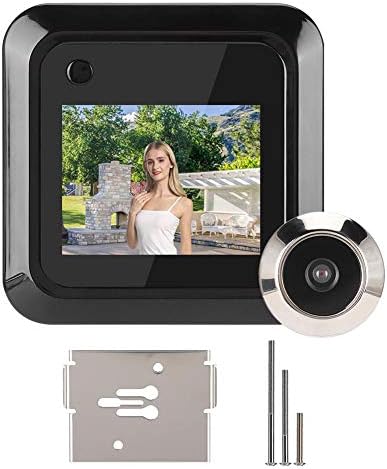
Image: The indoor display unit mounted on the door, showing a live view, with the outdoor camera visible through the door.
4.2 Kroki instalacji
- Usuń istniejący wizjer: If present, unscrew and remove your old peephole from the door.
- Insert Outdoor Camera: Insert the outdoor peephole camera through the door hole from the outside. Ensure the camera is facing outwards and the cable is threaded through to the inside.
- Zamontuj wspornik montażowy: From the inside of the door, place the mounting bracket over the camera cable and align it with the camera's threaded base.
- Bezpieczna kamera: Select the appropriate length screw from the provided set. Thread the screw through the mounting bracket and into the outdoor camera's threaded base. Tighten securely with a screwdriver until the outdoor camera is firmly in place.
- Podłącz jednostkę wewnętrzną: Connect the cable from the outdoor camera to the corresponding port on the back of the indoor display unit.
- Montaż jednostki wewnętrznej: Align the indoor display unit with the mounting bracket and slide it downwards until it clicks into place.
- Włóż baterie: Open the battery compartment on the back of the indoor unit and insert 3 AAA batteries, observing polarity.

Obraz: Tył view of the indoor display unit, highlighting the battery compartment and connection points.
5. Działanie
Operating your Estink Electronic Peephole Camera is straightforward.
5.1 Viewing Visitors
- Press the power button on the indoor display unit to activate the screen.
- The screen will display a live view from the outdoor camera.
- The wide-angle lens provides a comprehensive view of the area outside your door.

Obraz: Wizualna reprezentacja obiektywu szerokokątnego o kącie 160 stopni view provided by the camera, showing a broad area in front of a door.
5.2 Photo Recording
- Chwila viewing the live feed, press the designated photo button (usually the same as the power button or a separate button, refer to device markings) to capture a still image.
- Images will be saved to the inserted TF card.
- The system features an intelligent FIFO (First-In, First-Out) storage function, automatically overwriting the oldest filegdy karta TF jest pełna.

Image: The indoor unit displaying a photo, with icons indicating one-touch photo capture and TF card storage.
5.3 24-Hour Monitoring
The device is designed for continuous monitoring, providing security around the clock. Ensure batteries are adequately charged for uninterrupted operation.

Image: The electronic peephole camera shown in different environments, highlighting its application for continuous home security.
6. Konserwacja
To ensure optimal performance and longevity of your electronic peephole camera, follow these maintenance guidelines:
- Czyszczenie: Gently wipe the screen and camera lens with a soft, dry cloth. Avoid using abrasive cleaners or solvents.
- Wymiana baterii: When the battery indicator shows low power, replace the 3 AAA batteries in the indoor unit promptly.
- Zarządzanie kartami TF: Okresowo ponownieview and back up important recordings from your TF card. Format the TF card occasionally to maintain performance.
- Warunki środowiskowe: Ensure the outdoor camera is protected from extreme weather conditions if not already designed for it. The indoor unit should be kept in a dry environment.
7. Rozwiązywanie Problemów
If you encounter issues with your Estink Electronic Peephole Camera, refer to the following common problems and solutions:
| Problem | Możliwa przyczyna | Rozwiązanie |
|---|---|---|
| Ekran się nie włącza | Low or dead batteries; incorrect battery installation; loose cable connection. | Replace batteries; ensure batteries are inserted with correct polarity; check that the cable between the outdoor camera and indoor unit is securely connected. |
| Brak obrazu na ekranie | Loose cable connection; faulty outdoor camera; screen malfunction. | Verify cable connection; contact customer support if the issue persists after checking connections. |
| Cannot record photos | Brak włożonej karty TF; karta TF jest pełna; błąd karty TF. | Insert a TF card (up to 32GB); check if the TF card is full and back up/delete files; try formatting the TF card or using a different one. |
| Obraz jest niewyraźny lub niejasny | Dirty camera lens; protective film still on lens/screen. | Clean the camera lens and screen with a soft cloth; remove any protective films. |
| Device does not fit door | Door hole or thickness outside specified range. | Ensure your door hole diameter is 15-50mm and door thickness is 35-110mm. If not, the product may not be compatible. |
8. Specyfikacje
| Funkcja | Szczegół |
|---|---|
| Producent | Śmierdzieć |
| Numer modelu | Estink9p6stdxgnk |
| Waga przedmiotu | 7.4 uncji |
| Kolor | Czarny |
| Tomtage | 1 wolty |
| Applicable Door Hole | Approx. 15 - 50mm (0.6 - 2 inches) |
| Door Panel Thickness | Approx. 35 - 110mm (1.4 - 4.3 inches) |
| Źródło zasilania | Baterie 3 x AAA (brak w zestawie) |
| Składowanie | Karta TF (do 32 GB, nie jest dołączona) |
| Rozdzielczość kamery | 1 megapiksela |
| Viewing kąt | 145° (or 160° as per some descriptions) |
9. Oficjalny film o produkcie
Video: An official product video demonstrating the features and functionality of the Estink 2.4-inch Smart Electronic Peephole Camera. This video showcases the device's design, screen clarity, and ease of use.
10. Gwarancja i wsparcie
For warranty information or technical support, please refer to the product packaging or contact the seller directly through your purchase platform. Keep your purchase receipt for any warranty claims.