
SANNCE NVR+4*CAM
Instrukcja obsługi systemu monitoringu CCTV SANNCE 8CH 4K PoE
Model: NVR+4*CAM
Marka: SANNCE
1. Wprowadzenie
This manual provides detailed instructions for the installation, operation, and maintenance of your SANNCE 8CH 4K PoE CCTV System. This system is designed to provide reliable surveillance for your home or business, featuring Power over Ethernet (PoE) for simplified installation, 3MP outdoor IP cameras with audio recording, and advanced motion detection capabilities.

Figure 1.1: SANNCE 8CH 4K PoE CCTV System components, including the Network Video Recorder (NVR) and four 3MP IP cameras.
2. Komponenty systemu
Your SANNCE 8CH 4K PoE CCTV System typically includes the following items:
- 1 x 8-kanałowy sieciowy rejestrator wideo 4K (NVR)
- 4 kamer IP PoE 3 MP
- Kable Ethernet do podłączenia kamery
- Zasilacz do rejestratora NVR
- Mysz USB
- Szybki przewodnik
3. Przewodnik konfiguracji
3.1 Początkowa konfiguracja rejestratora NVR
- Podłącz monitor: Podłącz monitor do portu HDMI lub VGA rejestratora NVR.
- Podłącz mysz: Podłącz dołączoną mysz USB do portu USB w rejestratorze NVR.
- Podłącz zasilanie: Podłącz NVR do gniazdka elektrycznego za pomocą dołączonego zasilacza. NVR włączy się automatycznie.
- Połączenie internetowe: Podłącz port LAN rejestratora NVR do routera za pomocą kabla Ethernet, aby uzyskać zdalny dostęp i korzystać z funkcji sieciowych.
3.2 Instalacja kamery
The PoE (Power over Ethernet) feature simplifies camera installation by providing both power and video signal through a single Ethernet cable.
- Montowanie: Wybierz odpowiednie lokalizacje dla swoich kamer, zapewniając optymalną viewing angles and coverage. Use the provided screws and anchors to securely mount each camera.
- Podłącz kamery do NVR: Connect each IP camera to one of the PoE ports on the back of the NVR using an Ethernet cable. The cameras will automatically power on and connect to the NVR.

Figure 3.1: Simplified wiring with Power over Ethernet (PoE), where a single Ethernet cable transmits both data and power to the camera from the NVR.
3.3 Początkowa konfiguracja systemu
Po pierwszym uruchomieniu NVR przeprowadzi Cię przez kreatora konfiguracji początkowej. Postępuj zgodnie z instrukcjami wyświetlanymi na ekranie, aby:
- Ustaw silne hasło dla konta administratora.
- Skonfiguruj ustawienia daty i godziny.
- Adjust network settings (DHCP is recommended for most users).
- Format the hard drive (if an optional HDD is installed).
4. Obsługa systemu
4.1 Na żywo View i nagrywanie
Once cameras are connected, their live feeds will appear on the connected monitor. The system supports continuous recording, motion-triggered recording, and scheduled recording.
- Ciągłe nagrywanie: Nagrywa 24/7.
- Nagrywanie wyzwalane ruchem: Rejestruje tylko po wykryciu ruchu, oszczędzając miejsce na dysku.
- Zaplanowane nagrywanie: Records during specific times of the day.

Figure 4.1: The 3MP cameras provide Super HD clarity, allowing for clear and sharp viewing of details.
4.2 Detekcja ruchu i alerty
Configure motion detection zones and sensitivity through the NVR's menu. When motion is detected in the specified areas, the system can:
- Trigger recording.
- Send instant push notifications to your smartphone via the Sannce Sight App.
- Wysyłaj alerty e-mailowe zawierające migawki.
- Activate an NVR buzzer alarm.

Figure 4.2: The system features sensitive motion and human detection, providing immediate alerts through the app, email, and NVR buzzer.
4.3 Nagrywanie dźwięku
The cameras are equipped with built-in microphones for audio recording, providing an additional layer of security and information.

Figure 4.3: Cameras support audio recording, capturing sound along with video footage.
4.4 Remote Access (Sannce Sight App)
Download the free Sannce Sight App from your smartphone's app store. With the app, you can:
- View żyćtage z dowolnego miejsca.
- Review nagrane filmy.
- Manage camera settings.
- Receive real-time alerts.
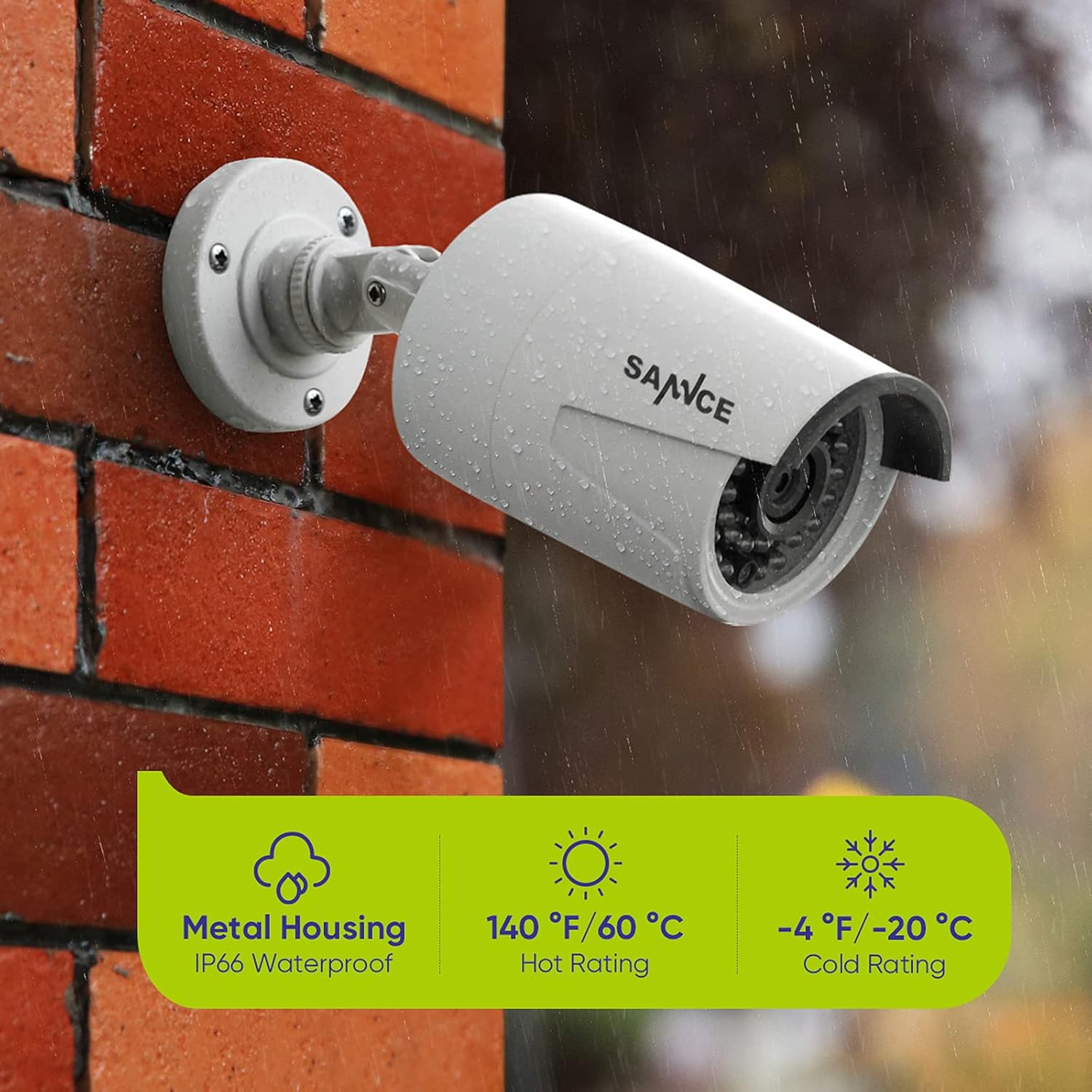
Figure 4.4: Enjoy unlimited remote access to your security system via smartphone, tablet, or computer.
5. Konserwacja
Regular maintenance ensures optimal performance and longevity of your SANNCE CCTV system.
- Czyszczenie aparatu: Okresowo czyść obiektywy aparatu miękką,amp szmatką, aby usunąć kurz i brud, które mogą zasłaniać view. Unikaj środków czyszczących o działaniu ściernym.
- Aktualizacje oprogramowania układowego: Sprawdź oficjalne informacje SANNCE website for any available firmware updates for your NVR and cameras. Keeping firmware updated can improve performance and add new features.
- Kontrola kabla: Regularly inspect all cables for any signs of wear, damage, or loose connections. Ensure all connections are secure.
- Ochrona środowiska: While cameras are IP66 weatherproof, extreme conditions can still affect performance. Ensure cameras are securely mounted and protected from direct impact.

Figure 5.1: The cameras feature durable metal housing and IP66 weatherproof rating, designed to withstand various weather conditions from -4°F (-20°C) to 140°F (60°C).
6. Rozwiązywanie Problemów
This section addresses common issues you might encounter. For more complex problems, please contact SANNCE support.
| Problem | Możliwa przyczyna | Rozwiązanie |
|---|---|---|
| Brak obrazu na monitorze | Loose cable connection; NVR not powered on; Incorrect monitor input. | Check HDMI/VGA cable connections; Ensure NVR power adapter is plugged in; Select correct input source on monitor. |
| Camera not showing image | Loose PoE cable; Camera not powered; Faulty camera/port. | Ensure PoE cable is securely connected to both camera and NVR port; Try connecting camera to a different NVR port; Restart NVR. |
| Cannot access system remotely | NVR not connected to internet; App configuration error; Network firewall. | Verify NVR's network connection; Re-add device to Sannce Sight App; Check router settings for port forwarding if necessary. |
| Brak nagrywania | No HDD installed (for variants with HDD); HDD not formatted; Recording schedule not set. | Ensure an HDD is installed (if applicable to your model); Format HDD via NVR menu; Configure recording schedule or motion detection. |
7. Specyfikacje
| Funkcja | Szczegół |
|---|---|
| Marka | SANNCE |
| Technologia łączności | Przewodowy |
| Rozdzielczość przechwytywania wideo | 3840 x 2160 (4K NVR support) |
| Liczba kanałów | 8 |
| Pojemność pamięci masowej | 1 TB (for specific variants, base model is NO HDD) |
| Kolor | NVR+4*CAM |
| Wymiary przedmiotu Dł. x Szer. x Wys. | 12.6 x 10.6 x 7 cala |
| Kompatybilne urządzenia | Kamery |
| Format sygnału | Cyfrowy |
| Inne funkcje aparatu | Przód |
| Technologia słabego oświetlenia | Kolor nocy |
| Zakres noktowizora | 100 stóp |
| Szybkość klatek | 15/30/60 FPS |
| Tryb nagrywania | 4K video, audio |
| Technologia czujnika optycznego | CMOS |
| Interfejs sprzętowy | Sieć Ethernetowa |
| Typ soczewki | Naprawił |
| Wejście wideo | RJ45 |
| Producent | SANNCE |
| Wymiary produktu | 12.6 x 10.6 x 7 cala |
| Waga przedmiotu | 8.07 funta |
| Data pierwszej dostępności | 9 grudnia 2020 r. |
8. Gwarancja i wsparcie
8.1 Informacje o gwarancji
Produkty SANNCE zazwyczaj objęte są ograniczoną gwarancją. Prosimy o zapoznanie się z kartą gwarancyjną dołączoną do produktu lub odwiedzenie oficjalnej strony SANNCE. webAby zapoznać się ze szczegółowymi warunkami gwarancji obowiązującymi w Twoim regionie i dacie zakupu, odwiedź naszą witrynę.
8.2 Wsparcie techniczne
For technical assistance, troubleshooting beyond this manual, or inquiries regarding your SANNCE 8CH 4K PoE CCTV System, please contact SANNCE customer support. Support contact information can usually be found on the official SANNCE webmiejscu lub w opakowaniu produktu.