
YESKAMO B08PP2CFBP
YESKAMO Wireless Security Camera System User Manual
Model: B08PP2CFBP
1. Wprowadzenie
This manual provides detailed instructions for the installation, operation, and maintenance of your YESKAMO Wireless Security Camera System. This system includes 3MP wireless cameras and an 8-channel NVR with a pre-installed 1TB HDD, designed for reliable outdoor and indoor surveillance.

Obraz: Ponadview of the YESKAMO Wireless Security Camera System, showing two cameras, the NVR, and a 1TB hard drive.
2. Zawartość opakowania
Sprawdź, czy w przesyłce znajdują się wszystkie elementy wymienione poniżej:
- 2 x Wireless Security Cameras (3MP)
- 1 x Wireless NVR (8-channel, 5MP compatible) with 1TB HDD pre-installed
- 2 x 12V1A Power Adapters for Cameras
- 1 x 12V2A Power Adapter for NVR
- Mysz 1 x USB
- 1 x 1m LAN Cable
- 2 x Security Stickers
- 1 x Quick Start Guide (Japanese)
- 1 x Detailed User Manual (Japanese)
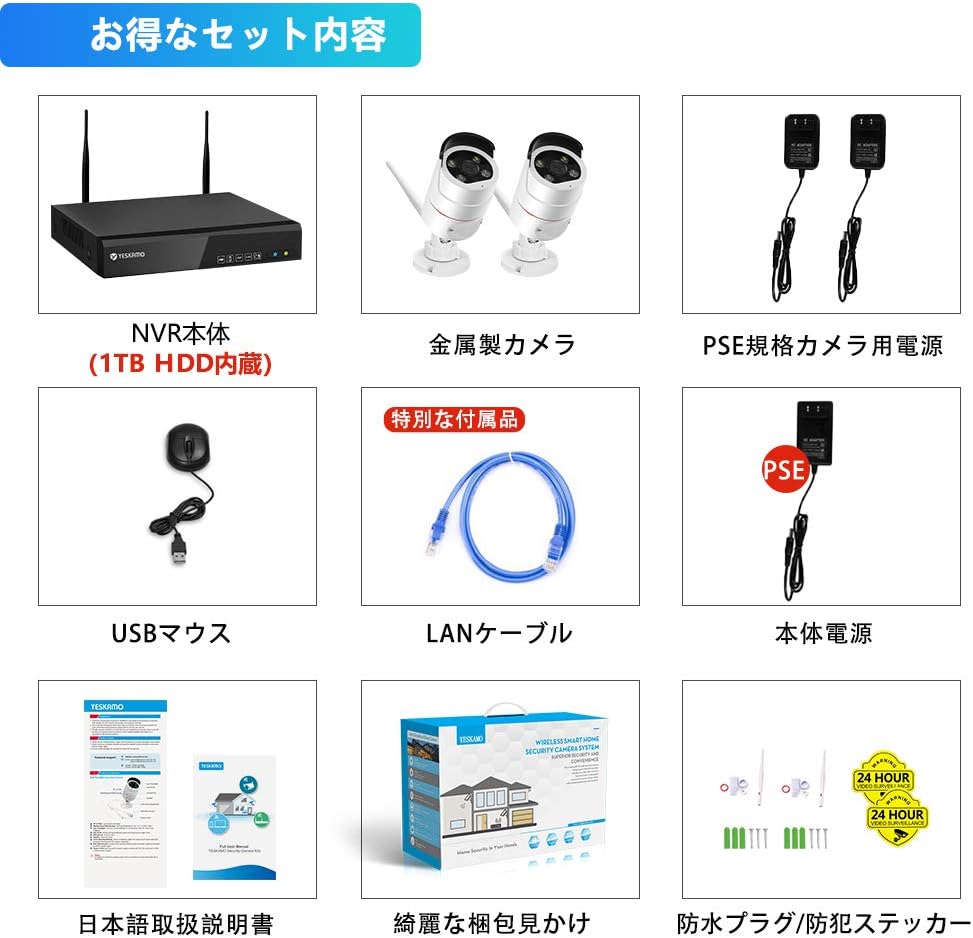
Image: Illustration of the complete package contents, including NVR, cameras, power adapters, mouse, LAN cable, and manuals.
3. Koniec produktuview
3.1 Funkcje aparatu
- 3MP High-Resolution Sensor with HISILICON chip
- Obiektyw szerokokątny 100°
- IP66 Waterproof and Dustproof Metal Casing
- Built-in Microphone and Speaker for Two-Way Audio
- AI Human Detection with Sensor Light and Siren Alarm
- Diody podczerwieni do widzenia w nocy
- Adjustable 3DB Antennas
3.2 Funkcje NVR
- 8-Channel Recorder, compatible with up to 5MP cameras
- Pre-installed 1TB HDD for continuous recording
- H.265 Video Compression for efficient storage
- VGA and HDMI outputs for monitor connection
- LAN port for network connection and remote access
- Porty USB do myszy i tworzenia kopii zapasowych
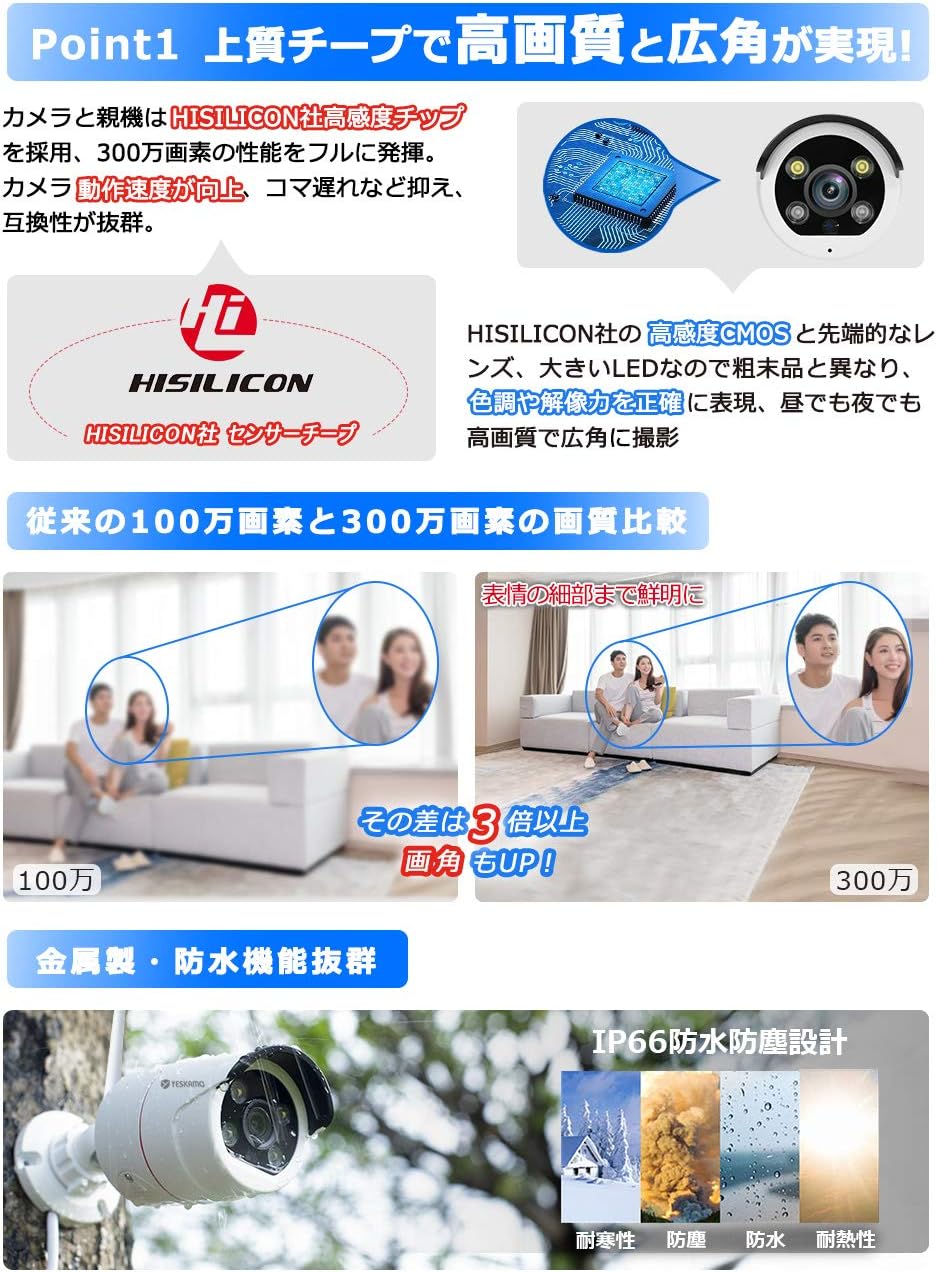
Obraz: Szczegółowy view of the camera's high-sensitivity chip and lens, alongside a comparison demonstrating the superior clarity of 3MP resolution over 1MP.
4. Przewodnik konfiguracji
Aby przeprowadzić początkową konfigurację systemu, wykonaj następujące czynności:
- Podłącz kamery: Plug the 12V1A power adapters into each camera and then into a power outlet. The cameras will power on.
- Podłącz NVR:
- Connect the NVR to a monitor (VGA or HDMI) with a resolution of 1024x1280 or higher.
- Podłącz mysz USB do portu USB rejestratora NVR.
- Plug the 12V2A power adapter into the NVR and then into a power outlet. The NVR will power on and automatically detect the cameras within seconds.
- Lokalny Viewing: Once powered on, the system will automatically begin recording. You can view żyćtage and playback recordings directly on the connected monitor without an internet connection.
- Zdalny Viewing (Optional): Dla pilota viewing via mobile app or PC, connect the NVR to your home router using the provided LAN cable. Ensure your router has an active internet connection.
Image: Visual guide for connecting the camera power, NVR power, and NVR to a monitor.
5. Instrukcja obsługi
5.1 Tryby nagrywania
System obsługuje różne tryby nagrywania:
- Ciągłe nagrywanie: Records 24/7. The 1TB HDD allows for extended recording periods. Older files are automatically overwritten when the disk is full.
- Zaplanowane nagrywanie: Set specific times for recording, such as during weekdays, nights, or holidays.
- Nagrywanie z wykrywaniem ruchu: Records only when motion is detected. This conserves storage space and makes reviewing events easier.
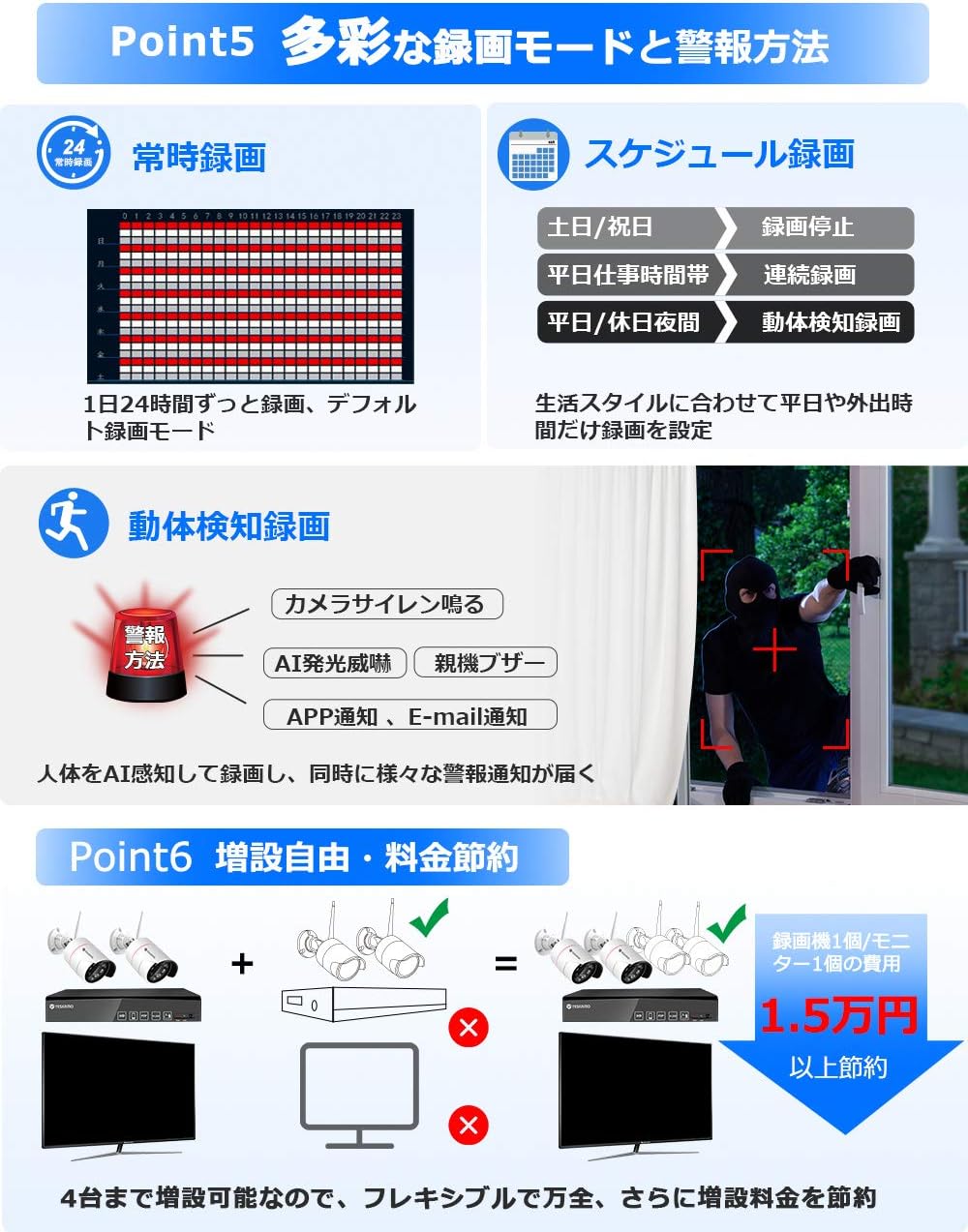
Image: Visual representation of different recording options including continuous, scheduled, and motion detection, along with various alarm methods.
5.2 AI Human Detection and Alarms
The system features advanced AI human detection to minimize false alarms caused by light changes or heat. When a human is detected:
- Alarm syreny: The camera can emit a siren sound to deter intruders.
- Światło czujnika: In dark conditions, the camera's sensor lights will illuminate, providing a color image and acting as a deterrent. This feature can be enabled/disabled.
- Powiadomienia mobilne: Otrzymuj natychmiastowe alerty na swój smartfon.
- Powiadomienia e-mailowe: Get email alerts with snapshots of the event.
- Brzęczyk NVR: Rejestrator NVR może emitować alarm dźwiękowy.

Image: Illustration of AI human detection triggering a siren and sensor light, showing color night vision capabilities and different night vision modes.
5.3 Dźwięk dwukierunkowy
Equipped with a high-sensitivity microphone and speaker, the cameras support two-way audio communication. You can:
- Listen to audio from the camera's location (up to 8m range).
- Speak through the camera to communicate with visitors or deter intruders.

Image: Depiction of two-way audio functionality, showing a user speaking through a smartphone to someone at the camera's location, and audio recording examples.
5.4 Dostęp zdalny
Access your camera system remotely using the YESKAMO app on your smartphone or client software on your PC. Ensure the NVR is connected to your router via LAN cable for this functionality.

Image: Steps for connecting the NVR to a router and accessing the system via the YESKAMO app on a smartphone or PC, illustrating live view i odtwarzanie.
6. Konserwacja
- Czyszczenie: Regularly wipe the camera lenses with a soft, dry cloth to ensure clear image quality. Do not use harsh chemicals.
- Ochrona przed warunkami atmosferycznymi: The cameras are IP66 rated for outdoor use, providing protection against dust and strong jets of water. However, avoid submerging them in water.
- Zarządzanie kablami: Ensure all cables are securely connected and protected from environmental damage. Use waterproof plugs for exposed connections.
- Aktualizacje oprogramowania układowego: Check the official YESKAMO webOdwiedzaj witrynę okresowo w celu uzyskania aktualizacji oprogramowania sprzętowego, aby zapewnić optymalną wydajność i bezpieczeństwo.
7. Rozwiązywanie Problemów
7.1 No Image Display
- Sprawdź, czy rejestrator NVR i kamery są prawidłowo włączone.
- Ensure the monitor is correctly connected to the NVR via VGA or HDMI.
- Verify that the monitor input source is set correctly.
7.2 Unstable Wi-Fi Signal
If the wireless signal between the cameras and NVR is unstable, consider the following solutions:
- Funkcja powtarzania: Utilize the NVR's repeater function to extend the Wi-Fi range.
- Połączenie przewodowe: Connect cameras to the NVR directly via an Ethernet cable for a more stable connection.
- External Repeater: Use a separate Wi-Fi repeater or range extender (sold separately).
- Rozbudowana antena: Connect an external Wi-Fi extension antenna (sold separately) to the cameras.
7.3 Problemy z nagrywaniem
- Ensure the 1TB HDD is properly installed and recognized by the NVR.
- Check recording settings (continuous, scheduled, motion detection) to ensure they are configured as desired.
- If the HDD is full, the system will automatically overwrite the oldest files. To retain more footage, consider upgrading the HDD to a maximum of 6TB.
8. Specyfikacje
| Funkcja | Specyfikacja |
|---|---|
| Marka | TAK |
| Numer modelu | B08PP2CFBP |
| Technologia komunikacji bezprzewodowej | Wi-Fi |
| Tworzywo | Metal (Camera Body) |
| Wymiary produktu (dł. x szer. x wys.) | Wymiary 31.5 x 15.5 x 28.5 cm |
| Poziom wodoodporności | Wodoodporność IP66 |
| Waga produktu | 3.1 kilograma |
| Cechy specjalne | AI Human Detection, Human Sensor Light, Night Vision, Recording, Two-Way Talk |
| Rozdzielczość przechwytywania wideo | 1296P (3 MP) |
| Źródło zasilania | Adapter prądu stałego |
| Typ montażu | Montaż sufitowy |
| Zawarte komponenty | 2 Wireless Cameras, Wireless NVR, 2 Camera Power Adapters, 1 NVR Power Adapter, Mouse, 1m LAN Cable, 2 Security Stickers, Manuals |
| Pojemność dysku twardego | 1TB (z możliwością rozszerzenia do 6TB) |
9. Gwarancja i wsparcie
YESKAMO provides comprehensive support for its products:
- Gwarancja: Ten produkt jest objęty 3-letnią gwarancją.
- Zasady zwrotu: 60-dniowa gwarancja zwrotu pieniędzy.
- Polityka wymiany: Free exchange within 1 year.
- Wsparcie techniczne:
- Telephone support available during business hours.
- Email inquiries are responded to promptly, typically within 24 hours.
- For any questions or assistance, please contact YESKAMO customer support.
Ask a question about this manual
Ask about setup, troubleshooting, compatibility, parts, safety, or missing instructions. Manuals+ will review the question and use this page’s manual context to help answer it.