
1. Wprowadzenie
The Kawish KW308 OBD2 Breakout Box is a diagnostic tool designed to provide easy access to the On-Board Diagnostics II (OBDII) connector in vehicles. It allows for monitoring of communication protocols, power, and ground signals, aiding in the diagnosis of vehicle Electronic Control Unit (ECU) or decoder issues. This device is essential for automotive technicians and enthusiasts for efficient and safe vehicle diagnostics.
2. Funkcje produktu
- Cyfrowy wyświetlacz LCD: Zapewnia obj. w czasie rzeczywistymtage readings of the OBD port, helping to identify power issues.
- Wskaźniki LED: Different colored LEDs (yellow, green, red) illuminate to indicate OBDII protocol communication, normal ground, and normal power supply respectively.
- 16-Pin Interface: Designed for easy connection to all 16 pins of the OBDII port for comprehensive testing.
- 4mm Banana Plug Sockets: Allows connection of external testing equipment such as multimeters or oscilloscopes for detailed signal analysis.
- Rozszerzona długość kabla: A 128cm (approximately 50.39 inches) extension cable provides flexibility and convenience during use in confined spaces.
- Ochrona bezpieczeństwa: Features reverse polarity protection with an audible alarm to prevent damage to the diagnostic tool and vehicle.
- Zintegrowana latarka: A small flashlight assists in locating and connecting to the OBD port in low-light conditions.
- Protocol Detection: Capable of detecting various OBDII communication protocols including PWM (J1850), VPW (J1850), ISO 9141-2, DIS/ISO 14230-4 (12V automotive and 24V diesel), and CAN bus (J-2284, SAEJ1939).

Figure 1: Kawish KW308 OBD2 Breakout Box with key features labeled.
3. Zawartość opakowania
- 1 x 16-Pin CAN Breakout Box
4. Konfiguracja i połączenie
- Zlokalizuj port OBDII: Identify the vehicle's 16-pin OBDII diagnostic link connector (DLC), typically located under the dashboard on the driver's side. Use the integrated flashlight if necessary.
- Podłącz skrzynkę rozdzielczą: Plug the male end of the Kawish KW308 OBD2 Breakout Box into the vehicle's OBDII DLC. Ensure a secure connection.
- Włączanie: Once connected, the device will typically power on automatically, displaying the voltage on its LCD screen.
- Connect Diagnostic Equipment (Optional): If using an OBD2 scanner, plug it into the female OBDII port on the breakout box. For multimeter or oscilloscope testing, connect the probes to the corresponding 4mm banana plug sockets on the breakout box.

Figure 2: Connecting the OBD2 Breakout Box to the vehicle's diagnostic port and a scanner.

Figure 3: Using the 4mm banana plug sockets to connect a multimeter for signal testing.
5. Instrukcja obsługi
5.1 Interpretacja wskaźników LED
The breakout box features various colored LEDs to indicate the status of different pins:
- Red LED (Pin 16): Illuminates steadily if the vehicle's power supply is normal.
- Green LEDs (Pins 4/5): Illuminate steadily if a normal car ground is detected.
- Yellow LEDs (Pins 2/6/7/10/14/15): Flash with a signal waveform when the diagnostic tool is communicating with the vehicle via the respective protocol.

Figure 4: Explanation of LED indicator functions.
5.2 Korzystanie z wyświetlacza cyfrowego
The integrated LCD display shows the voltage present at the OBD port, allowing for quick verification of power supply before proceeding with diagnostics.
5.3 Advanced Testing with External Tools
For in-depth analysis, connect a multimeter or oscilloscope to the 4mm banana plug sockets. This allows you to measure specific signal information on any lit port, helping to identify complex electrical or communication issues.
6. Definicje pinów
The 16-pin OBDII interface has specific functions assigned to each pin. Refer to the table below for detailed definitions:

Figure 5: OBD2 16-Pin Interface Pin Definitions.
| SZPILKA | DEFINICJA | SZPILKA | DEFINICJA |
|---|---|---|---|
| 1 | OEM Discretionary | 9 | OEM Discretionary |
| 2 | Bus+ Line of SAE J1850 (PWM/VPW) | 10 | Bus- Line of SAE J1850 (PWM) |
| 3 | OEM Discretionary | 11 | OEM Discretionary |
| 4 | Podwozie Uziemienie | 12 | OEM Discretionary |
| 5 | Sygnał uziemienia | 13 | OEM Discretionary |
| 6 | CAN High of SAE J2284 (ISO15765-4) | 14 | CAN Low of SAE J2284 (ISO15765-4) |
| 7 | K-Line (ISO9141-2 and ISO14230-4) | 15 | L-Line (ISO9141-2 and ISO14230-4) |
| 8 | OEM Discretionary | 16 | Battery Power On when plugged into DLC |
7. Informacje dotyczące bezpieczeństwa
- Ochrona przed odwrotną polaryzacją: The device is equipped with reverse polarity protection. If an incorrect connection is made, an alarm will sound to alert the user and prevent damage.
- Avoid Jumpering Pins: Do not connect pins together without a thorough understanding of the vehicle's electrical circuits and the specific diagnostic procedure. Incorrect jumpering can cause severe damage to the vehicle's ECU or the diagnostic tool.
- Stosować w pomieszczeniach o dobrej wentylacji: Always perform diagnostic work in a well-ventilated area.
- Keep Away from Moving Parts: Ensure cables and the device are clear of any moving engine parts or hot surfaces.
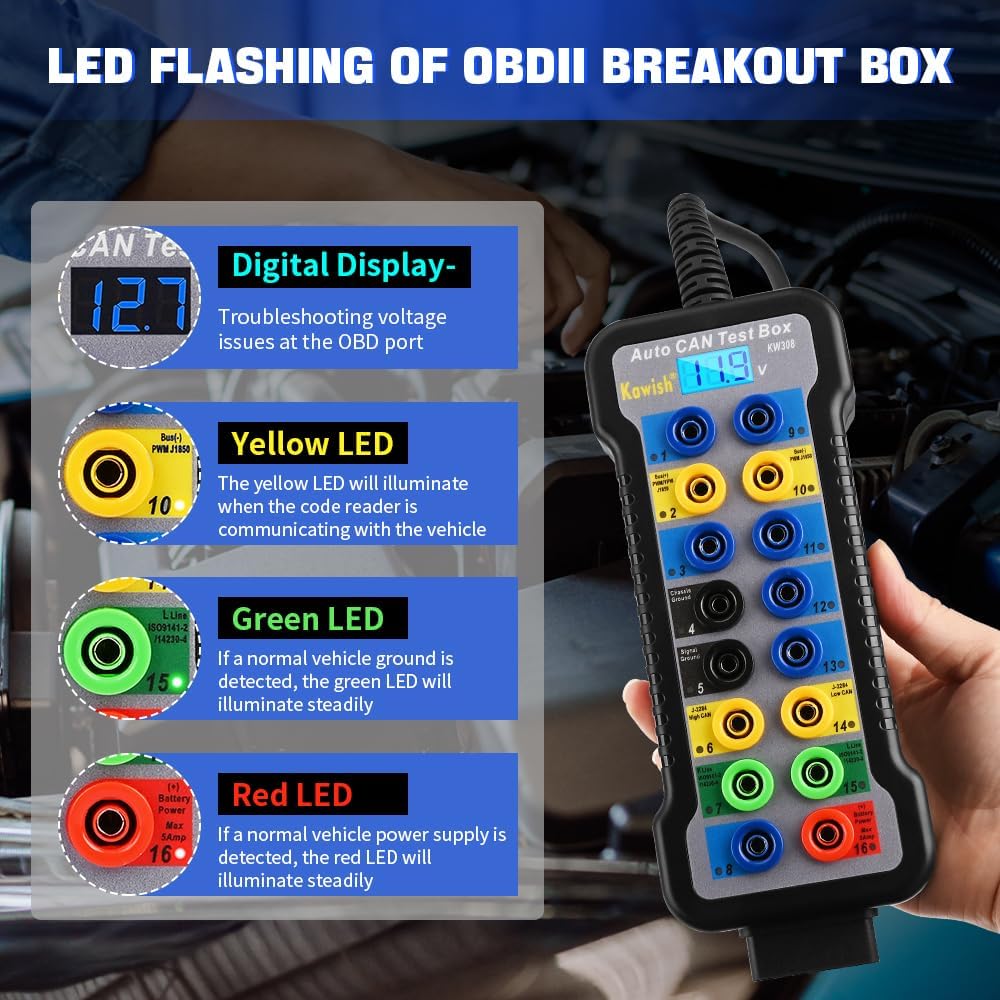
Figure 6: Safety feature: Short circuit and overload protection.
8. Rozwiązywanie Problemów
- Brak zasilania urządzenia:
a. Check the vehicle's OBDII port for proper voltage using the digital display. If no voltage is shown, there might be an issue with the vehicle's OBDII port power supply.
b. Ensure the breakout box is securely plugged into the vehicle's OBDII port. - Brak komunikacji z pojazdem:
a. Verify that the yellow LEDs for communication protocols are flashing. If not, check the connection to the vehicle and the diagnostic tool.
b. Ensure the vehicle's ignition is in the 'ON' position (engine off or running, as required by the diagnostic procedure).
c. Confirm that the diagnostic tool being used is compatible with the vehicle's protocol. - Dźwięki alarmu:
a. An alarm indicates a reverse polarity connection or a short circuit. Immediately disconnect the device and re-check all connections for correctness before reconnecting.
9. Specyfikacje
- Model: KW308
- Waga przedmiotu: 14.1 uncji (około 400 gramów)
- Wymiary produktu: 7.87 x 1.38 x 3.15 cala (około 20 x 3.5 x 8 cm)
- Długość kabla: 128 cm (około 50.39 cala)
- Interfejs: 16-Pin OBDII
- Zgodność: All OBDII compliant vehicles (12V automotive and 24V diesel)

Rysunek 7: Wymiary produktu i jego komponentyview.
10. Gwarancja i wsparcie
For warranty information and technical support, please refer to the product packaging or contact Kawish customer service directly. Specific warranty terms and conditions may vary.