
1. Wprowadzenie
Thank you for choosing the Tbest CCD HD IP68 Reversing Camera. This manual provides detailed instructions for the installation, operation, and maintenance of your new reversing camera system. Please read this manual thoroughly before installation and use to ensure proper function and safety. This camera is designed to enhance your vehicle's safety by providing a clear view of the area behind your car when reversing.
2. Koniec produktuview
2.1 Główne cechy
- High-Definition CCD Sensor: Zapewnia wyraźny i ostry obraz.
- Stopień wodoodporności IP68: Gwarantuje trwałość i niezawodną pracę w różnych warunkach pogodowych.
- Obiektyw szerokokątny 170 stopni: Oferuje szerokie pole view aby zminimalizować martwe pola.
- Możliwość widzenia w nocy: Operates effectively in low-light conditions.
- Integrated License Plate Light Design: Replaces the original license plate light for a seamless, factory-like installation.
- Wytyczne dotyczące parkowania: Assists with precise parking maneuvers.
- Universal RCA Connector: Compatible with most aftermarket car displays and head units.
2.2 Zawartość opakowania
- 1 x Tbest CCD HD Reversing Camera
- 1 x Video Cable (approx. 6 meters / 19.7 feet)
- 1 x kabel zasilający
- 1 x Instrukcja obsługi (ten dokument)

This image displays the complete set of cables provided with the camera, including the video cable (approximately 6 meters long) and the power cable.
3. Informacje dotyczące bezpieczeństwa
Należy przestrzegać następujących środków ostrożności:
- Przed przystąpieniem do prac elektrycznych należy zawsze odłączyć akumulator pojazdu.
- Upewnij się, że wszystkie przewody są odpowiednio zaizolowane i zabezpieczone, aby zapobiec zwarciom i uszkodzeniom.
- Nie utrudniaj kierowcy view lub zakłócać działanie elementów sterujących pojazdu podczas instalacji.
- This camera is an aid for reversing and parking; it does not replace the driver's responsibility to check surroundings manually.
- Jeśli masz wątpliwości co do jakiegokolwiek etapu procesu instalacji, skonsultuj się ze specjalistą.
4. Konfiguracja i instalacja
The Tbest Reversing Camera is designed for specific vehicle models, integrating into the license plate light housing. Compatible vehicles include Renault Fluence (2019-2014), Renault Duster (2009-2014), Dacia Duster (2010-2014), Renault Megane 3 (2008-2016), and Nissan Terrano (2010-2014).
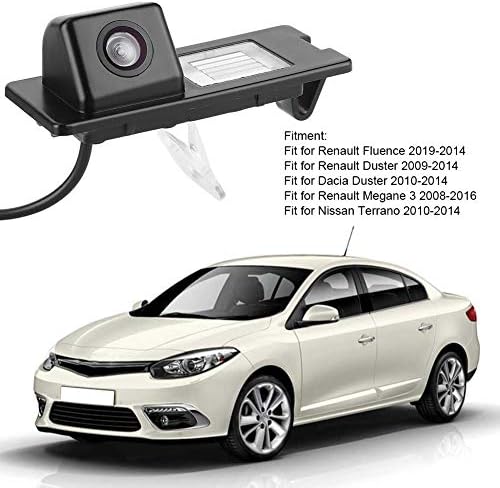
The camera unit is shown next to a list detailing compatible vehicle models, including Renault Fluence, Duster, and Megane, and Nissan Terrano.
4.1 Kroki instalacji
- Przygotuj pojazd: Ensure the vehicle is turned off and the parking brake is engaged. Disconnect the negative terminal of the car battery to prevent electrical shorts.
- Remove Original License Plate Light: Carefully remove the existing license plate light housing from your vehicle's rear. This usually involves unfastening screws or clips.
- Zainstaluj jednostkę kamery: Insert the Tbest reversing camera unit into the vacant license plate light slot. Ensure it fits securely and the camera lens is facing outwards and downwards for optimal viewkąt.
- Podłącz zasilanie: Connect the camera's power cable (red and black wires) to the vehicle's reverse light power supply. The red wire connects to the positive (+) lead of the reverse light, and the black wire connects to a ground (-) point. This ensures the camera activates automatically when reverse gear is engaged.
- Route Video Cable: Run the video cable (RCA connector) from the camera unit through the vehicle's interior to the location of your car's display screen (e.g., infotainment system, rearview mirror monitor). Ensure the cable is routed safely, away from moving parts or heat sources, and secured to prevent damage.
- Połącz z wyświetlaczem: Plug the RCA video cable into the video input port of your car's display unit.
- Przetestuj system: Reconnect the car battery. Turn on the vehicle and engage reverse gear. The camera image should appear on your display screen. Adjust the camera's position slightly if needed to optimize the view.
- Bezpieczne okablowanie: Once tested and confirmed working, secure all wiring with cable ties or electrical tape to prevent rattling or damage.

The camera is shown integrated into a vehicle's rear license plate light housing, with the corresponding view on the car's display screen, complete with dynamic parking guidelines.
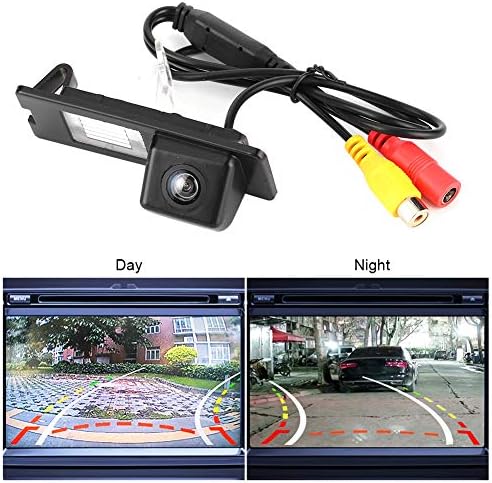
The camera unit is pictured with its RCA video and power cables. Below, two screens demonstrate the camera's performance in both bright daylight and low-light night conditions.
5. Instrukcja obsługi
Once properly installed, the Tbest Reversing Camera operates automatically:
- Aktywacja automatyczna: When you shift your vehicle into reverse gear, the camera will automatically power on and transmit its video feed to your connected display screen.
- Wytyczne dotyczące parkowania: The display will show dynamic parking guidelines overlaid on the camera's view, assisting you in judging distances and positioning your vehicle.
- Szeroki kąt View: Utilize the 170-degree wide-angle view to observe obstacles and surroundings that may not be visible in your rearview lustra.
- Widzenie nocne: The camera's low-light capability ensures a clear view even in dark conditions.
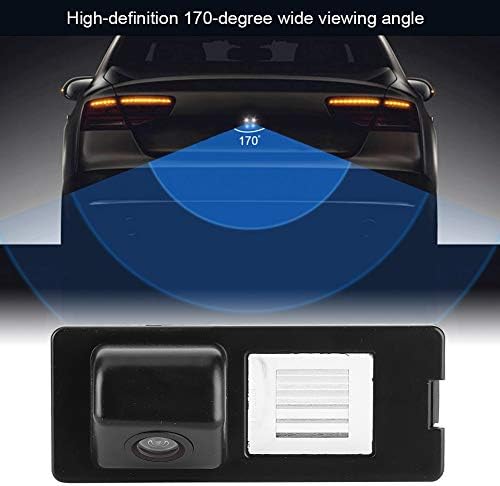
This diagram visually represents the camera's 170-degree wide viewing angle, highlighting the broad area it covers behind the vehicle for enhanced safety.
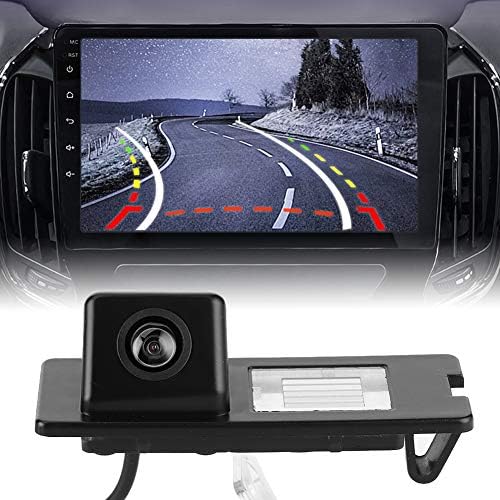
This image displays the Tbest reversing camera unit alongside a car's infotainment screen, illustrating the camera's output with parking guidelines.
6. Konserwacja
To ensure the longevity and optimal performance of your Tbest Reversing Camera, follow these maintenance guidelines:
- Regularne czyszczenie: Okresowo czyść obiektyw aparatu miękką,amp szmatką, aby usunąć brud, kurz lub plamy wodne, które mogą blokować view. Unikaj środków czyszczących o działaniu ściernym.
- Sprawdź okablowanie: Occasionally check the wiring for any signs of wear, fraying, or loose connections. Secure any loose wires.
- Unikaj silnych środków chemicznych: Do not use strong chemical cleaners or solvents on the camera unit, as they may damage the housing or lens.
- Ekstremalne temperatury: While designed for automotive use, prolonged exposure to extreme temperatures (hot or cold) can affect electronic components.

A detailed close-up of the camera unit, showing its compact design and lens.
7. Rozwiązywanie Problemów
If you encounter issues with your reversing camera, refer to the following troubleshooting guide:
- Brak obrazu na wyświetlaczu:
- Sprawdź, czy pojazd jest włączony wsteczny bieg.
- Verify all power and video cable connections are secure and correctly plugged in.
- Ensure the display unit is set to the correct video input channel.
- Check the camera's power supply by testing the reverse light circuit with a multimeter.
- Migotanie lub zniekształcenie obrazu:
- Inspect video cables for damage or loose connections.
- Ensure proper grounding for the camera's power supply.
- Sprawdź, czy występują zakłócenia elektromagnetyczne ze strony innych urządzeń elektronicznych pojazdu.
- Słaba jakość obrazu (rozmazany/ciemny):
- Dokładnie wyczyść obiektyw aparatu.
- Ensure there is sufficient ambient light for optimal night vision performance.
- Verify the camera is securely mounted and not vibrating.
- Nieprawidłowe linie parkingowe:
- Parking lines are typically fixed and cannot be adjusted. Ensure the camera is mounted straight.
If the problem persists after following these steps, please contact Tbest customer support.
8. Specyfikacje
| Funkcja | Specyfikacja |
|---|---|
| Marka | Tbest |
| Kompatybilne urządzenia | Renault Fluence, Duster, Megane |
| Typ instalacji | Surface Mount (License Plate Light Housing) |
| Tomtage | 12 wolty |
| Technologia czujnika optycznego | CCD |
| Typ soczewki | Szeroki kąt |
| Prawdziwy View Kąt | 170 stopni |
| Typ złącza | RCA |
| Rozmiar czujnika optycznego | 1/3 cala |
| Pole View | 170 stopni |
| Oświetlenie (Lux) | 0.2 |
| Screen Capture Resolution | 720p |
| Effective Capture Resolution | 720 pikseli |
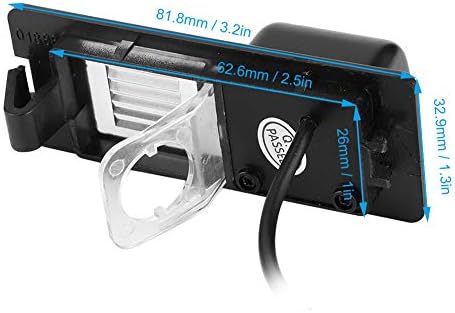
This image provides precise measurements of the camera unit, including its length, width, and height, in both millimeters and inches.
9. Gwarancja i wsparcie
Tbest products are manufactured to high-quality standards. This product comes with a standard manufacturer's warranty. Please refer to the warranty card included with your purchase or visit the official Tbest webSzczegółowe warunki gwarancji można znaleźć na naszej stronie.
For technical support, troubleshooting assistance, or warranty claims, please contact Tbest customer service through the retailer where you purchased the product or via the contact information provided on the official Tbest webstrona.