
Young YY-PIONEER 6IN1
Young 6-in-1 Universal Remote Control User Manual
Model: YY-PIONEER 6IN1
Wstęp
This manual provides comprehensive instructions for the Young 6-in-1 Universal Remote Control, designed for use with various television brands including Pioneer, Viore, Polaroid, RCA, Vios, and Speler. Please read this manual carefully before using your new remote control to ensure proper setup and operation.
Organizować coś
1. Zdalne sterowanieview
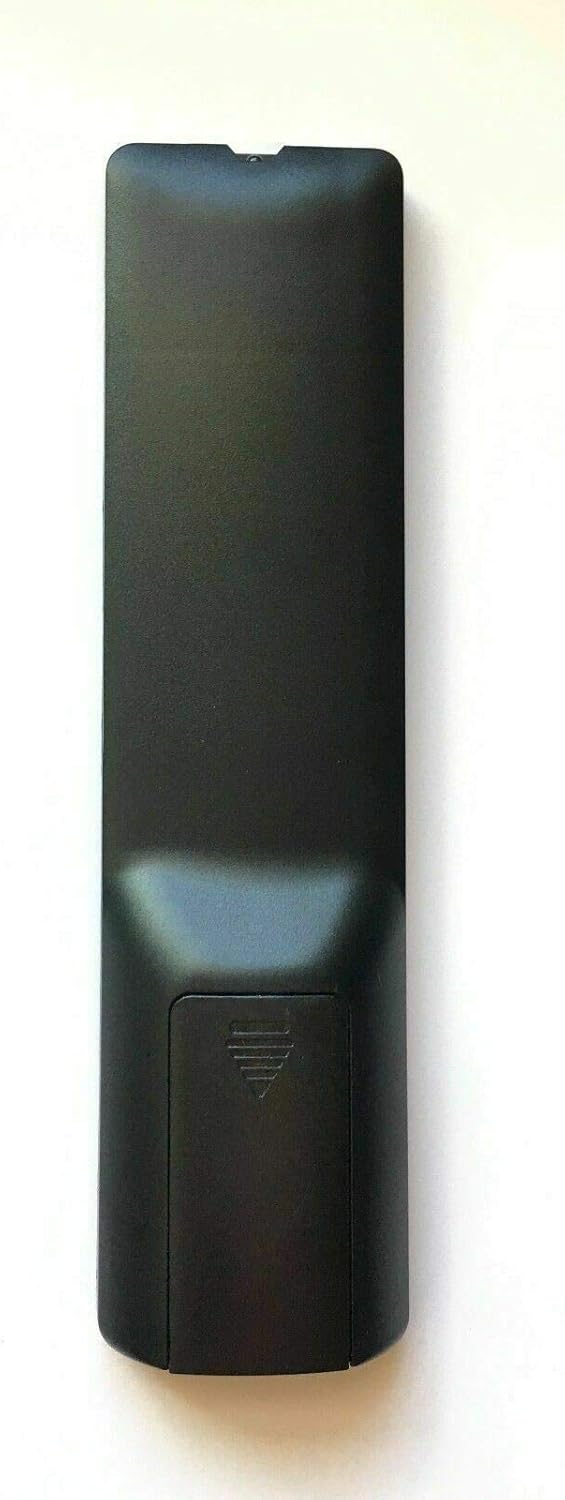
Obraz: Tył view of the Young 6-in-1 Universal Remote Control, highlighting the battery compartment location.
Familiarize yourself with the remote control's layout before proceeding with battery installation.
2. Instalacja baterii
The remote control requires two (2) AAA alkaline batteries (not included) for operation. Follow these steps to install the batteries:
- Znajdź pokrywę komory baterii z tyłu pilota.
- Aby otworzyć komorę, naciśnij zakładkę i przesuń pokrywę w dół.
- Włóż dwie baterie AAA, upewniając się, że bieguny dodatni (+) i ujemny (-) pokrywają się z oznaczeniami wewnątrz komory.
- Przesuń pokrywę komory baterii z powrotem na miejsce, aż zatrzaśnie się pewnie.

Obraz: Tył view of the remote control with the battery cover removed, showing the correct orientation for inserting two AAA batteries.
3. Initial Operation and Programming
The remote control is designed to work directly with the specified TV brands. After installing batteries, point the remote at your TV and attempt to use it.
- Direct Use: For many compatible TVs, the remote will function immediately after battery installation.
- If Not Working Directly (Method 1): If the remote does not operate your TV, press and hold the "Moc" button and the "1" button simultaneously for 1 second. Release both buttons and then attempt to use the remote.
- If Not Working Directly (Method 2): If Method 1 is unsuccessful, press and hold the "Moc" button and the "2" button simultaneously for 1 second. Release both buttons and then attempt to use the remote.
These methods attempt to cycle through internal codes for broader compatibility with the listed TV brands.
Instrukcja obsługi
This section outlines the general functions of the buttons on your Young 6-in-1 Universal Remote Control.

Obraz: Przód view of the Young 6-in-1 Universal Remote Control, displaying the layout of all control buttons.
- Zasilanie (czerwony przycisk): Włącza lub wyłącza telewizor.
- Mute (Green Button): Wycisza lub wyłącza wyciszenie dźwięku telewizora.
- YPbPr, CC, MTS, VGA, TV, AV, HDMI: Input selection buttons for various video and audio sources. Press the corresponding button to switch to that input.
- CHLIST, EPG, FAV, ASPECT: Special function buttons for channel list, electronic program guide, favorites, and aspect ratio adjustment, respectively.
- Panel nawigacyjny (góra, dół, lewo, prawo, ENTER): Służy do poruszania się po menu i potwierdzania wyborów.
- WYJŚCIE: Wychodzi z bieżącego menu lub funkcji.
- WYŚWIETLACZ TV: Displays current TV information.
- GŁOŚNOŚĆ +/-: Reguluje głośność w górę lub w dół.
- CO +/-: Zmienia kanał w górę lub w dół.
- S.M, P.M: Service Menu and Picture Mode buttons (functions may vary by TV model).
- Przyciski numeryczne (0-9): Wprowadź bezpośrednio numery kanałów.
- PRZYPOMNIENIE SOBIE CZEGOŚ: Przełącza między bieżącym a poprzednim viewed kanał.
Konserwacja
- Wymiana baterii: Replace batteries when the remote's performance degrades or it stops responding. Always replace both batteries at the same time with new AAA alkaline batteries.
- Czyszczenie: Use a soft, dry cloth to clean the remote control. Do not use liquid cleaners or abrasive materials, as they may damage the remote.
- Składowanie: Jeśli pilot nie będzie używany przez dłuższy czas, należy wyjąć baterie, aby zapobiec wyciekowi i potencjalnym uszkodzeniom.
Rozwiązywanie problemów
- Pilot nie odpowiada:
- Upewnij się, że baterie są zainstalowane prawidłowo, z zachowaniem właściwej polaryzacji.
- Wymień stare baterie na nowe baterie alkaliczne AAA.
- Upewnij się, że między pilotem a czujnikiem podczerwieni telewizora nie ma żadnych przeszkód.
- Try the initial programming steps (holding "Power" + "1" or "Power" + "2" for 1 second).
- Some functions are not working:
- The remote is designed for universal compatibility, but some advanced or brand-specific functions may not be supported.
- Ensure the remote is correctly programmed for your TV model using the "Power" + "1" or "Power" + "2" methods.
- To return to factory settings:
If you wish to reset the remote control to its factory default settings, press and hold the "Moc" button and the "0" button simultaneously for 1 second. Release both buttons. This will clear any programmed codes.
Specyfikacje
| Numer modelu | YY-PIONEER 6IN1 |
| Marka | Młody |
| Kompatybilne urządzenia | Television (Pioneer, Viore, Polaroid, RCA, Vios, Speler) |
| Technologia łączności | Podczerwony |
| Źródło zasilania | 2 baterie alkaliczne AAA 1.5 V |
| Wymiary produktu | 7 x 2 x 1 cala |
| Waga przedmiotu | 4 uncji |
| Producent | Młoda Elektronika |
Gwarancja i wsparcie
Information regarding product warranty and customer support is not provided within this manual. For warranty details or technical assistance, please refer to the product packaging or contact the manufacturer, Young Electronics, directly.
You may also visit the product's listing page on Amazon for additional support information: Strona produktu Amazon