
1. Wprowadzenie
Thank you for choosing the Xtorm Power Bank 20W Fuel Series 4 (FS402). This manual provides essential information for the safe and efficient use of your power bank. Please read these instructions carefully before use and retain them for future reference.
The Xtorm FS402 is a high-capacity portable charger designed to provide fast and reliable power to your mobile devices, including smartphones and tablets, on the go.
2. Koniec produktuview
The Xtorm Power Bank FS402 features a robust design and multiple charging ports to keep your devices powered throughout the day.

Obraz 2.1: Widok z góry na dół view of the Xtorm Power Bank FS402, showcasing its textured surface and port layout.
Główne cechy:
- Duża pojemność: Bateria 20,000 mAh do wielokrotnego ładowania urządzeń.
- Szybkie ładowanie: 20W USB-C Power Delivery (PD) and 18W USB-A Quick Charge (QC) 3.0 outputs.
- Wiele portów: Two USB-A output ports and one USB-C input/output port.
- Funkcje bezpieczeństwa: Automatic shut-off to prevent overcharging and overheating.
- Kompaktowa konstrukcja: Portable and travel-friendly dimensions.

Image 2.2: The Xtorm Power Bank FS402 highlighting its universal compatibility with various devices via USB-A and USB-C ports.
3. Konfiguracja
Pierwsze ładowanie powerbanku:
- Podłącz dołączony kabel USB-C do portu USB-C w powerbanku.
- Connect the other end of the USB-C cable to a compatible USB wall charger (not included). For fastest charging, use a 20W Power Delivery charger.
- The LED indicators on the power bank will illuminate to show the charging status. Allow the power bank to fully charge before its first use.
4. Instrukcja obsługi
Ładowanie urządzeń:
The Xtorm Power Bank FS402 allows you to charge up to three devices simultaneously.
- Podłącz kabel ładujący urządzenia do jednego z portów wyjściowych USB-A lub portu wejściowego/wyjściowego USB-C w powerbanku.
- Podłącz drugi koniec kabla do urządzenia.
- Powerbank automatycznie rozpocznie ładowanie urządzenia. Jeśli nie, naciśnij przycisk zasilania raz, aby rozpocząć ładowanie.
- Wskaźniki LED pokażą poziom naładowania baterii powerbanku.
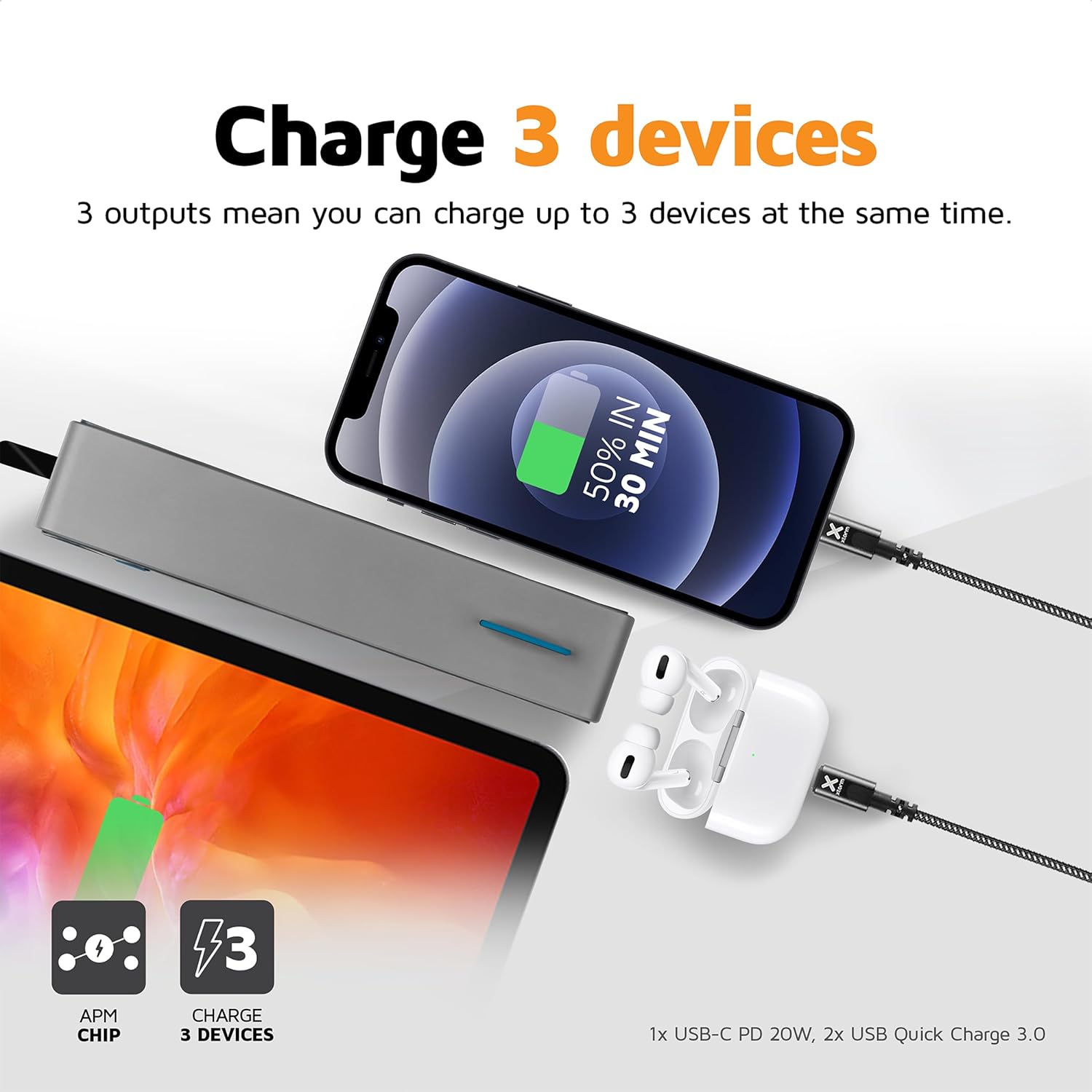
Image 4.1: The Xtorm Power Bank FS402 demonstrating its ability to charge three devices concurrently using its USB-C and two USB-A ports.
Możliwości szybkiego ładowania:
The power bank supports Power Delivery (PD) via the USB-C port and Quick Charge (QC) 3.0 via the USB-A ports, enabling rapid charging for compatible devices.
- USB-C PD (20 W): Ideal for fast charging modern smartphones and tablets.
- USB-A QC 3.0 (18W): Provides quick charging for a wide range of Android devices.

Image 4.2: Visual representation of the Xtorm Power Bank FS402's 20W fast charging capability, showing a device reaching 50% charge in 30 minutes.
5. Informacje dotyczące bezpieczeństwa
Your safety is paramount. The Xtorm Power Bank FS402 incorporates several safety features to ensure reliable operation.
- Nie wystawiaj powerbanku na działanie ekstremalnych temperatur, bezpośredniego światła słonecznego ani ognia.
- Unikaj upuszczania i narażania power banku na silne uderzenia.
- Nie należy podejmować prób rozmontowywania, naprawiania ani modyfikowania urządzenia.
- Przechowywać w miejscu niedostępnym dla dzieci.
- Powerbank należy utylizować zgodnie z lokalnymi przepisami.
Zintegrowane funkcje bezpieczeństwa:
- Zabezpieczenie przed zwarciem: Chroni przed uszkodzeniami powstałymi na skutek zwarć elektrycznych.
- Ochrona przed przeładowaniem: Automatyczne zatrzymanie ładowania po naładowaniu baterii.
- Kontrola temperatury: Monitoruje i reguluje temperaturę wewnętrzną, zapobiegając przegrzaniu.
- A-Class Batteries: Utilizes high-quality lithium-polymer cells for enhanced safety and performance.

Image 5.1: Diagram illustrating the Xtorm Power Bank FS402's internal safety mechanisms, including control chip, A-Class batteries, temperature control chip, short-circuit protection, and battery temperature sensor.
6. Konserwacja
- Czyść powerbank miękką, suchą ściereczką. Nie używaj środków czyszczących o właściwościach ściernych ani rozpuszczalników.
- Przechowuj powerbank w chłodnym i suchym miejscu, z dala od bezpośredniego światła słonecznego i wilgoci.
- Jeśli powerbank będzie przechowywany przez dłuższy czas, ładuj go do około 50% co trzy miesiące, aby zachować sprawność baterii.
7. Rozwiązywanie Problemów
Typowe problemy i rozwiązania:
- Power bank nie ładuje: Ensure the charging cable is securely connected to both the power bank and the wall charger. Try a different cable or wall charger.
- Urządzenie nie ładuje się z powerbanku: Ensure the power bank has sufficient charge. Press the power button to activate charging. Try a different cable or port.
- Powolne ładowanie: Verify that your device and cable support fast charging. Ensure you are using the correct port (USB-C for PD, USB-A for QC).
- Wskaźniki LED nie działają: The power bank might be fully discharged or require a reset. Try charging it for a few hours.
8. Specyfikacje
| Specyfikacja | Wartość |
|---|---|
| Nazwa modelu | FS402 |
| Marka | Xtorm |
| Pojemność baterii | 20,000 mAh |
| Skład baterii | Litowo-polimerowy |
| Wyjście/wejście USB-C | Moc dostarczana 20 W (PD) |
| Wyjście USB-A (x2) | Szybkie ładowanie (QC) 3.0 18 W |
| Typ złącza | USB typu C, USB typu A |
| Zalecane zastosowanie | Smartfon, Tablet |
| Waga przedmiotu | 376 gram |
| Kolor | Szary |

Image 8.1: The Xtorm Power Bank FS402 showcasing its compact dimensions (136mm x 71mm x 26mm) and travel-friendly features, including its weight of 379 grams.
9. Gwarancja i wsparcie
The Xtorm Power Bank 20W Fuel Series 4 (FS402) comes with a 2-letnia gwarancja od daty zakupu, obejmując wady produkcyjne.

Image 9.1: The Xtorm Power Bank FS402 highlighting its design and the included 2-year warranty.
For warranty claims, technical support, or any questions regarding your product, please contact Xtorm customer service through their official website or your retailer's support channels. Please have your proof of purchase and product model number (FS402) ready.