
1. Wprowadzenie
The Aputure Amaran 200d is a high-output 200W LED video light designed for professional and enthusiast filmmakers and photographers. It offers exceptional color fidelity, versatile control options, and a robust build, making it suitable for various lighting scenarios. This manual provides detailed instructions for the safe and effective use of your Amaran 200d.

Figure 1.1: The Amaran 200d LED Video Light with its standard reflector mounted on a light stand.
2. Informacje dotyczące bezpieczeństwa
Przed użyciem tego produktu należy przeczytać i zrozumieć wszystkie ostrzeżenia i instrukcje dotyczące bezpieczeństwa. Nieprzestrzeganie tych instrukcji może spowodować porażenie prądem, pożar lub poważne obrażenia.
- Do not expose the light to water or high humidity.
- Do not disassemble or modify the light. Refer all servicing to qualified personnel.
- Ensure the power supply is compatible with the local voltage (100-240 V).
- Do not block the ventilation openings on the light fixture. Overheating can cause damage.
- Avoid direct eye exposure to the LED light source when it is powered on.
- Always secure the light fixture properly on a stable light stand before operation.
3. Co znajduje się w pudełku
Sprawdź, czy po rozpakowaniu znajdują się wszystkie elementy:
- Amaran 200d LED Lamp Głowa
- Standard Bowens Mount Reflector
- Zasilacz prądu przemiennego
- Kabel zasilający

Figure 3.1: Included components of the Amaran 200d package.
4. Konfiguracja
4.1 Montaż głowicy lampy
- Attach the Amaran 200d lamp head to a compatible light stand using the integrated mounting bracket.
- Secure the light head by tightening the locking knob on the mounting bracket.

Figure 4.1: The Amaran 200d securely mounted on a light stand.
4.2 Attaching the Reflector
- Align the three mounting prongs of the standard reflector with the Bowens Mount on the front of the lamp głowa.
- Insert the reflector into the mount and twist clockwise until it locks securely into place.
4.3 Połączenie zasilania
The Amaran 200d supports both AC and DC (48V) power input.
- Connect the AC power cable to the power supply unit.
- Connect the power supply unit's output cable to the 48V DC input port on the rear of the Amaran 200d lamp głowa.
- Plug the AC power cable into a suitable wall outlet.
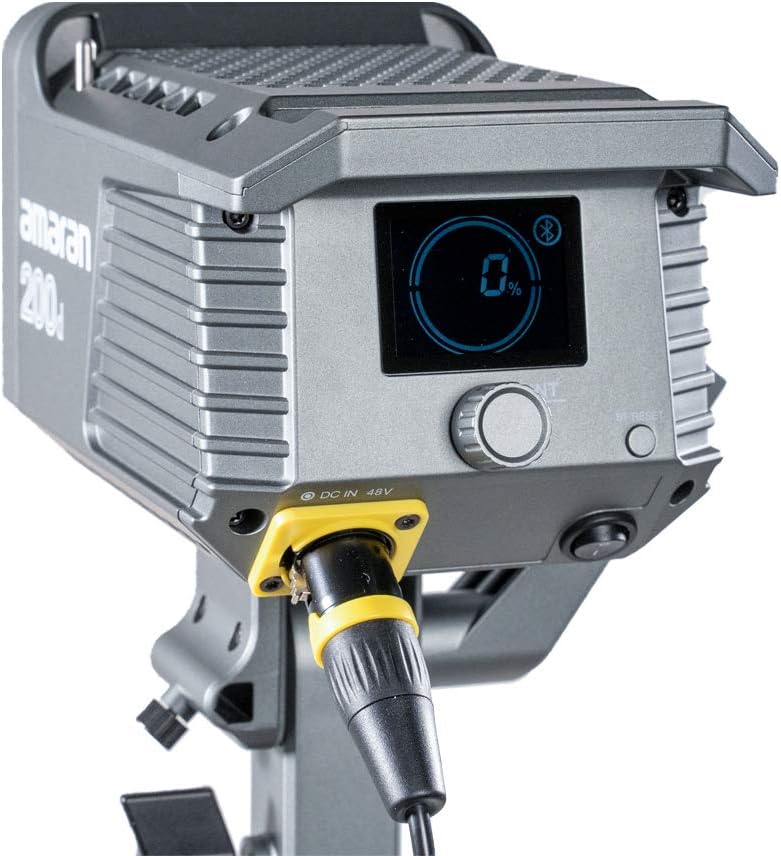
Figure 4.2: Detail of the DC 48V power input on the Amaran 200d.
5. Obsługa
5.1 Włączanie/wyłączanie
Locate the power switch on the rear panel of the light head. Flip the switch to the 'ON' position to power on the device. Flip it to 'OFF' to power down.
5.2 Kontrola jasności
The Amaran 200d features an INT adjustment knob for brightness control (0-100%).
- Rotate the INT knob clockwise to increase brightness.
- Rotate the INT knob counter-clockwise to decrease brightness.
- Press the INT knob to quickly cycle through preset brightness levels: 20%, 40%, 60%, 80%, 100%.
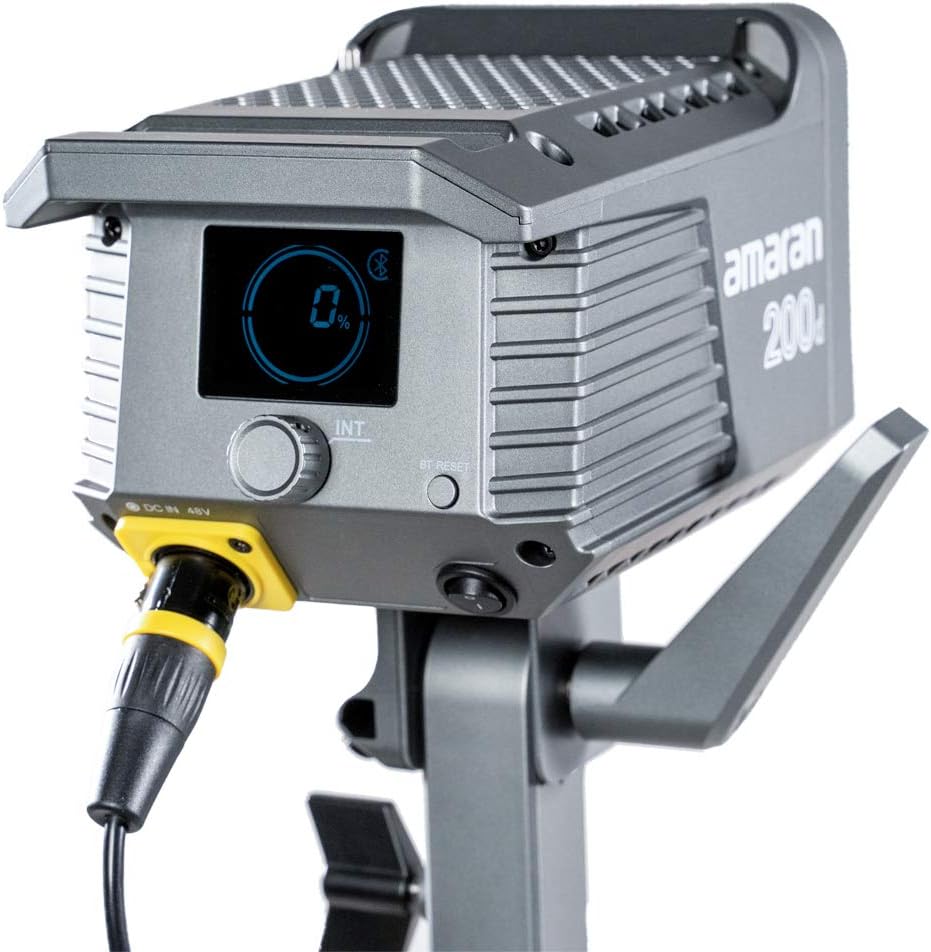
Figure 5.1: The control panel of the Amaran 200d, showing the display and adjustment knob.
5.3 efektów świetlnych
The Amaran 200d includes 8 pre-programmed lighting effects:
- Paparazzi
- Fajerwerki
- Błyskawica
- Wadliwa żarówka
- TV
- Oddech
- Błysk
- Eksplozja
These effects can be accessed and controlled via the Sidus Link App.
5.4 Kontrola aplikacji Sidus Link
The Amaran 200d supports 2.4G Bluetooth control via the Sidus Link App, allowing remote adjustment of brightness, lighting effects, and frequency.
- Download the Sidus Link App from your device's app store.
- Upewnij się, że Bluetooth jest włączony w Twoim urządzeniu mobilnym.
- Open the Sidus Link App and follow the on-screen instructions to connect to your Amaran 200d.
- Once connected, you can control various parameters of the light remotely.

Figure 5.2: Controlling the Amaran 200d via the Sidus Link App.
6. Konserwacja
6.1 Czyszczenie
- Zawsze odłączaj zasilanie przed czyszczeniem.
- Do przecierania powierzchni lampy należy używać miękkiej, suchej ściereczki.
- Nie używaj żrących środków chemicznych ani materiałów ściernych.
6.2 Przechowywanie
- Przechowuj lampę w chłodnym i suchym miejscu, z dala od bezpośredniego światła słonecznego.
- If storing for extended periods, disconnect the power supply.
7. Rozwiązywanie Problemów
| Problem | Możliwa przyczyna | Rozwiązanie |
|---|---|---|
| Światło nie włącza się. | No power supply; loose connection; faulty power supply. | Check power cable connection; ensure outlet is working; test with another power supply if available. |
| Światło migocze lub jest niestabilne. | Loose power connection; overheating; interference. | Secure all connections; ensure proper ventilation; move away from other electronic devices. |
| Sidus Link App cannot connect. | Bluetooth off; light not in pairing mode; app issue. | Ensure Bluetooth is on; restart light and app; try pairing again. |
8. Specyfikacje
- Wymiary produktu: 13 x 11.4 x 21 cala
- Waga przedmiotu: 10.34 funta
- Numer modelu: 200D
- Marka: Aputacja
- Technologia łączności: Bluetooth, częstotliwość radiowa
- Opis trybów lampy błyskowej: Constant illumination, adjustable brightness, 8 built-in lighting effects
- Temperatura barwowa: 5600K (światło dzienne)
- Wskaźnik oddawania barw: ≥95
- TLCI: ≥96
- Oświetlenie: Up to 65,000 lux@1m (with Hyper-Reflector)
- Uchwyt: Universal Bowens Mount
- Pobór mocy: 48V prądu stałego
9. Gwarancja i wsparcie
Aputure products are designed for durability and performance. For specific warranty details and terms, please refer to the warranty card included with your product or visit the official Aputure website. For technical support, troubleshooting assistance, or service inquiries, please contact Aputure customer support through their official channels.
Optional protection plans are available for purchase, such as 2-Year and 3-Year Protection Plans, which can provide extended coverage beyond the standard manufacturer's warranty.
Więcej informacji znajdziesz na stronie Sklep Aputure.