
1. Informacje dotyczące bezpieczeństwa
Read all safety instructions carefully before installing and operating the PNI SP2000W Voltage Inverter. Failure to follow these instructions may result in electric shock, fire, or serious injury.
- Bezpieczeństwo elektryczne: To urządzenie działa przy dużej głośnościtage. Nie otwierać falownika casing. All servicing must be performed by qualified personnel.
- Wentylacja: Ensure adequate ventilation around the inverter. Do not block the cooling fans or place the inverter in an enclosed space. Overheating can cause damage or fire.
- Środowisko: Do not expose the inverter to water, rain, snow, spray, or dust. Operate in a dry, cool, and well-ventilated area.
- Podłączenie akumulatora: Connect the inverter directly to a 12V car battery. Do not connect to other voltage sources or attempt to use with solar panels, as special inverters are required for solar systems.
- Zgodność obciążenia: This inverter is designed for resistive loads such as TVs, lighting lamps, radios, fans, and mini-refrigerators. Avoid connecting inductive loads with high starting currents unless within the inverter's surge capacity.
- Zabezpieczenie przed przeciążeniem: The inverter includes overload protection. Do not exceed the continuous output power of 2000W.
2. Koniec produktuview
The PNI SP2000W is a pure sinusoid voltage inverter designed to convert 12V DC power from a car battery into 230V AC power, suitable for powering various electrical appliances. It features a continuous output of 2000W and active cooling for efficient operation.
2.1. Główne cechy
- Moc wyjściowa: 2000W mocy ciągłej, 4000W mocy szczytowej.
- Wejście Voltage: 12 V prądu stałego.
- Objętość wyjściatage: 220V / 230V AC.
- Krzywa wyjściowa: Pure Sinusoid.
- Częstotliwość: 50 Hz.
- Chłodzenie: Active cooling with two built-in fans and aluminum housing.
- Ochrona: Overload, thermal, short circuit.
2.2. Zawartość opakowania
- PNI SP2000W Voltage Falownik
- Power connection cables (red for positive, black for negative)
- Wrench for terminal connections
- Instrukcja obsługi
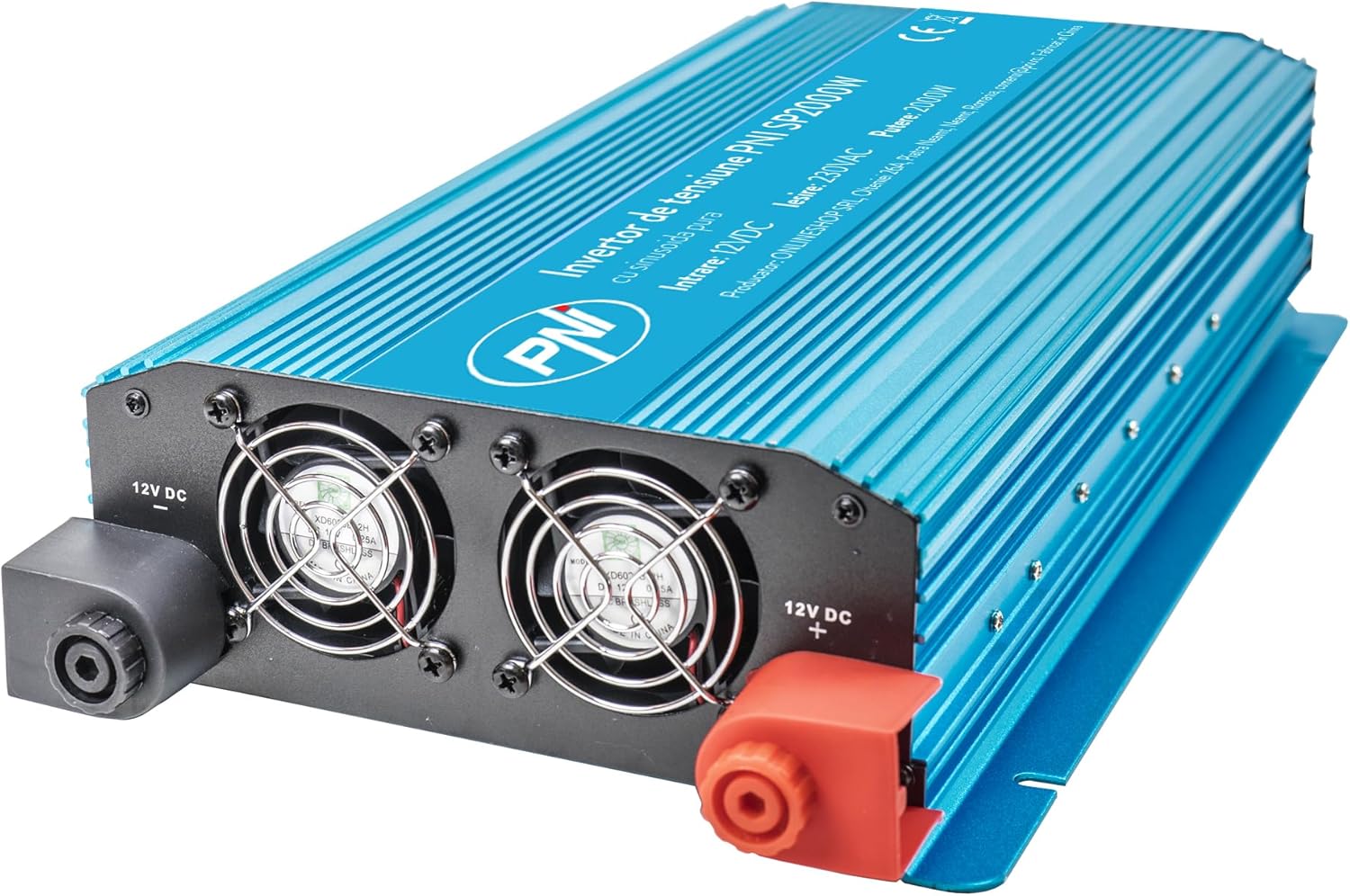
Rycina 1: Przód view of the PNI SP2000W Voltage Inverter, showing the blue casing and the PNI logo.

Rysunek 2: Góra view of the PNI SP2000W Voltage Inverter, displaying the product label with model information and specifications.

Figure 3: The PNI SP2000W Voltage Inverter shown with its included accessories: power connection cables (red and black) and a wrench for securing terminals.
3. Konfiguracja
Prawidłowa konfiguracja ma kluczowe znaczenie dla bezpiecznej i wydajnej pracy falownika.
3.1. Umieszczenie
- Place the inverter on a flat, stable surface.
- Ensure there is at least 15 cm (6 inches) of clear space around the inverter for proper ventilation.
- Unikaj bezpośredniego światła słonecznego, źródeł ciepła i miejsc o dużej wilgotności lub zapyleniu.
3.2. Connecting to a 12V Battery
The inverter must be connected directly to a 12V DC battery. Use the provided cables for connection.
- Upewnij się, że wyłącznik zasilania falownika jest w pozycji „WYŁ”.
- Connect the red cable to the positive (+) terminal of the inverter and then to the positive (+) terminal of the 12V battery.
- Connect the black cable to the negative (-) terminal of the inverter and then to the negative (-) terminal of the 12V battery.
- Tighten all connections securely using the provided wrench to prevent loose connections, which can cause overheating and damage.
- Verify that all connections are correct and secure before proceeding.

Figure 4: Input side of the inverter, showing the 12V DC positive (+) and negative (-) terminals for battery connection, along with the cooling fans.

Figure 5: Output side of the inverter, featuring two 230V AC sockets, the main power switch, and indicator lights for power and fault status.
4. Instrukcja obsługi
Follow these steps to operate your PNI SP2000W Voltage Inverter safely.
- Włączanie: After ensuring all connections are secure and correct, switch the inverter's power button to the "ON" position. The green "POWER" indicator light should illuminate.
- Podłącz urządzenia: Plug your 230V AC appliances into the inverter's output sockets. Ensure the total wattagMoc wszystkich podłączonych urządzeń nie przekracza 2000W.
- Monitor: Observe the inverter's indicator lights. If the red "FAULT" light illuminates, refer to the Troubleshooting section.
- Wyłączone: When you are finished using the inverter, first turn off and unplug all connected appliances. Then, switch the inverter's power button to the "OFF" position.
5. Konserwacja
Regular maintenance helps ensure the longevity and reliable performance of your inverter.
- Czyszczenie: Periodically clean the exterior of the inverter with a soft, dry cloth. Do not use liquid cleaners or solvents. Ensure the cooling vents are free from dust and debris.
- Wentylacja: Regularly check that the cooling fans are not obstructed and are operating correctly. Good airflow is essential to prevent overheating.
- Połączenia kablowe: Periodically inspect the battery connection cables for any signs of wear, damage, or corrosion. Ensure connections remain tight.
- Składowanie: If storing the inverter for an extended period, disconnect it from the battery and store it in a cool, dry place away from direct sunlight.
6. Rozwiązywanie Problemów
If you encounter issues with your PNI SP2000W Inverter, refer to the following common problems and solutions.
| Problem | Możliwa przyczyna | Rozwiązanie |
|---|---|---|
| Brak mocy wyjściowej / Falownik się nie włącza | Luźne połączenia akumulatora Niski poziom naładowania akumulatoratage Przełącznik falownika jest wyłączony | Sprawdź i dokręć kable akumulatora Naładuj lub wymień baterię Upewnij się, że przełącznik falownika jest w pozycji WŁ. |
| Red "FAULT" light is on | Przeciążać Przegrzanie Zwarcie Niska/wysoka głośność wejściowatage | Zmniejsz obciążenie sieciowe Allow inverter to cool, ensure ventilation Check for short circuits in connected appliances/cables Sprawdź pojemność akumulatoratage |
| Urządzenia nie działają prawidłowo | Appliance wattage za wysoko Appliance type incompatible (e.g., high inductive load) | Ensure total load is within 2000W continuous Consult appliance manual for compatibility with pure sine wave inverters |
| Wentylatory pracują ciągle głośno | Wysoka temperatura wewnętrzna spowodowana dużym obciążeniem lub słabą wentylacją | Reduce load or improve ventilation around the inverter |
Jeśli po wypróbowaniu tych rozwiązań problem nadal występuje, skontaktuj się z obsługą klienta.
7. Specyfikacje
| Funkcja | Specyfikacja |
|---|---|
| Model | PNI-SP2000W |
| Ciągła moc wyjściowa | 2000 W |
| Maximum Output Power (Peak) | 4000 W |
| Wejście Voltage | 12 V prądu stałego |
| Objętość wyjściatage | 220 V / 230 V AC |
| Częstotliwość pracy | 50 Hz |
| Przebieg wyjściowy | Pure Sinusoid |
| Efektywność | > 88% |
| Consumption in Stand-by | 10-15 W |
| Aktywne chłodzenie | Z wentylatorem |
| Wymiary (dł. x szer. x wys.) | Wymiary: 440 x 220 x 100 mm |
| Waga | 4.27 kg |
| Długość kabla | 44 cm |
| Temperatura pracy | -10 °C ~ +40 °C |
| Temperatura przechowywania | -20 °C ~ +55 °C |
| Wilgotność | 90% (bez kondensacji) |
| Przeciążalność | > 120% |
| Ochrona | Overload, Thermal, Short Circuit, Over-voltage, Under-ttage |
| Gniazda wyjściowe | 2 x 230 V AC sockets |
8. Gwarancja i wsparcie
PNI products are manufactured to high-quality standards. This product is covered by a manufacturer's warranty against defects in materials and workmanship. Please retain your proof of purchase for warranty claims.
For technical support or warranty inquiries, please refer to the contact information provided with your purchase documentation or visit the official PNI webstrona.