
1. Wprowadzenie
Dziękujemy za zakupasing the SHARP XL-B512 Stereo Sound System. This micro sound system offers a rich 45-watt sound experience with versatile connectivity options including Bluetooth, CD player, USB, and FM radio. Its elegant design with a wooden speaker housing and LED display complements any living space. This manual provides essential information for setting up, operating, and maintaining your device to ensure optimal performance and longevity.
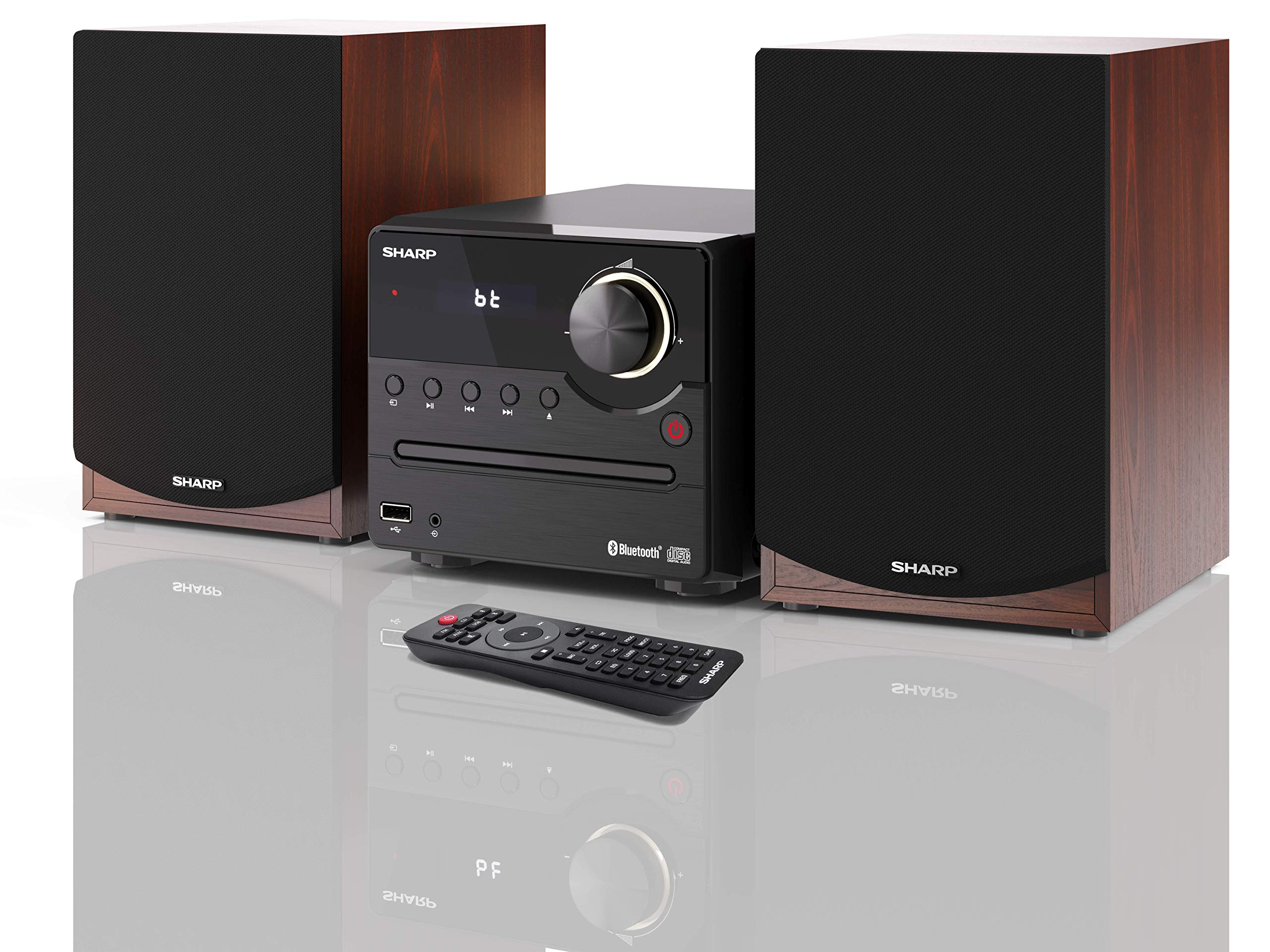
Rysunek 1: SHARP XL-B512 Stereo Sound System. This image shows the central unit flanked by two wooden-cased speakers, reflecting on a polished surface.
2. Informacje dotyczące bezpieczeństwa
Przed użyciem produktu należy uważnie przeczytać wszystkie instrukcje bezpieczeństwa. Zachowaj tę instrukcję do wykorzystania w przyszłości.
- Źródło zasilania: Używaj wyłącznie określonego zasilacza. Upewnij się, że napięcietage pasuje do lokalnego źródła zasilania.
- Wentylacja: Nie blokuj żadnych otworów wentylacyjnych. Pozostaw odpowiednią ilość miejsca wokół urządzenia, aby zapewnić prawidłowy przepływ powietrza.
- Woda i wilgoć: Nie wystawiać urządzenia na działanie deszczu, wilgoci ani kapiących/rozpryskujących się płynów. Nie stawiać na urządzeniu przedmiotów wypełnionych płynami, takich jak wazony.
- Ciepło: Trzymaj urządzenie z dala od źródeł ciepła, takich jak grzejniki, kratki wentylacyjne, piece lub inne urządzenia (w tym amp(lifiers) wytwarzające ciepło.
- Czyszczenie: Przed czyszczeniem odłącz urządzenie od gniazdka ściennego. Używaj wyłącznie suchej ściereczki.
- Serwisowanie: Nie próbuj samodzielnie naprawiać tego produktu. Wszelkie czynności serwisowe należy powierzyć wykwalifikowanemu personelowi serwisowemu.
3. Zawartość opakowania
Sprawdź, czy w przesyłce znajdują się wszystkie elementy wymienione poniżej:
- SHARP XL-B512 Micro Sound System (Main Unit)
- Two Speakers (with wooden housing)
- Kabel zasilający
- Pilot (z bateriami)
- Instrukcja obsługi (ten dokument)
- Szybki przewodnik
4. Konfiguracja
4.1 Podłączenie głośników
Connect the two speakers to the main unit using the provided speaker cables. Ensure correct polarity (positive to positive, negative to negative) for optimal sound quality.
4.2 Połączenie zasilania
Connect the power cable to the AC IN port on the rear of the main unit, then plug it into a wall outlet.

Rysunek 2: Rear panel connections. This image displays the back of the central unit with ports for speaker wires and the AC power input, alongside the rear of the two speakers.
4.3 Pierwsze włączenie zasilania
Press the Power button on the main unit or the remote control to turn on the system. The LCD display will illuminate.
5. Instrukcja obsługi
5.1 Elementy sterujące na panelu przednim

Rysunek 3: Front panel controls. This close-up shows the central unit's display, volume knob, and various control buttons for playback and source selection.
- Przycisk zasilania: Włącza lub wyłącza urządzenie.
- Przycisk źródła: Cycles through available input sources (CD, FM, Bluetooth, USB, AUX).
- Pokrętło głośności: Dostosowuje główny poziom głośności.
- Sterowanie odtwarzaniem: Play/Pause, Stop, Skip Forward/Backward for CD and USB modes.
- Port USB: Do podłączania urządzeń pamięci masowej USB w celu odtwarzania muzyki.
- Wejście AUX: Gniazdo 3.5 mm do podłączania zewnętrznych urządzeń audio.
5.2 Odtwarzanie płyt CD
- Naciśnij Źródło button to select 'CD' mode.
- Open the CD tray by pressing the Eject button.
- Place a CD (CD/CD-R/CD-RW/MP3 format) with the label side up into the tray.
- Close the CD tray. The system will read the disc and begin playback automatically or display track information.
- Zarządzaj swoją muzyką za pomocą przycisków odtwarzania (Odtwórz/Pauza, Zatrzymaj, Pomiń).
5.3 Radio FM
- Naciśnij Źródło button to select 'FM' mode.
- The system will automatically search for available stations or you can manually tune.
- Aby zapisać stację jako ustawioną wstępnie, dostrój się do żądanej stacji, a następnie naciśnij i przytrzymaj Ustawienie wstępne button (if available on remote) or follow on-screen instructions. The system supports 40 preset memories.
- Użyj Zaprogramowane góra/dół przyciski do poruszania się po zapisanych stacjach.
5.4 parowanie Bluetooth
- Naciśnij Źródło button to select 'Bluetooth' mode. The display will show 'bt' and flash, indicating it's in pairing mode.
- Na swoim urządzeniu mobilnym włącz Bluetooth i wyszukaj dostępne urządzenia.
- Select 'SHARP XL-B512' from the list of devices.
- Once paired, the 'bt' indicator on the system's display will stop flashing. You can now stream audio from your device.
5.5 Odtwarzanie USB
- Podłącz urządzenie pamięci masowej USB do portu USB na panelu przednim.
- Naciśnij Źródło button to select 'USB' mode.
- System automatycznie wykryje i odtworzy zgodny plik audio filew (MP3).
- Użyj przycisków odtwarzania, aby poruszać się po utworach.
5.6 Wejście AUX
- Connect an external audio device (e.g., smartphone, MP3 player) to the AUX IN jack on the front panel using a 3.5mm audio cable (not supplied).
- Naciśnij Źródło button to select 'AUX' mode.
- Play audio from your connected device. The sound will be output through the SHARP XL-B512 system.
5.7 Ustawienia korektora
The system features 6 preset equalizers with independent treble and depth control. Use the EQ button on the remote control or main unit to cycle through the presets and adjust sound to your preference.
6. Konserwacja
6.1 Czyszczenie urządzenia
Wipe the unit with a soft, dry cloth. Do not use abrasive cleaners, waxes, or solvents as they may damage the finish. Ensure the unit is unplugged before cleaning.
6.2 Pielęgnacja płyt CD
Trzymaj płyty CD za krawędzie. Utrzymuj je w czystości i bez zarysowań. Przechowuj płyty CD w pudełkach, gdy ich nie używasz.
6.3 Pielęgnacja głośników
The wooden speaker housing can be cleaned with a soft, dry cloth. Avoid placing heavy objects on the speakers or exposing them to direct sunlight or extreme temperatures.
7. Rozwiązywanie Problemów
If you encounter any issues with your SHARP XL-B512 system, refer to the following table for common problems and solutions.
| Problem | Możliwa przyczyna | Rozwiązanie |
|---|---|---|
| Brak zasilania | Power cable not connected securely; Power outlet not active. | Sprawdź podłączenie kabla zasilającego; spróbuj użyć innego gniazdka elektrycznego. |
| Brak dźwięku | Volume too low; Incorrect source selected; Speaker cables disconnected. | Zwiększ głośność; Wybierz prawidłowe źródło sygnału wejściowego; Sprawdź połączenia kabli głośnikowych. |
| Bluetooth nie łączy się | System not in pairing mode; Device too far; Bluetooth disabled on device. | Ensure system is in Bluetooth pairing mode; Move device closer; Enable Bluetooth on your device. |
| Płyta CD nie odtwarza się | CD inserted incorrectly; CD is dirty or scratched; Incorrect format. | Reinsert CD correctly; Clean CD; Ensure CD is a supported format (CD/CD-R/CD-RW/MP3). |
| Pilot nie działa | Baterie są rozładowane lub nieprawidłowo włożone; Przeszkoda między pilotem a urządzeniem. | Wymień baterie; Sprawdź polaryzację baterii; Usuń wszelkie przeszkody. |
Jeśli po wypróbowaniu tych rozwiązań problem nadal występuje, skontaktuj się z obsługą klienta.
8. Specyfikacje
Below are the technical specifications for the SHARP XL-B512 Stereo Sound System:
- Model: XL-B512
- Całkowita moc wyjściowa: 45 watów
- Tryb wyjścia audio: Stereofoniczny
- Speaker Output Channel Quantity: 2
- Obsługiwane formaty audio: MP3, CD, CD-R, CD-RW
- Technologia tunera: FM PLL Tuner
- Zakres częstotliwości FM: 87.5 do 108 MHz
- FM Preset Memory: 40 stacji
- Łączność: Bluetooth, USB, AUX (3.5 mm)
- Cechy szczególne: 6 Preset Equalizers, LCD Display with white backlight
- Sound System Dimensions (W x H x D): Wymiary 17 x 22 x 15 cm
- Speaker Dimensions (W x H x D): 14.5 x 17.7 x 22.3 cm (każdy)
- Waga przedmiotu: 4 kilogramów
- Źródło zasilania: Elektryczny przewodowy
- Zdalne sterowanie: Tak (baterie w zestawie)
9. Gwarancja i wsparcie
Your SHARP XL-B512 Stereo Sound System comes with a standard manufacturer's warranty. Please refer to the warranty card included in your package for specific terms and conditions, including the warranty period and coverage details.
For technical support, service inquiries, or further assistance, please contact your local SHARP customer service center. Contact information can typically be found on the manufacturer's webmiejscu lub w dokumentacji gwarancyjnej.