
1. Wprowadzenie
The DUDAO 8-in-1 Type C Hub, Model A15 Pro, is a versatile multiport adapter designed to expand the connectivity of your USB-C enabled devices. It provides essential ports for data transfer, video output, power delivery, and memory card access, enhancing your productivity and convenience.
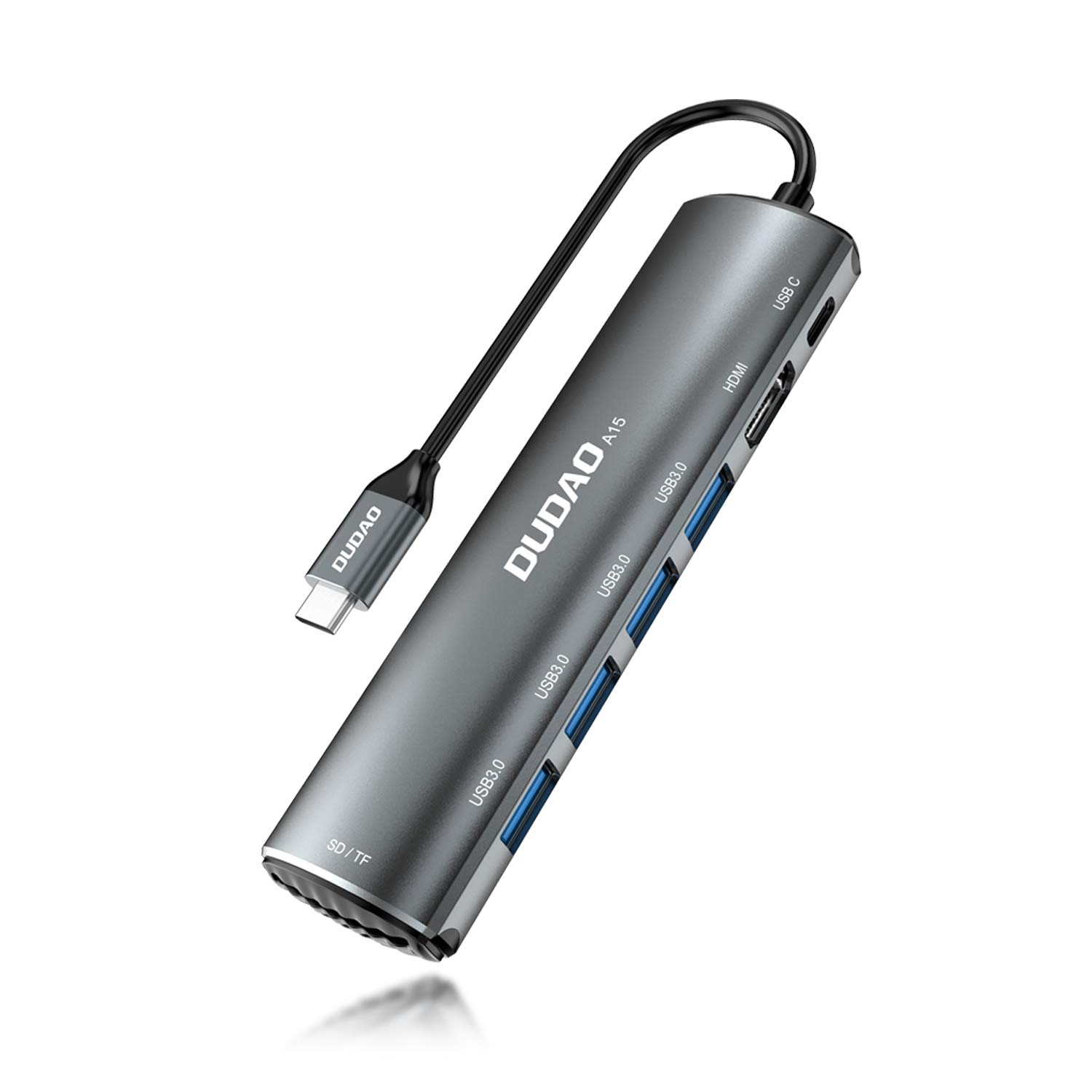
Obraz 1.1: Koniecview of the DUDAO 8-in-1 Type C Hub, Model A15 Pro, showcasindzięki kompaktowej konstrukcji i licznym portom.
2. Funkcje produktu
The DUDAO 8-in-1 Type C Hub offers the following functionalities:
- Multi-Port Connectivity: Expands a single USB-C port into 8 essential ports.
- Wyjście HDMI 4K: Connects to external displays, TVs, or projectors with support for up to 4K resolution at 30Hz.
- High-Speed USB 3.0 Ports: Features four USB 3.0 ports for connecting multiple USB devices simultaneously, offering data transfer speeds up to 5Gbps.
- Moc dostarczana 60 W (PD): Supports fast charging for compatible USB-C devices, allowing you to power your laptop while using the hub.
- Integrated SD/TF Card Reader: Provides dedicated slots for SD and TF (MicroSD) memory cards, enabling direct access to media files.
- Szeroka kompatybilność: Compatible with various operating systems including Android, Windows, Linux, iOS, and Mac OS.

Rysunek 2.1: Szczegółowy view of the DUDAO 8-in-1 Type C Hub, highlighting its various ports including Type-C PD, HDMI, USB 3.0, and SD/TF card slots.
3. Zawartość opakowania
Sprawdź, czy w przesyłce znajdują się wszystkie elementy:
- 1 x DUDAO 8-in-1 Type C Hub (Model A15 Pro)
4. Przewodnik konfiguracji
Follow these steps to set up your DUDAO 8-in-1 Type C Hub:
4.1. Podłączanie koncentratora
- Locate an available USB-C port on your laptop, tablet, or smartphone.
- Insert the USB-C connector of the DUDAO hub firmly into your device's USB-C port. The hub is plug-and-play and should be recognized automatically by your operating system.
4.2. Podłączanie urządzeń peryferyjnych
Once the hub is connected to your device, you can attach your peripherals:
- Urządzenia USB: Plug your USB flash drives, external hard drives, keyboards, mice, or other USB accessories into the USB 3.0 ports.
- Wyświetlacz HDMI: Connect an HDMI cable from your monitor, TV, or projector to the HDMI port on the hub. Ensure your display is set to the correct HDMI input.
- Zasilacz: If your device requires charging or if you are connecting power-intensive peripherals, connect your USB-C power adapter to the Type-C PD port on the hub.
- Karty SD/TF: Insert your SD or TF (MicroSD) memory cards into the corresponding slots until they click into place.

Image 4.1: The DUDAO 8-in-1 Type C Hub connected to a laptop with various peripherals such as USB drives and an HDMI cable.
5. Instrukcja obsługi
5.1. Przesyłanie danych przez USB
The four USB 3.0 ports support data transfer speeds up to 5Gbps. Simply plug your USB devices into any of these ports. Your operating system will typically recognize the device automatically, allowing you to access files or use the peripheral.

Image 5.1: A laptop connected to the DUDAO hub, demonstrating the use of USB 3.0 ports for connecting multiple USB devices.
5.2. Wyjście wyświetlacza HDMI
Connect an HDMI cable from the hub to your external display. The hub supports resolutions up to 4K (3840x2160) at 30Hz. Your device's display settings can be used to configure mirror or extended display modes.

Image 5.2: A laptop connected to a large external display through the DUDAO hub's HDMI port, suitable for presentations or extended workspaces.
5.3. Ładowanie z wykorzystaniem technologii Power Delivery (PD)
The Type-C PD port supports up to 60W power input. Connect your original USB-C power adapter to this port to charge your laptop or other compatible devices while simultaneously using the hub's other functions. This ensures your device remains powered during use.

Obraz 5.3: Zbliżenie view of the Type-C PD 60W port on the DUDAO hub, indicating its fast charging capability.
5.4. Czytnik kart SD/TF
Insert your SD or TF (MicroSD) card into the corresponding slot. The card will appear as a removable drive on your computer, allowing you to transfer photos, videos, and other files. Ensure the card is inserted correctly to avoid damage.

Image 5.4: Close-up of the DUDAO hub's SD and TF card slots, shown with memory cards inserted for data access.
6. Konserwacja i pielęgnacja
- Czyszczenie: Do czyszczenia piasty używaj miękkiej, suchej ściereczki. Unikaj płynnych środków czyszczących i materiałów ściernych.
- Składowanie: Przechowuj piastę w chłodnym, suchym miejscu, z dala od bezpośredniego światła słonecznego i ekstremalnych temperatur.
- Obsługiwanie: Unikaj upuszczania piasty ani narażania jej na silne uderzenia. Nie próbuj demontować ani modyfikować urządzenia.
- Łączność: Zawsze należy ostrożnie wkładać i wyjmować kable, aby zapobiec uszkodzeniu portów.
7. Rozwiązywanie Problemów
If you encounter issues with your DUDAO 8-in-1 Type C Hub, please refer to the following common problems and solutions:
- Urządzenie nierozpoznane:
- Ensure the hub's USB-C connector is fully inserted into your device's port.
- Spróbuj podłączyć koncentrator do innego portu USB-C w swoim urządzeniu.
- Restart your host device (laptop/tablet).
- Verify that your device's USB-C port supports data transfer and display output (DisplayPort Alternate Mode).
- Brak wyjścia wyświetlacza przez HDMI:
- Sprawdź połączenie kabla HDMI między koncentratorem i wyświetlaczem.
- Ensure the external display is powered on and set to the correct HDMI input source.
- Sprawdź, czy port USB-C Twojego urządzenia hosta obsługuje tryb alternatywny DisplayPort.
- Spróbuj użyć innego kabla HDMI lub wyświetlacza.
- Urządzenia USB nie działają:
- Sprawdź, czy urządzenie USB jest prawidłowo podłączone do koncentratora.
- If it's a high-power device (e.g., external hard drive), connect a power adapter to the hub's Type-C PD port.
- Test the USB device by connecting it directly to your host device (if possible).
- Powolne ładowanie przez port PD:
- Ensure your power adapter is capable of providing sufficient wattage (do 60W obsługiwane przez hub).
- Verify that your USB-C charging cable is rated for Power Delivery.
- Karta SD/TF nie została wykryta:
- Sprawdź, czy karta jest całkowicie i prawidłowo włożona do odpowiedniego gniazda.
- Try a different SD/TF card to rule out card issues.
8. Specyfikacje techniczne
| Marka | DUDAO |
| Model | A15 Pro |
| Wymiary produktu | Wymiary 18 x 12 x 3 cm |
| Waga przedmiotu | 360 gramów |
| Zgodność z systemem operacyjnym | Android, All Windows Platforms, Linux, iOS, Mac OS, Unix |
| Platforma sprzętowa | Laptop, komputer osobisty |
| Interfejs sprzętowy | USB 3.0 |
| Kompatybilne urządzenia | Laptops, Projectors, Televisions |
| Cechy specjalne | Fast Charging (60W PD) |
| Szybkość przesyłu danych | 5 gigabitów na sekundę (USB 3.0) |
| Liczba portów | 8 (1x HDMI, 4x USB 3.0, 1x Type-C PD, 1x SD, 1x TF) |
| Typ złącza | HDMI, USB, typ C |
| Tworzywo | Aluminium |
| Kolor | Szary |
9. Gwarancja i wsparcie
For warranty information or technical support, please contact the manufacturer or your retailer. Keep your purchase receipt for warranty claims.
Producent: Dudao
Pakowacz: DUDAO INDIA, 101 Mall Road, Kingsway Camp, Stacja metra GTB Nagar, bramka nr 1, NEW DELHI, DELHI 110009
Kontakt: +91 9310681651