
Wstęp
The Fostex 6301DT is a compact and versatile 4-inch powered studio monitor, designed for broadcast, production facilities, mobile setups, project studios, and home recording environments. Building upon the legacy of the 6301-series, this model incorporates a D-class power amplifier and a new driver unit, featuring an energy-saving auto stand-by function. The 6301DT integrates Dante network audio capabilities, allowing playback of any two channels of Dante network audio signals, alongside traditional 1/4-inch TS analog inputs. Its ultra-rugged die-cast aluminum enclosure ensures durability for professional use.
Informacje dotyczące bezpieczeństwa
- Źródło zasilania: Podłącz urządzenie wyłącznie do określonego źródła zasilania.tage. Ensure the power cord is securely connected.
- Wentylacja: Nie zasłaniaj otworów wentylacyjnych. Zapewnij odpowiedni przepływ powietrza wokół urządzenia, aby zapobiec przegrzaniu.
- Wilgoć: Nie wystawiaj urządzenia na działanie deszczu, wilgoci ani nadmiernej wilgotności. Unikaj umieszczania na urządzeniu przedmiotów wypełnionych płynami.
- Obce przedmioty: Nie wkładaj żadnych przedmiotów do otworów urządzenia.
- Serwisowanie: Wszelkie prace serwisowe należy zlecać wykwalifikowanemu personelowi. Nie należy podejmować prób samodzielnego otwierania ani naprawy urządzenia.
- Umieszczenie: Place the monitor on a stable surface. Avoid locations with excessive vibration, dust, or direct sunlight.
Zawartość opakowania
Sprawdź, czy w opakowaniu znajdują się wszystkie elementy:
- Fostex 6301DT Active Monitor Speaker
- Przewód zasilający IEC
Produkt ponadview
Panel przedni

Rysunek 1: Elementy sterujące na panelu przednim
- Przycisk zasilania: Press to turn the unit ON or OFF. An LED indicator shows the power status.
- Pokrętło głośności: Adjusts the output level of the monitor.
Panel tylny
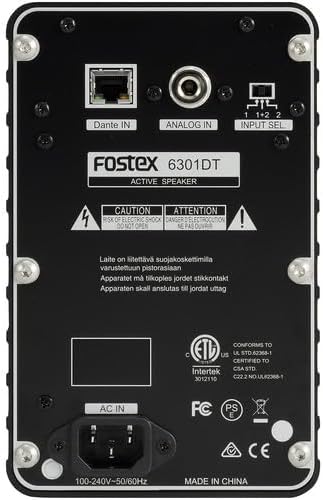
Rysunek 2: Połączenia na panelu tylnym
- Dante IN (RJ45): Connects to a Dante network for digital audio input.
- Analog IN (1/4" TS): Connects to an analog audio source using a 1/4-inch TS cable.
- Przełącznik wyboru wejścia: Selects the audio input channel for monitoring (1, 2, or 1+2 mixed).
- WEJŚCIE AC: Connects the supplied IEC power cord.
Organizować coś
Umieszczenie
Place the Fostex 6301DT on a stable, flat surface. For optimal sound reproduction, position the monitor at ear level and equidistant from your listening position. An optional EB-6301 mounting bracket (not included) allows for easy surface-mounting at various angles.

Rysunek 3: ExampKonfiguracja aplikacji
Podłączenie zasilania
- Ensure the monitor's power button is in the OFF position.
- Connect the supplied IEC power cord to the AC IN port on the rear panel of the monitor.
- Podłącz drugi koniec przewodu zasilającego do odpowiedniego gniazdka elektrycznego.
Połączenia audio
The 6301DT supports both analog and Dante network audio inputs.
- Wejście analogowe: Connect your analog audio source (e.g., mixer, audio interface) to the 1/4" TS Analog IN port on the rear panel using a 1/4-inch TS cable.
- Dante Network Input: Connect an RJ45 Ethernet cable from your Dante network switch or device to the Dante IN port on the rear panel.
Operacyjny
Włączanie/wyłączanie
Press the Power button on the front panel to turn the monitor ON. The power indicator LED will illuminate. Press the button again to turn the monitor OFF.
Regulacja głośności
Rotate the Volume knob on the front panel clockwise to increase the output level and counter-clockwise to decrease it. Start with a low volume setting and gradually increase it to a comfortable listening level.
Wybór wejścia
Use the Input Select switch on the rear panel to choose the desired audio source:
- Analog: Selects the 1/4" TS analog input.
- Dante Channel 1: Monitors the first Dante audio channel.
- Dante Channel 2: Monitors the second Dante audio channel.
- Dante Channel 1+2 (Mixed): Monitors a mix of both Dante channels.
Konfiguracja sieci Dante
For Dante network operation, you will need to use Audinate's Dante Controller software on a computer connected to the same Dante network. This software allows you to route audio signals to the Fostex 6301DT and configure its network settings. The 6301DT supports sampling frequencies of 44.1 kHz, 48 kHz, 88.2 kHz, and 96 kHz.
Konserwacja
- Czyszczenie: Use a soft, dry cloth to clean the exterior of the monitor. Do not use abrasive cleaners, waxes, or solvents.
- Składowanie: Jeśli przechowujesz urządzenie przez dłuższy czas, odłącz je od zasilania i przechowuj w chłodnym, suchym miejscu, z dala od bezpośredniego światła słonecznego i ekstremalnych temperatur.
- Wentylacja: Ensure that the ventilation openings are kept clear of dust and debris.
Rozwiązywanie problemów
| Problem | Możliwa przyczyna | Rozwiązanie |
|---|---|---|
| Brak dźwięku |
|
|
| Zniekształcony dźwięk |
|
|
| Dante connection issues |
|
|
Specyfikacje

Rysunek 4: Wymiary produktu
| Funkcja | Specyfikacja |
|---|---|
| Numer modelu | AMS-6301DT |
| Typ głośnika | Zasilany monitor studyjny |
| Rozmiar głośnika | 4 cali |
| Średnica głośnika niskotonowego | 4 cali |
| AmpTyp lifier | klasa D |
| Maksymalna moc wyjściowa | 20 watów |
| Tryb wyjścia audio | Stereofoniczny |
| Liczba kanałów audio | 2.0 |
| Technologia łączności | RJ45 (Dante), 1/4" TS (Analog) |
| Protokół łączności | Dante |
| Obsługiwane Sampczęstotliwości ling | Częstotliwość 44.1/48/88.2/96 kHz |
| Stosunek sygnału do szumu | 85dB |
| Źródło zasilania | Elektryczny przewodowy |
| Materiał obudowy | Odlew aluminiowy |
| Kolor | Czarny |
| Wymiary przedmiotu (gł. x szer. x wys.) | 4.7" x 7.5" x 4.7" |
| Waga przedmiotu | 5.1 funtów |
| Dodatkowe funkcje | Auto stand-by function, Recessed front-panel controls |
Gwarancja i wsparcie
Informacje o gwarancji
The Fostex 6301DT is covered by a 1-roczna ograniczona gwarancja producenta. Zachowaj dowód zakupu na wypadek roszczeń gwarancyjnych.
Obsługa klienta
For technical assistance, troubleshooting, or warranty service, please contact American Music and Sound, the manufacturer, or your authorized Fostex dealer. Refer to the Fostex official webstrona zawierająca najnowsze informacje kontaktowe dotyczące pomocy technicznej.