
1. Wprowadzenie
Dziękujemy za zakupasing the BONSEN S3101 Cross-Cut Paper Shredder. This manual provides important information regarding the safe operation, setup, maintenance, and troubleshooting of your shredder. Please read this manual thoroughly before using the product and retain it for future reference.

Image 1.1: The BONSEN S3101 Cross-Cut Paper Shredder, a compact device designed for home and office document destruction.
2. Ważne instrukcje bezpieczeństwa
Aby zminimalizować ryzyko obrażeń lub uszkodzeń, należy przestrzegać następujących środków ostrożności:
- Trzymaj dzieci i zwierzęta z dala od rozdrabniacza.
- Trzymaj luźne ubrania, biżuterię, włosy i inne obce przedmioty z dala od otworu wlotowego papieru.
- Nie wkładaj palców ani rąk do szczeliny wejściowej papieru.
- Odłącz niszczarkę od zasilania, gdy jej nie używasz oraz przed czyszczeniem.
- Nie niszcz przedmiotów metalowych, etykiet samoprzylepnych ani mokrego papieru.
- Ensure the shredder head is correctly positioned on the wastebasket for operation. The shredder will not operate if not properly assembled.
- Nie należy używać niszczarki, jeżeli przewód zasilający jest uszkodzony.
- Avoid placing the shredder near heat sources or in humid environments.
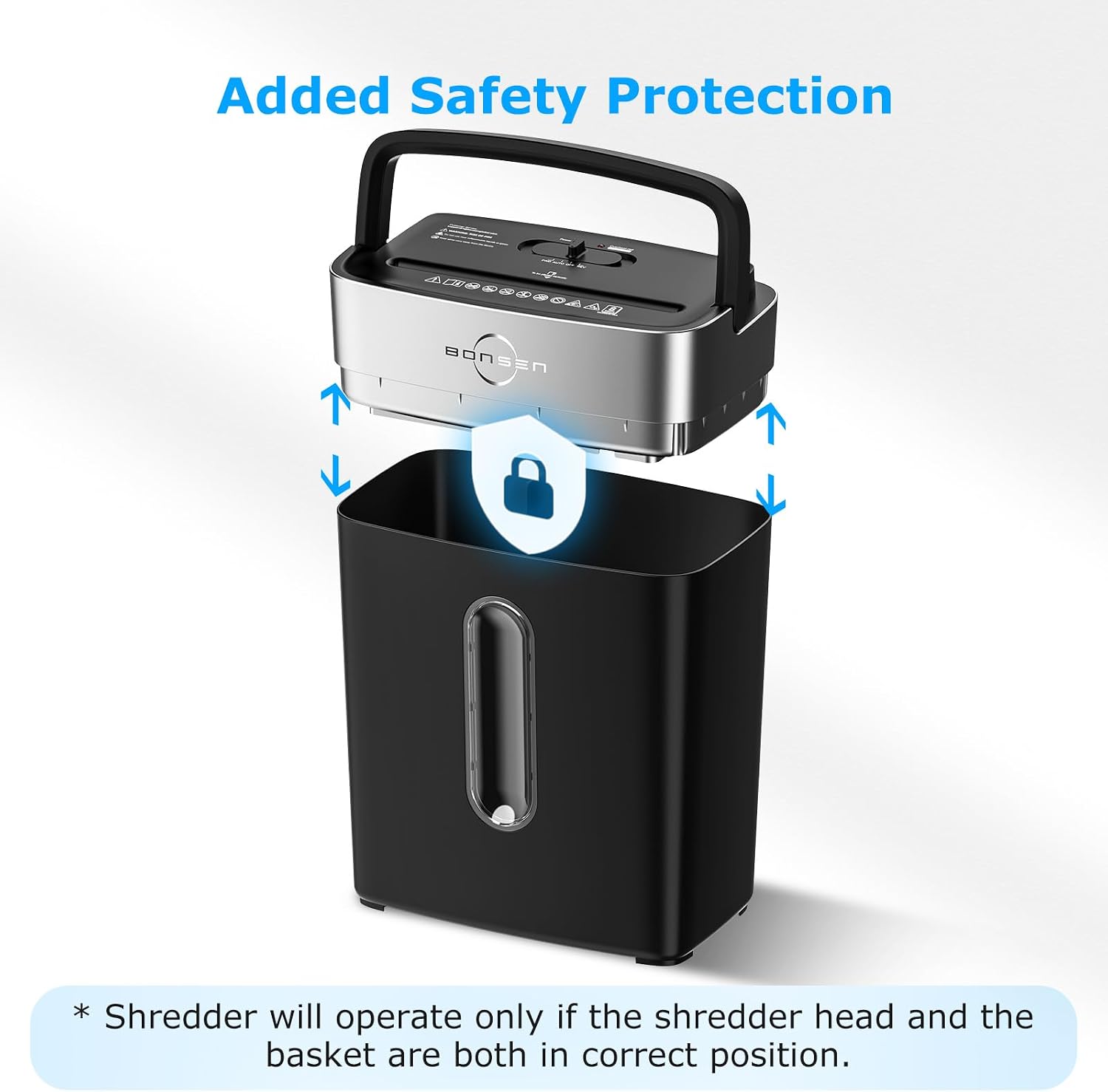
Image 2.1: The shredder features an added safety protection mechanism, ensuring operation only when the shredder head is correctly seated on the wastebasket.
3. Składniki produktu
The BONSEN S3101 shredder consists of the following main components:
- Shredder Head (with paper entry slot, control switch, and LED indicators)
- 4-Gallon Wastebasket
- Lift-Off Handle (integrated into the shredder head)
- Przewód zasilający

Image 3.1: The BONSEN S3101 shredder with its dimensions: 12.09 inches (L) x 7.44 inches (W) x 15.40 inches (H), illustrating its compact design suitable for home or small office use.
4. Konfiguracja
- Unpack the shredder and all components from the packaging.
- Place the shredder head securely onto the 4-gallon wastebasket. Ensure it is properly aligned and seated to activate the safety interlock.
- Position the shredder on a flat, stable surface.
- Podłącz przewód zasilający do standardowego gniazdka elektrycznego.
5. Działanie
5.1 Control Switch Functions
The shredder features a 4-mode control switch located on the top of the shredder head:
- FWD (do przodu): Manually feeds paper forward. Useful for clearing minor jams.
- AUTO (automatyczny): The shredder will automatically start when paper is detected in the entry slot and stop when shredding is complete. This is the recommended setting for normal operation.
- OFF: Turns the shredder off.
- REV (Wsteczny): Manually reverses the shredder blades. Useful for clearing paper jams.
Image 5.1: Close-up of the shredder's control switch, showing the Forward, Auto, Off, and Reverse settings, along with Power On (green) and Overheat (red) LED indicators.
5.2 Niszczenie dokumentów
- Ensure the shredder is plugged in and the control switch is set to AUTOMATYCZNY. The green Power LED should be illuminated.
- Insert up to 8 sheets of 20 lb. bond paper into the paper entry slot. The shredder will automatically begin shredding.
- For credit cards, insert one card at a time into the designated slot.
- The shredder can also handle small paper clips and staples.
- The shredder has a continuous run time of up to 5 minutes. After this period, a 30-minute cool-down period is required to prevent overheating.

Image 5.2: The shredder's capability to shred up to 8 sheets of paper, junk mail, credit cards, staples, and small paper clips.

Image 5.3: An illustration indicating the shredder's 5-minute continuous run time before requiring a cool-down period.
6. Konserwacja
6.1 Opróżnianie kosza na śmieci
When the wastebasket is full, the shredder will stop operating. To empty it:
- Ensure the shredder is turned WYŁĄCZONY i odłączony.
- Use the lift-off handle to carefully remove the shredder head from the wastebasket.
- Empty the shredded contents from the 4-gallon wastebasket.
- Ponownie zamontuj głowicę niszczarki w koszu na śmieci.

Image 6.1: The shredder head being lifted off the 4-gallon wastebasket, demonstrating the easy emptying process.
6.2 Czyszczenie i smarowanie
- Clean the exterior of the shredder with a soft, dry cloth. Do not use abrasive cleaners or solvents.
- Regularly lubricate the shredder blades with shredder oil sheets or liquid shredder oil (sold separately) to maintain optimal performance and extend the life of the shredder. Follow the instructions provided with the lubricant.
7. Rozwiązywanie Problemów
| Problem | Możliwa przyczyna | Rozwiązanie |
|---|---|---|
| Niszczarka nie uruchamia się. |
|
|
| Zacięcie papieru. |
|
|
| Niszczarka zatrzymuje się w trakcie pracy. |
|
|

Image 7.1: The LED indicators for Power (green) and Overheat (red). A red light indicates the shredder needs to cool down for 30 minutes.

Image 7.2: Visual guide for clearing a paper jam using the reverse function and reducing the paper load.
8. Specyfikacje
- Model: S3101
- Typ niszczarki: Przekop
- Poziom bezpieczeństwa: P-4
- Rozdrabnianie Pojemność: 8 sheets (20 lb. bond paper), 1 credit card
- Ciągły czas pracy: 5 minut
- Czas wyciszenia: 30 minut
- Wastebasket Capacity: 4 Gallons (approximately 210 shredded sheets)
- Dopuszczalne materiały: Paper, credit cards, staples, small paper clips
- Wymiary produktu (dł. x szer. x wys.): 12.09 x 7.44 x 15.40 cala
- Waga przedmiotu: 7.9 funta
- Certyfikaty: ETL

Image 8.1: The shredder's P-4 security level, indicating a high level of document security with cross-cut shred size of 13/64" x 45/64" (5 x 18 mm).
9. Gwarancja i wsparcie
BONSEN provides professional customer service for the S3101 paper shredder. For any questions, concerns, or support needs, please refer to the contact information provided with your product or visit the official BONSEN webstrona.
Proszę zachować paragon jako dowód zakupu na wypadek ewentualnych roszczeń gwarancyjnych.