
1. Wprowadzenie
This manual provides comprehensive instructions for the operation and maintenance of the POMIACAM IPC-5200 Plus CCTV Tester. This device is designed for professional use in the installation and maintenance of security camera systems, offering a wide range of testing functionalities for various camera types and network infrastructure.

Figure 1: POMIACAM IPC-5200 Plus CCTV Tester and Wire Receiver.
2. Koniec produktuview
2.1 Główne cechy
- IP Discovery: Automatically scans network segments for IP cameras and adjusts the tester's IP address for seamless connectivity.
- Multi-format Camera Testing: Supports 8MP CVI, TVI, AHD, SDI, and CVBS analog cameras.
- Wyświetlacz o wysokiej rozdzielczości: Features a 5-inch 1080P IPS touch screen for clear video display.
- Odtwarzacz multimedialny: Capable of displaying genuine resolution IP camera images and playing 4K H.264/H.265 video files and MKV/MP4 media.
- Versatile Interfaces: Includes VGA and HDMI input for connecting to NVR/DVR systems as a display monitor.
- Advanced Cable Testing: Performs UTP cable tests, RJ45 TDR cable tests, and includes a cable tracer for network, BNC, and shielded cables.
- Sterowanie PTZ: Supports Pan/Tilt/Zoom control for compatible cameras.
- Migawka i nagrywanie: Allows for image snapshots, video recording, and playback.
2.2 Układ urządzenia i porty
Familiarize yourself with the various ports and controls on the IPC-5200 Plus tester.

Rysunek 2: Góra i dół views of the IPC-5200 Plus showing power input, RS485, audio in, UTP/SCAN, VGA, ON/OFF button, SD card slot, DC12V/3A out, LAN, HDMI in, SDI, and AHD TVI CVI test ports.
3. Zawartość opakowania
Sprawdź, czy w przesyłce znajdują się wszystkie elementy wymienione poniżej:

Figure 3: Contents of the IPC-5200 Plus package.
- POMIACAM IPC-5200 Plus CCTV Tester
- Torba narzędziowa
- Kabel wideo
- Kabel testowy audio
- RS485 control cable
- Kabel wyjściowy zasilania
- Przewód bezpieczeństwa
- Rumak
- Cable tester (wire receiver)
4. Konfiguracja
4.1 Ładowanie urządzenia
Before initial use, fully charge the IPC-5200 Plus using the provided charger. Connect the charger to the DC12V/VIN port on the tester and plug it into a power outlet. The charging indicator will show the charging status.
4.2 Włączanie/wyłączanie
- Włączanie: Press and hold the ON/OFF button located on the side of the device until the screen illuminates.
- Aby wyłączyć: Press and hold the ON/OFF button until a power-off prompt appears on the screen, then confirm.
5. Instrukcja obsługi
5.1 Poruszanie się po interfejsie
The IPC-5200 Plus features a 5-inch IPS touch screen. Navigate through menus and functions by tapping icons and swiping as you would on a smartphone.
5.2 IP Discovery
This function allows the tester to automatically scan for IP cameras on a network segment and adjust its own IP address to match the camera's segment for easy access.
- From the main menu, select the 'IP Discovery' or 'IP Test pro' icon.
- The tester will automatically scan the network.
- It can also auto-modify the tester's IP to the same network segment as the scanned camera's IP.

Figure 4: IP Discovery interface showing local IP, discovery IP, and scan options.
5.3 Camera Testing (Analog, HD Coaxial, IP)
The tester supports a wide range of camera types:
- CVBS Analog Cameras: Connect the analog camera to the CVBS input port.
- HD Coaxial Cameras (CVI, TVI, AHD, SDI): Connect these cameras to their respective input ports. The tester supports up to 8MP resolution for CVI, TVI, AHD, and SDI.
- Kamery IP: Connect via LAN. The tester supports 4K H.264/H.265 IP cameras and ONVIF protocols.
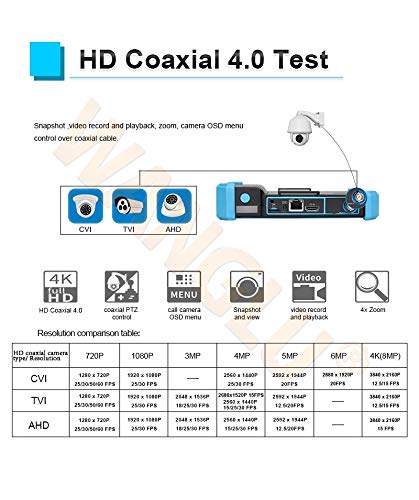
Figure 5: HD Coaxial 4.0 Test features including CVI, TVI, AHD support, PTZ control, OSD menu, snapshot, video record, and 4x zoom. A resolution comparison table is also shown.

Figure 6: Rapid ONVIF interface for 4K camera testing and OSD menu modification.
5.4 Wejście VGA i HDMI
The IPC-5200 Plus can function as a display monitor for NVRs or DVRs via its VGA and HDMI input ports.
- Connect the NVR/DVR's VGA or HDMI output to the corresponding input port on the tester.
- Select the appropriate input source on the tester's menu to display the NVR/DVR feed.
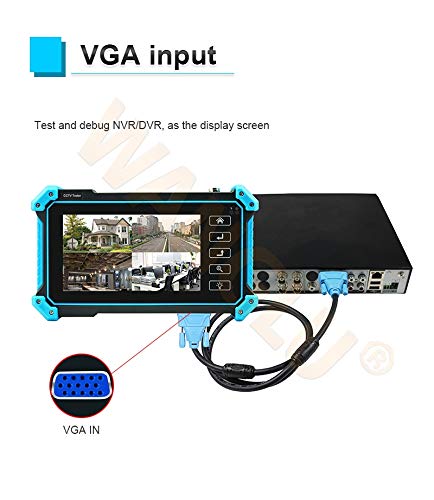
Figure 7: Using the tester as a display for an NVR/DVR via VGA input.
5.5 Cable Testing Functions
The tester provides comprehensive cable testing capabilities:
- UTP Cable Test: Tests sequence and continuity for UTP, BNC, telephone, and shielded cables. It can save testing reports and detect near-end, mid-end, and far-end fault points of RJ45 cable connectors.
- RJ45 TDR Cable Test: Measures cable pair status, length, attenuation, reflectivity, impedance, and skew. Measurement range up to 180m.
- Cable Tracer: Use the included wire receiver to search for network, BNC, and shielded cables, effectively rejecting noise and false signals.

Figure 8: Advanced UTP cable test interface showing cable sequence and connection diagram.

Figure 9: RJ45 TDR cable test in progress, displaying cable pair status and quality.
5.6 PTZ Control, Snapshot, and Recording
- Sterowanie PTZ: Access PTZ controls from the camera test interface to adjust camera pan, tilt, and zoom functions.
- Migawka: Capture still images from the live video feed.
- Nagrywanie i odtwarzanie wideo: Record video streams and play them back directly on the device.
6. Konserwacja
6.1 Czyszczenie
Do czyszczenia urządzenia należy używać miękkiej, suchej ściereczki. W przypadku uporczywych zabrudzeń należy delikatnie przetrzeć urządzenie.amp cloth can be used. Avoid abrasive cleaners or solvents that may damage the screen or casing.
6.2 Pielęgnacja baterii
- Aby przedłużyć żywotność baterii, należy unikać częstego całkowitego rozładowywania baterii.
- Przechowuj urządzenie w chłodnym i suchym miejscu, jeśli nie będziesz go używać przez dłuższy czas.
- Jeśli urządzenie jest przechowywane przez dłuższy czas, należy je okresowo ładować, aby zapobiec jego głębokiemu rozładowaniu.
7. Rozwiązywanie Problemów
7.1 Urządzenie się nie włącza
- Upewnij się, że akumulator jest naładowany. Podłącz ładowarkę i spróbuj ponownie włączyć urządzenie.
- Sprawdź, czy przycisk zasilania jest wciśnięty i prawidłowo przytrzymany.
7.2 IP Camera Not Found During IP Discovery
- Confirm the IP camera is powered on and properly connected to the network.
- Ensure the network cable is functional using the cable test feature.
- Check if the camera and tester are on the same physical network segment. The IP Discovery feature should auto-adjust, but manual verification may be needed.
- Verify the camera's IP address and subnet mask if known, and compare with the tester's settings.
7.3 No Video Display from Camera
- Check all cable connections (BNC, LAN, etc.) for secure fit.
- Ensure the camera is powered on and functioning correctly.
- Verify the correct input mode is selected on the tester (e.g., CVI, TVI, AHD, SDI, CVBS, IP).
- For IP cameras, confirm successful IP discovery and login credentials if required.
7.4 Cable Test Errors
- Ensure the cable is properly terminated and connected to the tester.
- For UTP tests, ensure the remote kit is correctly attached to the other end of the cable.
- Sprawdź, czy kabel nie ma widocznych uszkodzeń.
8. Specyfikacje
| Funkcja | Specyfikacja |
|---|---|
| Numer modelu | POMIACAM IPC5200C plus |
| Wyświetlacz | 5-inch IPS Touch Screen, 1920x1080 Resolution |
| Wsparcie kamery | 8MP CVI, TVI, AHD, SDI, CVBS, IP (4K H.264/H.265) |
| Wejście wideo | VGA, HDMI, BNC (CVI/TVI/AHD/SDI/CVBS) |
| Funkcje sieciowe | IP Discovery, ONVIF, LAN, Built-in WiFi |
| Testowanie kabli | UTP Cable Test, RJ45 TDR Cable Test, Cable Tracer |
| Źródło zasilania | Zasilanie bateryjne (w zestawie 1 bateria litowo-jonowa) |
| Wymiary | 10.2 x 5.79 x 4.17 cala |
| Waga | 2.64 funtów |

Figure 10: Connectivity diagram illustrating the versatile integration of the IPC-5200 Plus with different camera types (IP, TVI, CVI, AHD, CVBS, SDI) and network devices (NVR/DVR, Switch, WiFi).
9. Gwarancja i wsparcie
For warranty information and technical support, please refer to the contact details provided with your purchase or visit the official POMIACAM webZachowaj paragon jako dowód zakupu na wypadek reklamacji.