
1. Wprowadzenie
This manual provides essential instructions for the proper installation, operation, and maintenance of your ProCase Smart Case. Designed to protect your iPad Air, this case offers functionality and durability. Please read this manual thoroughly to ensure optimal use of your product.
1.1 Produkt powyżejview
The ProCase Smart Case is a protective cover for various iPad Air models, featuring a lightweight hard back, a translucent frosted finish, and a foldable front cover that functions as a stand. It supports automatic sleep/wake functions and is compatible with Apple Pencil charging and attachment.

This image displays the ProCase Smart Case in navy blue, designed for iPad Air models. The case is shown both closed and open, revealing an iPad with an Apple Pencil magnetically attached to its side. The front cover is folded back to form a stand.
1.2 Zgodność
This ProCase Smart Case is specifically designed for the following iPad Air models:
- iPad Air 11-inch M3 (2025): Models A3266, A3267, A3270
- iPad Air 11-inch M2 (2024): Models A2902, A2903, A2904
- iPad Air 10.9-inch 5th Generation (2022): Models A2589, A2591, A2588
- iPad Air 10.9-inch 4th Generation (2020): Models A2316, A2324, A2325, A2072
To verify your iPad model number, check the back of your device. This case is not compatible with any other iPad models.

This chart details the compatibility of the ProCase Smart Case. It lists the supported iPad Air models and their corresponding model numbers. A visual guide shows where to find the model number on the back of an iPad.
2. Konfiguracja
2.1 Installing Your iPad
- Upewnij się, że Twój iPad jest czysty i wolny od kurzu i zanieczyszczeń.
- Align your iPad with the hard back shell of the ProCase Smart Case.
- Gently press the iPad into the case, starting from one corner and working your way around until it is securely seated. Ensure all edges are properly enclosed by the case.
- Verify that all ports, buttons, and camera cutouts align correctly with your iPad.
2.2 Important Note for Touch ID Users
If your iPad model features Touch ID, it is recommended to complete or re-register your Touch ID settings zanim assembling the case. This ensures optimal functionality of the Touch ID sensor once the case is installed.

This image serves as a reminder to complete Touch ID settings on the iPad prior to installing the ProCase Smart Case. A hand is shown interacting with the iPad's screen near the Touch ID sensor.
3. Instrukcja obsługi
3.1 Funkcja automatycznego uśpienia/wybudzenia
The ProCase Smart Case supports the automatic Sleep/Wake feature of your iPad. Closing the front cover will put your iPad to sleep, and opening it will wake your iPad. This helps conserve battery life.
3.2 Korzystanie ze składanego stojaka
The tri-fold front cover can be configured into two stable stand positions for different uses:
- ViewKąt nachylenia (65 stopni): Ideal for watching videos, presentations, or video calls.
- Typing Angle (30 degrees): Provides an ergonomic incline for comfortable typing and drawing.
To form the stand, fold the front cover from the inside to the outside as shown in the guide below. Avoid bending the cover from the outside to the inside, as this may result in an unstable stand.
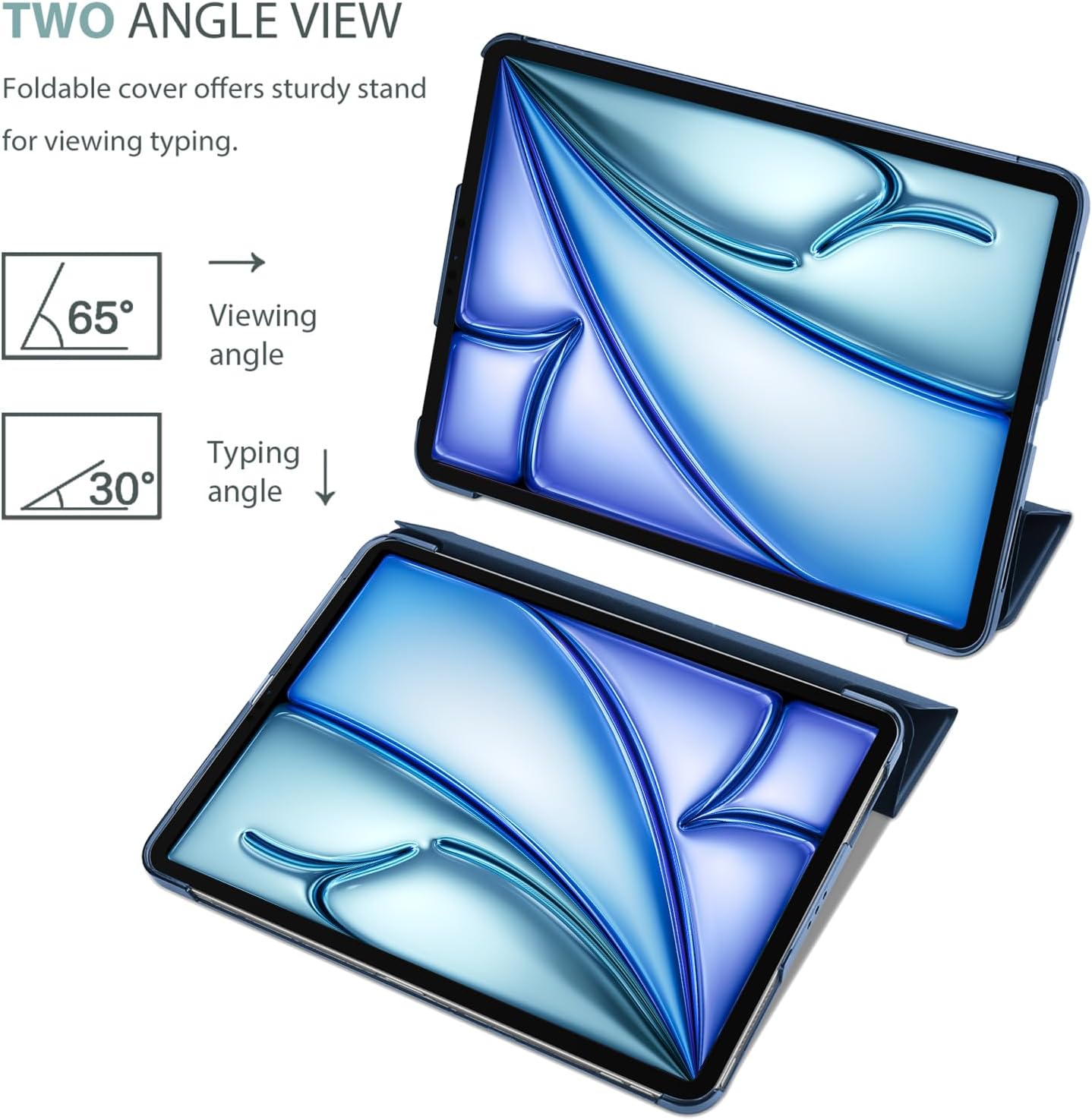
The image demonstrates the two functional angles provided by the foldable cover of the ProCase Smart Case: a 65-degree viewing angle and a 30-degree typing angle.

A visual guide demonstrating the correct method for folding the front cover of the ProCase Smart Case to create a stable stand. It shows that the front cover should be folded from the inside to the outside for proper support.
3.3 Apple Pencil Compatibility
The case is designed to fully support Apple Pencil Pro, Apple Pencil (2nd Generation), and Apple Pencil (USB-C). It allows for magnetic attachment and wireless charging of compatible Apple Pencils directly to your iPad while the case is on.

The image illustrates the ProCase Smart Case's full support for Apple Pencil Pro, 2nd Generation, and Apple Pencil (USB-C). An Apple Pencil is shown magnetically attached to the side of the iPad within the case, indicating wireless charging capability.
3.4 Access to Features
The precise cutouts of the ProCase Smart Case ensure full access to all iPad features, including cameras, speakers, charging ports, and buttons, without the need to remove the case.

This image emphasizes the precise cutouts of the ProCase Smart Case, ensuring full access to all iPad features, including ports, speakers, and buttons, without needing to remove the case.
4. Konserwacja
4.1 Instrukcje dotyczące czyszczenia
To maintain the appearance and functionality of your ProCase Smart Case:
- Przetrzyj powierzchnię zewnętrzną miękką,amp szmatką. Unikaj środków czyszczących o działaniu ściernym i rozpuszczalników.
- The translucent frosted back cover is designed to be anti-fingerprint and smudge-free, requiring minimal cleaning.
- Ensure the case is completely dry before re-installing your iPad.

This image showcases the translucent frosted back cover design of the ProCase Smart Case. The matte finish exterior is designed to prevent fingerprints and scratches.
4.2 Ogólna opieka
While the case offers protection against accidental drops and bumps, avoid exposing it to extreme temperatures, direct sunlight for prolonged periods, or sharp objects that could scratch the surface.
5. Rozwiązywanie Problemów
5.1 Case Not Fitting Correctly
- Sprawdź zgodność: Double-check your iPad model number against the compatibility list in Section 1.2. An incorrect model will prevent proper fit.
- Ponowna instalacja: Remove the iPad from the case and carefully re-install it, ensuring all corners and edges snap into place.
5.2 Niestabilność stojaka
- Correct Folding: Ensure the front cover is folded from the inside to the outside to create a stable triangular stand. Refer to Section 3.2 and the 'Correct Support Guide' image for proper technique.
- Płaska powierzchnia: Always place the stand on a flat, stable surface for optimal support.
5.3 Auto Sleep/Wake Not Functioning
- Sprawdź ustawienia iPada: Ensure the 'Lock/Unlock' feature is enabled in your iPad's settings (Settings > Display & Brightness > Lock/Unlock).
- Case Alignment: Confirm the iPad is correctly seated in the case, allowing the magnets in the cover to properly interact with the iPad's sensors.
6. Specyfikacje
| Wymiary produktu | 9.8 x 7.2 x 0.48 cala |
| Waga przedmiotu | 8 uncji |
| Kompatybilne urządzenia | iPad Air 11-Inch M3 2025 / M2 2024 / 10.9" iPad Air 5th 4th Generation 2022 2020 |
| Cechy specjalne | Anti-Slip, Auto Sleep/Wake, Lightweight |
| Współczynnik kształtu | Sprawa |
| Typ powłoki | Twardy |
| Tworzywo | Matte finish exterior, translucent frosted back |

Dodatkowy plusfile view of an iPad enclosed in the ProCase Smart Case. The image highlights the ultra-slim and lightweight design, intended to maximize usability and comfort while adding minimal bulk to the device.
7. Gwarancja i wsparcie
7.1 Gwarancja na produkt
For information regarding the product warranty, please refer to the packaging or contact ProCase customer support directly. Warranty terms and conditions may vary.
7.2 Obsługa klienta
If you encounter any issues or have questions not covered in this manual, please contact ProCase customer support for assistance. Contact details can typically be found on the product packaging or the official ProCase webstrona.