
EARISE M15
Instrukcja obsługi urządzenia karaoke EARISE M15
Model: M15
Wstęp
Dziękujemy za zakupasing the EARISE M15 Karaoke Machine. This portable PA loudspeaker system is designed to provide high-quality audio for various entertainment and public address needs. Featuring powerful sound output, versatile connectivity options, and vibrant LED lights, the M15 is perfect for parties, gatherings, and karaoke sessions. Please read this manual thoroughly before operating the device to ensure proper use and to maximize its lifespan.
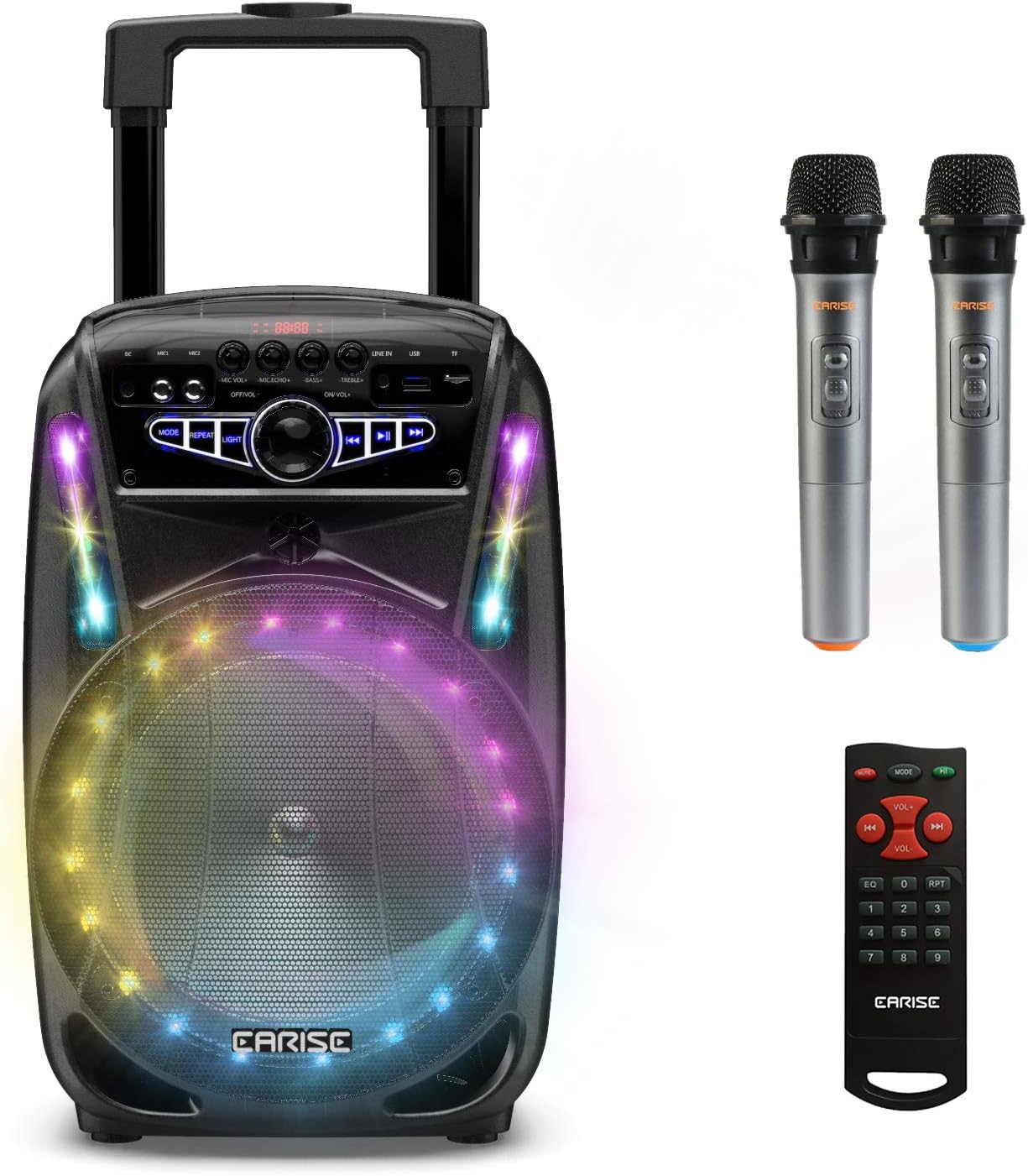
Image: The EARISE M15 Karaoke Machine, a black portable speaker with colorful LED lights on the front, shown with two wireless microphones and a remote control.
Co jest w pudełku
Sprawdź zawartość paczki, aby upewnić się, że wszystkie przedmioty są obecne i w dobrym stanie.
- 1 x System PA na wózku M15
- 2 x mikrofony bezprzewodowe (baterie nie są dołączone)
- 1 x Pilot zdalnego sterowania
- 1 x Przewód zasilający
- Kabel 1 x AUX
- 1 x Instrukcja obsługi (ten dokument)

Image: A visual representation of the package contents, showing the M15 speaker, two wireless microphones, a remote control, an AUX cable, and a charging cable.
Przewodnik po konfiguracji
1. Ładowanie urządzenia
Before first use, fully charge the M15 Karaoke Machine. The built-in 3600mAh 7.4V Lithium rechargeable battery provides portability. A full recharge takes approximately 3 hours.
- Connect the included power cord to the DC Charging Port (6) on the back of the unit.
- Plug the other end of the power cord into a standard AC 100-240V power outlet.
- The charging indicator light will illuminate. Once fully charged, the light may change color or turn off depending on the unit's design.
2. Instalowanie baterii mikrofonu
The wireless microphones require batteries (not included). Open the battery compartment of each microphone and insert the required batteries, ensuring correct polarity.
3. Pierwsze włączenie zasilania
Locate the Power On/Off switch (15) on the control panel. Turn the switch to the "ON" position to power on the unit.
Instrukcja obsługi
Panel sterowania nadview
Familiarize yourself with the control panel for optimal operation.

Image: Close-up of the M15's control panel, highlighting various buttons and ports with corresponding numbers for easy identification.
- Ekran wyświetlacza: Shows current mode, track number, and other information.
- Głośność mikrofonu: Reguluje głośność podłączonych mikrofonów.
- Echo mikrofonu: Steruje efektem echa w mikrofonach.
- Bas: Reguluje poziom basów w wyjściu audio.
- Potroić: Reguluje poziom wysokich tonów w wyjściu audio.
- Port ładowania DC: For connecting the power adapter to charge the unit.
- Mic 1 Port: Wejście dla mikrofonu przewodowego.
- Mic 2 Port: Input for a second wired microphone.
- Line In Port (AUX): Do podłączania zewnętrznych urządzeń audio poprzez kabel AUX.
- Gniazdo na dysk flash USB: Do odtwarzania dźwięku files z dysku USB.
- Gniazdo karty TF/SD: Do odtwarzania dźwięku files from a TF or SD card.
- Tryb: Switches between Bluetooth, USB, TF, AUX, and FM Radio modes.
- Powtarzać: Powtarza bieżący utwór lub listę odtwarzania.
- Światło: Toggles or changes the LED light patterns.
- Power On/Off, Master Volume: Turns the unit on/off and adjusts the overall volume.
- Poprzedni utwór: Przeskakuje do poprzedniego utworu.
- Odtwórz/Pauza: Odtwarza lub wstrzymuje odtwarzanie bieżącego utworu.
- Następny utwór: Przeskakuje do następnego utworu.
1. Parowanie Bluetooth
Connect your smartphone, tablet, or other Bluetooth-enabled device to the M15 for wireless audio streaming.
- Power on the M15 unit.
- Naciśnij Tryb button (12) until "Bluetooth" or "BT" appears on the Display Screen (1).
- Enable Bluetooth on your device and search for "EARISE M15" in the list of available devices.
- Select "EARISE M15" to pair. A confirmation sound will indicate successful pairing.
- You can now play audio from your device through the M15.

Image: A person sitting outdoors, connecting their smartphone to the EARISE M15 speaker via Bluetooth, indicated by the Bluetooth logo.
2. Odtwarzanie z USB/karty TF
Odtwórz dźwięk files directly from a USB flash drive or TF/SD card.
- Insert a USB flash drive into the USB Flash Drive Slot (10) or a TF/SD card into the TF/SD Card Slot (11).
- The unit should automatically switch to USB or TF mode and begin playing compatible audio files. Jeśli nie, naciśnij Tryb przycisk (12), aby wybrać właściwy tryb.
- Użyj Poprzedni utwór (16), Odtwórz/Pauza (17) i Następny utwór (18) buttons to control playback.
3. Wejście AUX
Connect external audio devices that do not have Bluetooth capability using the AUX cable.
- Connect one end of the included AUX cable to the Line In Port (9) on the M15.
- Podłącz drugi koniec kabla AUX do gniazda wyjściowego audio w urządzeniu zewnętrznym (np. odtwarzaczu MP3, laptopie).
- Naciśnij Tryb button (12) until "AUX" or "LINE" appears on the Display Screen (1).
- Steruj odtwarzaniem z urządzenia zewnętrznego.
4. Użycie mikrofonu
The M15 supports up to two wireless microphones and two wired microphones simultaneously for karaoke fun.
- Mikrofony bezprzewodowe: Turn on the wireless microphones. They should automatically connect to the M15.
- Mikrofony przewodowe: Plug wired microphones into Mic 1 Port (7) or Mic 2 Port (8).
- Adjust the Microphone Volume (2) and Microphone Echo (3) knobs to achieve desired sound effects.

Image: A group of people enjoying karaoke, with the EARISE M15 speaker providing sound and multiple microphones in use, demonstrating its multi-user capability.
5. Światła LED
Enhance your party atmosphere with the M15's colorful LED disco lights.
- Naciśnij Światło button (14) to toggle the LED lights on/off or to cycle through different light patterns.

Image: The EARISE M15 speaker with its front-facing LED lights glowing in multiple colors, creating a vibrant visual effect.
6. Korzystanie z pilota zdalnego sterowania
Dołączony pilot zdalnego sterowania umożliwia wygodną obsługę urządzenia z odległości.
- Sprawdź, czy w pilocie zdalnego sterowania są sprawne baterie.
- Point the remote control towards the front of the M15 unit.
- Use the buttons on the remote to control volume, mode, track selection, EQ, and other functions.
Konserwacja
Proper maintenance will ensure the longevity and optimal performance of your EARISE M15 Karaoke Machine.
- Czyszczenie: Use a soft, dry cloth to wipe the exterior of the unit. Do not use abrasive cleaners, waxes, or solvents as they may damage the finish.
- Pielęgnacja baterii: Aby przedłużyć żywotność baterii, należy unikać częstego całkowitego rozładowywania. W przypadku przechowywania urządzenia przez dłuższy czas, należy ładować je do około 50% pojemności co kilka miesięcy.
- Składowanie: Przechowuj urządzenie w chłodnym i suchym miejscu, z dala od bezpośredniego światła słonecznego, ekstremalnych temperatur i wysokiej wilgotności.
- Obsługiwanie: While the unit is portable with wheels and a handle, avoid dropping or subjecting it to strong impacts.

Image: A person demonstrating the portability of the EARISE M15 by pulling it with its retractable handle and built-in wheels.
Rozwiązywanie problemów
If you encounter issues with your M15, please refer to the following common problems and solutions.
| Problem | Możliwa przyczyna | Rozwiązanie |
|---|---|---|
| Brak zasilania / Urządzenie nie włącza się. | Bateria jest rozładowana. Przewód zasilający nie jest prawidłowo podłączony. | Naładuj urządzenie całkowicie. Ensure power cord is securely connected to both the unit and the power outlet. |
| Brak dźwięku z głośnika. | Głośność jest zbyt niska. Wybrano niewłaściwy tryb. Głośność urządzenia zewnętrznego jest niska. | Increase the Master Volume (15). Naciśnij Tryb button (12) to select the correct input source (Bluetooth, USB, AUX). Increase volume on the connected external device. |
| Mikrofon nie działa. | Microphone batteries are dead or incorrectly inserted. Głośność mikrofonu jest zbyt niska. Wireless microphone not paired. | Replace microphone batteries, ensuring correct polarity. Increase Microphone Volume (2). Ensure wireless microphones are turned on and within range. |
| Parowanie Bluetooth nie powiodło się. | M15 is not in Bluetooth mode. Device is too far from M15. Bluetooth w urządzeniu jest wyłączony. | Naciskać Tryb button (12) to select Bluetooth mode. Zbliż urządzenie do M15. Włącz Bluetooth w swoim urządzeniu. |
| Karta USB/TF nie jest obsługiwana. | Błędny file format. Karta/dysk nie został włożony prawidłowo. Unit not in USB/TF mode. | Zapewnij dźwięk filepliki są w kompatybilnym formacie (np. MP3). Re-insert the USB drive or TF card firmly. Naciskać Tryb button (12) to select USB or TF mode. |
Specyfikacje
Detailed technical specifications for the EARISE M15 Karaoke Machine.
| Funkcja | Specyfikacja |
|---|---|
| Model | M15 |
| Moc wyjściowa | 400 W maks. |
| R.Frequency | 90Hz-20KHz |
| Akumulator litowo-jonowy | 3.7V / 2600mAh (Built-in) |
| Jednostka napędowa | 8" 4Ω*1 + 1" tweeter*1 |
| Stosunek sygnału do szumu | ≥60dB |
| Zasilacz | Prąd zmienny 100-240 V |
| Wymiary produktu (dł. x szer. x wys.) | 27.94 x 25.4 x 40.64 cm (11 x 10.4 x 16.3 cala) |
| Waga przedmiotu | 4.08 kilogramów |
| Technologia łączności | Bluetooth, USB, AUX |
| Kompatybilne urządzenia | Laptopa, smartfona |

Image: A diagram illustrating the physical dimensions of the EARISE M15 speaker, showing its height, width, and depth.
Gwarancja i wsparcie
For warranty information or technical support, please refer to the contact details provided with your purchase documentation or visit the official EARISE webZachowaj paragon jako dowód zakupu na wypadek ewentualnych roszczeń gwarancyjnych.