
1. Wprowadzenie
This manual provides essential information for the safe and effective use of your LEXIBOOK Disney Frozen 2 Bilingual Educational Laptop, model JC598FZi3. This educational laptop is designed to offer engaging learning experiences in both English and German, featuring 124 activities across various subjects.
Przed rozpoczęciem korzystania z urządzenia należy uważnie przeczytać instrukcję i zachować ją do wykorzystania w przyszłości.
2. Koniec produktuview
The LEXIBOOK Disney Frozen 2 Bilingual Educational Laptop is an interactive learning tool featuring a realistic laptop design with a functional keyboard and mouse. It includes a monochrome LCD screen for displaying activities and animations.
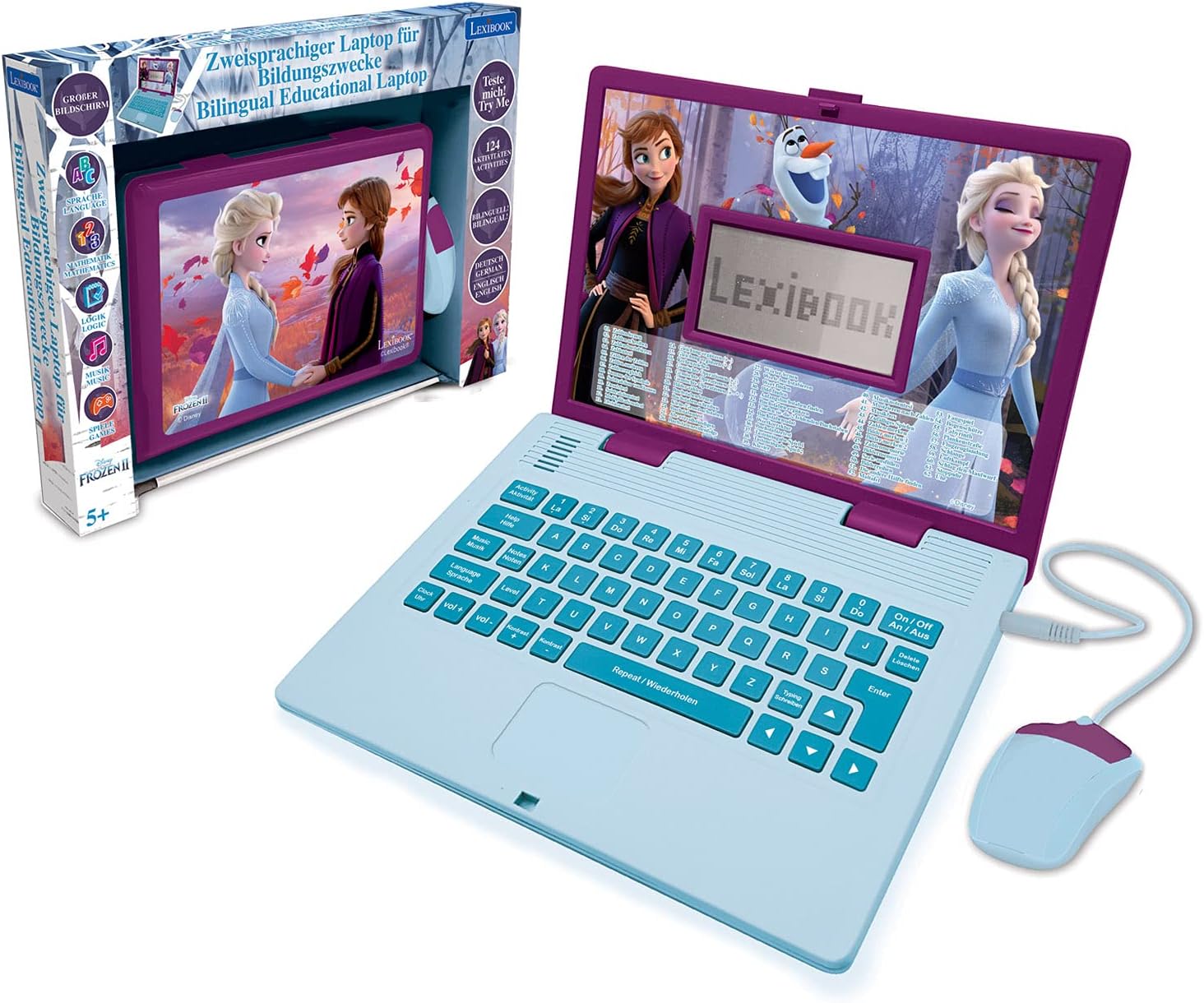
Figure 2.1: The educational laptop and its retail packaging.

Rycina 2.2: Przód view of the laptop with the wired mouse connected.

Rysunek 2.3: Szczegółowy view of the laptop screen and mouse.
3. Konfiguracja
3.1 Instalacja baterii
The laptop requires 2 Alkaline batteries (not included). Follow these steps to install them:
- Znajdź komorę baterii na spodzie laptopa.
- Za pomocą śrubokręta otwórz pokrywę komory baterii.
- Insert 2 new Alkaline batteries, ensuring correct polarity (+/-).
- Załóż pokrywę komory baterii i zabezpiecz ją śrubą.
3.2 Włączanie/wyłączanie
To turn the laptop ON, press the 'On/Off' button located on the keyboard. To turn it OFF, press the 'On/Off' button again.
4. Instrukcja obsługi
4.1 Podstawowa nawigacja
Use the integrated keyboard and the wired mouse to navigate through the menus and select activities. The keyboard features standard QWERTY layout keys and dedicated function buttons.

Figure 4.1: Detail of the laptop keyboard layout.

Figure 4.2: Detail of the wired mouse.
4.2 Wybór języka
The laptop supports two languages: English and German. Use the 'Language' button to switch between the available languages. The selected language will apply to all activities and instructions.
4.3 Regulacja głośności
Adjust the volume using the 'Vol+' and 'Vol-' buttons on the keyboard to suit your environment.
4.4 Ekran LCD
The LCD screen displays animations and activity content. Its dimensions are approximately 9.7 cm x 5.1 cm.

Figure 4.3: LCD screen dimensions.

Rysunek 4.4: Examples of screen animations.
5. Działania
The laptop offers 124 educational activities designed to enhance various skills. These activities are categorized as follows:
- Język: Activities focusing on letters, words, typing, and spelling in both English and German.
- Matematyka: Ćwiczenia obejmujące liczby, podstawowe obliczenia (dodawanie, odejmowanie, mnożenie, dzielenie) i rozwiązywanie problemów.
- Wiedza ogólna: Quizy i fakty poszerzające wiedzę.
- Logika: Puzzles and challenges to develop critical thinking and memory.
- Muzyka: Introduction to musical notes, composing simple melodies, and playing pre-programmed tunes.
- Odczyt zegara: Activities to learn how to tell time.
- Zawody sportowe: Fun and engaging games to reinforce learning and provide entertainment.
Many activities feature multiple levels to allow for progressive learning and skill development.

Figure 5.1: Partial list of available activities.

Figure 5.2: Child engaging with the laptop.
6. Konserwacja
6.1 Czyszczenie
To clean the laptop, use a soft, dry cloth. Do not use abrasive cleaners or solvents, as these can damage the surface. Keep the device away from water and excessive moisture.
6.2 Pielęgnacja baterii
Wyjmij baterie, jeśli urządzenie nie będzie używane przez dłuższy czas, aby zapobiec wyciekowi. Zużyte baterie należy utylizować w sposób odpowiedzialny, zgodnie z lokalnymi przepisami.
7. Rozwiązywanie Problemów
- Urządzenie się nie włącza: Sprawdź, czy baterie są prawidłowo zainstalowane i w pełni naładowane. W razie potrzeby wymień je na nowe.
- Ekran jest pusty lub zamrożony: Try turning the device off and then on again. If the issue persists, replace the batteries.
- Problemy z dźwiękiem: Ensure the volume is not set to minimum. Check battery levels.
- Mouse or keyboard unresponsive: Ensure the mouse cable is securely plugged in. Check for any debris obstructing buttons or the mouse sensor.
8. Specyfikacje
| Numer modelu | JC598FZi3 |
| Marka | Leksykon |
| Wymiary (dł. x szer. x wys.) | Wymiary 24 x 18 x 3.6 cm |
| Waga | 830 gram |
| Zalecany wiek | 5 lata i więcej |
| Języki | Niemiecki, angielski |
| Typ baterii | Alkaline (2 required, not included) |
| Materiał główny | Plastikowy |
9. Informacje dotyczące bezpieczeństwa
- This product is recommended for children aged 5 years and older.
- Podczas zabawy zaleca się nadzór osoby dorosłej.
- Nie wystawiaj urządzenia na działanie ekstremalnych temperatur ani bezpośredniego światła słonecznego.
- Przechowuj małe części, takie jak baterie, poza zasięgiem małych dzieci, aby uniknąć ryzyka zadławienia.
- Nie próbuj demontować ani modyfikować produktu.
10. Gwarancja i wsparcie
For warranty information or technical support, please refer to the contact details provided with your purchase or visit the official Lexibook webZachowaj dowód zakupu na wypadek roszczeń gwarancyjnych.