
Beatfoxx SDH-340/32
Beatfoxx SDH-340/32 Silent Disco V2 Set
Instrukcja obsługi
1. Wprowadzenie
Thank you for choosing the Beatfoxx SDH-340/32 Silent Disco V2 Set. This manual provides essential information for the proper setup, operation, and maintenance of your wireless stereo headphones and charging system. Please read this manual thoroughly before use to ensure optimal performance and longevity of your product.
Ważna uwaga dotycząca zgodności: The Silent Disco V2 series is designed for exclusive compatibility with other Beatfoxx Silent Disco V2 devices. It is not compatible with first-generation Silent Disco products or the Silent Guide series. When purchasing additional components, ensure they explicitly carry the "V2" designation.
2. Zawartość opakowania
Your Beatfoxx SDH-340/32 Silent Disco V2 Set includes the following components:
- 32 x Beatfoxx SDH-340 V2 Wireless Stereo Headphones
- 2 x Multi-Headphone Charging System (consisting of 1 power supply and 4 distribution cables each)

Image: The Beatfoxx SDH-340 V2 wireless stereo headphones shown with the included charging cables and power adapter.
3. Koniec produktuview
3.1 Funkcje słuchawek
- Wireless stereo headphones with 3 selectable channels.
- LED lighting indicates the currently selected channel (blue, red, green).
- Tactile channel selection switch.
- Regulacja głośności.
- Włącznik/wyłącznik zasilania.
- LED lighting can be switched off.
- 3.5 mm stereo jack input for wired audio sources.
- Adjustable, elastic headband for comfortable fit.
- Very soft, rotatable ear pads for high wearing comfort.
- Integrated lithium-polymer battery (600 mAh).
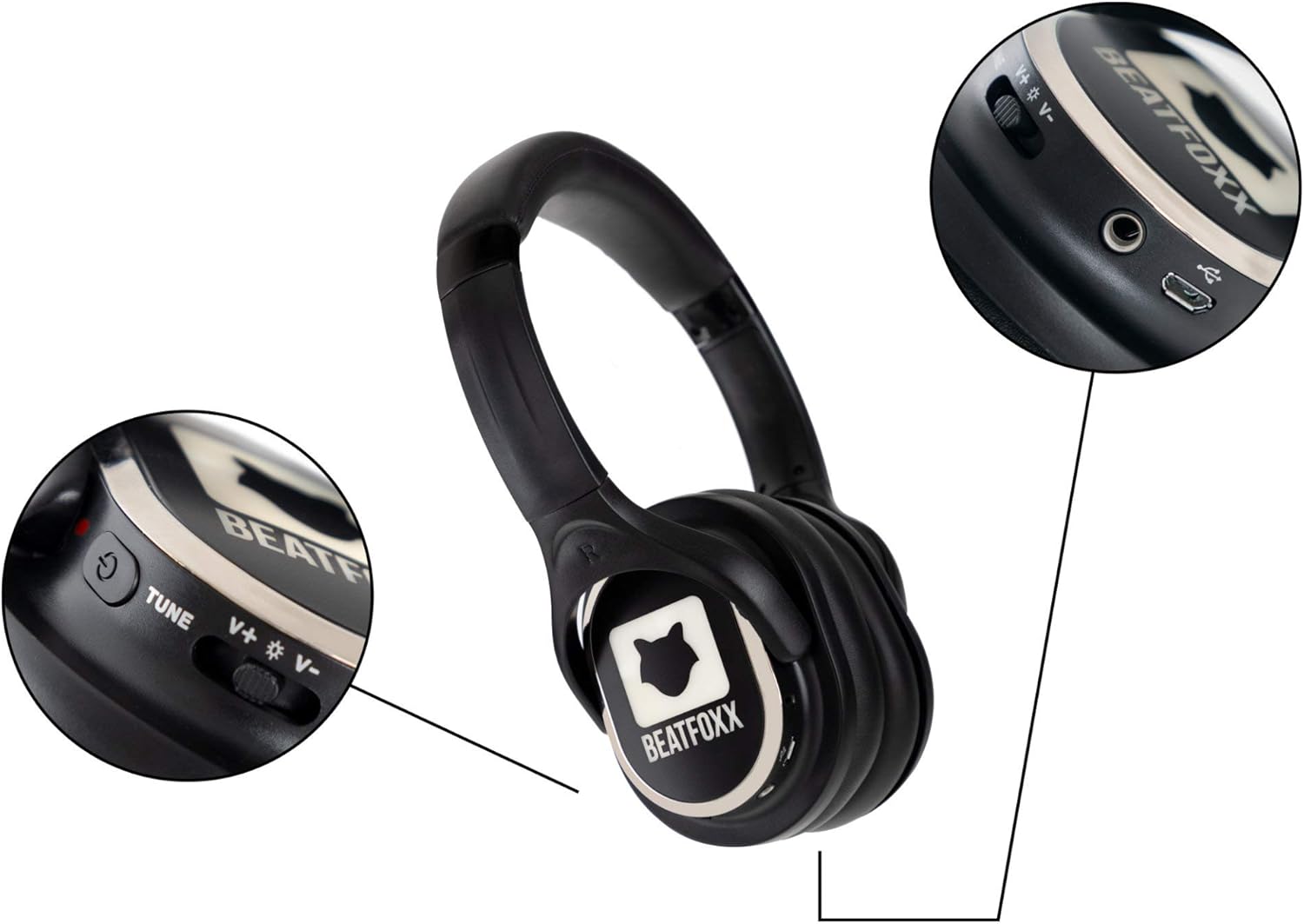
Obraz: szczegółowy view of the Beatfoxx SDH-340 V2 headphone's right earcup, highlighting the power switch, volume controls, channel tune button, and charging port.
3.2 Charging System Features
- Charging system includes 1 power supply and 4 distribution cables.
- Allows simultaneous charging of up to 16 headphones with a single power outlet.
- USB connection enables charging via PC or laptop.

Image: The components of the Beatfoxx charging system, including the power adapter and various charging cables, demonstrating its versatility.
4. Konfiguracja
4.1 Ładowanie słuchawek
Before first use, fully charge all headphones. The integrated lithium-polymer battery provides an operating time of 8 to 10 hours, depending on usage and volume level. Charging takes approximately 4 hours.
- Podłącz zasilacz do gniazdka ściennego.
- Connect the distribution cables to the power supply.
- Plug the micro-USB connectors from the distribution cables into the charging port on each headphone.
- During charging, red and green LEDs on the headphones will indicate the charging status. Refer to the headphone's LED indicators for full charge status.

Image: A visual representation of the Beatfoxx headphones connected to various power sources (PC, power bank, wall adapter) for charging via USB cables.

Image: A diagram showing how multiple Beatfoxx headphones can be charged simultaneously using the provided charging system, connecting up to 16 headphones to a single power source.
4.2 Connecting to a Transmitter
The headphones receive a clear audio signal from any Beatfoxx SDT-40 Silent Disco V2 transmitter within a range of approximately 150 meters. UHF technology ensures clear, noise-free transmission.
- Ensure your Beatfoxx Silent Disco V2 transmitter is powered on and transmitting audio.
- Power on the headphones using the On/Off switch.
- Select the desired channel directly on the headphones using the channel selection switch. The headphone's LED lighting will indicate the currently selected channel (blue, red, or green) to match the transmitter's channel.

Image: Individuals at an outdoor event wearing Beatfoxx Silent Disco headphones, demonstrating their use in a group setting with a DJ.
5. Instrukcja obsługi
5.1 Włączanie/wyłączanie
Locate the On/Off switch on the headphone. Slide the switch to the "On" position to power on the headphones. Slide it to the "Off" position to power them off.
5.2 Wybór kanału
The headphones support up to 3 distinct channels. Use the tactile channel selection switch on the headphone to cycle through the available channels. The LED lighting on the headphones will change color (blue, red, or green) to indicate the active channel, corresponding to the transmitter's channel.
5.3 Regulacja głośności
Adjust the listening volume using the dedicated volume control located on the headphone. Rotate the control to increase or decrease the volume to your preferred level.
5.4 Połączenie przewodowe (opcjonalnie)
The headphones feature a 3.5 mm stereo jack input, allowing them to be used with cable-bound audio sources such as smartphones, tablets, or laptops, even without a wireless transmitter.
- Connect one end of a 3.5mm audio cable (not included) to the headphone's 3.5mm jack.
- Connect the other end of the cable to the audio output of your device.
- Ensure the headphones are powered on for optimal sound, though passive listening may be possible.

Image: A woman wearing Beatfoxx headphones, connected via a cable to a smartphone, illustrating the wired connection capability.
6. Konserwacja i pielęgnacja
- Czyszczenie: Use a soft, dry cloth to clean the headphones and charging system. Do not use abrasive cleaners or solvents.
- Składowanie: Store the headphones and charging system in a cool, dry place when not in use. Avoid extreme temperatures and direct sunlight.
- Pielęgnacja baterii: To prolong battery life, avoid fully discharging the headphones frequently. If storing for an extended period, charge the battery to approximately 50% every few months.
- Wodoodporność: The product is water-resistant, but not waterproof. Avoid submerging the headphones in water or exposing them to heavy rain.
7. Rozwiązywanie Problemów
- Brak dźwięku:
- Sprawdź, czy słuchawki są włączone i naładowane.
- Verify the selected channel on the headphones matches the transmitter's channel.
- Check the volume level on both the headphones and the audio source/transmitter.
- Ensure the transmitter is powered on and receiving an audio signal.
- Słaby sygnał/zakłócenia:
- Ensure headphones are within the 150m range of the transmitter.
- Minimize obstacles between the headphones and the transmitter.
- Check for other strong RF signals in the area that might cause interference.
- Słuchawki się nie ładują:
- Verify the charging cables are securely connected to both the headphones and the power source.
- Ensure the power adapter is properly plugged into a working outlet.
- Check if the charging indicator LEDs on the headphones are active.
8. Specyfikacje
| Funkcja | Specyfikacja |
|---|---|
| Model | SDH-340 V2 |
| Technologia łączności | Wireless (RF), Wired (3.5 mm jack) |
| Technologia tunera | UHF |
| Liczba kanałów | 3 |
| Zakres częstotliwości | 20 - 15,000 Hz |
| Stosunek sygnału do szumu (SNR) | >80dB |
| Całkowite zniekształcenie harmoniczne (THD) | <1% |
| Średnica głośnika | 38mm mylar diaphragm |
| Typ baterii | Zintegrowany litowo-polimerowy (600 mAh) |
| Czas pracy baterii | 8 - 10 hours (usage dependent) |
| Czas ładowania akumulatora | Około 4 godzin |
| Waga słuchawek | 225 gramów |
| Tworzywo | Skóra sztuczna |
| Poziom wodoodporności | Wodoodporny |
9. Gwarancja i wsparcie
Beatfoxx products are designed for reliability and performance. For information regarding warranty coverage, technical support, or service, please refer to the warranty card included with your product or visit the official Beatfoxx webZachowaj paragon jako dowód zakupu na wypadek ewentualnych roszczeń gwarancyjnych.