
Wstęp
The Thincol GM640 Grain Moisture Meter is a portable digital instrument designed for accurate measurement of moisture content and temperature in various grains. It is an essential tool for grain procurement, storage, and processing, ensuring optimal quality control.
This device offers dual functionality, measuring both moisture and temperature, and supports a wide range of grain types including rice, barley, wheat, feed, corn, rapeseed, and soybean. Key features include an LCD backlight for clear readings, multiple function support such as moisture standard setting and data hold, a detachable protective case, and a robust split probe for immediate measurements.
Zawartość opakowania
- 1 x GM640 Moisture Meter
- 1 x sonda testowa
- 1 x Instrukcja obsługi (ten dokument)

Image: The GM640 Grain Moisture Meter unit, its detachable probe, and the included user manual.
Organizować coś
1. Instalacja baterii
The GM640 meter requires 3 x 1.5V AAA batteries (not included). To install:
- Znajdź pokrywę komory baterii znajdującą się z tyłu miernika.
- Aby otworzyć, przesuń lub odepnij pokrywę.
- Włóż trzy baterie AAA, zwracając uwagę na prawidłową biegunowość (+/-), zgodnie ze wskazaniami wewnątrz komory.
- Dokładnie załóż pokrywę komory baterii.
2. Connecting the Test Probe
The test probe is essential for taking measurements. To connect:
- Identify the connector port on the top of the main meter unit.
- Align the probe's connector with the port and gently push to secure. Ensure a firm connection.
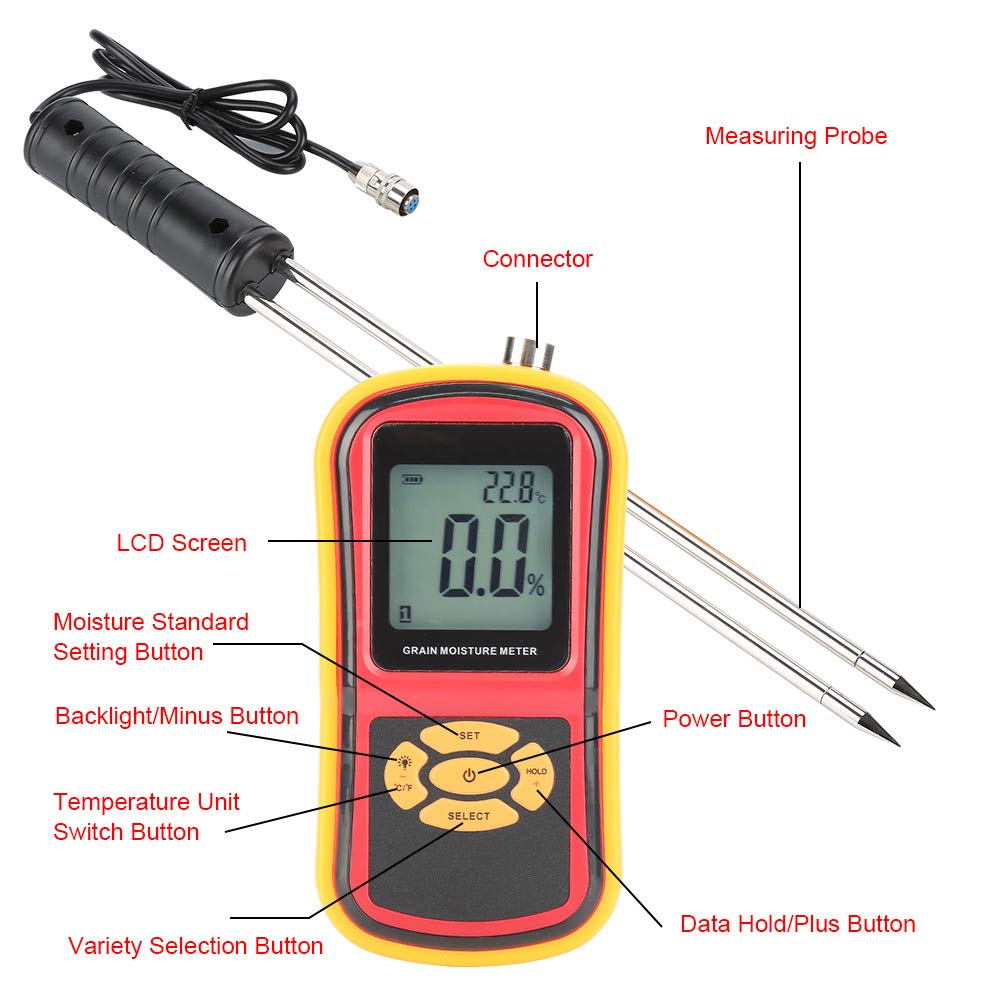
Image: The main meter unit, the measuring probe, and the connector point for assembly.
Instrukcja obsługi
Miernik ponadview i funkcje przycisków

Obraz: szczegółowy view of the GM640 meter's front panel, highlighting the LCD screen, buttons, and their respective functions.
- Przycisk zasilania: Press to turn the meter ON or OFF.
- Przycisk WYBIERZ: Used to cycle through different grain varieties (codes 1-8).
- Przycisk SET: For setting moisture standards or entering calibration mode.
- HOLD / + Button: Press to hold the current measurement on the display. Also used to increase values in setting modes.
- Backlight / - Button: Activates or deactivates the LCD backlight. Also used to decrease values in setting modes.
- Przycisk °C/°F: Przełącza wyświetlanie temperatury pomiędzy stopniami Celsjusza i Fahrenheita.
Informacje na wyświetlaczu LCD

Image: A close-up of the GM640's LCD screen, with numbered labels indicating the meaning of each displayed icon and value.
- Battery Power Symbol: Wskazuje pozostały czas pracy baterii.
- Data Hold Symbol: Pojawia się, gdy funkcja zatrzymania danych jest aktywna.
- Pomiar temperatury: Wyświetla aktualny odczyt temperatury.
- Measurement Unit Symbol: Shows the unit for temperature (°C or °F).
- Moisture Setting Symbol: Indicates a moisture setting mode.
- Water Content Overrun Symbol: Warns if moisture content exceeds a set limit.
- Pomiar wilgotności: Displays the current moisture percentage.
- Procent wilgocitagSymbol: Indicates the unit for moisture (%).
- Grain Variety Code: Shows the currently selected grain type (1-8).
Dokonywanie pomiaru
- Włączanie: Naciśnij przycisk zasilania, aby włączyć miernik.
- Select Grain Variety: Press the "SELECT" button repeatedly to choose the appropriate grain variety (e.g., Corn, Wheat, Rice). The corresponding grain code (1-8) will appear on the LCD.
- Włóż sondę: Carefully insert the test probe into the grain sample. Ensure the probe is fully submerged and stable within the sample for accurate readings.
- Odczyt pomiaru: The moisture content (%) and temperature (°C/°F) will be displayed on the LCD screen.
- Hold Data (Optional): Press the "HOLD" button to freeze the current readings on the display. Press again to release.
- Zmień jednostkę temperatury (opcjonalnie): Naciśnij przycisk „°C/°F”, aby przełączać się między jednostkami temperatury Celsjusza i Fahrenheita.
- Backlight (Optional): Press the "Backlight" button to turn the LCD backlight on or off for better visibility in low light conditions.

Image: Visual representation of the GM640 meter's capability to measure moisture in multiple grain types, including corn, wheat, soybean, rice, and sesame.
Konserwacja
Czyszczenie
To ensure the longevity and accuracy of your GM640 meter:
- Przetrzyj jednostkę główną miękką, suchą ściereczką. Nie używaj środków czyszczących o właściwościach ściernych ani rozpuszczalników.
- After each use, clean the test probe thoroughly to remove any grain residue. A soft brush or cloth can be used. Ensure the probe is dry before storage.
- Do not immerse the meter or probe in water or any other liquid.
Składowanie
When not in use, store the GM640 meter and probe in a cool, dry place, away from direct sunlight and extreme temperatures. The meter comes with a detachable protective case:

Image: The GM640 meter with its protective rubber soft case, demonstrating how it can be removed or applied to safeguard the instrument.
The split protective case can be removed at any time and is designed to fully wrap the edge, protecting the instrument from harm.
Wymiana baterii
When the low battery warning symbol appears on the LCD, replace all three AAA batteries promptly to ensure accurate readings and proper operation.
Rozwiązywanie problemów
- Licznik się nie włącza: Sprawdź, czy baterie są prawidłowo zainstalowane i wystarczająco naładowane. W razie potrzeby wymień baterie.
- Niedokładne odczyty:
- Ensure the probe is clean and fully inserted into the grain sample.
- Verify that the correct grain variety is selected using the "SELECT" button.
- Check for "Water Content Overrun" symbol; if displayed, the moisture content may be outside the meter's measurable range.
- Ensure the probe connection is secure.
- LCD display is dim: Activate the backlight using the "Backlight" button. If still dim, replace batteries.
- "Over-standard prompt" appears: This indicates that the measured moisture content exceeds a pre-set standard. Adjust your grain storage or processing methods accordingly.
Specyfikacje
| Parametr | Wartość |
|---|---|
| Model | GM640 |
| Moisture Content Measuring Range | 5% ~ 30% |
| Rozdzielczość wilgoci | 0.5% |
| Dokładność wilgotności | ±(1%RH + 0.5) |
| Zakres pomiaru temperatury | -10 ~ 60°C (14 ~ 140°F) |
| Rozdzielczość temperatury | 0.1°C |
| Dokładność temperatury | ±2.5°C (±5°F) |
| Temperatura pracy | 0 ~ 40 ° C (32 ~ 104 ° F) |
| Wilgotność robocza | 0 ~ 85% wilgotności względnej |
| Zasilacz | 3 x 1.5V AAA Batteries (NOT included) |
| Rozmiar miernika | 15.5 x 8 x 3.5 cm (6.10 x 3.15 x 1.38 cala) |
| Rozmiar sondy | 41.8 x 3.5 cm (16.46 x 1.38 cala) |
| Waga | 505 g (17.8 uncji) |
Gwarancja i wsparcie
Informacje o gwarancji
Specific warranty terms and conditions for the Thincol GM640 Grain Moisture Meter are typically provided by the manufacturer or seller at the time of purchase. Please refer to any documentation included with your product or contact your point of purchase for detailed warranty information.
Obsługa klienta
For technical assistance, troubleshooting beyond this manual, or inquiries regarding your product, please contact the manufacturer, Thincol, or the seller from whom you purchased the device. Contact information can usually be found on the product packaging or the seller's webstrona.