
1. Wprowadzenie
The VGEBY YCX-003 MPPT Solar Charge Controller is designed to manage power flow from your solar panels to your battery bank and connected loads. It features an industrial-grade master chip for accurate monitoring and control, ensuring efficient charging and protection for your battery system. This controller automatically adapts to 12V or 24V systems and incorporates advanced Maximum Power Point Tracking (MPPT) technology for high charging efficiency.
Główne funkcje obejmują:
- Maintaining optimal battery charge levels.
- Protection against over-charging and over-discharging.
- Prevention of reverse charging from battery to solar panels at night.
- Reverse polarity protection for both battery and solar panels.
- Automatic load cut-off and recovery based on battery voltage.
- Built-in thunder protection.
- Automatyczna kompensacja temperatury dla objętości ładowaniatage.
2. Konfiguracja i instalacja
Prawidłowa instalacja jest kluczowa dla bezpiecznego i wydajnego działania regulatora ładowania słonecznego. Prosimy o dokładne przestrzeganie poniższych kroków.
2.1 Schemat okablowania

Figure 1: Wiring connections for the solar charge controller.
2.2 Kroki połączenia
Connect the components in the following order to prevent damage to the controller or other system components:
- Podłącz akumulator: First, connect the battery to the controller's battery terminals. Ensure correct polarity (positive to positive, negative to negative). The controller will automatically detect the system voltage (12 V lub 24 V).
- Podłącz panel słoneczny: Next, connect the solar panel to the controller's solar panel terminals. Ensure correct polarity.
- Podłącz obciążenie: Finally, connect your DC loads to the controller's load terminals. Ensure correct polarity.
Ważny: Always connect the battery first and disconnect the load first when disassembling the system.
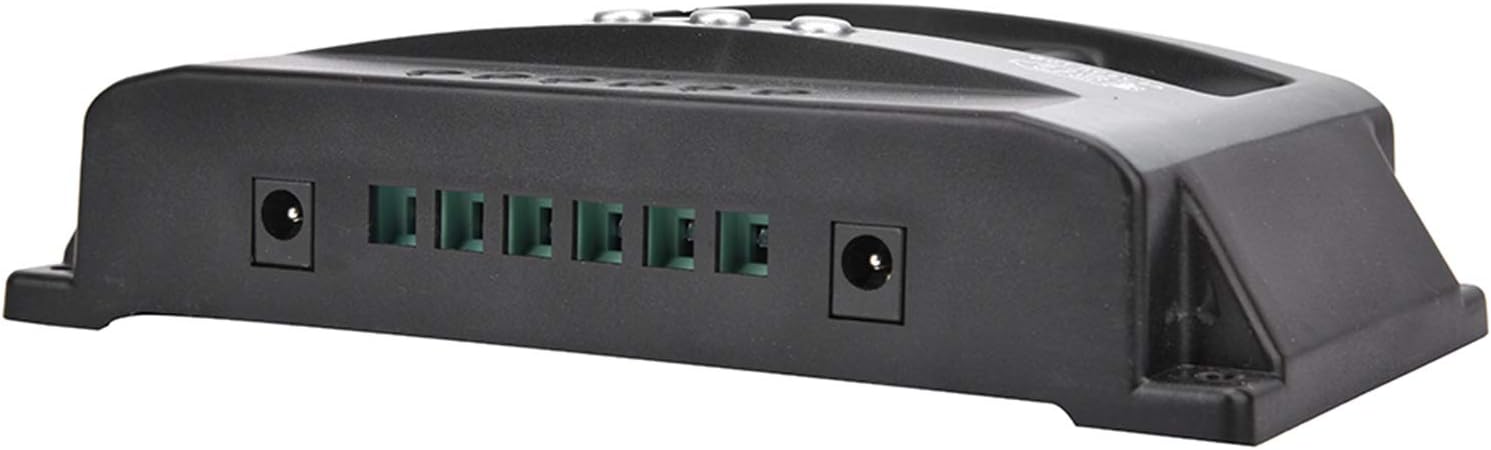
Figure 2: Connection terminals on the side of the controller.
3. Instrukcja obsługi
The VGEBY YCX-003 controller features a large LCD display and user-friendly buttons for monitoring and adjusting parameters.
3.1 Wyświetlacz LCD i przyciski

Rysunek 3: Panel przedni z wyświetlaczem LCD i przyciskami sterującymi.
The LCD display provides real-time information on battery voltage, charging current, discharge current, and system status. The buttons allow you to navigate through display modes and adjust certain charging and discharging parameters.
3.2 Parametry regulowane
The controller allows for adjustment of floating charge voltage, objętość odcięcia rozładowaniatage i objętość odzysku rozładowaniatage. Refer to the on-screen menu for specific adjustment procedures. These parameters are factory-set to default values suitable for most lead-acid batteries but can be customized if needed.
3.3 wyjście USB
The controller includes a 5V/2A USB output for charging small electronic devices. This output is active when the battery has sufficient charge.

Figure 4: USB charging capability.
4. Konserwacja
To ensure the longevity and optimal performance of your VGEBY YCX-003 MPPT Solar Charge Controller, periodic maintenance is recommended.
- Czystość: Utrzymuj kontroler w czystości, bez kurzu i zanieczyszczeń. Do czyszczenia używaj suchej ściereczki.
- Znajomości: Periodically check all wiring connections to ensure they are secure and free from corrosion. Loose connections can lead to power loss or overheating.
- Wentylacja: Aby zapobiec przegrzaniu, należy upewnić się, że kontroler został zainstalowany w dobrze wentylowanym pomieszczeniu.
5. Rozwiązywanie Problemów
The VGEBY YCX-003 controller is designed with several built-in protection features. If the system is not operating as expected, check the following:
- Brak wyświetlacza/zasilania: Sprawdź połączenia akumulatora i upewnij się, że akumulator ma wystarczającą pojemność.tage.
- Brak ładowania: Verify solar panel connections and ensure adequate sunlight. Check for reverse polarity on solar panel connections.
- Ładowanie nie działa: Check load connections and ensure the battery voltage is above the discharge recovery voltage. The controller automatically cuts off the load if battery voltage jest za niskie.
- Error Codes/Warnings: The controller has built-in protections for overheating, overcurrent, short circuit, open circuit, and reverse connection. If a fault occurs, the controller will automatically recover once the issue is resolved. Consult the display for any specific indicators.
- Odwrotna polaryzacja: The controller has reverse polarity protection for both the battery and solar panels. If connected incorrectly, the controller will not operate until the polarity is corrected.
6. Specyfikacje techniczne

Figure 5: VGEBY YCX-003 MPPT Solar Charge Controller.
| Funkcja | Specyfikacja |
|---|---|
| Model | YCX-003 |
| Objętość systemutage | 12V/24V Adaptive |
| Panel słonecznytage | 12V, 18V, 24V, 36V |
| Objętość ładunku zmiennegotage | 13.7 V (domyślnie, regulowany) |
| Objętość odcięcia rozładowaniatage | 10.7 V (domyślnie, regulowany) |
| Odzyskiwanie rozładowania Objętośćtage | 12.6 V (domyślnie, regulowany) |
| Prąd czuwania | <10mA |
| Wyjście USB | 5V / 2A Max |
| Opcje prądu znamionowego | 40 A, 50 A, 60 A, 100 A |
| Maks. PV Cztage | 50 V |
| Maksymalna moc wejściowa PV | 750 W (12 V) / 1500 W (24 V) |
| Wymiary | Około 170 x 92 x 45 mm (6.7 x 3.6 x 1.8 cala) |
| Tworzywo | ABS + ROHS |
| Producent | VGEBY |
7. Gwarancja i wsparcie
For warranty information or technical support, please refer to the documentation provided at the time of purchase or contact VGEBY customer service directly. Ensure you have your product model number (YCX-003) and purchase details available when seeking support.