
Wstęp
This manual provides detailed instructions for the installation, operation, and maintenance of your XVIM 8CH 1080P Home Security Camera System. Please read this manual thoroughly before using the product to ensure proper setup and functionality. Keep this manual for future reference.
Produkt ponadview
The XVIM 8CH 1080P Home Security Camera System includes an 8-channel Digital Video Recorder (DVR) with a 1TB hard drive and four 2MP HD outdoor IP66 waterproof cameras. The system is designed for reliable surveillance with features such as night vision and remote access capabilities.

Obraz: Ponadview of the XVIM 1080P HD Security Camera System, showing a camera and a smartphone displaying live view.
Funkcje aparatu
- Obudowa metalowa IP66: Durable and weatherproof construction.
- Obiektyw HD 3.6 mm: Zapewnia 75° viewkąt.
- Filtr IR-Cut: Ensures clear day and night vision.
- 24 diody LED: Offers up to 65ft night vision range.

Image: Diagram highlighting key camera features: IP66 metal housing, 3.6mm HD lens, IR-cut filter, and 24 LEDs.
Day and Night Monitoring
The cameras are equipped with an IR-Cut filter and infrared LEDs to provide clear surveillance both during the day and at night. During the day, images are colorful and high definition. At night, the cameras automatically switch to infrared mode for clear black and white vision in low-light conditions.
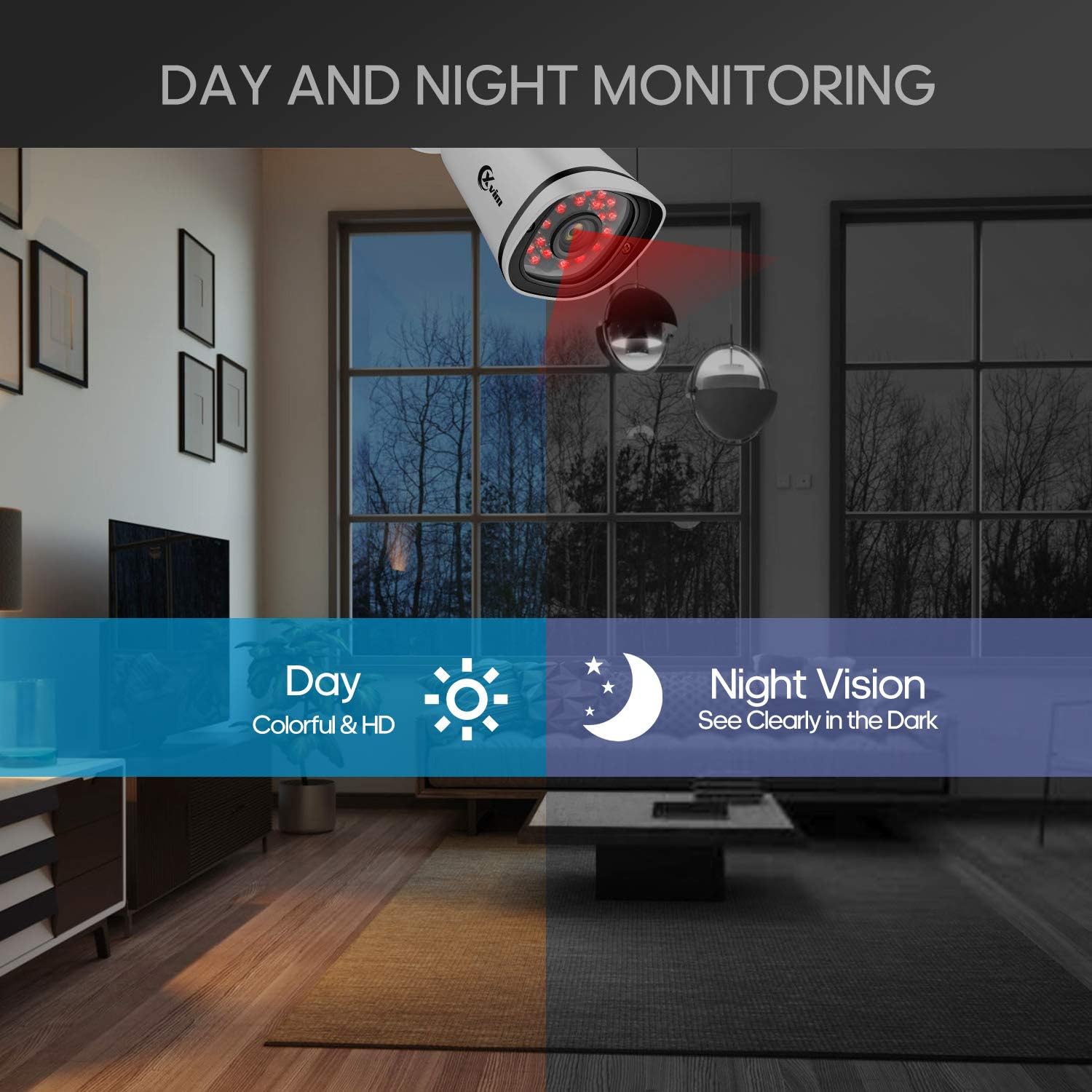
Image: Illustration showing the camera's ability to monitor both during the day (colorful HD) and at night (clear vision in the dark).
Wodoodporna konstrukcja
The cameras feature an IP66-rated metal housing, ensuring they are protected against dust and powerful water jets, making them suitable for outdoor installation in various weather conditions.
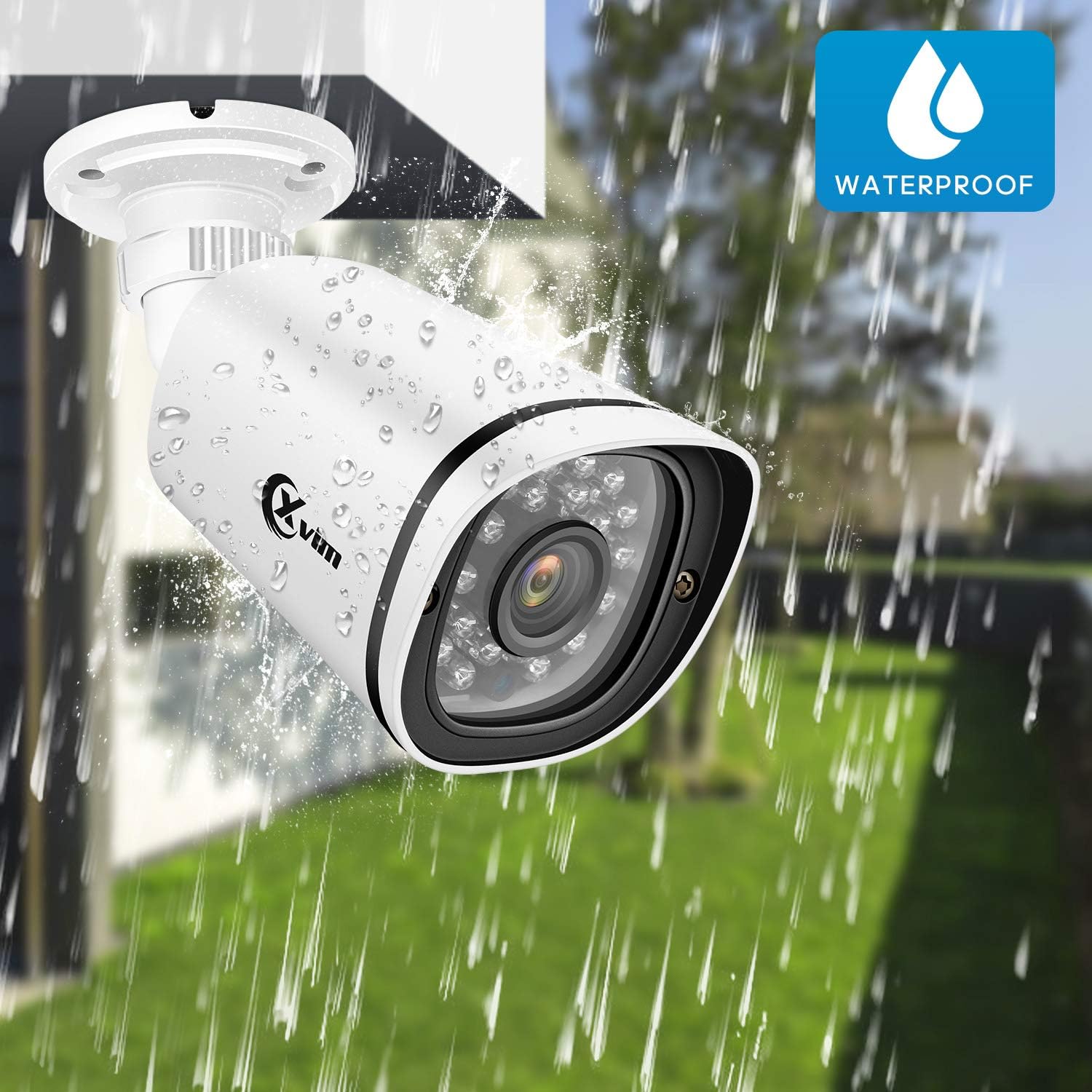
Image: An XVIM camera being sprayed with water, illustrating its waterproof design.
DVR Back Panel Overview
The DVR unit provides multiple ports for connecting cameras, a monitor, audio input/output, and network connectivity. Familiarize yourself with the ports before installation.
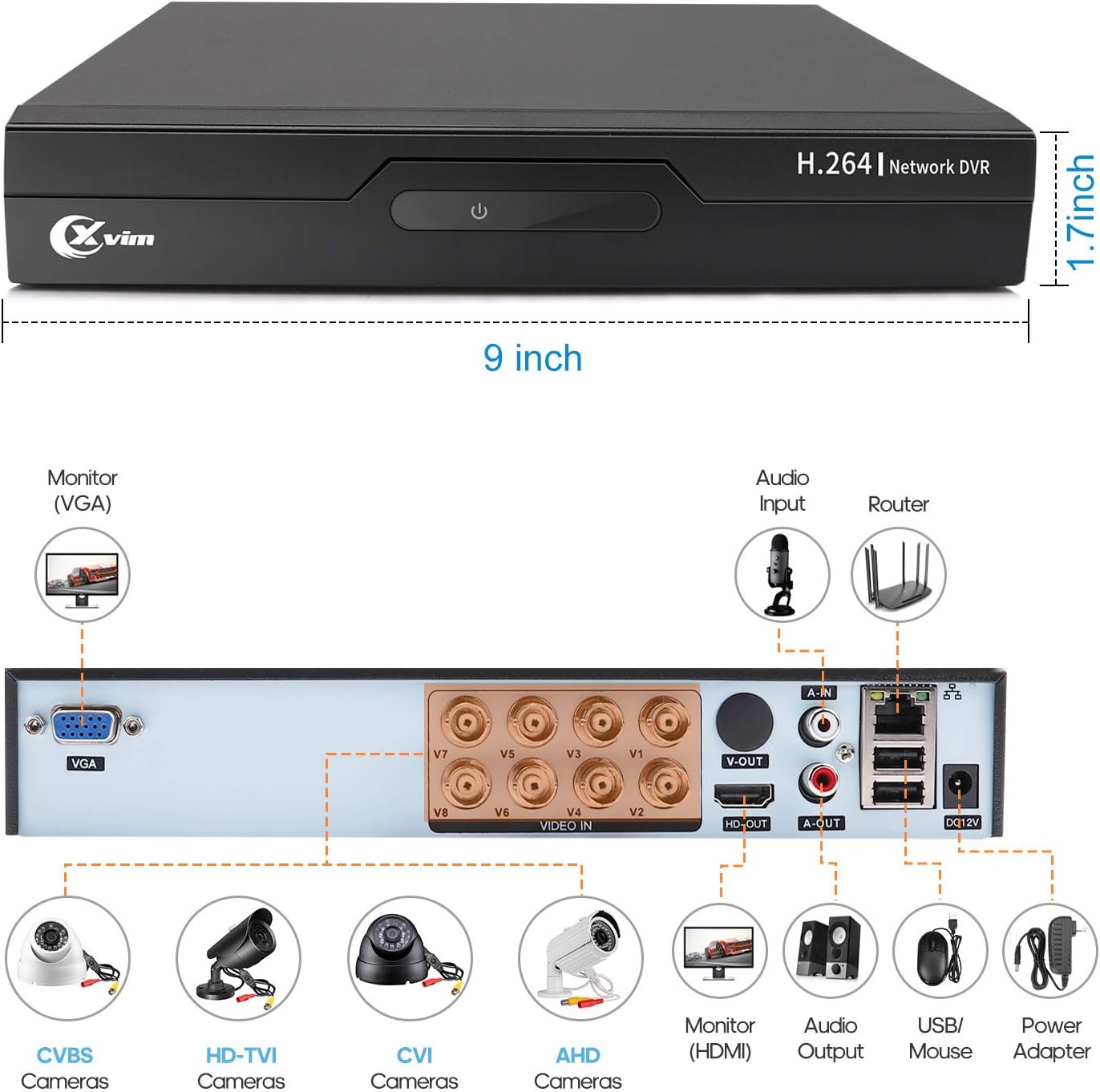
Image: Diagram of the DVR's back panel, showing ports for VGA, HDMI, video input (BNC), audio input/output, USB, and power.
Instrukcje konfiguracji
- Podłącz kamery do rejestratora DVR: Connect each camera to the corresponding video input (BNC) port on the DVR using the provided cables. Ensure secure connections.
- Podłącz rejestrator DVR do monitora: Connect the DVR to a monitor using either the VGA or HDMI port.
- Podłącz DVR do sieci: Aby uzyskać dostęp zdalny, podłącz rejestrator DVR do routera za pomocą kabla Ethernet.
- Podłącz zasilanie: Connect the power adapters to the cameras and the DVR, then plug them into a power outlet. The system will power on automatically.
- Początkowe ustawienia: Follow the on-screen prompts on your monitor to complete the initial DVR setup, including setting up a password and configuring basic settings.
- Konfiguracja aplikacji mobilnej:
- Download the "XVR Pro" app from your smartphone's app store.
Pobierz na Androida
Pobierz na iOS - Register for an account within the app.
- Add your DVR device by scanning the QR code displayed on the DVR's monitor or by manually entering the device ID.
- Po dodaniu możesz view your cameras remotely from anywhere.
- Download the "XVR Pro" app from your smartphone's app store.

Image: Step-by-step guide for connecting the system components and setting up the XVR Pro mobile application.
Instrukcja obsługi
Na żywo View
Po pomyślnej konfiguracji możesz view żyćtage from your cameras on the connected monitor or through the XVR Pro mobile app. The DVR interface allows you to switch between single-camera view i siatka wielokamerowa view.
Tryby nagrywania
System obsługuje różne tryby nagrywania:
- Nagrywanie ręczne: Start and stop recording manually via the DVR interface.
- Nagrywanie z wykrywaniem ruchu: Configure the system to record automatically when motion is detected in specified areas. This helps conserve hard drive space.
- Zaplanowane nagrywanie: Ustaw konkretne czasy ciągłego nagrywania.
Refer to the DVR's on-screen menu for detailed configuration of recording schedules and motion detection zones.
Zdalny dostęp
The XVR Pro app enables you to:
- View Transmisja na żywo z kamer z dowolnego miejsca z dostępem do Internetu.
- Odtwarzanie nagranego footagzapisane na dekoderze DVR.
- Otrzymuj powiadomienia o wykryciu ruchu.
- Control certain DVR settings remotely.
Camera Mode Switching (OSD Menu)
Each camera features an OSD (On-Screen Display) button on its cable, allowing you to switch between different video modes (Analog, AHD, TVI, CVI) to ensure compatibility with various DVRs. To access the OSD menu and switch modes:
- Analog (CVBS) Mode: Naciśnij przycisk OSD W górę na 5 sekundy.
- Tryb AHD: Naciśnij przycisk OSD Od lewej na 5 sekundy.
- TVI Mode: Naciśnij przycisk OSD W prawo na 5 sekundy.
- CVI Mode: Naciśnij przycisk OSD Zniżkowy na 5 sekundy.
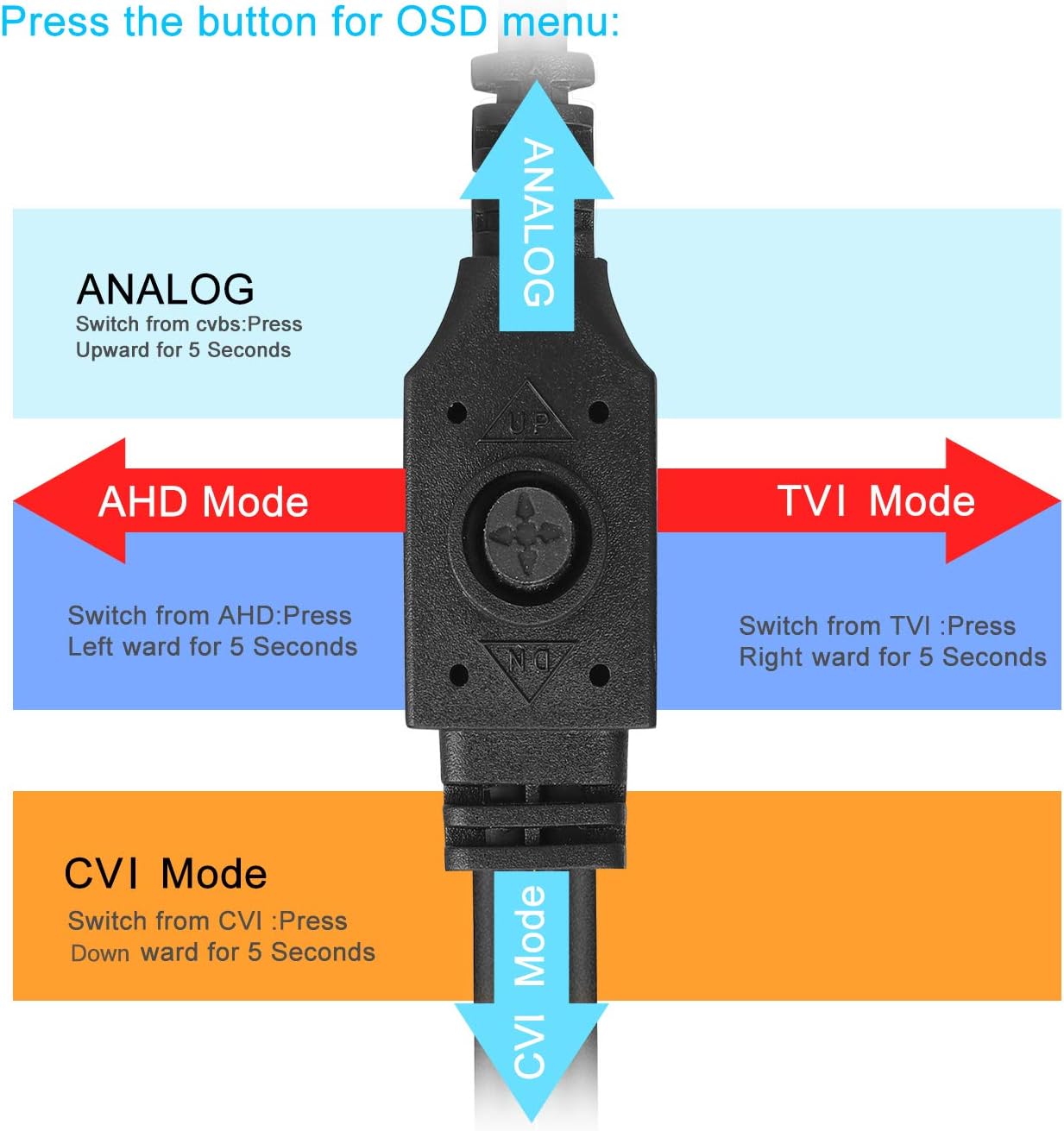
Image: Diagram illustrating how to use the OSD button on the camera cable to switch between Analog, AHD, TVI, and CVI video modes.
Konserwacja
- Czyszczenie aparatu: Regularnie czyść obiektywy aparatu miękką,amp ściereczką, aby zapewnić wysoką jakość obrazu. Unikaj środków czyszczących o działaniu ściernym.
- Kontrola kabla: Periodically check all cables and connections for wear, damage, or loose connections.
- Wentylacja DVR: Ensure the DVR unit has adequate ventilation to prevent overheating. Keep vents clear of obstructions.
- Zarządzanie dyskiem twardym: Dysk twardy o pojemności 1 TB automatycznie nadpisze najstarsze plikitage, gdy jest pełny. Regularnie twórz kopie zapasowe ważnych nagrań, jeśli to konieczne.
- Aktualizacje oprogramowania układowego: Check the XVIM official webodwiedź naszą witrynę, aby uzyskać dostęp do aktualizacji oprogramowania sprzętowego Twojego rejestratora DVR, dzięki czemu zapewnisz sobie optymalną wydajność i bezpieczeństwo.
Rozwiązywanie problemów
Brak wyświetlania obrazu
- Check all power connections for the DVR and cameras.
- Verify that the monitor is correctly connected to the DVR via VGA or HDMI and is set to the correct input source.
- Ensure camera cables are securely connected to the DVR's video input ports.
- If a specific camera has no video, try switching its video mode using the OSD button (refer to "Camera Mode Switching" section).
Remote Access Issues
- Confirm the DVR is connected to your router and has internet access.
- Sprawdź połączenie internetowe routera.
- Ensure the XVR Pro app is updated to the latest version.
- Verify that the device ID is correctly added in the app and your login credentials are correct.
Słaba widoczność w nocy
- Upewnij się, że obiektyw aparatu jest czysty i nie ma w nim żadnych przeszkód.
- Check for strong light sources near the camera that might interfere with the infrared LEDs.
DVR Not Recording
- Check the hard drive status in the DVR's system settings. Ensure it is detected and functioning.
- Sprawdź, czy harmonogramy nagrywania i ustawienia wykrywania ruchu są prawidłowo skonfigurowane.
- Ensure there is sufficient hard drive space (though the system typically overwrites old footagmi).
If you encounter persistent issues not covered here, please contact XVIM customer support for assistance.
Specyfikacje
| Marka | XVIM |
| Numer modelu | US-D8-4AHD7-1T-203 |
| Technologia łączności | Przewodowy |
| Rozdzielczość przechwytywania wideo | 1080p |
| Cechy specjalne | Image, Motion Sensor, Night Vision, Waterproof |
| Liczba kanałów | 4 (cameras included, DVR supports 8 channels) |
| Pojemność pamięci masowej | 1 TB (dysk twardy) |
| Źródło zasilania | Elektryczny przewodowy |
| Pozycja Wymiary (dł. x szer. x wys.) | 13.94 x 11.85 x 6.93 cala |
| Zakres noktowizora | 85 stóp |
| Tryb nagrywania | Manual, Motion Detection |
| Interfejs sprzętowy | USB 3.0 typu B |
| Typ soczewki | Naprawił |
| Wejście wideo | BNC, RCA (CVBS) |
| Viewing kąt | 81 stopni |
Gwarancja i wsparcie
XVIM products are designed for reliability and performance. For specific warranty details, please refer to the warranty card included with your product or visit the official XVIM website. For technical support, troubleshooting assistance, or any inquiries, please contact XVIM customer service through their official channels.
Zasoby internetowe: For additional support, FAQs, and software downloads, please visit the XVIM Store on Amazon or the official XVIM webstrona.