
1. Wprowadzenie
This manual provides detailed instructions for the installation, operation, and maintenance of your ATOTO S8 Gen 2 Ultra Plus Android Car Stereo (Model: S8G2109UP-A). Please read this manual thoroughly before using the product to ensure proper functionality and safety.
The ATOTO S8 Gen 2 is the second generation of ATOTO S8 Android car stereos, featuring a 12nm manufacturing process, an ARM Cortex Octa-Core processor for high efficiency and performance, and the ATOTO AICE 11.0 user interface based on Android Q. This unit offers a comprehensive multimedia and navigation experience for your vehicle.
2. Koniec produktuview
The ATOTO S8 Gen 2 Ultra Plus (S8G2109UP-A) is an advanced Android car stereo designed to integrate seamlessly into your vehicle's dashboard. It features a 10.1-inch QLED display with a resolution of 1280x720 and a 178° viewing angle, providing clear and vibrant visuals. The floating display design allows for adjustable height and viewkąty.

Obraz: Przód view of the ATOTO S8 Gen 2 Ultra Plus car stereo unit.

Image: The ATOTO S8 Gen 2 Ultra Plus car stereo installed in a vehicle dashboard, showcasinz dużym wyświetlaczem.
Główne cechy:
- Wyświetlacz QLED: 10.1-inch 1280x720 resolution screen with 178° wide viewkąt.
- Procesor ośmiordzeniowy: 12nm ARM Cortex Octa-Core for efficient performance.
- Podwójny Bluetooth: BT1 with aptX HD codec for high-quality audio, BT2 for internet tethering and device connections.
- Dostęp do Internetu: Supports Wi-Fi, Bluetooth tethering, USB tethering, and an integrated 4G cellular modem (SIM card not included).
- Integracja z telefonem: Wired and wireless Apple CarPlay and Android Auto support.
- Asystent AI DriveChat: Advanced voice control for safer driving.
- Sterowanie gestami: Hand gesture sensor for basic operations like skipping tracks and adjusting volume.
- Obsługa kamery: Compatible with ATOTO AC-HD03LR camera for Virtual Surround-View (VSV) i żywo z tyłuView (LRV).
- Ulepszenia dźwięku: Digital Signal Processor (DSP) and Speed Compensated Volume Control (SCVC).
3. Konfiguracja i instalacja
3.1 Zawartość pudełka
Przed instalacją należy sprawdzić, czy wszystkie komponenty są obecne:
- ATOTO S8 Gen 2 Ultra Plus Car Stereo Unit
- Antena GPS
- Mikrofon zewnętrzny
- Konwerter wyjścia liniowego
- Kabel zasilający
- Antena 4G LTE
- Uchwyty montażowe i śruby
- Kable USB
- Instrukcja obsługi (ten dokument)

Obraz: Ponadview of the components included in the ATOTO S8 Gen 2 Ultra Plus package.
3.2 Uwagi dotyczące instalacji
The S8 Gen 2 Ultra Plus features a 10.1-inch floating display. The double DIN base has dimensions of 178x100 mm, and the screen itself measures 252x155 mm. The floating design allows for adjustment of height and viewing angles (up/down).
Ważna uwaga:
- In some vehicles, the edge of the large screen may obstruct air vents, emergency switch buttons, or other controls. Ensure your vehicle's dashboard layout accommodates the screen without inconvenience, or be prepared to accept such minor obstructions.
- When installing the display module, ensure all screw holes are properly secured and screws are tightened. Failure to do so may lead to display issues such as lines, frozen screens, or blurry images.

Image: Diagram illustrating the dimensions and adjustable nature of the ATOTO S8 floating display for vehicle fitment.
3.3 Schemat okablowania
Zapoznaj się z poniższym schematem, aby uzyskać informacje na temat prawidłowego podłączenia przewodów. Nieprawidłowe podłączenie może uszkodzić urządzenie lub układ elektryczny pojazdu.
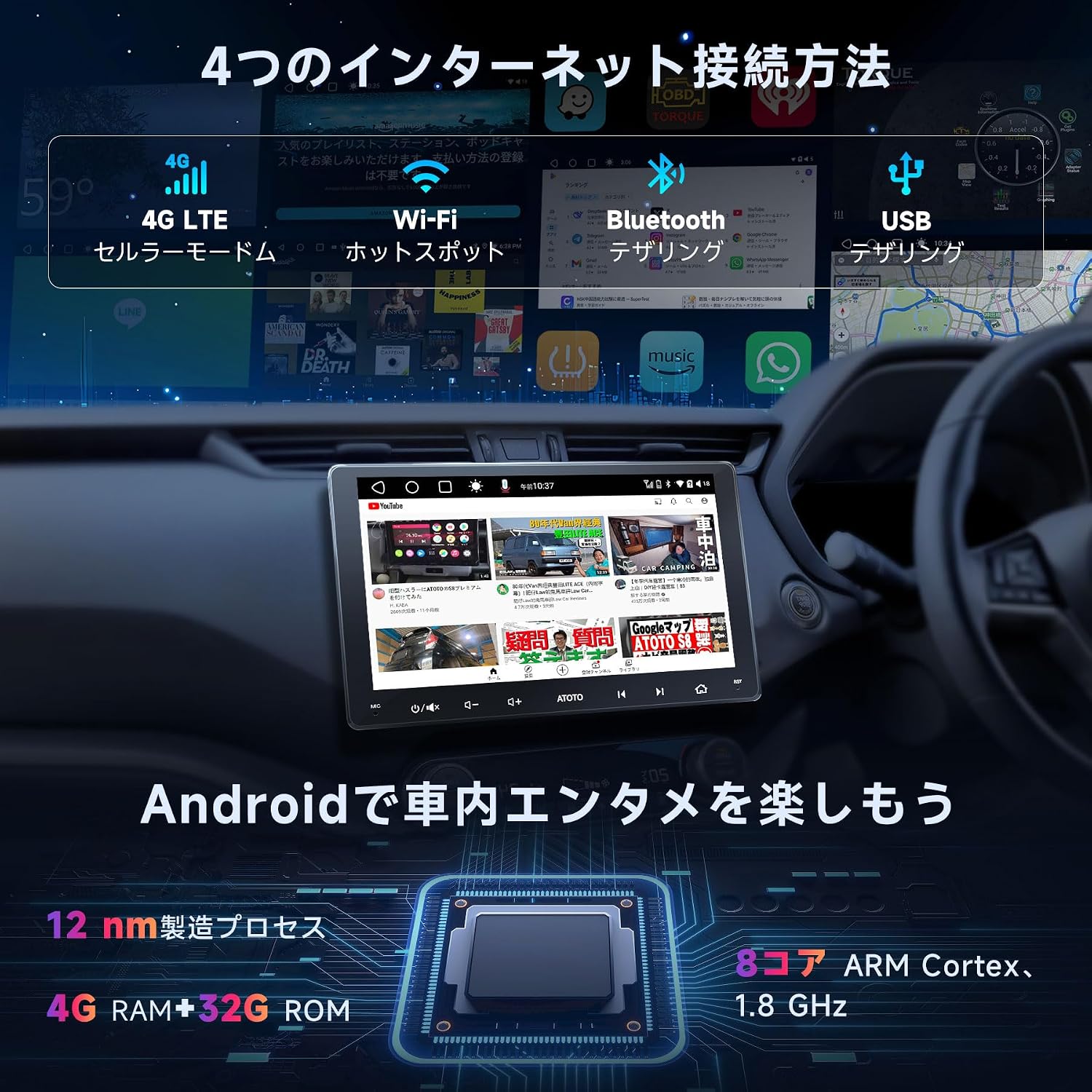
Image: Detailed wiring diagram for the ATOTO S8 Gen 2 Ultra Plus car stereo, showing connections for power, speakers, antennas, and external devices.
Kluczowe połączenia:
- Moc: Podłącz główną wiązkę zasilania do źródła zasilania pojazdu (stałe 12 V, dodatkowe 12 V i uziemienie).
- Prelegenci: Connect speaker wires to the corresponding vehicle speakers. The unit supports 5.1 surround sound.
- Anteny: Connect the GPS antenna, Wi-Fi antenna, and 4G LTE antenna to their respective ports.
- Mikrofon zewnętrzny: Plug in the external microphone for improved call quality and voice commands.
- Porty USB: Multiple USB ports are available for data transfer, charging, and connecting external devices.
- Tyłview Wejście kamery: Dedicated input for rearview cameras (e.g., ATOTO AC-HD03LR).
- Sterowanie z kierownicy: Connect to your vehicle's steering wheel control interface (if applicable) via the 3.5mm jack.
3.4 Wszechstronna łączność
The ATOTO S8 Ultra Plus offers various inputs and outputs for enhanced functionality:
- USB DVR Camera: Connect a specific 1080P USB On-dash DVR camera for video preview i odtwarzanie.
- USB TPMS System: Connect a specific ATOTO USB TPMS system. Low tire pressure warnings will appear on the S8 screen with an audible alert.
- Tyłview Kamera: Podłącz tyłview camera with CVBS and HD video signal output for safe parking.
- Odbicie lustrzane smartfona: Connect your Android/iOS smartphone via USB/Wi-Fi using EasyConnection to mirror your phone's screen.
- CarPlay/Android Auto: Connect your iOS phone via USB or Bluetooth for wired/wireless CarPlay. Android Auto works with wired USB connection. This integrates your smartphone with the S8 display for calls, music, messages, and navigation.
- OBD II Diagnostic Scanner: Connect an OBD II engine code reader/diagnostic scanner via Bluetooth. Dual Bluetooth ensures stable communication with multiple Bluetooth connections.
- Szybkie ładowanie: Connect your phone to the dedicated Fast Charge USB interface for quick battery charging.
- Monitory zagłówkowe: Connect to headrest monitors using ATOTO USB video output adapters (AC-AHV68: USB to HDMI; AC-AHV48: USB to RCA; both sold separately) to synchronize S8 display content.
4. Instrukcja obsługi
4.1 Podstawowe operacje
The unit features a touch-sensitive QLED display for intuitive control. Power-on is quick, typically within 2 seconds after ignition.

Image: The ATOTO S8 Android interface showing various applications and connectivity icons like Wi-Fi and Bluetooth.
4.2 Dostęp do Internetu
The S8 Ultra Plus offers four methods for internet connectivity:
- Połączenie Wi-Fi: Połącz się z dostępnymi sieciami Wi-Fi.
- Tethering przez Bluetooth: Use your phone's Bluetooth to share its internet connection.
- Tethering przez USB: Connect your phone via USB to share its internet connection.
- Zintegrowany modem komórkowy 4G: Insert a 4G SIM card (not included) directly into the unit for independent internet access.

Image: Visual representation of the four internet connection methods: 4G LTE, Wi-Fi, Bluetooth Tethering, and USB Tethering.
Once connected, you can install numerous Android applications from the Google Play Store.

Image: The Google Play Store interface displayed on the ATOTO S8 unit, showing available applications.
4.3 Łączność Bluetooth
The S8 features dual Bluetooth modules:
- BT1: Supports the QCM aptX HD codec for 24-bit high-quality music streaming (requires a phone compatible with aptX HD).
- BT2: Primarily for internet tethering and connecting other Bluetooth devices.
This dual setup allows simultaneous connections to your phone and other Bluetooth accessories.

Image: The ATOTO S8 display showing music playback via Bluetooth, with controls and track information.
4.4 Apple CarPlay i Android Auto
The S8 supports both wired and wireless Apple CarPlay and Android Auto, integrating your smartphone's features directly onto the car stereo display. This allows for navigation, calls, messages, and music control.

Image: Screenshots of Apple CarPlay and Android Auto interfaces on the ATOTO S8, demonstrating navigation, communication, and media functions.
Notatka:
While older package instructions might not mention it, the received car stereo unit is compatible with wireless Android Auto.
4.5 Asystent kierowcy DriveChat AI
Enhance your driving safety and convenience with the DriveChat app, your AI driving assistant. It offers advanced voice control to manage the car stereo, answer calls, control music, and more, allowing you to keep your hands on the wheel.
- Interact with multiple "Drivebots" for expert advice and specific needs.
- Customize activation words for a personalized experience.

Image: The DriveChat application interface, demonstrating AI voice control and intelligent conversations for driving assistance.
Notatka:
DriveChat is continuously under development with periodic updates. Ensure you update the app or system for the latest version.
4.6 Sterowanie gestami
The S8 features a hand gesture sensor for convenient control of basic functions without touching the screen. This includes skipping tracks, adjusting system volume, and other operations.

Image: Diagram illustrating the hand gesture control functionality of the ATOTO S8, showing the operating plane and detection range.
4.7 Camera Features (VSV & LRV)
When used with the ATOTO AC-HD03LR camera (sold separately), the S8 Ultra Plus can display HD Virtual Surround-View (VSV) i żywo z tyłuView (LRV).
- Wirtualny dźwięk przestrzennyView (VSV): An integrated panoramic image stitching algorithm processes images from the AC-HD03LR to reconstruct a virtual, nearly real-sized surround view.
- Na żywo z tyłu-View (LRV): Allows users to see the rearview while the vehicle is moving forward, eliminating obstructions from headrests and rear pillars, thereby increasing the visual field.

Image: Display showing Virtual Surround View (top) and Live Rear View (bottom) from compatible ATOTO cameras on the S8 screen.
4.8 Funkcje audio
- Cyfrowy procesor sygnałowy (DSP): Provides advanced audio processing for a balanced and high-quality sound experience, regardless of speaker placement.
- Regulacja głośności z kompensacją prędkości (SCVC): Automatically adjusts the system volume as vehicle speed changes, compensating for road and wind noise.
- Zaawansowany korektor: Offers separate 16-band EQ adjustments for front and rear audio channels.

Image: Visuals demonstrating the Digital Signal Processor (DSP) for time alignment, Speed Compensated Volume Control (SCVC), and the advanced equalizer interface on the ATOTO S8.
5. Konserwacja
To ensure the longevity and optimal performance of your ATOTO S8 Gen 2 Ultra Plus, follow these maintenance guidelines:
- Czyszczenie ekranu: Delikatnie przetrzyj ekran QLED miękką, niepozostawiającą włókien ściereczką. W przypadku uporczywych plam delikatnie przetrzyj.ampPrzetrzyj ściereczkę wodą lub środkiem do czyszczenia ekranów. Unikaj silnych środków chemicznych i materiałów ściernych.
- Aktualizacje oprogramowania: Regularly check for and install software updates via OTA (Over-The-Air) through the FindApps application. Updates often include performance improvements, bug fixes, and new features.
- Resetowanie systemu: If the unit experiences persistent issues, a factory reset may resolve them. Refer to the troubleshooting section or contact support before performing a reset, as it will erase all user data and settings.
- Warunki środowiskowe: Unikaj wystawiania urządzenia na działanie ekstremalnych temperatur, długotrwałego bezpośredniego światła słonecznego i nadmiernej wilgoci.
- Połączenia kablowe: Okresowo sprawdzaj wszystkie połączenia kablowe, aby mieć pewność, że są solidne i nieuszkodzone.

Image: Illustration of the software update process, emphasizing the importance of regular updates for optimal performance.
6. Rozwiązywanie Problemów
This section addresses common issues you might encounter with your ATOTO S8 Gen 2 Ultra Plus. For more complex problems, please contact ATOTO customer support.
| Problem | Możliwa przyczyna | Rozwiązanie |
|---|---|---|
| Urządzenie nie włącza się. | Nieprawidłowe podłączenie zasilania, przepalony bezpiecznik, problem z akumulatorem pojazdu. | Check power cable connections (constant 12V, accessory 12V, ground). Inspect vehicle fuses. Ensure vehicle battery is charged. |
| Brak dźwięku lub dźwięk zniekształcony. | Incorrect speaker wiring, volume too low, audio settings misconfigured. | Verify speaker connections. Adjust volume. Check EQ and DSP settings. Ensure correct audio source is selected. |
| Problemy z połączeniem Bluetooth. | Urządzenie nie jest w trybie parowania, proces parowania jest nieprawidłowy, występują zakłócenia. | Upewnij się, że oba urządzenia są w trybie parowania. Usuń poprzednie parowania i sparuj je ponownie. Zbliż się do urządzenia. Uruchom ponownie oba urządzenia. |
| Utrata lub niedokładność sygnału GPS. | GPS antenna not properly installed or obstructed, outdated maps. | Upewnij się, że antena GPS jest bezpiecznie podłączona i ma wolną przestrzeń. view nieba. Zaktualizuj oprogramowanie nawigacyjne/mapy. |
| Screen issues (lines, frozen, blurry). | Loose display module screws, software glitch. | Check and tighten the screws on the display module. Perform a soft reset (power cycle). If persistent, contact support. |
| CarPlay/Android Auto nie łączy się. | Incorrect USB cable, phone settings, software incompatibility. | Use a high-quality USB cable. Ensure CarPlay/Android Auto is enabled on your phone. Update phone OS and unit firmware. |
7. Specyfikacje
| Funkcja | Szczegół |
|---|---|
| Numer modelu | S8G2109UP-A |
| Marka | ATOTO |
| Wymiary produktu | 12.6 x 17.8 x 10 cm; waga 2.1 kg |
| Typ wyświetlacza | 10.1-calowy QLED, rozdzielczość 1280x720, 178° viewkąt nachylenia |
| Edytor | ARM Cortex Octa-Core (proces produkcyjny 12 nm) |
| System operacyjny | Android Q (ATOTO AICE 11.0 UI) |
| Technologia łączności | Bluetooth (Dual, aptX HD), USB, Wi-Fi, Integrated 4G LTE Modem |
| Kompatybilne urządzenia | Smartfon |
| Cechy specjalne | Quick start (2s), Privacy protection, Digital Signal Processor (DSP), HD rearview input with Virtual Surround View (VSV), QLED screen, Hand gesture recognition, CarPlay, Android Auto, Integrated 4G LTE cellular modem. |
| Tryb wyjścia audio | Stereo, Surround (5.1 channels) |
| Moc wyjściowa | 180 watów |
| Kodowanie wideo | H.264, H.265/HEVC |
| Metoda kontroli | Dotykać |
| UPC / GTIN | 799257526356 |
8. Gwarancja i wsparcie
8.1 Gwarancja na produkt
The ATOTO S8 Gen 2 Ultra Plus comes with an 18-month product care period:
- 12 miesięcy za wady produkcyjne.
- Dodatkowy 6 miesięcy of product care can be obtained by contacting ATOTO. This provides top-priority support, as ATOTO can access initial order details and the product's Serial Number (SN code).
Please retain your purchase receipt and product SN code for warranty claims.
8.2 Obsługa klienta
For technical assistance, troubleshooting, or warranty inquiries, please contact ATOTO customer support through the following channels:
- Odwiedź oficjalną stronę ATOTO webwitryna zawierająca zasoby pomocy technicznej i informacje kontaktowe.
- Refer to the "Szukaj help" section within the FindApps application on your device.
- Wsparcie e-mail pod adresem wsparcie@atotoglobal.com.

Image: Steps to access ATOTO customer support, including purchasing information and direct inquiry options.
Image: Contact information for ATOTO support, including product care duration and update methods.