1. Wprowadzenie
The Green Blue GB200 is a modern radio alarm clock designed for versatile use in any home or office environment. It features a large mirror display, integrated thermometer, and robust audio capabilities, including Bluetooth connectivity and FM radio. This manual provides detailed instructions for setting up, operating, and maintaining your GB200 device.
1.1 Zawartość opakowania
- Green Blue GB200 Radio Alarm Clock
- Kabel ładujący USB
- Instrukcja obsługi
2. Główne cechy
- Multifunction Device: Combines a radio alarm clock with a high-quality Bluetooth speaker.
- Large Mirror LED Display: Clear display of time (12/24-hour format), ambient temperature, and battery status.
- Funkcja podwójnego alarmu: Set two independent alarms with adjustable volume and an 8-minute snooze feature.
- Połączenie bezprzewodowe: Bluetooth 4.2 for seamless audio streaming from compatible devices.
- Radio FM: Enjoy your favorite radio stations with automatic tuning and external antenna support via AUX-IN.
- Wszechstronne odtwarzanie dźwięku: Supports Micro SD card for MP3 playback and AUX-IN for external audio sources.
- Rozmowy bez użycia rąk: Built-in microphone for convenient hands-free phone calls when connected via Bluetooth.
- Wyłącznik czasowy: Adjustable sleep timer up to 90 minutes for listening to music before sleep.
- Regulowana jasność: Customize display brightness to suit your environment.
- Przenośna moc: Integrated 2200 mAh lithium battery for extended use on the go.
3. Sterowanie i wyświetlacz

Rycina 3.1: Przód View and Display. This image shows the front of the GB200 radio alarm clock, highlighting its large mirror LED display. The display clearly shows the current time (23:07), ambient temperature (26°C), and battery level indicator. Below the main time display, icons for sleep mode, alarm 1, alarm 2, Bluetooth, FM radio, AUX-IN, and SD card are visible, indicating active functions or available modes.
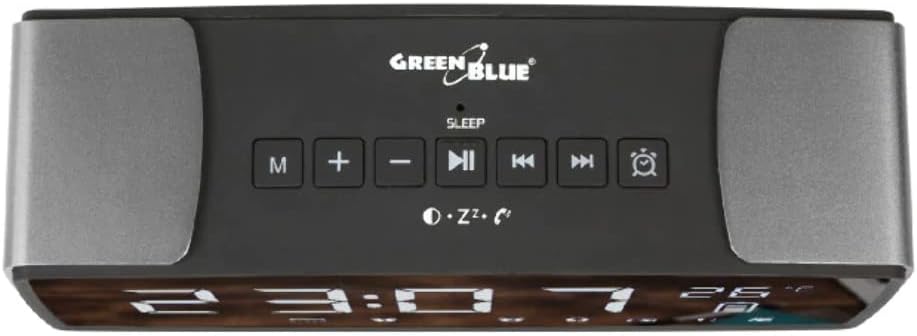
Rysunek 3.2: Elementy sterujące na górnym panelu. This image displays the top panel of the GB200, featuring the main control buttons. From left to right, these include the Mode (M) button, Volume Down (-) button, Play/Pause (▶︎■) button, Previous Track (◀︎◀︎) button, Next Track (▶︎▶︎) button, and Alarm (⏰) button. These buttons are used for navigating modes, controlling media playback, and setting alarms.
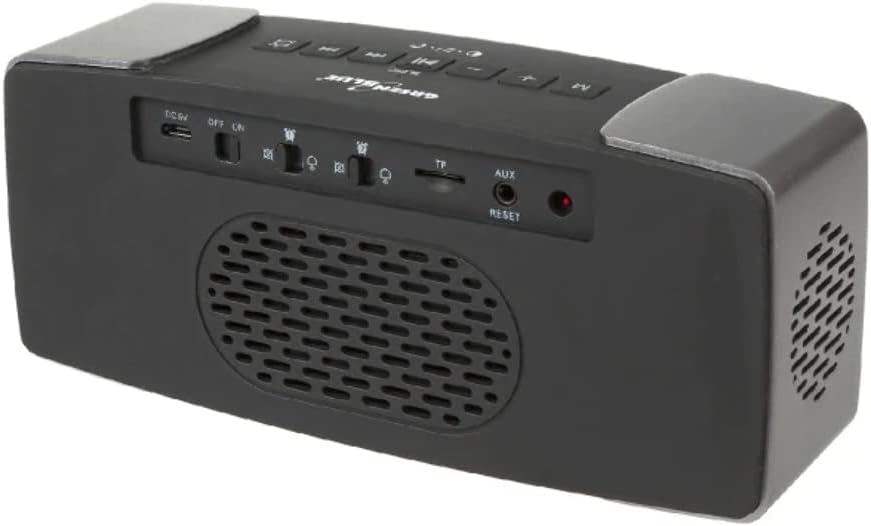
Figure 3.3: Rear Panel Ports and Switches. This image illustrates the rear panel of the GB200, where various ports and switches are located. From left to right, you can see the DC 5V charging port (micro USB), Power ON/OFF switch, Brightness control switch, SD card slot, AUX-IN port, and a small reset button. These provide connectivity for charging, external audio, and memory cards, along with power and display adjustments.
3.1 Funkcje przycisków
| Przycisk/port | Funkcjonować |
|---|---|
| M (tryb) | Switches between FM Radio, Bluetooth, SD Card, and AUX-IN modes. |
| + / - | Adjusts volume. In time/alarm setting mode, adjusts values. |
| ▶︎■ (Play/Pause) | Plays or pauses audio. In FM mode, short press for auto-scan. Long press to answer/end calls. |
| ◀︎◀︎ (Previous) | Przechodzi do poprzedniego utworu/stacji. |
| ▶︎▶︎ (Next) | Przechodzi do następnego utworu/stacji. |
| ⏰ (Alarm) | Enters alarm setting mode. Short press to activate snooze when alarm sounds. |
| Prąd stały 5 V (Micro USB) | Wejście zasilania umożliwiające ładowanie urządzenia. |
| Przełącznik WŁ./WYŁ. | Turns the device power on or off. |
| Przełącznik jasności | Adjusts the brightness level of the LED display. |
| Gniazdo karty SD | Insert a Micro SD card for MP3 audio playback. |
| HORMON | Connect external audio devices using a 3.5mm audio cable. Can also be used for external FM antenna. |
| NASTAWIĆ | Resets the device to factory settings. Use a thin object to press. |
4. Konfiguracja początkowa
4.1 Ładowanie urządzenia
Before first use, fully charge the GB200. Connect the supplied USB cable to the DC 5V port on the back of the device and the other end to a USB power adapter (not included) or a computer's USB port. The battery indicator on the display will show charging status and will be full when charging is complete.
4.2 Włączanie/wyłączanie
Locate the ON/OFF switch on the rear panel. Slide the switch to the "ON" position to power on the device. Slide it to the "OFF" position to power off.
5. Instrukcja obsługi
5.1 Ustawianie czasu i alarmów
- Czas wiązania:
- In standby mode, long press the M button to enter time setting. The hour digits will flash.
- Użyj + or - przyciski do regulacji godziny.
- Naciśnij M Naciśnij przycisk ponownie, aby potwierdzić godzinę i przejść do ustawiania minut. Cyfry minut zaczną migać.
- Użyj + or - przyciski do ustawienia minut.
- Naciśnij M button again to confirm and exit time setting.
- Ustawianie alarmu 1/2:
- Naciśnij krótko ⏰ (Alarm) button to cycle through Alarm 1, Alarm 2, and Alarm Off.
- To set an alarm, long press the ⏰ button when the desired alarm (e.g., Alarm 1) is displayed. The hour digits will flash.
- Użyj + or - przyciski do ustawienia godziny alarmu.
- Naciśnij ⏰ Naciśnij przycisk ponownie, aby zatwierdzić godzinę i przejść do ustawiania minut.
- Użyj + or - przyciski do regulacji minut alarmu.
- Naciśnij ⏰ button one more time to confirm and select the alarm sound source (FM radio or built-in melody). Use + or - wybierać.
- Naciśnij ⏰ button one more time to confirm and exit alarm setting.
- When an alarm sounds, short press the ⏰ button to activate the 8-minute snooze. Press any other button or slide the ON/OFF switch to turn off the alarm.
5.2 Tryb Bluetooth
- Naciśnij M button until "Bluetooth" mode is indicated on the display. The Bluetooth icon will flash, indicating it's ready for pairing.
- On your mobile device, enable Bluetooth and search for "GB200".
- Select "GB200" to pair. Once connected, the Bluetooth icon will stop flashing and remain solid.
- You can now play audio from your device through the GB200. Use the ▶︎■, ◀︎◀︎, I ▶︎▶︎ przyciski do sterowania odtwarzaniem.
- Rozmowy bez użycia rąk: Gdy nadejdzie połączenie, naciśnij krótko ▶︎■ to answer, and short press again to end the call. Long press ▶︎■ aby odrzucić połączenie.
Tryb radia FM 5.3
- Naciśnij M button until "FM" mode is indicated on the display.
- Automatyczne skanowanie stacji: Naciśnij krótko ▶︎■ button to initiate an automatic scan for available FM stations. The device will save all found stations.
- Manual Station Selection: Użyj ◀︎◀︎ I ▶︎▶︎ przyciski umożliwiające nawigację pomiędzy zapisanymi stacjami.
- Poprawa odbioru: For better FM reception, connect a 3.5mm audio cable (not included) to the AUX-IN port on the rear panel. This cable will act as an external antenna.
5.4 Odtwarzanie z karty SD
- Insert a Micro SD card containing MP3 audio files into the SD card slot on the rear panel.
- The device will automatically switch to SD card mode and begin playing the first track. If it doesn't, press the M button to select SD card mode.
- Użyj ▶︎■, ◀︎◀︎, I ▶︎▶︎ przyciski do sterowania odtwarzaniem.
5.5 Tryb AUX-IN
- Connect an external audio device (e.g., smartphone, MP3 player) to the AUX-IN port on the rear panel using a 3.5mm audio cable.
- Naciśnij M button until "AUX" mode is indicated on the display.
- Audio will now play from your external device through the GB200 speakers. Control playback from your external device.
5.6 Wyłącznik czasowy
The sleep timer allows you to set a duration after which the device will automatically turn off. While playing audio (Bluetooth, FM, SD, AUX), long press the M button to enter sleep timer setting. Use the + or - buttons to adjust the timer (e.g., 15, 30, 60, 90 minutes). The device will turn off after the selected time.
5.7 Jasność wyświetlacza
Use the Brightness switch on the rear panel to adjust the intensity of the LED display. Slide it to your preferred level for optimal visibility in different lighting conditions.
6. Konserwacja
- Czyszczenie: Do czyszczenia urządzenia należy używać miękkiej, suchej ściereczki. Nie należy używać środków czyszczących o właściwościach ściernych ani rozpuszczalników.
- Składowanie: Przechowywać urządzenie w chłodnym i suchym miejscu, z dala od bezpośredniego światła słonecznego i ekstremalnych temperatur.
- Pielęgnacja baterii: Aby przedłużyć żywotność baterii, unikaj częstego całkowitego rozładowywania baterii. Regularnie ładuj urządzenie, nawet jeśli nie jest używane przez dłuższy czas.
- Reset: If the device malfunctions or becomes unresponsive, use a thin object (like a paperclip) to press the RESET button on the rear panel. This will restore factory settings.
7. Rozwiązywanie Problemów
| Problem | Możliwa przyczyna | Rozwiązanie |
|---|---|---|
| Urządzenie się nie włącza. | Bateria jest rozładowana. | Naładuj urządzenie za pomocą dołączonego kabla USB. |
| Brak dźwięku z głośników. | Głośność jest zbyt niska lub wyciszona. Wybrano nieprawidłowy tryb. | Zwiększ głośność za pomocą + button. Ensure the correct mode (Bluetooth, FM, SD, AUX) is selected. |
| Parowanie Bluetooth nie powiodło się. | Device is too far from the source. Bluetooth not enabled on source. | Ensure the GB200 is in Bluetooth pairing mode. Move devices closer. Restart Bluetooth on both devices. |
| Słaby odbiór radia FM. | Weak signal. No external antenna. | Try repositioning the device. Connect a 3.5mm audio cable to the AUX-IN port to act as an external antenna. |
| Wyświetlacz jest zbyt ciemny/jasny. | Ustawienie jasności nie jest optymalne. | Adjust the Brightness switch on the rear panel. |
| Urządzenie nie odpowiada. | Tymczasowy błąd oprogramowania. | Press the RESET button on the rear panel using a thin object. |
8. Specyfikacje techniczne
| Funkcja | Specyfikacja |
|---|---|
| Model | GB200 |
| Marka | Zielony Niebieski |
| Kolor | Czarny |
| Wymiary (dł. x szer. x wys.) | 190 × 57 × 80 mm (7.48 × 2.24 × 3.15 cala) |
| Waga | 670 g (1.48 funta) |
| Tworzywo | Plastikowy |
| Wersja Bluetooth | BT4.2 |
| Odległość transmisji Bluetooth | ≤10 meters (open space) |
| Głośniki | 2 x 4Ω / 3W / 1.5" |
| Zakres częstotliwości | 70 Hz ~ 20 kHz |
| Zakres częstotliwości radia FM | 87.5 ~ 108 MHz |
| Zasilacz | Built-in 18650 2200 mAh Lithium battery |
| Moc czuwania | ≤ 0.6 W |
| Maksymalna moc | 6.6 W |
| Stosunek sygnału do szumu | > 70dB |
| Stopień zniekształcenia | > 1% |
| Typ wyświetlacza | PROWADZONY |
| Zgodność | Android, iOS |
9. Informacje o gwarancji
Green Blue products are manufactured to high quality standards. For specific warranty terms and conditions, please refer to the warranty card included with your product or visit the official Green Blue webZachowaj paragon jako dowód zakupu na wypadek ewentualnych roszczeń gwarancyjnych.
10. Obsługa klienta
If you encounter any issues or have questions regarding your Green Blue GB200 Radio Alarm Clock that are not covered in this manual, please contact Green Blue customer support. Contact details can typically be found on the product packaging, the official Green Blue webna stronie internetowej lub u sprzedawcy.
Aby uzyskać więcej informacji i aktualizacji produktów, odwiedź stronę Green Blue Brand Store.