
Eskorta 0100047-1
Escort MAX 3 Laser Radar Detector
Instrukcja obsługi
1. Wprowadzenie
The Escort MAX 3 is an advanced laser radar detector designed to enhance your driving awareness. It provides real-time alerts and warnings, leveraging premium detection range and sophisticated filtering capabilities. With its AutoLearn technology and Bluetooth connectivity, the MAX 3 integrates seamlessly into your driving experience, offering a more informed and safer journey.
This manual provides detailed instructions for setting up, operating, and maintaining your Escort MAX 3 Laser Radar Detector.
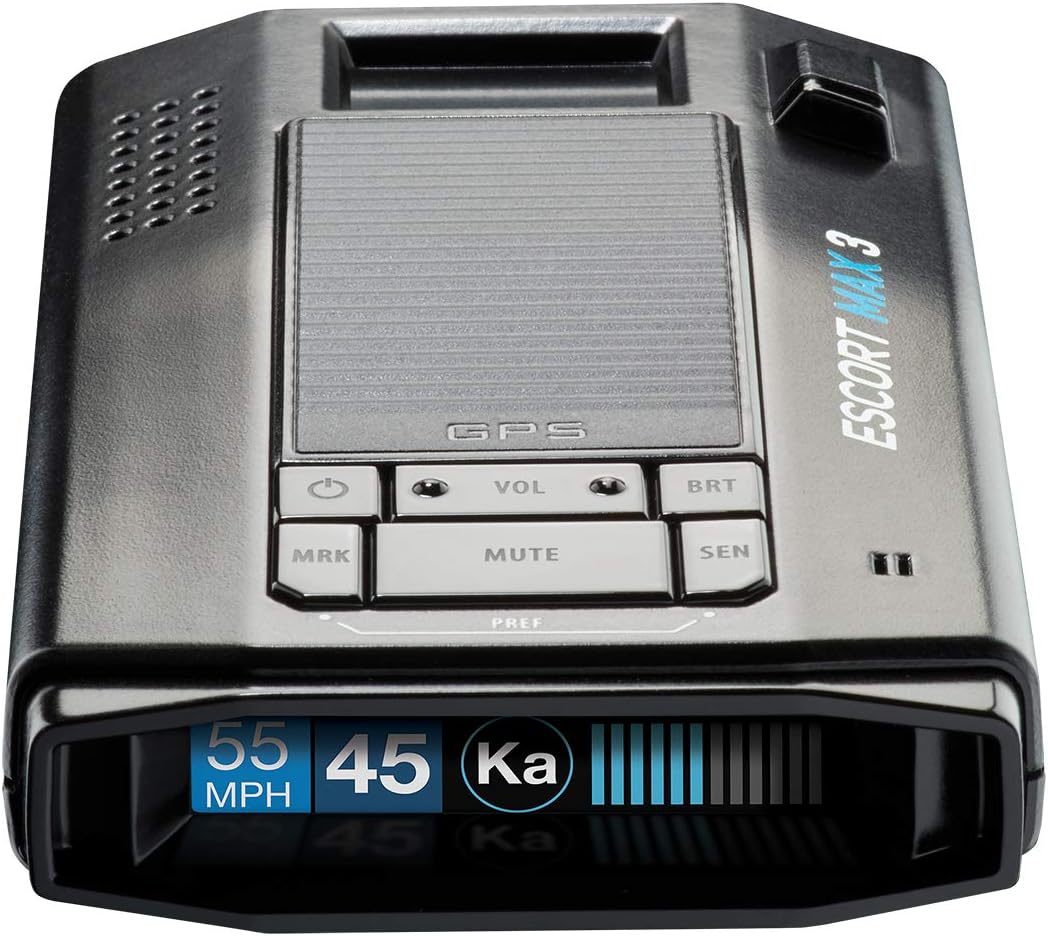
Rycina 1: Przód view of the Escort MAX 3 Laser Radar Detector, showing its OLED display and control buttons.
2. Główne cechy
- Premium Detection Range: Escort's legendary detection range provides rapid responses, advance alerts, and warnings, allowing significantly more time to adjust speed.
- Zaawansowane filtrowanie: Advanced filtering software processes thousands of radar signals to recognize and reduce false alerts, minimizing distractions and providing accurate alerts.
- AutoLearn Intelligence: Intelligent GPS-based software learns your route over time, enabling the detector to reject false alerts from specific locations.
- Variable Speed Sensitivity: Automatically adjusts sensitivity based on your speed to reduce false alerts and maximize accuracy. Access to the Defender Database provides up-to-date information on red light and speed camera alerts.
- M2 Compatible: The MAX 3 radar detector can be paired with the Escort M2 smart dash cam, allowing you to capture your drive in full HD resolution, day or night.

Figure 2: Core detection and learning features.

Figure 3: Advanced sensitivity and compatibility features.
3. Zawartość opakowania
The Escort MAX 3 package includes the following items:
- Escort MAX 3 Radar Detector
- Etui podróżne
- Magnetic Mount (Suction Cup)
- Kabel USB SmartCord (z przyciskiem wyciszenia)

Figure 4: All items included in the MAX 3 complete package.
4. Konfiguracja i instalacja
Follow these steps to properly set up your Escort MAX 3 in your vehicle:
- Wybierz miejsce montażu: Select a location on your windshield that provides a clear view of the road ahead and behind, typically near the center of the windshield, below the rearview mirror. Ensure it does not obstruct your driving view.
- Wyczyść przednią szybę: Thoroughly clean the chosen area on the windshield to ensure the suction cup mount adheres securely.
- Zamontuj uchwyt magnetyczny: Press the suction cup firmly against the clean windshield surface until it is securely attached.
- Attach the MAX 3: The MAX 3 unit has a magnetic connection point. Simply place the detector onto the magnetic mount until it clicks into place.
- Podłącz zasilanie: Plug the small end of the USB SmartCord into the power input port on the MAX 3. Plug the larger end of the SmartCord into your vehicle's 12V accessory socket (cigarette lighter).
- Regulować View: Adjust the angle of the detector to ensure it is level and has an unobstructed view.

Figure 5: Proper mounting of the Escort MAX 3 on a vehicle windshield.
5. Instrukcja obsługi
The Escort MAX 3 features an intuitive interface with several buttons and an OLED display. Here's how to operate your device:
5.1. Włączanie/wyłączanie zasilania
- The device typically powers on automatically when connected to a powered 12V accessory socket.
- Aby ręcznie wyłączyć zasilanie, naciśnij i przytrzymaj MRK button until the device announces "Powering down."
5.2. Funkcje przycisków
| Przycisk | Funkcja (krótkie naciśnięcie) | Funkcja (długie naciśnięcie) |
|---|---|---|
| MRK | Marks a location (e.g., "Mark this location"). Useful for false alert locations or points of interest. | Powers the device on/off (e.g., "Powering down"). |
| VOL - / + | Reguluje głośność. | No specific long-press function for volume. |
| BRT | Cycles through display brightness modes (e.g., "Auto", "Full", "Dark", "Minimum", "Medium", "Maximum"). | No specific long-press function. |
| NIEMY | Mutes current alert. | Cycles through sensitivity modes (e.g., "Highway", "Auto", "Auto No X", "Auto Low K"). |
| SEN | Adjusts sensitivity settings. | No specific long-press function. |
5.3. Drive Smarter® App Integration
The Escort MAX 3 can connect to the Drive Smarter® app via Bluetooth, offering enhanced features and real-time shared alerts.
- Download the Drive Smarter® app from your device's app store (compatible with Apple CarPlay and Android Auto).
- Pair your MAX 3 with your smartphone via Bluetooth as per the app's instructions.
- Wygodnie view and verify shared alerts directly on your compatible display.

Figure 6: Drive Smarter® App interface on a smartphone and car display.
5.4. Video Demonstration (Not Embeddable)
While an official seller video is not available for direct embedding, the Escort MAX 3 offers various customizable settings for optimal performance. These include adjusting display brightness, marking locations, and cycling through different sensitivity modes (e.g., Highway, Auto, Auto No X, Auto Low K) to suit your driving environment. The device provides clear voice alerts for these changes and detected signals.
6. Konserwacja
- Czyszczenie: Użyj miękkiego, damp cloth to clean the exterior of the detector. Do not use abrasive cleaners or solvents.
- Pielęgnacja soczewek: Keep the front and rear lenses clean and free of dust or smudges to ensure optimal detection performance. Use a lens cleaning cloth if necessary.
- Składowanie: When not in use for extended periods, store the detector in its travel case in a cool, dry place. Avoid extreme temperatures.
- Aktualizacje oprogramowania: Periodically check the Escort website or the Drive Smarter® app for available software updates to ensure your device has the latest features and performance enhancements.
7. Rozwiązywanie Problemów
| Problem | Możliwa przyczyna | Rozwiązanie |
|---|---|---|
| Urządzenie nie włącza się. | No power from 12V socket; loose connection; blown fuse in vehicle. | Check 12V socket for power with another device. Ensure SmartCord is securely plugged in. Check vehicle's fuse box. |
| Częste fałszywe alarmy. | Interference from other vehicles' blind spot monitors or traffic flow sensors; sensitivity setting too high. | Utilize AutoLearn technology by marking false alert locations. Adjust sensitivity mode (e.g., to "Auto" or "Auto Low K") via the MUTE button long press. |
| Poor detection range. | Przeszkoda view; dirty lenses; low sensitivity setting. | Ensure clear line of sight for the detector. Clean front and rear lenses. Increase sensitivity setting. |
| Problemy z łącznością Bluetooth. | Bluetooth nie jest włączony w telefonie; urządzenie nie jest w trybie parowania; występują zakłócenia. | Ensure Bluetooth is on. Restart both the detector and your phone. Try re-pairing the device through the Drive Smarter® app. |
8. Specyfikacje
| Atrybut | Szczegół |
|---|---|
| Wymiary produktu | 5.13 x 1.25 x 2.88 cala (5.13" dł. x 1.25" szer. x 2.88" wys.) |
| Waga przedmiotu | 7.9 uncji |
| Numer modelu przedmiotu | 0100047-1 |
| Baterie | Wymagane 1 baterie litowo-jonowe (w zestawie) |
| Kolor | Czarny |
| Producent | Elektronika Cedar |
| Kompatybilne urządzenia | Komputer osobisty, smartfon, tablet |
| Obsługiwane pasma częstotliwości | K, KA, X, M, POP |
| Źródło zasilania | Elektryczny przewodowy |
| Typ wyświetlacza | OLED |
| Tomtage | 12 wolty |
| UPC | 737795004714 |

Rysunek 7: Tył view of the Escort MAX 3 with regulatory information.
9. Gwarancja i wsparcie
Aby uzyskać szczegółowe informacje dotyczące gwarancji i obsługi klienta, zapoznaj się z oficjalną stroną Escort webOdwiedź witrynę lub skontaktuj się z działem obsługi klienta. Zachowaj dowód zakupu na wypadek reklamacji.
Additional resources, including PDF user guides and manuals, may be available on the manufacturer's support page.
Ask a question about this manual
Ask about setup, troubleshooting, compatibility, parts, safety, or missing instructions. Manuals+ will review the question and use this page’s manual context to help answer it.