
BIOS 335FC
Instrukcja obsługi krokomierza cyfrowego BIOS Living 335FC
Model: 335FC
1. Wprowadzenie
Thank you for choosing the BIOS Living Digital Pedometer 335FC. This compact and smart device is designed to help you maintain a healthy and active lifestyle by accurately tracking your daily physical activity.
It counts your steps walked, distance traveled, and calories burned, all displayed on a large, easy-to-read LCD screen. The pedometer is designed for convenience, easily clipping to your belt or waistband, and offers both 12/24 hour time formats and imperial/metric unit options.
2. Informacje dotyczące bezpieczeństwa
- Trzymaj urządzenie z dala od wody i nadmiernej wilgoci.
- Do not expose the pedometer to extreme temperatures (hot or cold).
- Unikaj upuszczania i narażania urządzenia na silne uderzenia.
- Do not attempt to disassemble or repair the pedometer yourself. Refer to qualified service personnel.
- Baterie należy przechowywać poza zasięgiem dzieci. W przypadku połknięcia natychmiast zasięgnij porady lekarza.
- Zużyte baterie i urządzenie należy utylizować zgodnie z lokalnymi przepisami.
3. Koniec produktuview
Familiarize yourself with the components of your BIOS Living Digital Pedometer 335FC.

Rycina 3.1: Przód View of Pedometer
This image shows the front of the BIOS Living Digital Pedometer 335FC. It features a prominent LCD screen displaying "23 STEP" and three buttons below it: "RESET", "SET", and "MODE". The device is white with a blue accent around the screen, and "BIOS living" is printed at the top.
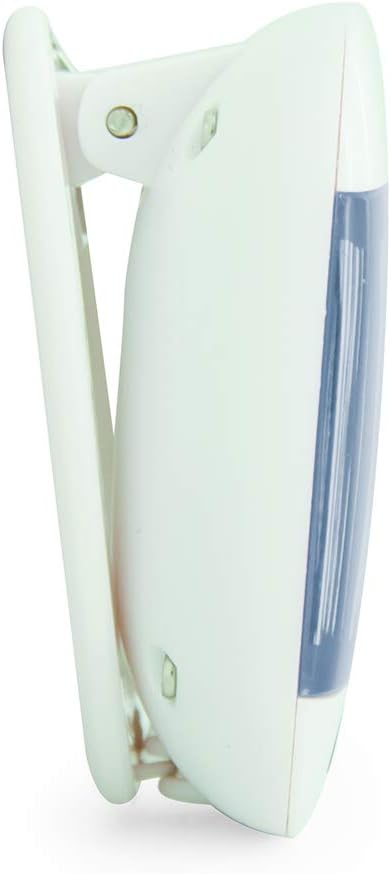
Rysunek 3.2: Strona View z klipsem do paska
This image displays a side profile of the BIOS Living Digital Pedometer 335FC. It highlights the integrated white clip mechanism designed for attaching the pedometer to clothing, such as a belt or waistband. The blue accent on the front is visible from this angle.

Rysunek 3.3: Tył View z komorą baterii
This image shows the back of the BIOS Living Digital Pedometer 335FC. It clearly displays the battery compartment cover, which can be opened to insert or replace the battery. The back is white with some regulatory markings and the brand "HAPTIME" embossed.
Kluczowe komponenty:
- Wyświetlacz LCD: Duży ekran dla łatwego viewing of steps, distance, calories, and time.
- Przycisk reset: Used to clear current readings or reset settings.
- Przycisk SET: Used to confirm settings or enter setting mode.
- Przycisk TRYB: Used to cycle through different display modes (Steps, Distance, Calories, Time).
- Sprzączka: Integrated clip for secure attachment to clothing.
- Komora baterii: Znajduje się z tyłu i służy do montażu baterii.
4. Konfiguracja
4.1 Instalacja baterii
Your pedometer comes with a battery. Follow these steps to install it:
- Locate the battery compartment on the back of the pedometer (refer to Figure 3.3).
- Za pomocą małego śrubokręta lub monety delikatnie otwórz pokrywę komory baterii.
- Insert the provided battery, ensuring the correct polarity (+/-) as indicated inside the compartment.
- Załóż pokrywę komory baterii i zabezpiecz ją.
4.2 Initial Settings (Time & Units)
After battery installation, the device may prompt you to set the time and units. If not, press and hold the USTAWIĆ przycisk, aby wejść w tryb ustawień.
- Format czasu: The display will flash "12H" or "24H". Use the TRYB button to toggle between 12-hour and 24-hour formats. Press USTAWIĆ aby potwierdzić.
- Ustaw czas: Cyfra godziny zacznie migać. Użyj TRYB przycisk, aby ustawić godzinę. Naciśnij USTAWIĆ to confirm. Repeat for minutes.
- System jednostkowy: The display will flash "KM" (metric) or "MI" (imperial). Use the TRYB button to select your preferred unit system. Press USTAWIĆ aby potwierdzić.
- Stride Length (for distance accuracy): If prompted, enter your average stride length. This can be estimated by walking 10 steps and dividing the total distance by 10. Use TRYB dostosować i USTAWIĆ aby potwierdzić.
- Weight (for calorie accuracy): If prompted, enter your weight. Use TRYB dostosować i USTAWIĆ aby potwierdzić.
The pedometer is now ready for use.
5. Instrukcja obsługi
5.1 Wearing the Pedometer
For accurate readings, clip the pedometer securely to your belt or waistband, preferably near your hip. Ensure it is positioned vertically.
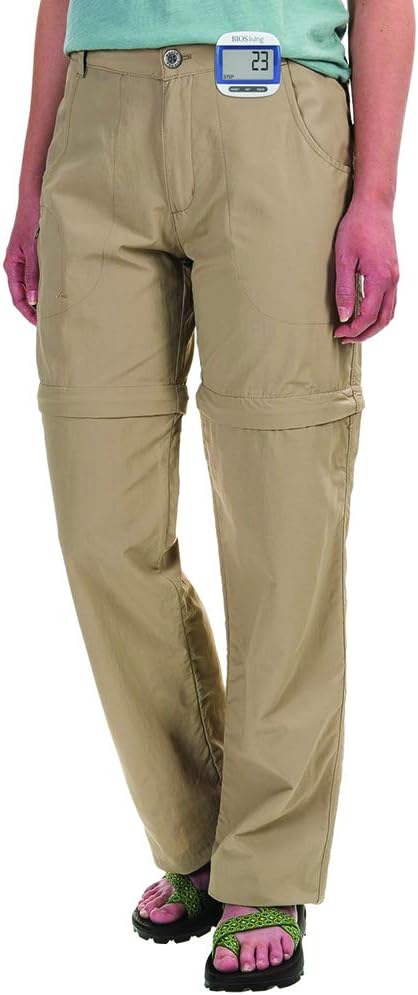
Figure 5.1: Correct Pedometer Placement
This image shows a person wearing the BIOS Living Digital Pedometer 335FC. The pedometer is clipped to the waistband of their khaki pants, positioned on the side of their hip, demonstrating the recommended placement for accurate step counting.
5.2 Tryby wyświetlania
Naciśnij TRYB przycisk umożliwiający przełączanie się pomiędzy następującymi trybami wyświetlania:
- Kroki: Wyświetla całkowitą liczbę wykonanych kroków.
- Dystans: Displays the total distance traveled (in KM or MI).
- Kalorie: Displays the estimated calories burned (in KCAL).
- Czas: Wyświetla aktualny czas.

Figure 5.2: Time Display Mode
This image shows the BIOS Living Digital Pedometer 335FC displaying the time. The large LCD screen shows "2:34 P", indicating 2:34 PM. A small clock icon is visible on the bottom left of the display.

Figure 5.3: Distance Display Mode
This image shows the BIOS Living Digital Pedometer 335FC displaying distance. The screen shows "1.25" with "DIST" and "KM" below it, indicating a distance of 1.25 kilometers.

Figure 5.4: Calories Display Mode
This image shows the BIOS Living Digital Pedometer 335FC displaying calories burned. The screen shows "4.87" with "KCAL" below it, indicating 4.87 kilocalories.
5.3 Resetowanie danych
To reset your daily steps, distance, and calorie count to zero, press and hold the NASTAWIĆ button until the display clears. This is typically done at the start of a new day or activity.
6. Konserwacja
6.1 Czyszczenie
Przetrzyj krokomierz miękką, suchą ściereczką. Nie używaj środków czyszczących o właściwościach ściernych ani nie zanurzaj urządzenia w wodzie.
6.2 Wymiana baterii
When the display becomes dim or the device stops responding, it's time to replace the battery. Follow the battery installation steps in Section 4.1.
7. Rozwiązywanie Problemów
| Problem | Możliwa przyczyna | Rozwiązanie |
|---|---|---|
| Wyświetlacz jest pusty lub przyciemniony. | Niski poziom naładowania akumulatora lub jego rozładowanie. | Wymień baterię (patrz rozdział 6.2). |
| Niedokładny pomiar kroków. | Incorrect placement of pedometer; irregular walking motion; incorrect stride length setting. | Ensure pedometer is clipped securely and vertically to your belt/waistband. Walk naturally. Re-enter stride length in settings (Section 4.2). |
| Przyciski nie reagują. | Battery issue; temporary software glitch. | Replace battery. If problem persists, try removing and reinserting the battery to perform a hard reset. |
| Nie można zmienić ustawień. | Nie w trybie ustawień. | Naciśnij i przytrzymaj USTAWIĆ przycisk, aby wejść w tryb ustawień. |
8. Specyfikacje
| Funkcja | Szczegół |
|---|---|
| Numer modelu | 335FC |
| Kolor | Niebieski |
| Tworzywo | Plastikowy |
| Wymiary (dł. x szer. x wys.) | Około. 5 x 2 x 2 cm |
| Waga | Około 31.81 g |
| Wyświetlacz | Duży wyświetlacz LCD |
| Funkcje | Steps, Distance, Calories, Time |
| Format czasu | Możliwość wyboru 12/24 godzin |
| Jednostki | Imperial/Metric selectable |
| Bateria w zestawie | Tak |
| Żywotność baterii | 24 Hours (Note: This might refer to continuous operation or a specific test condition, typical pedometer battery life is much longer) |
| UPC | 057475335632 |
9. Gwarancja i wsparcie
This BIOS Living Digital Pedometer 335FC is covered by a manufacturer's warranty against defects in materials and workmanship. Please refer to the warranty card included with your purchase for specific terms and conditions, including the warranty period and how to make a claim.
For technical support, troubleshooting assistance, or warranty inquiries, please contact BIOS Living customer service. Contact information can typically be found on the product packaging or the manufacturer's official webstrona.
Prosimy zachować dowód zakupu w celach gwarancyjnych.
Ask a question about this manual
Ask about setup, troubleshooting, compatibility, parts, safety, or missing instructions. Manuals+ will review the question and use this page’s manual context to help answer it.